
- Getting StartedIntroductionQuery BasicsMutation BasicsRoot EndpointAuthentication
- BudgetsGet All BudgetsGet a Specific Budget createBudgetupdateBudgetdeleteBudget
- MetadataCloud RegionCloud ServicesAWS AccountsAzure SubscriptionsNode Query
- Custom Line ItemsQuery and Mutation FieldsGet Custom Line Item RulesGet Cost Allocation Settings Create Line Item Remove RuleUpdate Line Item Remove Rule Create Custom Line Item Add RuleUpdate Custom Line Item Add RuleDelete Custom Line Item Rule
- Cost Reallocation APIs Manage Cost Reallocation using APIs Get list of Cost Reallocation RulesCost Reallocation Node Queries Source: Indirect Cost and Destination: All Groups All Perspectives Source: Indirect Cost and Destination: All Groups Specific PerspectivesSource: Indirect Cost and Destination: Specific Groups Specific PerspectivesSource: Perspective Group and Destination: Specific Groups Specific PerspectivesSource: Perspective Group and Destination: Remaining Groups Same Perspective Delete Cost Reallocation Cost Reallocation Miscellaneous ScenariosCost Reallocation API Error Handling
- FlexOrgsManage FlexOrgs Using APIsGetARoleDocumentGetSomeRoleDocumentscreateRoleDocumentupdateRoleDocumentdeleteRoleDocumentusers and userGroupsaddUserGroupaddUsersToUserGroupremoveUsersFromUserGroupupdateUserGroupRoleBindings Remove Usergroup from RoleDocumentorganizationsorganizationHierarchyLimitsuserOrganizationsavailableAccountsForSubOrgscreateOrganizationupdateOrganizationdeleteOrganizationunassignAccountsFromOrganizationsassignAccountsToOrganizations
- FlexReportsTanzu CloudHealth Data DictionaryHow to Work with Time Range in FlexReports GraphQL API createFlexReportupdateFlexReportGet a Specific FlexReportGet All FlexReportsexecuteFlexReportDelete FlexReportManage FlexReport Dataset Permissions (BETA)Get Metadata for FlexReport DatasourceGet FlexReports DatasourcesGet FlexReport TemplateGet All FlexReports TemplatesCreate a FlexReport to Show Cost Difference Month Over Month
- Saved ReportsRetrieve list of saved reportsCreate a saved reportUpdate a saved report Delete a saved report
- Savings Plan RecommendationsGenerate Savings Plan Recommendations Using APIsavailableBillingAccountsdefaultSavingsPlanRecommendationssavingsPlanRecommendationssavingsPlanSimulationavailableAccountsspSavedRecommendationscreateSpSavedRecommendationsspSavedSimulation
- Azure Commitment Discount (Beta)Get Single Recommendation by IDGet Collection of Recommendations with DetailsGet Usage Data by Recommendation ID
- AWS Commitment DiscountsGenerate Recommendations for a Billing Account Recommendation Status for a Billing Account Recommendation Summary Update RecommendationsReservation Recommendation UsageReservation Recommendations List
- GCP Billing Account APIsIntroduction to GCP Billing Account APIGet All GCP Billing AccountsUpdate Billing Account NameDelete Billing Account
- GCP ProjectsList Details for GCP ProjectsUpdate GCP Project DetailsAuthenticate GCP Projects for Direct Users and Partners Accessing Own Data
- GCP Partner Data Connect APIsData Connect Configuration APIs How to Encode a JSON Private KeyCreate Data ConnectUpdate Data ConnectGet all Data Connect ConfigurationData Connect Node RequestDelete Data Connect
- GCP Partner Billing Account Assignment APIsGet List of Accounts assigned to the msp_clientNode RequestAssign Billing Accounts to Customer TenantsUnassign Billing Accounts from Customer Tenants
- GCP Partner Billing Rules APIsGet All Partner Billing RulesGet List of Billing Rules with Specific IDDownload List of Partner Billing Rules Create Billing RulesUpdate Partner Billing RuleUpdate Partner Billing Rule for Target ClientsDelete Billing Rule
- Tag ManagementGet Tag Key TotalsDrilldown into Tag Key AssetGet Sorted List of Tag Key AssetsUpdate Tag Key Enabled Status Get List of All Tag Keys Get Tag Key Enabled Totals Get Sorted Tag Keys ListPaginationFilter Tag KeysAdd Filters and getTagKeyEnabledTotals
- Anomaly DetectioncostAnomaliesGet Specific Cost AnomalycostAnomalySummarysaveAnomalyFeedback
- AWS Account Status Get List of AWS Account Status APIs for All Services and Regions Get List of AWS Account Status APIs within an Organization Get an Overview of API Access Failures
- EC2 Rightsizing Commonly Used Fields in EC2 Rightsizing Recommendation and SummaryEC2 rightsizingRecommendations EC2 rightsizingRecommendationsSummaryEC2 Recommendation Aggregation EC2 Rightsizing Recommendations Sort by OptionsEC2 rightsizingefficiencytargetsCreate EC2 Rightsizing Efficiency TargetUpdate EC2 Rightsizing Efficiency TargetDelete EC2 Rightsizing Efficiency Target
- RDS Rightsizing Commonly Used Fields in RDS Rightsizing Recommendation and SummaryRDS rightsizingRecommendationsRDS rightsizingRecommendationsSummary RDS Recommendation AggregationRDS rightsizingefficiencytargets
- S3 RightsizingCommonly Used Fields in AWS S3 Rightsizing Recommendation and Summary S3 Rightsizing RecommendationsS3 Rightsizing Recommendations SummaryS3 Bucket Recommendation - Group By AccountS3 Rightsizing Recommendations - Filter by Storage Class
- Kubernetes RightsizingCommonly Used Fields in Kubernetes Rightsizing Recommendation and Summary Kubernetes Rightsizing RecommendationsKubernetes Rightsizing Recommendations SummaryKubernetes Recommendation - Group by ClusterKubernetes Rightsizing Recommendation – Group by Namespace Kubernetes Rightsizing Recommendation – Group by Perspective Kubernetes Rightsizing Recommendation – Filter by Perspective Commonly Used Fields in Kubernetes Rightsizing Efficiency TargetCreate Kubernetes Rightsizing Efficiency TargetUpdate Kubernetes Rightsizing Efficiency Target Delete Kubernetes RightsizingEfficiencyTarget Kubernetes Search Request Kubernetes Multiple Filter Request
- OpenSearch Rightsizing Commonly Used Fields in OpenSearch Recommendation and SummaryOpenSearch Rightsizing RecommendationsOpenSearch Rightsizing Recommendations SummaryCommonly Used Fields in OpenSearch Rightsizing Efficiency TargetCreate OpenSearch Rightsizing Efficiency TargetUpdate OpenSearch Rightsizing Efficiency TargetDelete OpenSearch Rightsizing Efficiency Target
- EBS Volume Rightsizing Commonly Used Fields in EBS Volume Rightsizing Recommendation and Summary EBS Rightsizing RecommendationsEBS Rightsizing Recommendations SummaryCommonly Used Fields in EBS Volume Rightsizing Efficiency TargetCreate EBS Rightsizing Efficiency TargetUpdate EBS Rightsizing Efficiency TargetDelete EBS RightsizingEfficiencyTargetEBS Filter RequestEBS Search RequestEBS Search and Filter Request
- ElastiCache RightsizingCommonly Used Fields in ElastiCache Rightsizing Recommendation and Summary ElastiCache Rightsizing RecommendationsElastiCache Rightsizing Recommendations SummaryCommonly Used Fields in ElastiCache Rightsizing Efficiency Target Create ElastiCache Rightsizing EfficiencyTargetDelete RightsizingEfficiencyTarget
- DynamoDB Rightsizing Commonly Used Fields in DynamoDB Rightsizing Recommendation and Summary DynamoDB Rightsizing Recommendations DynamoDB Rightsizing Recommendations Summary Commonly Used Fields in DynamoDB Rightsizing Efficiency TargetCreate DynamoDB Rightsizing Efficiency Target Update DynamoDB Rightsizing Efficiency Target Delete DynamoDB Rightsizing Efficiency Target
- Redshift RightsizingCommonly Used Fields in Redshift Rightsizing Recommendation and Summary Redshift Rightsizing RecommendationsRedshift Recommendation – Group by AccountRedshift Recommendation – Group by Perspective Redshift Rightsizing Recommendation – Filter by Perspective
- AzureVM RightsizingCommonly Used Fields in AzureVM Rightsizing Recommendation and Summary AzureVM rightsizingRecommendationsAzureVM rightsizingRecommendationsSummaryAzureVM createRightsizingEfficiencyTargetAzureVM updateRightsizingEfficiencyTargetAzureVM deleteRightsizingEfficiencyTargetAzureVM Recommendation - Group by SubscriptionAzureVM Recommendation - Group by Perspective
- Azure SQL DB RightsizingCommonly Used Fields in the DTU-based Rightsizing Recommendation and SummarySQL DB DTU-based RecommendationsSQL DB DTU-based Recommendations SummarySQL DB DTU-based Recommendation - Group by SubscriptionSQL DB DTU-based Recommendation - Group by PerspectiveCommonly Used Fields in the vCore-based Rightsizing Recommendation and SummarySQL DB vCore-based RecommendationsSQL DB vCore-based Recommendations SummarySQL DB vCore-based Recommendation- Group by SubscriptionSQL DB vCore-based Recommendation- Group by Perspective
- Alibaba Cloud Data Connect APIs Commonly Used Fields in the Alibaba Cloud Data Connect APIsCreate Alibaba Cloud Data Connect Update Data ConnectDelete Alibaba Cloud Data Connect
- Savings AutomatorCommon Types ENUM and values Get List of Accounts with Savings Automator Configuration Details Savings Automator Account Preferences Node Request Get Details of Recommended ActionsCreate Savings Automator Account Preference Update Savings Automator Account PreferenceSavings Automator SummariesSavings Automator Data ProvenanceSavings Automator Recommended Action
- ForecastingGet Forecasting DetailsCompare Forecast Snapshots Get List of Forecast SnapshotsExport ForecastDelete Forecast Snapshot
- Bring Your Own DataCreate Cloud Data Connect
- Partner Content Sharing APIscreatePackageupdatePackagedeletePackagepublishPackageaddPackageAssignmentsdeletePackageAssignmentsgetPackagelistPackageAssignmentslistPackageSummarieslistContentAssignmentStatusSummary
- Channel Tenant Churn LifecyclechurnChannelCustomer
- Realized SavingsqueryUsageBasedDiscountOpportunitiesSummaryquerySpendBasedDiscountOpportunitiesSummaryqueryUnifiedEffectiveSavingsRateSummaryqueryDiscountConfigurationSummaryqueryExpiringCommitmentsSummaryqueryUsageBasedDiscountOpportunitiesquerySpendBasedDiscountOpportunitiesqueryEffectiveSavingsRateDataqueryRealizedSavingsSummaryqueryCommitmentSavingsqueryCommitmentCoveragequeryCommitmentUtilization
- Partner Statement APIPartner Statements List APIAggregate API QueryPartner Statements Download MutationPartner Statements Download Status Query
Getting Started
Introduction
Tanzu CloudHealth’s Next-Generation API is based on GraphQL. The API allows you to send a single query to the GraphQL server that includes specific requirements on which reporting fields you want included and how you want them organized. The server responds with a JSON object that fulfills those reporting requirements.
This API only exposes a single endpoint because the structure of the reporting data that the GraphQL server returns is not fixed. In fact, you have a lot of flexibility in terms of defining what the structure of the reporting data should be.
The GraphQL API provides significantly more flexibility and speed when compared with Tanzu CloudHealth’s existing REST-based API. The GraphQL API allows you to precisely define the data that you want included.
GraphQL is introspective, which means that you can query a GraphQL schema for details about itself. The GraphQL API is typically executed in a GraphQL console, such as GraphiQL or the Altair Chrome extension.
You can send two kinds of calls in GraphQL:
- Query: Retrieves data from a source without making any modification to the data. Queries are equivalent to a REST API GET request.
- Mutation: Creates, modifies, or deletes data from a source. Mutations are equivalent to a REST API POST, PUT, or DELETE request.
Query Basics
Queries are made up of three basic units:
- Query name: The name of the query you want to pass. For example,
budgetis the query name you use to retrieve information on an existing budget in the Platform. - Argument: Limits the data returned in a query to match the argument's defined parameters. For example, pass
BudgetIdas an argument to limit abudgetquery to a single budget. Without theBudgetIdargument, a query tobudgetwould return data on all budgets in your organization. By adding an argument to limit the query to a single budget, you can narrow the scope of your query. - Field: Defines which data you want to return from the Tanzu CloudHealth server. For example, pass
idas a field in thebudgetquery to return the id of the budget specified in the argument.
Mutation Basics
Mutations are made up of three basic units:
- Mutation name: The name of the mutation you want to pass. For example,
createBudgetis the mutation name you use to create a new budget in the Platform. - Input field: The data you want to send to the Tanzu CloudHealth server. These are passed as arguments to the mutation name. For example, pass
nameas an input field in thecreateBudgetmutation to add a name to the new budget. - Return field: The data you want to return from the Tanzu CloudHealth server following the successful passing of the mutation. For example, pass
idas a return field in thecreateBudgetmutation to return the ID of the new budget.
Root Endpoint
Tanzu CloudHealth GraphQL API uses a single endpoint:
https://apps.cloudhealthtech.com/graphql
Authentication
Get Tanzu CloudHealth API Key
You need an API Key in order to make authenticated requests to the Tanzu CloudHealth API service.
An API Key is a globally unique identifier (GUID) that Tanzu CloudHealth generates for each user in the platform. When you make an API request, this GUID uniquely identifies and authenticates you as the originator of the request.
Get your API Key using the following instructions:
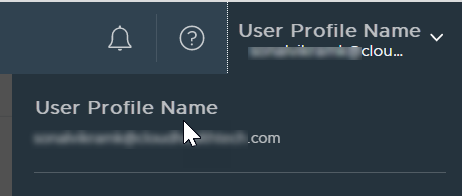
- In the Tanzu CloudHealth platform, click your profile name at the top right corner.
- In your profile settings, scroll to the Settings section and click Generate New API Key.
- Copy the newly generated unique API key for authenticating the Tanzu CloudHealth API calls.
- Click Save Profile Changes.
NOTE: While securing your API Key is important, it is also essential to periodically rotate your API key for security reasons. To update your key, return to your profile settings and create a new API key. Then click Save Profile Changes. When you generate an API Key, the previous key becomes invalid.
Generate Access Token
-
In your GraphQL console, paste the following command:
mutation Login($apiKey: String!) { loginAPI(apiKey: $apiKey) { accessToken refreshToken } } -
In the Variables pane, enter the following string.
{"apiKey":"<api_key>"}
Replace <api_key> with your Tanzu CloudHealth API key.
-
Click Send Request. The response pane generates two tokens:
-
Access token: Use this access token to run the Tanzu CloudHealth GraphQL queries and mutations. This token is valid for 15 minutes.
-
Refresh token: Use this refresh token after your access token has expired to generate a new access token. This token is valid for 9 hours.
-
-
Go to Edit HTTP Headers and click +Add Header.
-
In the Header Name field, enter Authorization. In the Header Value field, enter
Bearer <access token>and replace<access token>with your newly generated access token. Click Save. -
Reload the Docs pane. You can now view all the Tanzu CloudHealth queries and mutations available to you.
Regenerate Access Token
The Access token expires after every 15 minutes. Once the initial Access token expires, you can create a new Access token using the Refresh token.
To generate a new Access token,
- In your GraphQL console, paste the following command:
mutation refresh($userRefreshToken: String!) {
refresh(
  token: $userRefreshToken
) {
    accessToken
    refreshToken
    }
}
- In the Variables pane, enter the following string.
{"userRefreshToken": "<userRefreshToken>"}
Replace
- Click Send Request.
In the response pane, you will receive a new Access token and a Refresh token. The new refresh token will be valid for 9 hours.
Generate API Token for a Sub-Organization in a FlexOrg
To run commands against a sub-organization in a FlexOrg, first generate an API token for the sub-organization to pass in subsequent commands.
- Use
loginAPIto generate an access token or refresh token pair by passing in theapi-key.
SAMPLE REQUEST
mutation {
  loginAPI(apiKey: "XXXXXXX-XXXX-XXXX-XXXX-XXXXXXXXXXXXX"){
  accessToken
  refreshToken
  }
}
SAMPLE RESPONSE
{
  "data": {
    "loginAPI": {
      "accessToken": "XXXXXXXXXXXXXXXXXXXXXXXXXXXXXXXXXXXXXXXXXXXXXXXXXXXXXXX",
      "refreshToken": "XXXXXXXXXXXXXXXXXXXXXXXXXXXXXXXXXXXXXXXXXXXXXXXXXXXXXXX"
    }
  }
}
- Use the
getAccessToken APIto generate an access token for the sub organization by: a. Passing the refresh token obtained in step 1 as input. b. Passing the access token obtained in step 1 asBearer tokenin the header. c. Passing the CRN for the sub organization you want a token for.
SAMPLE REQUEST
mutation {
getAccessToken(input: {
  refreshToken: "XXXXXXXXXXXXXXXXXXXXXXXXXXXXXXXXXXXXXXXXXXXXXXXXXXXXXXX",
	organization: "crn:<tenant_id>:organization/<subOrg_id>",
  justification: "Justification text"
}){
  accessToken
  refreshToken
  }
}
SAMPLE RESPONSE
{
"data": {
  "getAccessToken": {
    "accessToken": "XXXXXXXXXXXXXXXXXXXXXXXXXXXXXXXXXXXXXXXXXXXXXXXXXXXXXXX",
    "refreshToken": "XXXXXXXXXXXXXXXXXXXXXXXXXXXXXXXXXXXXXXXXXXXXXXXXXXXXXXX"
    }
  }
}
- Use the generated access token to invoke the APIs.
Generate an API Token using the Client API ID
- Use
loginAPIto generate an access token or refresh token pair by passing in theapi-key.
SAMPLE REQUEST
mutation {
  loginAPI(apiKey: "XXXXXXX-XXXX-XXXX-XXXX-XXXXXXXXXXXXX"){
  accessToken
  refreshToken
  }
}
SAMPLE RESPONSE
{
  "data": {
    "loginAPI": {
      "accessToken": "XXXXXXXXXXXXXXXXXXXXXXXXXXXXXXXXXXXXXXXXXXXXXXXXXXXXXXX",
      "refreshToken": "XXXXXXXXXXXXXXXXXXXXXXXXXXXXXXXXXXXXXXXXXXXXXXXXXXXXXXX"
    }
  }
}
- Use
getAccessTokenAPI to generate access token for the customer's tenant by: a. Passing the refresh token obtained in step 1 as input. b. Passing the access token obtained in step 1 as Bearer token in the header.
SAMPLE REQUEST
mutation {
getAccessToken(input: {
  refreshToken: "XXXXXXXXXXXXXXXXXXXXXXXXXXXXXXXXXXXXXXXXXXXXXXXXXXXXXXX",
  customer: "crn:<partner_tenant_id>:msp_client/<msp_client_id>",
  justification: "Justification text"
}){
  accessToken
  refreshToken
  }
}
SAMPLE RESPONSE
{
"data": {
  "getAccessToken": {
    "accessToken":       "XXXXXXXXXXXXXXXXXXXXXXXXXXXXXXXXXXXXXXXXXXXXXXXXXXXXXXX",
    "refreshToken": "XXXXXXXXXXXXXXXXXXXXXXXXXXXXXXXXXXXXXXXXXXXXXXXXXXXXXXX"
    }
  }
}
- Use the generated access token to invoke the APIs.
How to Get the Client API ID
Tanzu CloudHealth generates a unique Client API ID for each partner customer. The partner customers require the Client API Id to request the client-specific data. You can get the Client API ID for a customer from the Tanzu CloudHealth platform. From the left menu, select Partner > Customer > List.
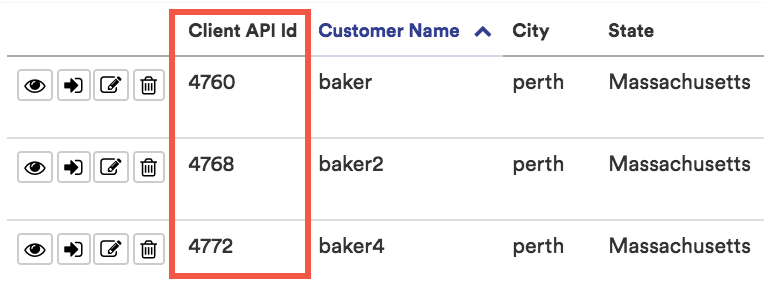
If the Client API Id column is not visible in the report, add it by clicking the Edit Columns button.
Budgets
Get All Budgets Query
Fetch a list of all the existing Overall or Categorized budgets. Here, Overall budget is your overall cloud spend and Categorized budget is based on the perspectives that you create.
| Field | Description |
|---|---|
id |
String that specifies the ID of the budget. |
cloud |
String that specifies the cloud name as AWS, Azure, GCP, or Oracle cloud. |
name |
String that specifies the unique budget name. |
query Budget {
 budgets {
     id
     name
     cloud
   }
 }
 "data": {
   "budgets": [
     {
       "id": "crn:17748:budget/5b3f39df-390b-4913-93f2-859dccd1cee9",
       "name": "Budget sher test",
       "cloud": "AWS"
     },
     {
       "id": "crn:17748:budget/3d9d087a-ba67-46de-b699-3687e1d62f0b",
       "name": "Budget12345",
       "cloud": "AWS"
     },
     {
       "id": "crn:17748:budget/c039f08f-8e67-482b-96c4-6e3b502338c6",
       "name": "Rollover Test",
       "cloud": "AWS"
     },
     {
       "id": "crn:17748:budget/20503c9b-01ec-46e9-adc9-2cabd21f1cfb",
       "name": "Monthly (Environment)",
       "cloud": "GCP"
     },
     {
       "id": "crn:17748:budget/de8d5597-aac2-4419-a1c7-edcd4347d4f5",
       "name": "Budget0010",
       "cloud": "AWS"
     },
     {
       "id": "crn:17748:budget/362ca7e8-4c3c-4c92-b22d-ba1ea152bd9b",
       "name": "Budget009",
       "cloud": "AWS"
     },
     {
       "id": "crn:17748:budget/cd3e38b1-03b9-440f-94ac-cab4aeefe438",
       "name": "Guidewire Demo",
       "cloud": "AWS"
     },
     {
       "id": "crn:17748:budget/07dbc9bd-99a2-4249-a8d5-ac51857acbeb",
       "name": "Testing",
       "cloud": "AZURE"
     },
     {
       "id": "crn:17748:budget/581e417b-f13a-4977-ac5b-8eca5bd8ee21",
       "name": "mouch-1",
       "cloud": "AWS"
     },
     {
       "id": "crn:17748:budget/48cf0a85-9ea0-4abc-a955-691aaeef60ee",
       "name": "Budget 2020",
       "cloud": "AWS"
     },
     {
       "id": "crn:17748:budget/a9b48f9a-351c-4015-84c6-54709ecbf983",
       "name": "Zack Budget",
       "cloud": "AZURE"
     },
     {
       "id": "crn:17748:budget/53f1cdb6-a5d5-42ce-a86e-02f1f9eedba1",
       "name": "Placeholder",
       "cloud": "GCP"
     },
     {
       "id": "crn:17748:budget/6a9b8110-52bc-4a9c-90ee-51fb13db98a3",
       "name": "Placeholder",
       "cloud": "AWS"
     },
     {
       "id": "crn:17748:budget/e43700d3-4700-4d63-8cfa-ce01540b3d8c",
       "name": "Placeholder",
       "cloud": "AZURE"
     },
     {
       "id": "crn:17748:budget/50036d59-c0e4-49b7-b71c-723bc3235f93",
       "name": "FY2019_budget",
       "cloud": "AZURE"
     },
     {
       "id": "crn:17748:budget/c704aa6b-41ad-49cc-a8f5-3ff1d8725b8e",
       "name": "Jono test",
       "cloud": "AZURE"
     }
   ]
 }
}
Get a Specific Budget Query
Look up an existing overall or categorized budget.
| Argument | Description |
|---|---|
isActive |
Boolean that indicates whether the budget is active, specified as true or false. |
cloud |
String that specifies the cloud name as AWS, Azure, GCP, VMC, or DATACENTER. |
| Field | Description |
|---|---|
id |
String that specifies the ID of the budget. |
cloud |
String that specifies the cloud name as AWS, Azure, GCP, VMC, or DATACENTER. |
name |
String that specifies the unique budget name. |
useAmortization |
Boolean that indicates whether the budget is amortized budget, specified as true or false. |
isActive |
Boolean that indicates whether the budget is active, specified as true or false. |
fiscalStart |
String that defines the fiscal start year of the budget. Use YYYY-MM format. |
fiscalEnd |
String that defines the fiscal end year of the budget. The fiscal end must be 12 months after the fiscal start. Use YYYY-MM format. |
type |
Specify whether the budget is TOTAL (overall) or CATEGORIZED (categorized by perspective). |
useRollover |
Boolean that indicates whether the budget has rollover data, specified as true or false. |
data |
JSON field that specifies the budget amounts per month and per perspective (if the budget is categorized). |
period: String that specifies the Budget for a particular month. The period must occur between the fiscal start and fiscal end of the budget year. Use YYYY-MM format. |
|
amount: Integer that specifies the Budget amount for the specified month. |
query budget($budgetId: ID!)
{
    node(id: $budgetId ) {
        id
        ... on Budget {
        cloud
         name
         useAmortization
        isActive
         fiscalStart
         fiscalEnd
        type
        data {
          period
          amount
                      ... on CategorizedBudgetAllocation {
                perspectiveId
                perspectiveGroupId
            }
        }
    }
 }
}
{
  "data": {
    "node": {
      "id": "crn:1:budget/ce231c5f-2aed-451b-8c05-1e6e7f0bca47",
      "cloud": "AWS",
      "name": "budg1",
      "useAmortization": true,
      "isActive": true,
      "fiscalStart": "2019-01",
      "fiscalEnd": "2019-12",
      "type": "TOTAL",
      "data": [
        {
          "period": "2019-01",
          "amount": 1000.5
        }
      ]
    }
  }
createBudget Mutation
Create a new overall or categorized budget in the Tanzu CloudHealth platform.
| Input Field | Description |
|---|---|
cloud (required) |
String that specifies the cloud name as AWS, Azure, GCP, VMC, or DATACENTER. |
name (required) |
String that specifies the unique budget name. |
useAmortization |
Boolean that indicates whether the budget is amortized budget, specified as true or false. |
isActive |
Boolean that indicates whether the budget is active, specified as true or false. |
fiscalStart (required) |
String that defines the fiscal start year of the budget. Use YYYY-MM format. |
fiscalEnd (required) |
String that defines the fiscal end year of the budget. The fiscal end must be 12 months after the fiscal start. Use YYYY-MM format. |
type (required) |
Specify whether the budget is TOTAL (overall) or CATEGORIZED (categorized by perspective). |
useRollover |
Boolean that indicates whether the budget has rollover data, specified as true or false. |
data (required) |
JSON field that specifies the budget amounts per month and per perspective (if the budget is categorized). |
period (required): String that specifies the Budget for a particular month. The period must occur between the fiscal start and fiscal end of the budget year. Use YYYY-MM format. |
|
amount (required): Integer that specifies the Budget amount for the specified month. |
|
perspectiveID: String that specifies the ID of a perspective whose budget is being configured in a categorized by perspective budget. |
|
perspectiveGroupID: String that specifies the ID of a perspective group belonging to the categorized perspective. |
| Return Field | Description |
|---|---|
id (required |
String that specifies the budget ID. |
cloud (required) |
String that specifies the cloud name as AWS, Azure, GCP, VMC, or DATACENTER. |
name (required) |
String that specifies the unique budget name. |
useAmortization |
Boolean that indicates whether the budget is amortized budget, specified as true or false. |
isActive |
Boolean that indicates whether the budget is active, specified as true or false. |
fiscalStart |
String that defines the fiscal start year of the budget. Use YYYY-MM format. |
fiscalEnd |
String that defines the fiscal end year of the budget. The fiscal end must be 12 months after the fiscal start. Use YYYY-MM format. |
type |
Specify whether the budget is TOTAL (overall) or CATEGORIZED (categorized by perspective). |
useRollover (required) |
Boolean that indicates whether the budget has rollover data, specified as true or false. |
data (required) |
JSON field that specifies the budget amounts per month and per perspective (if the budget is categorized). |
period: String that specifies the Budget for a particular month. The period must occur between the fiscal start and fiscal end of the budget year. Use YYYY-MM format. |
|
amount : Integer that specifies the Budget amount for the specified month. |
|
perspectiveID: String that specifies the ID of a perspective whose budget is being configured in a categorized by perspective budget. |
|
perspectiveGroupID: String that specifies the ID of a perspective group belonging to the categorized perspective. |
|
createdBy |
String that specifies the name of the user who created this budget. |
mutation
{
    createBudget(input:  { cloud: AWS, name: "Budget001", useAmortization: true,
        isActive: true, fiscalStart: "2019-01", fiscalEnd:"2019-12", type:  TOTAL, useRollover: true, data: [
         {period: "2019-01",  amount:1000, perspectiveId: "Environment_001", perspectiveGroupId: "Dev_1"}
        ]} )
  {
        id
        cloud
        name
        useAmortization
        isActive
        fiscalStart
        fiscalEnd
        type
        useRollover
        data {
            period
            amount
        }
    }
}
{
  "data": {
    "createBudget": {
      "id": "crn:1:budget/57a789ac-f276-4ab6-a8d4-b1e1bf9f9fb7",
      "cloud": "AWS",
      "name": "Budget001",
      "useAmortization": true,
      "isActive": true,
      "fiscalStart": "2019-01",
      "fiscalEnd": "2019-12",
      "type": "TOTAL",
      "useRollover": true,
      "data": [
        {
          "period": "2019-01",
          "amount": 1000
        },
        {
          "period": "2019-02",
          "amount": 1000
        },
        {
          "period": "2019-03",
          "amount": 1000
        },
        {
          "period": "2019-04",
          "amount": 1000
        },
        {
          "period": "2019-05",
          "amount": 1000
        },
        {
          "period": "2019-06",
          "amount": 1000
        },
        {
          "period": "2019-07",
          "amount": 1000
        },
        {
          "period": "2019-08",
          "amount": 1000
        },
        {
          "period": "2019-09",
          "amount": 1000
        },
        {
          "period": "2019-10",
          "amount": 1000
        },
        {
          "period": "2019-11",
          "amount": 1000
        },
        {
          "period": "2019-12",
          "amount": 1000
        }     ]
      }
   }
}
updateBudget Mutation
Update an existing overall or categorized budget.
| Input Field | Description |
|---|---|
id (required) |
String that specifies the ID of the budget. |
Input: name |
String that specifies the unique budget name. |
Input: useAmortization |
Boolean that indicates whether the budget is amortized budget, specified as true or false. |
Input: useRollover |
Boolean that indicates whether the budget has rollover data, specified as trueor false. |
Input: data |
JSON field that specifies the budget amounts per month and per perspective (if the budget is categorized). |
period: String that specifies the Budget for a particular month. The period must occur between the fiscal start and fiscal end of the budget year. Use YYYY-MM format. |
|
amount: Integer that specifies the Budget amount for the specified month. |
|
perspectiveID: String that specifies the ID of a perspective whose budget is being configured in a categorized by perspective budget. |
|
perspectiveGroupID: String that specifies the ID of a perspective group belonging to the categorized perspective. |
| Return Field | Description |
|---|---|
id |
String that specifies the ID of the budget. |
cloud |
String that specifies the cloud name as AWS, Azure, GCP, VMC, or DATACENTER. |
name |
String that specifies the unique budget name. |
useAmortization |
Boolean that indicates whether the budget is amortized budget, specified as true or false. |
isActive |
Boolean that indicates whether the budget is active, specified as true or false. |
fiscalStart |
String that defines the fiscal start year of the budget. Use YYYY-MM format. |
fiscalEnd |
String that defines the fiscal end year of the budget. The fiscal end must be 12 months after the fiscal start. Use YYYY-MM format. |
type |
Specify whether the budget is TOTAL (overall) or CATEGORIZED (categorized by perspective). |
useRollover |
Boolean that indicates whether the budget has rollover data, specified as true or false. |
data |
JSON field that specifies the budget amounts per month and per perspective (if the budget is categorized). |
period: String that specifies the Budget for a particular month. The period must occur between the fiscal start and fiscal end of the budget year. Use YYYY-MM format. |
|
amount: Integer that specifies the Budget amount for the specified month. |
|
perspectiveID: String that specifies the ID of a perspective whose budget is being configured in a categorized by perspective budget. |
|
perspectiveGroupID: String that specifies the ID of a perspective group belonging to the categorized perspective. |
|
createdBy |
String that specifies the name of the user who created this budget. |
mutation updateBudget($budgetId: ID!){
   updateBudget(id: $budgetId, input:
   {
      name: "budg1"
  }) {
       id
       cloud
       name
       useAmortization
       isActive
       fiscalStart
       fiscalEnd
       type
       data {
           period
           amount
           ... on CategorizedBudgetAllocation {
               perspectiveId
               perspectiveGroupId
           }
       }
     }
  }
{
  "data": {
    "updateBudget": {
      "id": "crn:1:budget/cfa31c5f-2ced-951b-8c05-1b6e7f0bca47",
      "cloud": "AWS",
      "name": "budg1",
      "useAmortization": true,
      "isActive": true,
        useAmortization
        isActive
      "fiscalStart": "2019-01",
      "fiscalEnd": "2019-12",
      "type": "TOTAL",
      "data": [
        {
          "period": "2019-01",
          "amount": 1000.5
        }
      ]
    }
  }
}
deleteBudget Mutation
Delete an existing overall or categorized budget from the Tanzu CloudHealth platform.
| Input Field | Description |
|---|---|
id (required) |
String that specifies the ID of the budget. |
mutation deleteBudget($budgetId: ID!) {
    delete(id: $budgetId)
}
{
  "data": {
    "delete": true
  }
}
Metadata
Cloud Region
Lists details of all regions for a cloud.
QUERY FIELDS
| Field | Description |
|---|---|
id |
CRN unique ID |
code |
Code of the cloud region |
name |
Name of the cloud region |
cloud |
Cloud type. AWS/AZURE/GCP |
QUERY REQUEST
query {
  cloudRegions(cloud: <cloud>){
    edges {
      node {
       id
       code
       name
       cloud
      }
    }
    pageInfo{
      hasNextPage
      hasPreviousPage
      startCursor
      endCursor
    }
  }
}
For paginated Requests, replace the first line of the query
cloudRegions(cloud: <cloud>){
with
cloudRegions(cloud: <cloud>, first: <integer>, after: <end-cursor>){
SAMPLE RESPONSE
Cloud set to GCP.
{
  "data": {
    "cloudRegions": {
      "edges": [
        {
          "node": {
            "id": "crn::cloud-region/GCP:asia-east1",
            "code": "asia-east1",
            "name": "Asia East 1 (Changhua County, Taiwan)",
            "cloud": "GCP"
          }
        },
        {
          "node": {
            "id": "crn::cloud-region/GCP:asia-east2",
            "code": "asia-east2",
            "name": "Asia East 2 (Hong Kong)",
            "cloud": "GCP"
          }
        },
        ...,
        {
          "node": {
            "id": "crn::cloud-region/GCP:us-west4",
            "code": "us-west4",
            "name": "us-west4",
            "cloud": "GCP"
          }
        }
      ],
      "pageInfo": {
        "hasNextPage": false,
        "hasPreviousPage": false,
        "startCursor": "eyJvZmZzZXQiOjB9",
        "endCursor": "eyJvZmZzZXQiOjQ5OX0="
      }
    }
  }
}
Cloud Services
Lists details of all services for a cloud.
QUERY FIELDS
| Field | Description |
|---|---|
id |
Cloud service Id in the following CRN format-- crn::cloud-service/<Cloud Type>:<Cloud Service>. |
name |
Name of the cloud service. |
parent |
Parent cloud service Id in the following CRN format-- crn::cloud-service/<Cloud>:<Cloud Service>. |
cloud |
Cloud type for which you requested the details of services. |
Query Arguments
| Arguments | Description |
|---|---|
cloud |
Cloud type for which you are querying the services. Valid values are - AWS/AZURE/GCP |
Filtering Details
Use the following fields to filter the query results.
| Field | Description |
|---|---|
filterrules |
Rules for filtering the results of a search. |
field |
This is a field applied for filtering. Supported field is isDirect. |
filterType |
Enum, type of filter to apply. Supported operator is EQ |
filterValues |
Input value for the filter. Boolean that indicates whether the query returns direct or indirect services, specified as true or false. |
QUERY REQUEST
Cloud set to AWS
query {
  cloudServices(
        cloud: AWS,
        filterRules: [
            {
                field: "isDirect",
                filterType: EQ,
                filterValues: ["true"]
            }
        ]
    ) {
    edges {
      node {
        id
        name
        parent
        cloud
        isDirect
      }
    }
    pageInfo {
      hasNextPage
      hasPreviousPage
      endCursor
      startCursor
    }
  }
}
For paginated Requests, replace the first line of the query
cloudService(cloud: <cloud>){
with
cloudService(cloud: <cloud>, first: <integer>, after: <end-cursor>){
SAMPLE RESPONSE
{
   "data": {
     "cloudServices": {
       "edges": [
         {
           "node": {
             "id": "crn::cloud-service/AWS:aws_document_db_io",
             "name": "DocumentDB - I/O",
             "parent": "crn::cloud-service/AWS:amazon_document_db_d",
             "cloud": "AWS",
             "isDirect": true
           }
         },
         {
           "node": {
             "id": "crn::cloud-service/AWS:aws_cloud_map_d",
             "name": "AWS Cloud Map - Direct",
             "parent": "crn::cloud-service/AWS:all",
             "cloud": "AWS",
             "isDirect": true
           }
         },
         {
           "node": {
             "id": "crn::cloud-service/AWS:amazon_fsx_d",
             "name": "Amazon FSx - Direct",
             "parent": "crn::cloud-service/AWS:all",
             "cloud": "AWS",
             "isDirect": true
           }
         },
         {
           "node": {
             "id": "crn::cloud-service/AWS:aws_security_hub_d",
             "name": "AWS Security Hub - Direct",
             "parent": "crn::cloud-service/AWS:all",
             "cloud": "AWS",
             "isDirect": true
           }
         }
       ],
       "pageInfo": {
         "hasNextPage": false,
         "hasPreviousPage": false,
         "endCursor": "eyJvZmZzZXQiOjQ5OX0=",
         "startCursor": "eyJvZmZzZXQiOjB9"
       }
     }
   }
 }
AWS Accounts
Lists all details for AWS accounts.
QUERY FIELDS
Note: Supported only for top-level organizational unit or the default org user. Only TLOU/default org users can get the list of all accounts/subscriptions across all organizations.
| Field | Description |
|---|---|
id |
CRN unique ID |
accountId |
AWS account ID |
name |
AWS account name |
ownerId |
AWS owner ID |
payerAccountId |
CRN of the billing account |
payerAccountName |
Billing account name |
accountType |
Billing account type |
Filtering Details
Use the following fields to filter the query results.
| Field | Description |
|---|---|
filterrules |
Rules for filtering the results of a search. |
field |
Field applied for filtering. Should be an attribute on the type being queried. Supported fields are -id, ownerId, accountType, payerAccountId, name. |
filterType |
Type of filter to apply. |
filterValues |
Input value for the filter. When multiple values are provided results remain in the result set if input values are matched. |
QUERY REQUEST
query {
    awsAccounts (
        filterRules: [
            {
                field: "id",
                filterType: EQ,
                filterValues: [
                    "crn:1:aws-account/xxxxxxxxxxxx",
                    "crn:1:aws-account/xxxxxxxxxxxx",
                    "crn:1:aws-account/xxxxxxxxxxxx",
                    "crn:1:aws-account/xxxxxxxxxxxx"
                ]
            }
        ]
    ) {
        totalCount
        edges {
            node {
                id
                accountId
                name
                ownerId
                payerAccountId
                payerAccountName
                accountType
            }
        },
        pageInfo {
            hasNextPage
            hasPreviousPage
            startCursor
            endCursor
        }
    }
}
For paginated Requests, replace the first line of the query
cloudRegions(cloud: <cloud>){
with
cloudRegions(cloud: <cloud>, first: <integer>, after: <end-cursor>){
SAMPLE RESPONSE
{
    "data": {
        "awsAccounts": {
            "totalCount": 4,
            "edges": [
                {
                    "node": {
                        "id": "crn:1:aws-account/xxxxxxxxxxxx",
                        "accountId": "xxxxxxxxxxxx",
                        "name": "CloudHealth",
                        "ownerId": "xxxxxxxxxxxx",
                        "payerAccountId": "crn:1:aws-account/146708650527",
                        "payerAccountName": "CloudHealth",
                        "accountType": "Consolidated"
                    }
                },
                {
                    "node": {
                        "id": "crn:1:aws-account/xxxxxxxxxxxx",
                        "accountId": "xxxxxxxxxxxx",
                        "name": "CloudHealth Druid",
                        "ownerId": "xxxxxxxxxxxx",
                        "payerAccountId": "crn:1:aws-account/xxxxxxxxxxxx",
                        "payerAccountName": "CloudHealth",
                        "accountType": "Linked"
                    }
                },
                {
                    "node": {
                        "id": "crn:1:aws-account/xxxxxxxxxxxx",
                        "accountId": "xxxxxxxxxxxx",
                        "name": "CloudHealth NG Prod",
                        "ownerId": "xxxxxxxxxxxx",
                        "payerAccountId": "crn:1:aws-account/xxxxxxxxxxxx",
                        "payerAccountName": "CloudHealth",
                        "accountType": "Linked"
                    }
                },
                {
                    "node": {
                        "id": "crn:1:aws-account/xxxxxxxxxxxx",
                        "accountId": "xxxxxxxxxxxx",
                        "name": "CloudHealth Starburst",
                        "ownerId": "xxxxxxxxxxxx",
                        "payerAccountId": "crn:1:aws-account/xxxxxxxxxxxx",
                        "payerAccountName": "CloudHealth",
                        "accountType": "Linked"
                    }
                }
            ],
            "pageInfo": {
                "hasNextPage": false,
                "hasPreviousPage": false,
                "startCursor": "eyJvZmZzZXQiOjB9",
                "endCursor": "eyJvZmZzZXQiOjQ5OX0="
            }
        }
    }
}
Azure Subscriptions
Lists all details for Azure subscriptions.
QUERY FIELDS
Note: Supported only for top-level organizational unit or the default org user. Only TLOU/default org users can get the list of all accounts/subscriptions across all organizations.
| Field | Description |
|---|---|
| id | CRN unique ID |
| azureId | Azure ID |
| name | Azure subscription name |
| accountId | Azure account ID |
Filtering Details
| Field | Description |
|---|---|
filterrules |
Rules for filtering the results of a search. |
field |
Field applied for filtering. Should be an attribute on the type being queried. Currently, supports filtering by id only. |
filterType |
Type of filter to apply. |
filterValues |
Input value for the filter. When multiple values are provided results remain in the result set if input values are matched. |
QUERY REQUEST
query {
    azureSubscriptions (
        filterRules: [{
            field: "id",
            filterType: EQ,
            filterValues: ["crn:1:azure-subscription/5e1455be-dd28-4290-b33b-141fd1bdcd3e"]
        }]
    ) {
        totalCount
        edges {
            node {
                id
                azureId
                name
                accountId
            }
        }
        pageInfo{
            hasNextPage
            hasPreviousPage
            startCursor
            endCursor
        }
    }
}
For paginated Requests, replace the first line of the query
cloudRegions(cloud: <cloud>){
with
cloudRegions(cloud: <cloud>, first: <integer>, after: <end-cursor>){
SAMPLE RESPONSE
{
  "data": {
    "azureSubscriptions": {
      "totalCount": 1,
      "edges": [
        {
          "node": {
            "id": "crn:1:azure-subscription/5e1455be-dd28-4290-b33b-141fd1bdcd3e",
            "azureId": "5e1675be-dd28-4290-b33b-109fd1bdcd3e",
            "name": "Free Trial(Converted to EA)",
            "accountId": "5e1455be-dd28-4290-b33b-141fd1bdcd3e"
          }
        }
      ],
      "pageInfo": {
        "hasNextPage": false,
        "hasPreviousPage": false,
        "startCursor": "eyJvZmZzZXQiOjB9",
        "endCursor": "eyJvZmZzZXQiOjQ5OX0="
      }
    }
  }
}
Node Query
Query Variable for all queries
Fetches details for a specific CRN.
{
  "id": "<valid-crn>"
}
Cloud Region
QUERY REQUEST
Fetches details for a specific cloud region.
query node($id: ID!){
   node(id: $id){
    ...on CloudRegion{
    	 id
       code
       name
       cloud
    }
  }
}
SAMPLE RESPONSE
{
  "data": {
    "node": {
      "id": "crn::cloud-region/GCP:asia-northeast1",
      "code": "asia-northeast1",
      "name": "Asia Northeast 1 (Tokyo, Japan)",
      "cloud": "GCP"
    }
  }
}
Cloud Service
Fetches details for a specific cloud service.
QUERY REQUEST
query node($id: ID!){
   node(id: $id){
    ...on CloudService{
      name
      id
      parent
      cloud
    }
  }
}
SAMPLE RESPONSE
{
  "data": {
    "node": {
      "name": "Cloud SQL - Database",
      "id": "crn::cloud-service/GCP:cloud-sql-VM-AA",
      "parent": "crn::cloud-service/GCP:cloud-sql",
      "cloud": "GCP"
    }
  }
}
AWS Account
Fetches details for a specific AWS account.
QUERY REQUEST
query node($id: ID!){
   node(id: $id){
    ...on AwsAccount{
      name
      id
      accountId
    	ownerId
      payerAccountId
      payerAccountName
      accountType
    }
  }
}
SAMPLE RESPONSE
{
  "data": {
    "node": {
      "name": "Test CloudHealth",
      "id": "crn:1:aws-account/XXXXXXXXX",
      "accountId": "XXXXXXXXX",
      "ownerId": "YYYYYYYY",
      "payerAccountId": "crn:1:aws-account/XXXXXXX",
      "payerAccountName": "CloudHealth",
      "accountType": "Linked"
    }
  }
}
Azure Subscription
Fetches details for a specific Azure subscription.
QUERY REQUEST
query node($id: ID!){
   node(id: $id){
    ...on AzureSubscription{
      name
      id
      accountId
      azureId
    }
  }
}
SAMPLE RESPONSE
{
  "data": {
    "node": {
      "name": "Test-azure",
      "id": "crn:1:azure-subscription/AAAAA-BBBB-CCCC-DDDD-FFFFFFFF",
      "accountId": "XXXX-YYYYY-111-222-3333",
      "azureId": "111-2222-3333-4444-5555"
    }
  }
}
Custom Line Items
Query and Mutation Fields
| Field | Description |
|---|---|
id |
CRN unique ID |
name |
Friendly name given to the subscription |
cloud |
Cloud type |
startMonth |
First month of the rule duration |
endMonth |
End month of the rule duration |
createdAt |
Date and Time of rule creation |
updatedAt |
Date and Time the rule was last updated |
pageInfo |
Information about pagination in a connection |
cursor |
Cursor to continue while paginating |
services |
List of Service IDs |
accounts |
List of Account IDs |
regions |
List of Region IDs |
direction |
Custom Line Item type |
| CREDIT - For accounting discounts and charges meant to be deducted from the total cost. | |
| DEBIT - For accounting costs meant to be charged in addition to the total cost | |
calculation |
enum for Line Item calculation method |
| FIXED | |
| PERCENTAGE | |
distribution |
enum for Line Item distribution |
| FLAT - If entered, the amount will be applied as a flat cost | |
| AMORTIZED - If entered, the amount will be applied based on the amortized spend | |
| ACCOUNT - If entered, the amount will be distributed across all selected accounts based on the total spend of each account. | |
| SERVICE - If entered, the amount entered will be distributed across all selected accounts | |
computeChargebacksForZeroSpendAccounts |
Boolean that indicates whether to include the chargebacks for the zero spend accounts. |
chargebacksForZeroSpendAccounts |
Indicates whether the Exclude chargebacks for no spend accounts option is available (enabled) or unavailable (disabled) for you to use. |
Note: The queries are supported for all users irrespective of the organizational units. Queries at levels other than the non-top-level will return an empty array and not fetch any account information. The mutations are allowed only for top-level organizational unit or the default org user.
Get Custom Line Item Rules
QUERY REQUEST
query customLineItemRules(
  $first: Int,
  $after: String,
  $sortRules: [SortRule!],
  $filterRules: [FilterRule!]) {
  customLineItemRules(first: $first, after: $after, filterRules: $filterRules, sortRules: $sortRules) {
    pageInfo {
      hasNextPage
      hasPreviousPage
      startCursor
      endCursor
    }
    edges {
      node {
        __typename
        id
        cloud
        name
        startMonth
        endMonth
        createdAt
        updatedAt
        ... on LineItemRemoveRule {
          services
        }
        ... on CustomLineItemAddRule {
          direction
          calculation
          distribution
          charge
          services
          accounts
          regions
          servicesInterpretation
          accountsInterpretation
        }
      }
      cursor
    }
  }
}
QUERY VARIABLES
{
	"first": 50,
	"after": "0",
	"sortRules": [
		{
			"field": "createdAt",
			"direction": "DESC"
		}
	],
	"filterRules": [
		{
			"field": "cloud",
			"filterType": "EQ",
			"filterValues": [
				"AZURE"
			]
		}
	]
}
Get Cost Allocation Settings
Verify if the Exclude chargebacks for no spend accounts option is available for you to use.
NOTE - Currently, this API is only available to select customers using Custom Line Item rules on the AWS cloud. Please get in touch with your TAM to check availability.
Sample Request
query ($cloud: CloudType) {
    costAllocationSettings(cloud: $cloud) {
      chargebacksForZeroSpendAccounts
    }
}
Query Variables
{
	"cloud": "AWS"
}
Sample Response
{
	"data": {
		"costAllocationSettings": {
			"chargebacksForZeroSpendAccounts": "ENABLED"
		}
	}
}
Create Line Item Remove Rule
MUTATION REQUEST
mutation create($input: CreateLineItemRemoveRuleInput!) {
  createLineItemRemoveRule(input: $input) {
    __typename
    id
    cloud
    name
    startMonth
    endMonth
    createdAt
    updatedAt
    services
  }
}
SAMPLE INPUT VARIABLES
 {
  "input": {
"name": "EC2 - Direct",
"cloud": "AWS",
"startMonth": "2020-12",
"services": [
"crn::cloud-service/AWS:ec2_d"
 	]
  }
}
In the above example, the rule created will be active starting December 2020.
Update Line Item Remove Rule
MUTATION REQUEST
mutation create($input: UpdateLineItemRemoveRuleInput!) {
  updateLineItemRemoveRule(input: $input) {
    __typename
    id
    cloud
    name
    startMonth
    endMonth
    createdAt
    updatedAt
    services
  }
}
SAMPLE INPUT VARIABLES
{
  "input": {
      "id:" : "crn:2017:custom-line-item/XXXXXXXXX",
	"name": "EC2 - Direct",
	"cloud": "AWS",
	"startMonth": "2020-12",
	"services": [
"crn::cloud-service/AWS:ec2_d"
]
  }
}
Create Custom Line Item Add Rule
MUTATION REQUEST
mutation create($input: CreateCustomLineItemAddRuleInput!) {
  createCustomLineItemAddRule(input: $input) {
    __typename
    id
    cloud
    name
    startMonth
    endMonth
    createdAt
    updatedAt
    direction
    calculation
    distribution
    charge
    services
    accounts
    regions
    servicesInterpretation
    accountsInterpretation
  }
}
SAMPLE INPUT VARIABLES - Flat Chargeback
{
  "input": {
    "name": "Charge $50 from All accounts 2020-04",
    "cloud": "AWS",
    "startMonth": "2020-04",
    "direction": "CREDIT",
    "calculation": "FIXED",
    "distribution": "FLAT",
    "charge": 50,
    "accounts": ["ALL"],
    "regions": ["ALL"],
    "accountsInterpretation": "INCLUDED"
  }
}
SAMPLE INPUT VARIABLES - Chargeback distributed by Account Spend
{
  "input": {
    "name": "Chargeback by account spend 2020-04",
    "cloud": "AWS",
    "startMonth": "2020-04",
    "direction": "CREDIT",
    "calculation": "FIXED",
    "distribution": "ACCOUNT",
    "charge": 50,
    "accounts": [
       "crn:2017:aws-account/XXXXXXXX"],
    "regions": ["ALL"],
    "accountsInterpretation": "INCLUDED"
  }
}
SAMPLE INPUT VARIABLES - Chargeback distributed by Service Spend
"input": {
  "name": "Chargeback by service spend by 2020-04",
  "cloud": "AWS",
  "startMonth": "2020-04",
  "direction": "CREDIT",
  "calculation": "FIXED",
  "distribution": "SERVICE",
  "charge": 50,
  "accounts": ["ALL"],
  "regions": ["ALL"],
  "services": [
    "crn::cloud-service/AWS:guard_duty",
    "crn::cloud-service/AWS:bus_support"],
  "accountsInterpretation": "INCLUDED",
  "servicesInterpretation": "INCLUDED"
  }
}
SAMPLE INPUT VARIABLES - Chargeback Amortized
{
  "input": {
    "name": "Amortized Chargeback 2020-04",
    "cloud": "AWS",
    "startMonth": "2020-04",
    "direction": "CREDIT",
    "calculation": "FIXED",
    "distribution": "AMORTIZED",
    "charge": 50,
    "accounts": [
      "crn:2017:aws-account/XXXXXXXX"
    ],
    "services": [
      "crn::cloud-service/AWS:ec2_d"
    ],
    "accountsInterpretation": "INCLUDED"
  }
}
SAMPLE INPUT VARIABLES - Include chargebacks for zero spend accounts
Note - Note - Currently, this feature is only available to select customers using Custom Line Item rules for the AWS cloud. Please get in touch with your TAM to check availability.
{
	"input": {
		"name": "AWS-SASANK-FLAT-RULES-TESTING",
		"cloud": "AWS",
		"startMonth": "2023-04",
		"endMonth": "2023-05",
		"direction": "CREDIT",
		"calculation": "FIXED",
		"distribution": "FLAT",
		"charge": 1000,
		"accounts": [
			"ALL"
		],
		"regions": [
			"ALL"
		],
		"accountsInterpretation": "INCLUDE",
		"computeChargebacksForZeroSpendAccounts": true
	}
}
SAMPLE INPUT VARIABLES - Exclude chargebacks for zero spend accounts
Note - Currently, this feature is only available to select customers using Custom Line Item rules for the AWS cloud. Please get in touch with your TAM to check availability.
{
	"input": {
		"name": "AWS-SASANK-FLAT-RULES-TESTING",
		"cloud": "AWS",
		"startMonth": "2023-04",
		"endMonth": "2023-05",
		"direction": "CREDIT",
		"calculation": "FIXED",
		"distribution": "FLAT",
		"charge": 1000,
		"accounts": [
			"ALL"
		],
		"regions": [
			"ALL"
		],
		"accountsInterpretation": "INCLUDE",
		"computeChargebacksForZeroSpendAccounts": false
	}
}
NOTE:
- You can add up to 1000 Custom Line Item rules per cloud.
- The Custom Line Item rule name can contain only alphanumeric characters.
Update Custom Line Item Add Rule
MUTATION REQUEST
mutation create($input: UpdateCustomLineItemAddRuleInput!) {
updateCustomLineItemAddRule(input: $input) {
    __typename
    id
    cloud
    name
    startMonth
    endMonth
    createdAt
    updatedAt
    frequency
    status
    direction
    calculation
    distribution
    charge
    services
    accounts
    regions
    servicesInterpretation
    accountsInterpretation

}
}
SAMPLE INPUT VARIABLES
 {
    "input": {
    "id": "crn:2017:custom-line-item/XXXXXXXX",
    "name": "Charge $50 from All accounts",
    "cloud": "AWS",
    "startMonth": "2020-04",
    "direction": "CREDIT",
    "calculation": "FIXED",
    "distribution": "FLAT",
    "charge": 50,
    "accounts": ["ALL"],
    "regions": ["ALL"],
    "accountsInterpretation": "INCLUDED"
  }
}
NOTE:
- The Custom Line Item rule name can contain only alphanumeric characters.
Cost Reallocation APIs
Manage Cost Reallocation using APIs
You can create cost reallocation rules to determine when indirect costs are charged to your account. Reallocation involves selecting and redistributing a cost source among one or more cost destinations. After you create a cost reallocation rule, it takes at least 24 hours for the reallocation results to be available in the cost reports.
Using the Graphql APIs, you can build and manage your Cost Reallocation rules just as in the UI. Depending on your Cost Source and Destination selections, you can use the following APIs.
- Source: Indirect Cost > Destination: All Groups All Perspectives APIs
- Source: Indirect Cost > Destination: All Groups Specific Perspective APIs
- Source: Indirect Cost > Destination: Specific Groups Specific Perspectives APIs
- Source: Perspective Group > Destination: Specific Groups Specific Perspectives APIs
- Source: Perspective Group > Destination: Remaining Groups Same Perspective APIs
NOTE :
Rulein this document corresponds toRulesetin the Cost Reallocation UI, andSub-rulecorresponds toRulein the Cost Reallocation UI.- Use APIs to create Cost Reallocation rules only for top-level organizational units (TLOUs). However, you can use the Tanzu CloudHealth platform UI to create Cost Reallocation rules for TLOUs and Sub-OUs.
- Currently, Tanzu CloudHealth only supports global perspectives in Cost Reallocation APIs.
- When creating a Cost reallocation rule, it is mandatory to create a sub-rule.
- For Cost Reallocation strategies, refer to examples provided in the Knowledge Base article.
- For more information on creating Cost Reallocation rules, refer to the Cost Reallocation article.
Commonly used fields in Cost Reallocation APIs
| Field | Description |
|---|---|
id |
Id in CRN format representing the Cost Reallocation Rule. CRN format: crn:<customer-id>:cost-reallocation/rule:<numerical-value> |
name |
Name of Cost Reallocation rule. |
isActive |
Represent the status of the Rule. |
isEnabled |
Boolean that indicates whether the Cost Reallocation rule is enabled. |
cloud |
Represents the cloud in which the Rule needs to be applied. Valid values are AWS and Azure. Returns Null in case of Perspective Group cost source. |
description |
(Optional) Description of the cost reallocation rule |
reallocationAcrossAccounts |
Boolean that indicates whether reallocation should be done across accounts. |
reallocationAccountScope |
Enum that represents the account scope for cost reallocation. Valid values are ACROSS_ACCOUNTS – Represents cost reallocation across accounts, and BY_ACCOUNTS Represents cost reallocation by accounts. |
reallocationSource |
Enum that represents the source of costs for cost reallocation. Valid values are - INDIRECT_COST - Represents indirect costs, and PERSPECTIVE_GROUP - Represents costs from perspective group. |
sourceIndirectCosts |
Represents the services costs to consider for indirect costs. Returns Null if the reallocationSource is INDIRECT_COST. CRN format. - crn::cloud-service/<indirect-cost-id> |
sourcePerspectiveGroup |
Represents the perspective group to consider for costs. Returns Null if the reallocationSource is PERSPECTIVE_GROUP. CRN format - crn:<customer-id>:perspective-group/<perspective-group-id>:<perspective-id>:<organization-id> |
createdAt |
Timestamp when the cost reallocation rule was created. |
updatedAt |
Timestamp when the cost reallocation rule was last updated. |
subRules |
id - ID in CRN format representing the Cost Reallocation Sub Rule. CRN format for cost-reallocation sub rule: crn:<customer-id>:cost-reallocation/sub-rule:<numerical-value> |
includeCredits – Boolean that indicates whether credits should be included in cost reallocation. |
|
includeAssetsNotAllocated – Boolean that indicates whether to include Assets not Allocated in perspective. |
|
reallocationDestination - Enum that represents the destination of costs for cost reallocation. Valid values are - ALL_GROUPS_ALL_PERSPECTIVES - Reallocate to all groups in all perspectives, ALL_GROUPS_SPECIFIC_PERSPECTIVES - Reallocate to all groups in specific perspectives, SPECIFIC_GROUPS_SPECIFIC_PERSPECTIVES - Reallocate to specific groups in specific perspectives, REMAINING_GROUPS_SAME_PERSPECTIVE -Reallocate to the remaining groups within the same perspectives. |
|
destinationPerspectives - Represents the list of destination perspectives for cost reallocation. |
|
destinationPerspectiveGroups- Represents the list of destination perspective groups along with their respective cost reallocation percentages. - Id - Perspective Group id in the following CRN format. CRN format - crn:<customer-id>:perspective-group/<perspective-group-id>:<perspective-id>:<organization-id> - Percentage – Percentage of cost you allocate to a perspective group. |
|
createdAt - Timestamp when the cost reallocation Sub-rule was created. |
|
updatedAt - Timestamp when the cost reallocation Sub-rule was last updated. |
|
proportionBy - Represents the service(s) (direct cost) to be used for proportion. |
Get the IDs required to create a Perspective and Perspective Group CRN ID
Perspective ID
You can get the ID of a Perspective from the Tanzu CloudHealth platform. From the left menu, select Setup > Perspectives and click the Perspective. The ID of the Perspective appears in the browser URL.
Here’s an example URL:
https://apps.cloudhealthtech.com/perspectives/35261XXX012
In this example, 35261XXX012 is the Perspective ID.
You can also use the Retrieve All Perspectives API to locate the Perspective ID.
Perspective Group ID
To find information on a specific Perspective, you can use the Retrieve Perspective Schema API. You can use the ref id in the response as Perspective Group ID.
For example,
{
 "ref_id": "ABCDEFG522853",
 "name": "AWS Assets
 }
In this example, ref_id: "ABCDEFG522853 is the Perspective Group ID.
Organization ID
You can get the Organization ID for an organization from the Tanzu CloudHealth platform. From the left menu, go to Setup > Admin > Organizations and view or edit the organization. The Organization ID appears in the browser URL. Here’s an example URL:
https://apps.cloudhealthtech.com/organizations/20XXXXXXXX09
In this example, 20XXXXXXXX09 is the Organization ID.
The Organization ID can also be retrieved using the Get All Organizations API.
Get list of Cost Reallocation Rules
NOTE - For paginated Requests, replace the first line of the query
costReallocationRules (first: 2) with costReallocationRules (first: 2, after: String).
Sample Request
query {
    costReallocationRules (first: 2) {
        edges {
            node {
                id
                name
                cloud
                description
                isActive
                isEnabled
                createdAt
                updatedAt
                reallocationAccountScope
                reallocationSource
                sourceIndirectCosts
                sourcePerspectiveGroup
                subRules {
                    edges {
                        node {
                            id
                            createdAt
                            updatedAt
                            includeCredits
                            proportionBy
                            reallocationDestination
                            includeAssetsNotAllocated
                            reallocationDestination
                            destinationPerspectives
                            destinationPerspectiveGroups {
                                id
                                percentage
                            }
                        }
                    }
                    totalCount
                    pageInfo {
                        hasNextPage
                        hasPreviousPage
                        startCursor
                        endCursor
                    }
                }
            }
        }

        pageInfo {
            hasNextPage
            hasPreviousPage
            startCursor
            endCursor
        }

        totalCount
    }
}
Sample Response
{
    "data": {
        "costReallocationRules": {
            "edges": [
                {
                    "node": {
                        "id": "crn:2017:cost-reallocation/rule:5772436046140",
                        "name": "Chayan test delete audit",
                        "cloud": "AWS",
                        "description": null,
                        "isActive": true,
                        "isEnabled": true,
                        "createdAt": "2023-09-05T06:56:11Z",
                        "updatedAt": "2023-09-05T06:56:11Z",
                        "reallocationAccountScope": "BY_ACCOUNTS",
                        "reallocationSource": "INDIRECT_COST",
                        "sourceIndirectCosts": [
                            "crn::cloud-service/AWS:amazon_linux_2_desktop_mate"
                        ],
                        "sourcePerspectiveGroup": null,
                        "subRules": {
                            "edges": [
                                {
                                    "node": {
                                        "id": "crn:2017:cost-reallocation/sub-rule:5772436046150",
                                        "createdAt": "2023-09-05T06:56:11Z",
                                        "updatedAt": "2023-09-05T06:56:11Z",
                                        "includeCredits": false,
                                        "proportionBy": [
                                            "crn::cloud-service/AWS:aws_kms"
                                        ],
                                        "reallocationDestination": "ALL_GROUPS_ALL_PERSPECTIVES",
                                        "includeAssetsNotAllocated": false,
                                        "destinationPerspectives": null,
                                        "destinationPerspectiveGroups": null
                                    }
                                }
                            ],
                            "totalCount": 1,
                            "pageInfo": {
                                "hasNextPage": false,
                                "hasPreviousPage": false,
                                "startCursor": null,
                                "endCursor": null
                            }
                        }
                    }
                },
                {
                    "node": {
                        "id": "crn:2017:cost-reallocation/rule:5772436046119",
                        "name": "TestRule_API3",
                        "cloud": "AWS",
                        "description": "Test rule",
                        "isActive": true,
                        "isEnabled": true,
                        "createdAt": "2023-09-04T04:49:01Z",
                        "updatedAt": "2023-09-04T04:49:01Z",
                        "reallocationAccountScope": "BY_ACCOUNTS",
                        "reallocationSource": "INDIRECT_COST",
                        "sourceIndirectCosts": [
                            "crn::cloud-service/AWS:amazon_route53"
                        ],
                        "sourcePerspectiveGroup": null,
                        "subRules": {
                            "edges": [
                                {
                                    "node": {
                                        "id": "crn:2017:cost-reallocation/sub-rule:5772436046133",
                                        "createdAt": "2023-09-04T04:49:04Z",
                                        "updatedAt": "2023-09-04T04:49:04Z",
                                        "includeCredits": false,
                                        "proportionBy": [
                                            "crn::cloud-service/AWS:ec2_cpu_credits"
                                        ],
                                        "reallocationDestination": "ALL_GROUPS_SPECIFIC_PERSPECTIVES",
                                        "includeAssetsNotAllocated": false,
                                        "destinationPerspectives": [
                                            "crn:2017:perspective/893354338676:893353197629"
                                        ],
                                        "destinationPerspectiveGroups": null
                                    }
                                }
                            ],
                            "totalCount": 1,
                            "pageInfo": {
                                "hasNextPage": false,
                                "hasPreviousPage": false,
                                "startCursor": null,
                                "endCursor": null
                            }
                        }
                    }
                }
            ],
            "pageInfo": {
                "hasNextPage": true,
                "hasPreviousPage": false,
                "startCursor": "eyJvZmZzZXQiOjB9",
                "endCursor": "eyJvZmZzZXQiOjF9"
            },
            "totalCount": 36
        }
    }
}
Cost Reallocation Node Queries
Get the Cost Reallocation rule and Sub-rule details using the following APIs.
Node Query for Cost Reallocation Rule
Sample Request
query {
    node (id: "crn:2017:cost-reallocation/rule:5772436046142") {
        ... on CostReallocationRule {
            id
            name
            cloud
            createdAt
            updatedAt
        }
    }
}
Sample Response
{
    "data": {
        "node": {
            "id": "crn:2017:cost-reallocation/rule:5772436046142",
            "name": "Priyash_Test_Rule_PM_RM_3",
            "cloud": "AWS",
            "createdAt": "2023-09-05T09:12:57Z",
            "updatedAt": "2023-09-05T09:12:57Z"
        }
    }
}
Node Query for Cost Reallocation Sub-rule
Sample Request
query {
    node (id: "crn:2017:cost-reallocation/sub-rule:5772436046098") {
        ... on CostReallocationSubRule {
            id
            includeAssetsNotAllocated
            includeCredits
            reallocationDestination
            proportionBy
            destinationPerspectives
            destinationPerspectiveGroups {
                id
                percentage
            }
            createdAt
            updatedAt
        }
    }
}
Sample Response
{
    "data": {
        "node": {
            "id": "crn:2017:cost-reallocation/sub-rule:5772436046098",
            "includeAssetsNotAllocated": false,
            "includeCredits": false,
            "reallocationDestination": "ALL_GROUPS_SPECIFIC_PERSPECTIVES",
            "proportionBy": [
                "crn::cloud-service/AWS:rds_transfer"
            ],
            "destinationPerspectives": [
                "crn:2017:perspective/893354338676:893353197629"
            ],
            "destinationPerspectiveGroups": null,
            "createdAt": "2023-05-31T03:43:55Z",
            "updatedAt": "2023-05-31T03:43:55Z"
        }
    }
}
Source: Indirect Cost and Destination: All Groups All Perspectives
Create Cost Reallocation rule with a Sub-rule of type All Groups All Perspectives
Sample Request
mutation {
    createCostReallocationRule(
    	input: {
	        name: "TestRuleSourceICDestinationAGAP01"
	        description: "Test CR Rule for indirect_cost to all_group_all_perspective 01."
	        isEnabled: true,
	        cloud: AWS,
	        reallocationAcrossAccounts: false,
	        reallocationSource: INDIRECT_COST,
	        sourceIndirectCosts: ["crn::cloud-service/AWS:redshift_other"],
	        subRules: [
	            {
	                includeCredits: true,
	                reallocationDestination: ALL_GROUPS_ALL_PERSPECTIVES,
	                proportionBy: ["crn::cloud-service/AWS:ec2_cpu_credits"]
	            }
	        ]
    	}
    ) {
        __typename
        id
        name
        isActive
        isEnabled
        cloud
        description
        reallocationAccountScope
        reallocationSource
        sourceIndirectCosts
        sourcePerspectiveGroup
        createdAt
        updatedAt
        subRules {
            totalCount
            pageInfo {
                endCursor,
                hasNextPage,
                hasPreviousPage,
                startCursor
            },
            edges {
                node {
                    id,
                    includeCredits,
                    includeAssetsNotAllocated,
                    reallocationDestination,
                    proportionBy,
                    destinationPerspectives
                    destinationPerspectiveGroups {
                        id
                        percentage
                    },
                    createdAt
                    updatedAt
                }
            }
        }
    }
}
Sample Response
{
    "data": {
        "createCostReallocationRule": {
            "__typename": "CostReallocationRule",
            "id": "crn:2017:cost-reallocation/rule:5841155524756",
            "name": "TestRuleSourceICDestinationAGAP01",
            "isActive": true,
            "isEnabled": true,
            "cloud": "AWS",
            "description": "Test CR Rule for indirect_cost to all_group_all_perspective 01.",
            "reallocationAcrossAccounts": false,
            "reallocationSource": "INDIRECT_COST",
            "sourceIndirectCosts": [
                "crn::cloud-service/AWS:redshift_other"
            ],
            "sourcePerspectiveGroup": null,
            "createdAt": "2023-06-21T14:42:01.301008Z",
            "updatedAt": "2023-06-21T14:42:01.301008Z",
            "subRules": {
                "totalCount": 1,
                "pageInfo": {
                    "endCursor": null,
                    "hasNextPage": false,
                    "hasPreviousPage": false,
                    "startCursor": null
                },
                "edges": [
                    {
                        "node": {
                            "id": "crn:2017:cost-reallocation/sub-rule:5841155524831",
                            "includeCredits": true,
                            "includeAssetsNotAllocated": false,
                            "reallocationDestination": "ALL_GROUPS_ALL_PERSPECTIVES",
                            "proportionBy": [
                                "crn::cloud-service/AWS:ec2_cpu_credits"
                            ],
                            "destinationPerspectives": null,
                            "destinationPerspectiveGroups": null,
                            "createdAt": "2023-06-21T14:42:01.301008Z",
                            "updatedAt": "2023-06-21T14:42:01.301008Z"
                        }
                    }
                ]
            }
        }
    }
}
Update Cost Reallocation rule with a Sub-rule of type All Groups All Perspectives
Sample Request
mutation {
    updateCostReallocationRule(
        input: {
            id: "crn:2017:cost-reallocation/rule:5772436046094"
            cloud: AWS
            reallocationSource: INDIRECT_COST
            sourceIndirectCosts: [
                "crn::cloud-service/AWS:macie"
            ]
            subRulesForUpdate: {
                id: "crn:2017:cost-reallocation/sub-rule:5772436046109"
                reallocationDestination: ALL_GROUPS_ALL_PERSPECTIVES
                proportionBy: [
                    "crn::cloud-service/AWS:ebs_storage"
                ]
            }
        }
    ) {
        __typename
        id
        name
        isActive
        isEnabled
        cloud
        description
        reallocationAccountScope
        reallocationSource
        sourceIndirectCosts
        sourcePerspectiveGroup
        createdAt
        updatedAt
        subRules {
            totalCount,
            edges {
                node {
                    id,
                    includeCredits,
                    includeAssetsNotAllocated,
                    reallocationDestination,
                    proportionBy,
                    destinationPerspectives
                    destinationPerspectiveGroups {
                        id
                        percentage
                    },
                    createdAt
                    updatedAt
                }
            },
            pageInfo {
                endCursor,
                hasNextPage,
                hasPreviousPage,
                startCursor
            }
        }
    }
}
Sample Response
{
    "data": {
        "updateCostReallocationRule": {
            "__typename": "CostReallocationRule",
            "id": "crn:2017:cost-reallocation/rule:5772436046094",
            "name": "API_Priyash_Test_Rule_AGAP_2",
            "isActive": true,
            "isEnabled": true,
            "cloud": "AWS",
            "description": "Test CR Rule for indirect_cost to all_group_all_perspective 02.",
            "reallocationAccountScope": "BY_ACCOUNTS",
            "reallocationSource": "INDIRECT_COST",
            "sourceIndirectCosts": [
                "crn::cloud-service/AWS:macie"
            ],
            "sourcePerspectiveGroup": null,
            "createdAt": "2023-07-21T08:05:06Z",
            "updatedAt": "2023-07-28T10:54:15.771298Z",
            "subRules": {
                "totalCount": 1,
                "edges": [
                    {
                        "node": {
                            "id": "crn:2017:cost-reallocation/sub-rule:5772436046109",
                            "includeCredits": false,
                            "includeAssetsNotAllocated": false,
                            "reallocationDestination": "ALL_GROUPS_ALL_PERSPECTIVES",
                            "proportionBy": [
                                "crn::cloud-service/AWS:ebs_storage"
                            ],
                            "destinationPerspectives": null,
                            "destinationPerspectiveGroups": null,
                            "createdAt": "2023-07-21T08:05:09Z",
                            "updatedAt": "2023-07-28T10:54:15.816073Z"
                        }
                    }
                ],
                "pageInfo": {
                    "endCursor": null,
                    "hasNextPage": false,
                    "hasPreviousPage": false,
                    "startCursor": null
                }
            }
        }
    }
}
Source: Indirect Cost and Destination: All Groups Specific Perspectives
Create Rule with Sub-rule of type All Groups Specific Perspective
Sample Request
mutation {
    createCostReallocationRule(
    	input: {
	        name: "Priyash_Test_Rule_AGSP_2"
	        description: "Test Rule to create AGSP CR rule using API."
	        isEnabled: true,
	        cloud: AWS,
	        reallocationAcrossAccounts: false,
	        reallocationSource: INDIRECT_COST,
	        sourceIndirectCosts: [
                "crn::cloud-service/AWS:macie"
            ],
	        subRules: [
	            {
	                includeCredits: false,
	                reallocationDestination: ALL_GROUPS_SPECIFIC_PERSPECTIVES,
	                destinationPerspectives: [
                        "crn:2017:perspective/893354338676:893353197629"
                    ]
                    proportionBy: [
                        "crn::cloud-service/ec2_cpu_credits"
                    ]
	            }
	        ]
    	}
    ) {
        __typename
        id
        name
        isActive
        isEnabled
        cloud
        description
        reallocationAccountScope
        reallocationSource
        sourceIndirectCosts
        sourcePerspectiveGroup
        createdAt
        updatedAt
        subRules {
            totalCount
            edges {
                node {
                    id,
                    includeCredits,
                    includeAssetsNotAllocated,
                    reallocationDestination,
                    proportionBy,
                    destinationPerspectives
                    destinationPerspectiveGroups {
                        id
                        percentage
                    },
                    createdAt
                    updatedAt
                }
            }
        }
    }
}
Sample Response
{
    "data": {
        "createCostReallocationRule": {
            "__typename": "CostReallocationRule",
            "id": "crn:2017:cost-reallocation/rule:5841155524699",
            "name": "Priyash_Test_Rule_AGSP_2",
            "isActive": true,
            "isEnabled": true,
            "cloud": "AWS",
            "description": "Test Rule to create AGSP CR rule using API.",
            "reallocationAccountScope": "BY_ACCOUNTS",
            "reallocationSource": "INDIRECT_COST",
            "sourceIndirectCosts": [
                "crn::cloud-service/AWS:macie"
            ],
            "sourcePerspectiveGroup": null,
            "createdAt": "2023-08-01T12:04:12.796321Z",
            "updatedAt": "2023-08-01T12:04:12.796321Z",
            "subRules": {
                "totalCount": 1,
                "edges": [
                    {
                        "node": {
                            "id": "crn:2017:cost-reallocation/sub-rule:5841155524797",
                            "includeCredits": false,
                            "includeAssetsNotAllocated": false,
                            "reallocationDestination": "ALL_GROUPS_SPECIFIC_PERSPECTIVES",
                            "proportionBy": [
                                "crn::cloud-service/AWS:ec2_cpu_credits"
                            ],
                            "destinationPerspectives": [
                                "crn:2017:perspective/893354338676:893353197629"
                            ],
                            "destinationPerspectiveGroups": null,
                            "createdAt": "2023-08-01T12:04:14.005051Z",
                            "updatedAt": "2023-08-01T12:04:14.005051Z"
                        }
                    }
                ]
            }
        }
    }
}
Update Cost Reallocation rule with a Sub-rule of type All Groups Specific Perspective
Sample Request
mutation {
    updateCostReallocationRule(
        input: {
            name: "[Updated][CR-API-Testing] Priyash Test Rule IC AGSP"
            id: "crn:2017:cost-reallocation/rule:5841155524865",
            reallocationAcrossAccounts: true
            cloud: AWS
            reallocationSource: INDIRECT_COST,
            sourceIndirectCosts: [
                "crn::cloud-service/AWS:zocalo"
            ]
            subRulesForUpdate: [
                {
                    id: "crn:2017:cost-reallocation/sub-rule:5841155524931"
                    reallocationDestination: ALL_GROUPS_SPECIFIC_PERSPECTIVES
                    proportionBy: [
                        "crn::cloud-service/AWS:aws_secrets_manager_d"
                    ]
                    destinationPerspectives: [
                        "crn:2017:perspective/893354338676:893353197629"
                    ]
                }
            ]
        }
    ) {
        __typename
        id
        name
        isActive
        isEnabled
        cloud
        description
        reallocationAccountScope
        reallocationSource
        sourceIndirectCosts
        sourcePerspectiveGroup
        createdAt
        updatedAt
        subRules {
            totalCount,
            edges {
                node {
                    id,
                    includeCredits,
                    includeAssetsNotAllocated,
                    reallocationDestination,
                    proportionBy,
                    destinationPerspectives
                    destinationPerspectiveGroups {
                        id
                        percentage
                    },
                    createdAt
                    updatedAt
                }
            },
            pageInfo {
                endCursor,
                hasNextPage,
                hasPreviousPage,
                startCursor
            }
        }
    }
}
Sample Response
{
    "data": {
        "updateCostReallocationRule": {
            "__typename": "CostReallocationRule",
            "id": "crn:2017:cost-reallocation/rule:5841155524865",
            "name": "[Updated][CR-API-Testing] Priyash Test Rule IC AGSP",
            "isActive": true,
            "isEnabled": true,
            "cloud": "AWS",
            "description": "Test Rule to create AGSP CR rule using API.",
            "reallocationAccountScope": "ACROSS_ACCOUNTS",
            "reallocationSource": "INDIRECT_COST",
            "sourceIndirectCosts": [
                "crn::cloud-service/AWS:zocalo"
            ],
            "sourcePerspectiveGroup": null,
            "createdAt": "2023-09-01T05:53:49Z",
            "updatedAt": "2023-09-01T05:58:48.957583Z",
            "subRules": {
                "totalCount": 1,
                "edges": [
                    {
                        "node": {
                            "id": "crn:2017:cost-reallocation/sub-rule:5841155524931",
                            "includeCredits": false,
                            "includeAssetsNotAllocated": false,
                            "reallocationDestination": "ALL_GROUPS_SPECIFIC_PERSPECTIVES",
                            "proportionBy": [
                                "crn::cloud-service/AWS:aws_secrets_manager_d"
                            ],
                            "destinationPerspectives": [
                                "crn:2017:perspective/893354338676:893353197629"
                            ],
                            "destinationPerspectiveGroups": null,
                            "createdAt": "2023-09-01T05:53:50Z",
                            "updatedAt": "2023-09-01T05:58:49.011613Z"
                        }
                    }
                ],
                "pageInfo": {
                    "endCursor": null,
                    "hasNextPage": false,
                    "hasPreviousPage": false,
                    "startCursor": null
                }
            }
        }
    }
}
Source: Indirect Cost and Destination: Specific Groups Specific Perspectives
Create Rule with Sub-rule of type Specific Groups Specific Perspectives
Sample Request
mutation {
    createCostReallocationRule(
    	input: {
	        name: "TestRuleSourceICDestinationSGSP04"
	        description: "Test CR Rule for indirect_cost to specific_group_specific_perspective 04"
	        isEnabled: true,
	        cloud: AWS,
	        reallocationAcrossAccounts: false,
	        reallocationSource: INDIRECT_COST,
	        sourceIndirectCosts: [
	        	"crn::cloud-service/AWS:aws_codecommit"
	        ],
	        subRules: [
	            {
	                includeCredits: true,
	                reallocationDestination: SPECIFIC_GROUPS_SPECIFIC_PERSPECTIVE,
	                destinationPerspectives: [
	                	"crn:2017:perspective/5772436071960:893353197629"
	                ]
	                destinationPerspectiveGroups: [
	                	{
	                		id: "crn:2017:perspective-group/5772436646662:5772436071960:893353197629",
	                		percentage: "51.00"
	                	},
	                	{
	                		id: "crn:2017:perspective-group/5772436403308:5772436071960:893353197629"
	                		percentage: "49.00"
	                	}
	                ]
	            }
	        ]
    	}
    ) {
        __typename
        id
        name
        isActive
        isEnabled
        cloud
        description
        reallocationAccountScope
        reallocationSource
        sourceIndirectCosts
        sourcePerspectiveGroup
        createdAt
        updatedAt
        subRules {
            totalCount
            pageInfo {
                endCursor,
                hasNextPage,
                hasPreviousPage,
                startCursor
            },
            edges {
                node {
                    id,
                    includeCredits,
                    includeAssetsNotAllocated,
                    reallocationDestination,
                    proportionBy,
                    destinationPerspectives
                    destinationPerspectiveGroups {
                        id
                        percentage
                    },
                    createdAt
                    updatedAt
                }
            }
        }
    }
}
Sample Response
{
    "data": {
        "createCostReallocationRule": {
            "__typename": "CostReallocationRule",
            "id": "crn:2017:cost-reallocation/rule:5841155524764",
            "name": "TestRuleSourceICDestinationSGSP04",
            "isActive": true,
            "isEnabled": true,
            "cloud": "AWS",
            "description": "Test CR Rule for indirect_cost to specific_group_specific_perspective 04",
            "reallocationAcrossAccounts": false,
            "reallocationSource": "INDIRECT_COST",
            "sourceIndirectCosts": [
                "crn::cloud-service/AWS:aws_codecommit"
            ],
            "sourcePerspectiveGroup": null,
            "createdAt": "2023-06-22T12:58:26.850483Z",
            "updatedAt": "2023-06-22T12:58:26.850483Z",
            "subRules": {
                "totalCount": 1,
                "pageInfo": {
                    "endCursor": null,
                    "hasNextPage": false,
                    "hasPreviousPage": false,
                    "startCursor": null
                },
                "edges": [
                    {
                        "node": {
                            "id": "crn:2017:cost-reallocation/sub-rule:5841155524839",
                            "includeCredits": true,
                            "includeAssetsNotAllocated": false,
                            "reallocationDestination": "SPECIFIC_GROUPS_SPECIFIC_PERSPECTIVE",
                            "proportionBy": null,
                            "destinationPerspectives": null,
                            "destinationPerspectiveGroups": [
                                {
                                    "id": "crn:2017:perspective-group/5772436403308:5772436071960:61",
                                    "percentage": 51.0
                                },
                                {
                                    "id": "crn:2017:perspective-group/5772436646662:5772436071960:61",
                                    "percentage": 49.0
                                }
                            ],
                            "createdAt": "2023-06-22T12:58:26.850483Z",
                            "updatedAt": "2023-06-22T12:58:26.850483Z"
                        }
                    }
                ]
            }
        }
    }
}
Update Rule with Sub-rule of type Specific Groups Specific Perspectives
Sample Request
mutation {
    updateCostReallocationRule(
        input: {
            id: "crn:2017:cost-reallocation/rule:5772436046099"
            subRulesForUpdate: {
                id: "crn:2017:cost-reallocation/sub-rule:5772436046115"
                reallocationDestination: SPECIFIC_GROUPS_SPECIFIC_PERSPECTIVES
                destinationPerspectives: [
                    "crn:2017:perspective/5772436071960:893353197629"
                ]
                destinationPerspectiveGroups: [
                    {
                        id: "crn:2017:perspective-group/5772436646662:5772436071960:893353197629"
                        percentage: "100"
                    }
                ]

            }
        }
    ) {
        __typename
        id
        name
        isActive
        isEnabled
        cloud
        description
        reallocationAccountScope
        reallocationSource
        sourceIndirectCosts
        sourcePerspectiveGroup
        createdAt
        updatedAt
        subRules {
            totalCount,
            edges {
                node {
                    id,
                    includeCredits,
                    includeAssetsNotAllocated,
                    reallocationDestination,
                    proportionBy,
                    destinationPerspectives
                    destinationPerspectiveGroups {
                        id
                        percentage
                    },
                    createdAt
                    updatedAt
                }
            },
            pageInfo {
                endCursor,
                hasNextPage,
                hasPreviousPage,
                startCursor
            }
        }
    }
}
Sample Response
{
    "data": {
        "updateCostReallocationRule": {
            "__typename": "CostReallocationRule",
            "id": "crn:2017:cost-reallocation/rule:5772436046099",
            "name": "API_Priyash_Test_Rule_SGSP_1",
            "isActive": true,
            "isEnabled": true,
            "cloud": "AWS",
            "description": "Test CR Rule for indirect_cost to specific_group_specific_perspective 01.",
            "reallocationAccountScope": "BY_ACCOUNTS",
            "reallocationSource": "INDIRECT_COST",
            "sourceIndirectCosts": [
                "crn::cloud-service/AWS:guard_duty"
            ],
            "sourcePerspectiveGroup": null,
            "createdAt": "2023-07-26T09:51:29Z",
            "updatedAt": "2023-07-30T16:21:19.673973Z",
            "subRules": {
                "totalCount": 1,
                "edges": [
                    {
                        "node": {
                            "id": "crn:2017:cost-reallocation/sub-rule:5772436046115",
                            "includeCredits": false,
                            "includeAssetsNotAllocated": false,
                            "reallocationDestination": "SPECIFIC_GROUPS_SPECIFIC_PERSPECTIVES",
                            "proportionBy": null,
                            "destinationPerspectives": [
                                "crn:2017:perspective/5772436071960:893353197629"
                            ],
                            "destinationPerspectiveGroups": [
                                {
                                    "id": "crn:2017:perspective-group/5772436646662:5772436071960:893353197629",
                                    "percentage": "100.0"
                                }
                            ],
                            "createdAt": "2023-07-26T09:51:30Z",
                            "updatedAt": "2023-07-30T16:21:19.762511Z"
                        }
                    }
                ],
                "pageInfo": {
                    "endCursor": null,
                    "hasNextPage": false,
                    "hasPreviousPage": false,
                    "startCursor": null
                }
            }
        }
    }
}
Source: Perspective Group and Destination: Specific Groups Specific Perspectives
Create Cost Reallocation Rule with a Sub-rule of type Specific Groups Specific Perspective
Sample Request
mutation {
    createCostReallocationRule(
    	input: {
	        name: "[CR-API-Testing] Priyash Test Rule PG SGSP"
	        description: "Testing API Rule from PG to SGSP."
	        isEnabled: true,
            reallocationAcrossAccounts: false
            reallocationSource: PERSPECTIVE_GROUP,
            sourcePerspectiveGroup: "crn:2017:perspective-group/5772436087506:5772436056777:893353197629"
	        subRules: [
	            {
	                includeCredits: false,
                    includeAssetsNotAllocated: true
	                reallocationDestination: SPECIFIC_GROUPS_SPECIFIC_PERSPECTIVES
                    destinationPerspectiveGroups: [
                        {
                            id: "crn:2017:perspective-group/5772436087510:5772436056777:893353197629"
                            percentage: "100"
                        }
                    ]
	            }
	        ]
    	}
    ) {
        __typename
        id
        name
        isActive
        isEnabled
        cloud
        description
        reallocationAccountScope
        reallocationSource
        sourceIndirectCosts
        sourcePerspectiveGroup
        createdAt
        updatedAt
        subRules {
            totalCount
            edges {
                node {
                    id,
                    includeCredits,
                    includeAssetsNotAllocated,
                    reallocationDestination,
                    proportionBy,
                    destinationPerspectives
                    destinationPerspectiveGroups {
                        id
                        percentage
                    },
                    createdAt
                    updatedAt
                }
            }
        }
    }
}
Sample Response
{
    "data": {
        "createCostReallocationRule": {
            "__typename": "CostReallocationRule",
            "id": "crn:2017:cost-reallocation/rule:5841155524864",
            "name": "[CR-API-Testing] Priyash Test Rule PG SGSP",
            "isActive": true,
            "isEnabled": true,
            "cloud": null,
            "description": "Testing API Rule from PG to SGSP.",
            "reallocationAccountScope": "BY_ACCOUNTS",
            "reallocationSource": "PERSPECTIVE_GROUP",
            "sourceIndirectCosts": null,
            "sourcePerspectiveGroup": "crn:2017:perspective-group/5772436087506:5772436056777:893353197629",
            "createdAt": "2023-09-01T05:34:47.098639Z",
            "updatedAt": "2023-09-01T05:34:47.098639Z",
            "subRules": {
                "totalCount": 1,
                "edges": [
                    {
                        "node": {
                            "id": "crn:2017:cost-reallocation/sub-rule:5841155524930",
                            "includeCredits": false,
                            "includeAssetsNotAllocated": true,
                            "reallocationDestination": "SPECIFIC_GROUPS_SPECIFIC_PERSPECTIVES",
                            "proportionBy": null,
                            "destinationPerspectives": [
                                "crn:2017:perspective/5772436056777:893353197629"
                            ],
                            "destinationPerspectiveGroups": [
                                {
                                    "id": "crn:2017:perspective-group/5772436087510:5772436056777:893353197629",
                                    "percentage": "100.0"
                                }
                            ],
                            "createdAt": "2023-09-01T05:34:47.119942Z",
                            "updatedAt": "2023-09-01T05:34:47.119942Z"
                        }
                    }
                ]
            }
        }
    }
}
Update Cost Reallocation Rule with a Sub-rule of type Specific Groups Specific Perspectives
Sample Request
mutation {
    updateCostReallocationRule(
        input: {
            name: "[Updated][CR-API-Testing] Priyash Test Rule PG SGSP"
            id: "crn:2017:cost-reallocation/rule:5841155524864",
            reallocationAcrossAccounts: true
            reallocationSource: PERSPECTIVE_GROUP,
            sourcePerspectiveGroup: "crn:2017:perspective-group/5772436087506:5772436056777:893353197629"
            subRulesForUpdate: [
                {
                    id: "crn:2017:cost-reallocation/sub-rule:5841155524932"
                    reallocationDestination: SPECIFIC_GROUPS_SPECIFIC_PERSPECTIVES
                    destinationPerspectiveGroups: [
                        {
                            id: "crn:2017:perspective-group/5772436087515:5772436056777:893353197629"
                            percentage: "100"
                        }
                    ]
                }
            ]
        }
    ) {
        __typename
        id
        name
        isActive
        isEnabled
        cloud
        description
        reallocationAccountScope
        reallocationSource
        sourceIndirectCosts
        sourcePerspectiveGroup
        createdAt
        updatedAt
        subRules {
            totalCount,
            edges {
                node {
                    id,
                    includeCredits,
                    includeAssetsNotAllocated,
                    reallocationDestination,
                    proportionBy,
                    destinationPerspectives
                    destinationPerspectiveGroups {
                        id
                        percentage
                    },
                    createdAt
                    updatedAt
                }
            },
            pageInfo {
                endCursor,
                hasNextPage,
                hasPreviousPage,
                startCursor
            }
        }
    }
}
Sample Response
{
    "data": {
        "updateCostReallocationRule": {
            "__typename": "CostReallocationRule",
            "id": "crn:2017:cost-reallocation/rule:5841155524864",
            "name": "[Updated][CR-API-Testing] Priyash Test Rule PG SGSP",
            "isActive": true,
            "isEnabled": true,
            "cloud": null,
            "description": "Testing API Rule from PG to SGSP.",
            "reallocationAccountScope": "ACROSS_ACCOUNTS",
            "reallocationSource": "PERSPECTIVE_GROUP",
            "sourceIndirectCosts": null,
            "sourcePerspectiveGroup": "crn:2017:perspective-group/5772436087506:5772436056777:893353197629",
            "createdAt": "2023-09-01T05:34:47Z",
            "updatedAt": "2023-09-01T06:14:56.292581Z",
            "subRules": {
                "totalCount": 1,
                "edges": [
                    {
                        "node": {
                            "id": "crn:2017:cost-reallocation/sub-rule:5841155524932",
                            "includeCredits": false,
                            "includeAssetsNotAllocated": false,
                            "reallocationDestination": "SPECIFIC_GROUPS_SPECIFIC_PERSPECTIVES",
                            "proportionBy": null,
                            "destinationPerspectives": [
                                "crn:2017:perspective/5772436056777:893353197629"
                            ],
                            "destinationPerspectiveGroups": [
                                {
                                    "id": "crn:2017:perspective-group/5772436087515:5772436056777:893353197629",
                                    "percentage": "100.0"
                                }
                            ],
                            "createdAt": "2023-09-01T06:02:19Z",
                            "updatedAt": "2023-09-01T06:14:56.304086Z"
                        }
                    }
                ],
                "pageInfo": {
                    "endCursor": null,
                    "hasNextPage": false,
                    "hasPreviousPage": false,
                    "startCursor": null
                }
            }
        }
    }
}
Source: Perspective Group and Destination: Remaining Groups Same Perspective
Create Cost Reallocation Rule with a Sub-rule of type Remaining Groups Same Perspective
Sample Request
mutation {
    createCostReallocationRule(
    	input: {
	        name: "[CR-API-Testing] Priyash Test Rule PG RM"
	        description: "Testing API Rule from PG to RM."
	        isEnabled: true,
            reallocationAcrossAccounts: false
            reallocationSource: PERSPECTIVE_GROUP,
            sourcePerspectiveGroup: "crn:2017:perspective-group/5772436087506:5772436056777:893353197629"
	        subRules: [
	            {
	                includeCredits: false,
                    includeAssetsNotAllocated: true
	                reallocationDestination: REMAINING_GROUPS_SAME_PERSPECTIVE
	            }
	        ]
    	}
    ) {
        __typename
        id
        name
        isActive
        isEnabled
        cloud
        description
        reallocationAccountScope
        reallocationSource
        sourceIndirectCosts
        sourcePerspectiveGroup
        createdAt
        updatedAt
        subRules {
            totalCount
            edges {
                node {
                    id,
                    includeCredits,
                    includeAssetsNotAllocated,
                    reallocationDestination,
                    proportionBy,
                    destinationPerspectives
                    destinationPerspectiveGroups {
                        id
                        percentage
                    },
                    createdAt
                    updatedAt
                }
            }
        }
    }
}
Sample Response
{
    "data": {
        "createCostReallocationRule": {
            "__typename": "CostReallocationRule",
            "id": "crn:2017:cost-reallocation/rule:5841155524861",
            "name": "[CR-API-Testing] Priyash Test Rule PG RM",
            "isActive": true,
            "isEnabled": true,
            "cloud": null,
            "description": "Testing API Rule from PG to RM.",
            "reallocationAccountScope": "BY_ACCOUNTS",
            "reallocationSource": "PERSPECTIVE_GROUP",
            "sourceIndirectCosts": null,
            "sourcePerspectiveGroup": "crn:2017:perspective-group/5772436087506:5772436056777:893353197629",
            "createdAt": "2023-09-01T05:29:39.489040Z",
            "updatedAt": "2023-09-01T05:29:39.489040Z",
            "subRules": {
                "totalCount": 1,
                "edges": [
                    {
                        "node": {
                            "id": "crn:2017:cost-reallocation/sub-rule:5841155524927",
                            "includeCredits": false,
                            "includeAssetsNotAllocated": true,
                            "reallocationDestination": "REMAINING_GROUPS_SAME_PERSPECTIVE",
                            "proportionBy": null,
                            "destinationPerspectives": [
                                "crn:2017:perspective-group/5772436056777:893353197629"
                            ],
                            "destinationPerspectiveGroups": null,
                            "createdAt": "2023-09-01T05:29:39.575219Z",
                            "updatedAt": "2023-09-01T05:29:39.575219Z"
                        }
                    }
                ]
            }
        }
    }
}
Update Cost Reallocation Rule with a Sub-rule of type Remaining Groups Same Perspective
Sample Request
mutation {
    updateCostReallocationRule(
        input: {
            name: "[Updated][CR-API-Testing] Priyash Test Rule PG RM"
            id: "crn:2017:cost-reallocation/rule:5841155524866",
            reallocationAcrossAccounts: false
            reallocationSource: PERSPECTIVE_GROUP,
            sourcePerspectiveGroup: "crn:2017:perspective-group/5772436087510:5772436056777:893353197629"
            subRulesForUpdate: [
                {
                    id: "crn:2017:cost-reallocation/sub-rule:5841155524932"
                    reallocationDestination: REMAINING_GROUPS_SAME_PERSPECTIVE
                }
            ]
        }
    ) {
        __typename
        id
        name
        isActive
        isEnabled
        cloud
        description
        reallocationAccountScope
        reallocationSource
        sourceIndirectCosts
        sourcePerspectiveGroup
        createdAt
        updatedAt
        subRules {
            totalCount,
            edges {
                node {
                    id,
                    includeCredits,
                    includeAssetsNotAllocated,
                    reallocationDestination,
                    proportionBy,
                    destinationPerspectives
                    destinationPerspectiveGroups {
                        id
                        percentage
                    },
                    createdAt
                    updatedAt
                }
            },
            pageInfo {
                endCursor,
                hasNextPage,
                hasPreviousPage,
                startCursor
            }
        }
    }
}
Sample Response
{
    "data": {
        "updateCostReallocationRule": {
            "__typename": "CostReallocationRule",
            "id": "crn:2017:cost-reallocation/rule:5841155524866",
            "name": "[Updated][CR-API-Testing] Priyash Test Rule PG RM",
            "isActive": true,
            "isEnabled": true,
            "cloud": null,
            "description": "Test Rule to create RM CR rule using API.",
            "reallocationAccountScope": "BY_ACCOUNTS",
            "reallocationSource": "PERSPECTIVE_GROUP",
            "sourceIndirectCosts": null,
            "sourcePerspectiveGroup": "crn:2017:perspective-group/5772436087510:5772436056777:893353197629",
            "createdAt": "2023-09-01T06:02:19Z",
            "updatedAt": "2023-09-01T06:04:58.053390Z",
            "subRules": {
                "totalCount": 1,
                "edges": [
                    {
                        "node": {
                            "id": "crn:2017:cost-reallocation/sub-rule:5841155524932",
                            "includeCredits": false,
                            "includeAssetsNotAllocated": false,
                            "reallocationDestination": "REMAINING_GROUPS_SAME_PERSPECTIVE",
                            "proportionBy": null,
                            "destinationPerspectives": [
                                "crn:2017:perspective/5772436056777:893353197629"
                            ],
                            "destinationPerspectiveGroups": null,
                            "createdAt": "2023-09-01T06:02:19Z",
                            "updatedAt": "2023-09-01T06:04:58.063353Z"
                        }
                    }
                ],
                "pageInfo": {
                    "endCursor": null,
                    "hasNextPage": false,
                    "hasPreviousPage": false,
                    "startCursor": null
                }
            }
        }
    }
}
Delete Cost Reallocation
Delete Cost Reallocation Rule
Sample Request
mutation {
    delete(id: "crn:2017:cost-reallocation/rule:5772436046141")
}
Sample Response
{
    "data": {
        "delete": true
    }
}
Delete Cost Reallocation Sub-rule
Sample Request
mutation {
    delete(id: "crn:2017:cost-reallocation/sub-rule:5772436046153")
}
Sample Response
{
    "data": {
        "delete": true
    }
}
Cost Reallocation Miscellaneous Scenarios
Update Cost Source in the Indirect Cost Ruleset Configuration
Sample Request
mutation {
    updateCostReallocationRule(
        input: {
            id: "crn:2017:cost-reallocation/rule:5772436046097"
            name: "[Updated] API_Priyash_Test_Rule_AGAP_1"
            cloud: AWS
            reallocationSource: INDIRECT_COST
            sourceIndirectCosts: [
                "crn::cloud-service/AWS:redshift_other"
            ]
        }
    ) {
        __typename
        id
        name
        isActive
        isEnabled
        cloud
        description
        reallocationAccountScope
        reallocationSource
        sourceIndirectCosts
        sourcePerspectiveGroup
        createdAt
        updatedAt
        subRules {
            totalCount,
            edges {
                node {
                    id,
                    includeCredits,
                    includeAssetsNotAllocated,
                    reallocationDestination,
                    proportionBy,
                    destinationPerspectives
                    destinationPerspectiveGroups {
                        id
                        percentage
                    },
                    createdAt
                    updatedAt
                }
            },
            pageInfo {
                endCursor,
                hasNextPage,
                hasPreviousPage,
                startCursor
            }
        }
    }
}
Sample Response
{
    "data": {
        "updateCostReallocationRule": {
            "__typename": "CostReallocationRule",
            "id": "crn:2017:cost-reallocation/rule:5772436046097",
            "name": "[Updated] API_Priyash_Test_Rule_AGAP_1",
            "isActive": true,
            "isEnabled": true,
            "cloud": "AWS",
            "description": "Test CR Rule for indirect_cost to all_group_all_perspective 01.",
            "reallocationAccountScope": "BY_ACCOUNTS",
            "reallocationSource": "INDIRECT_COST",
            "sourceIndirectCosts": [
                "crn::cloud-service/AWS:redshift_other"
            ],
            "sourcePerspectiveGroup": null,
            "createdAt": "2023-07-24T10:32:52Z",
            "updatedAt": "2023-07-30T16:33:23.694373Z",
            "subRules": {
                "totalCount": 1,
                "edges": [
                    {
                        "node": {
                            "id": "crn:2017:cost-reallocation/sub-rule:5772436046112",
                            "includeCredits": true,
                            "includeAssetsNotAllocated": false,
                            "reallocationDestination": "ALL_GROUPS_ALL_PERSPECTIVES",
                            "proportionBy": [
                                "crn::cloud-service/AWS:rds_compute"
                            ],
                            "destinationPerspectives": null,
                            "destinationPerspectiveGroups": null,
                            "createdAt": "2023-07-24T10:32:52Z",
                            "updatedAt": "2023-07-24T10:32:52Z"
                        }
                    }
                ],
                "pageInfo": {
                    "endCursor": null,
                    "hasNextPage": false,
                    "hasPreviousPage": false,
                    "startCursor": null
                }
            }
        }
    }
}
Update Cost Source in the Perspective Group Ruleset Configuration
Sample Request
mutation {
    updateCostReallocationRule(
        input: {
            name: "[Updated][CR-API-Testing] Priyash Test Rule PG SGSP"
            id: "crn:2017:cost-reallocation/rule:5841155524864",
            reallocationAcrossAccounts: true
            reallocationSource: PERSPECTIVE_GROUP,
            sourcePerspectiveGroup: "crn:2017:perspective-group/5772436087508:5772436056777:893353197629"
        }
    ) {
        __typename
        id
        name
        isActive
        isEnabled
        cloud
        description
        reallocationAccountScope
        reallocationSource
        sourceIndirectCosts
        sourcePerspectiveGroup
        createdAt
        updatedAt
        subRules {
            totalCount,
            edges {
                node {
                    id,
                    includeCredits,
                    includeAssetsNotAllocated,
                    reallocationDestination,
                    proportionBy,
                    destinationPerspectives
                    destinationPerspectiveGroups {
                        id
                        percentage
                    },
                    createdAt
                    updatedAt
                }
            },
            pageInfo {
                endCursor,
                hasNextPage,
                hasPreviousPage,
                startCursor
            }
        }
    }
}
Sample Response
{
    "data": {
        "updateCostReallocationRule": {
            "__typename": "CostReallocationRule",
            "id": "crn:2017:cost-reallocation/rule:5841155524864",
            "name": "[Updated][CR-API-Testing] Priyash Test Rule PG SGSP",
            "isActive": true,
            "isEnabled": true,
            "cloud": null,
            "description": "Testing API Rule from PG to SGSP.",
            "reallocationAccountScope": "ACROSS_ACCOUNTS",
            "reallocationSource": "PERSPECTIVE_GROUP",
            "sourceIndirectCosts": null,
            "sourcePerspectiveGroup": "crn:2017:perspective-group/5772436087508:5772436056777:893353197629",
            "createdAt": "2023-09-01T05:34:47Z",
            "updatedAt": "2023-09-01T05:45:35.044939Z",
            "subRules": {
                "totalCount": 1,
                "edges": [
                    {
                        "node": {
                            "id": "crn:2017:cost-reallocation/sub-rule:5841155524930",
                            "includeCredits": false,
                            "includeAssetsNotAllocated": true,
                            "reallocationDestination": "SPECIFIC_GROUPS_SPECIFIC_PERSPECTIVES",
                            "proportionBy": null,
                            "destinationPerspectives": [
                                "crn:2017:perspective/5772436056777:893353197629"
                            ],
                            "destinationPerspectiveGroups": [
                                {
                                    "id": "crn:2017:perspective-group/5772436087510:5772436056777:893353197629",
                                    "percentage": "100.0"
                                }
                            ],
                            "createdAt": "2023-09-01T05:34:47Z",
                            "updatedAt": "2023-09-01T05:34:47Z"
                        }
                    }
                ],
                "pageInfo": {
                    "endCursor": null,
                    "hasNextPage": false,
                    "hasPreviousPage": false,
                    "startCursor": null
                }
            }
        }
    }
}
Add New Sub-rule in a Cost Reallocation Rule
NOTE- You can add more than one subrules in a Cost Reallocation rule only for the subrules of type SPECIFIC_GROUPS_SPECIFIC_PERSPECTIVES. All other types of subrules can only be added once in a rule.
Here's an example of adding a Sub-rule of type SPECIFIC_GROUPS_SPECIFIC_PERSPECTIVES in an existing Cost Reallocation Rule.
Sample Request
mutation {
    updateCostReallocationRule(
        input: {
            id: "crn:2017:cost-reallocation/rule:5772436046099"
            subRulesForInsert: [
                {
                    reallocationDestination: SPECIFIC_GROUPS_SPECIFIC_PERSPECTIVES
                    destinationPerspectives: [
                        "crn:2017:perspective/5772436066297:893353197629"
                    ]
                    destinationPerspectiveGroups: [
                        {
                            id: "crn:2017:perspective-group/5772436115885:5772436066297:893353197629"
                            percentage: "100"
                        }
                    ]
                }
            ]

        }
    ) {
        __typename
        id
        name
        isActive
        isEnabled
        cloud
        description
        reallocationAccountScope
        reallocationSource
        sourceIndirectCosts
        sourcePerspectiveGroup
        createdAt
        updatedAt
        subRules {
            totalCount,
            edges {
                node {
                    id,
                    includeCredits,
                    includeAssetsNotAllocated,
                    reallocationDestination,
                    proportionBy,
                    destinationPerspectives
                    destinationPerspectiveGroups {
                        id
                        percentage
                    },
                    createdAt
                    updatedAt
                }
            },
            pageInfo {
                endCursor,
                hasNextPage,
                hasPreviousPage,
                startCursor
            }
        }
    }
}
Sample Response
{
    "data": {
        "updateCostReallocationRule": {
            "__typename": "CostReallocationRule",
            "id": "crn:2017:cost-reallocation/rule:5772436046099",
            "name": "API_Priyash_Test_Rule_SGSP_1",
            "isActive": true,
            "isEnabled": true,
            "cloud": "AWS",
            "description": "Test CR Rule for indirect_cost to specific_group_specific_perspective 01.",
            "reallocationAccountScope": "BY_ACCOUNTS",
            "reallocationSource": "INDIRECT_COST",
            "sourceIndirectCosts": [
                "crn::cloud-service/AWS:guard_duty"
            ],
            "sourcePerspectiveGroup": null,
            "createdAt": "2023-07-26T09:51:29Z",
            "updatedAt": "2023-07-30T16:43:52.047626Z",
            "subRules": {
                "totalCount": 2,
                "edges": [
                    {
                        "node": {
                            "id": "crn:2017:cost-reallocation/sub-rule:5841155524789",
                            "includeCredits": false,
                            "includeAssetsNotAllocated": false,
                            "reallocationDestination": "SPECIFIC_GROUPS_SPECIFIC_PERSPECTIVES",
                            "proportionBy": null,
                            "destinationPerspectives": [
                                "crn:2017:perspective/5772436066297:893353197629"
                            ],
                            "destinationPerspectiveGroups": [
                                {
                                    "id": "crn:2017:perspective-group/5772436115885:5772436066297:893353197629",
                                    "percentage": "100.0"
                                }
                            ],
                            "createdAt": "2023-07-30T16:43:52.075117Z",
                            "updatedAt": "2023-07-30T16:43:52.075117Z"
                        }
                    },
                    {
                        "node": {
                            "id": "crn:2017:cost-reallocation/sub-rule:5772436046115",
                            "includeCredits": false,
                            "includeAssetsNotAllocated": false,
                            "reallocationDestination": "SPECIFIC_GROUPS_SPECIFIC_PERSPECTIVES",
                            "proportionBy": null,
                            "destinationPerspectives": [
                                "crn:2017:perspective/5772436071960:893353197629"
                            ],
                            "destinationPerspectiveGroups": [
                                {
                                    "id": "crn:2017:perspective-group/5772436646662:5772436071960:893353197629",
                                    "percentage": "100.0"
                                }
                            ],
                            "createdAt": "2023-07-26T09:51:30Z",
                            "updatedAt": "2023-07-30T16:21:20Z"
                        }
                    }
                ],
                "pageInfo": {
                    "endCursor": null,
                    "hasNextPage": false,
                    "hasPreviousPage": false,
                    "startCursor": null
                }
            }
        }
    }
}
Cost Reallocation API Error Handling
Rule Type - Cost Source - Indirect Cost > Destination - Any
| Error Message | Scenario |
|---|---|
Allowed cloud types are AWS and AZURE for indirect cloud services |
The cloud service provider passed is not valid. Valid values are - AWS and Azure |
Indirect Source Cost should have atleast one indirect cloud service CRN ID |
The source indirect cost is null, empty, or not passed. |
Indirect Cloud Service CRN ID cannot be null |
The source indirect cost value is an empty string. |
There already exists a rule for <Input Indirect Cloud Service>. Indirect Costs can only appear in 1 ruleset |
The given source indirect cost is already occupied in some other rule. |
The reallocation source INDIRECT_COST should not have any source perspective group input |
The source perspective group is present in the request. |
Rule Type - Cost Source - Perspective Group > Destination - Any
| Error Message | Scenario |
|---|---|
Cloud should be null when source of the rule is: PERSPECTIVE_GROUP |
The cloud type passed for the cost source is incorrect and should be null. |
Source Indirect Cost should be null when source of the rule is: PERSPECTIVE_GROUP |
The cost source indirect cost is not null. |
Source Perspective Group cannot be empty/blank/null when source of the rule is PERSPECTIVE_GROUP |
The source perspective group is missing or empty. |
No valid Perspective Group found with CRN ID: <Input Source Perspective Group> |
The source perspective group passed is not valid global perspective. |
The perspective group CRN is malformed. Perspective Group ID: <Perspective Group ID> does not belong to <Perspective ID> |
The source perspective group passed does not belong to the perspective ID in the CRN. |
The perspective group CRN is malformed. Organization ID: <organization ID in CRN> does not belong to the Perspective Group supplied |
The perspective ID in source perspective group CRN does not belong to the correct Organization ID. |
There already exists a ruleset for Perspective Group ID <Perspective Group ID>. Perspective Groups can only appear in 1 ruleset |
The source perspective group passed is already occupied by some other rule. |
Rule Type - Cost Source - Indirect Cost > Destination - All Groups All Perspectives
| Error Message | Scenario |
|---|---|
ALL_GROUPS_ALL_PERSPECTIVES sub\-rule type should have the source reallocation type as INDIRECT_COST |
The reallocation source for this destination type is not indirect cost. |
Reallocation across accounts cannot be true when sub-rule type is ALL_GROUPS_ALL_PERSPECTIVES |
The reallocation across account flag is true in source for this destination. |
At least one Direct Cost is required as direct cloud service CRN ID to proportion source cost by. |
The proportion by list is either null or empty |
Direct service to proportion by cannot be blank |
The direct service CRN Id is blank in proportion by list. |
Destination perspectives and perspective groups are not allowed when the sub-rule reallocation destination is ALL_GROUPS_ALL_PERSPECTIVES |
The destination perspective and destination perspective group should be NULL in the sub-rule input. |
Rule Type - Cost Source - Indirect Cost > Destination - All Groups Specific Perspectives
| Error Message | Scenario |
|---|---|
ALL_GROUPS_SPECIFIC_PERSPECTIVES sub-rule type should have the source reallocation type as INDIRECT_COST |
The reallocation source for this destination type should be Indirect cost. |
Destination perspective(s) cannot be empty or null when the sub-rule type is ALL_GROUPS_SPECIFIC_PERSPECTIVES |
The destination perspective is null or empty in the sub rule input. |
Destination perspective(s) cannot be blank |
The destination perspective is passed but is blank in sub-rule input. |
Destination Perspective array can only be of size one when reallocation across accounts flag is on |
The reallocation across account flag is true and the size of destination perspective is more than 1. |
At least one Direct Cost is required as direct cloud service CRN ID to proportion source cost by |
The proportion by list is either null or empty |
Direct service to proportion by cannot be blank |
The direct service CRN Id is blank in proportion by list |
Destination Perspective Group is not allowed in sub-rule of type ALL_GROUPS_SPECIFIC_PERSPECTIVES |
The destination perspective group(s) should be NULL in the sub rule input. |
Rule Type - Cost Source - Indirect Cost > Destination - Specific Groups Specific Perspectives
| Error Message | Scenario |
|---|---|
Sub-rule type SPECIFIC_GROUPS_SPECIFIC_PERSPECTIVE does not use Direct Cost(s) to proportion source cost. The field proportionBy should not be present. |
The proportion by list is passed in the sub-rule input. |
Destination perspectives and perspective groups should be present to reallocate source cost in sub-rule of type SPECIFIC_GROUPS_SPECIFIC_PERSPECTIVES |
The destination perspective group(s) are not passed in sub-rule input. |
Each sub-rule of type SPECIFIC_GROUPS_SPECIFIC_PERSPECTIVES should only have one destination perspective to choose perspective groups from |
The size of the destination perspective list is not equal to one. |
Destination perspective cannot be null in sub-rule of type SPECIFIC_GROUPS_SPECIFIC_PERSPECTIVES |
The destination perspective has a blank entry in sub-rule input. |
Destination perspective group ID and percentage cannot be null in sub-rule of type SPECIFIC_GROUPS_SPECIFIC_PERSPECTIVES |
The destination perspective group(s) has a blank entry either in ID or percentage. |
Percentage to reallocate cost to the destination perspective group should be a float number |
The destination perspective group(s) has an entry in percentage, which is not a float number. |
The sum of the percentage of all destination perspective group(s) should be equal to 100 |
The sum of all destination perspective group(s)'s percentage is not equal to 100. |
Rule Type - Cost Source - Perspective Group > Destination - Remaining Groups
| Error Message | Scenario |
|---|---|
Reallocation source for sub-rule of type REMAINING_GROUPS_SAME_PERSPECTIVE should be PERSPECTIVE_GROUP |
The reallocation source for this destination type is not perspective group. |
Size of sub-rule of type REMAINING_GROUPS_SAME_PERSPECTIVE should be one |
The size of sub-rule input list is not equal to 1. |
Proportion by should be null when the sub-rule type is: REMAINING_GROUPS_SAME_PERSPECTIVE |
The proportion by list is passed in the sub-rule input. |
Destination perspective should be null when the sub-rule type is: REMAINING_GROUPS_SAME_PERSPECTIVE |
The destination perspective list is passed in sub-rule input. |
Destination perspective group should be null when the sub-rule type is: REMAINING_GROUPS_SAME_PERSPECTIVE |
The destination perspective group(s) list is passed in sub-rule input. |
Rule Type - Cost Source - Perspective Group > Destination - Specific Groups Specific Perspectives
| Error Message | Scenario |
|---|---|
Size of sub-rule for type SPECIFIC_GROUPS_SPECIFIC_PERSPECTIVES should be one |
The size of sub-rule input list is not equal to 1 . |
Sub-rule type SPECIFIC_GROUPS_SPECIFIC_PERSPECTIVES does not use Direct Cost(s) to proportion source cost. The field proportionBy should not be present |
The proportion by list is passed in the sub-rule input. |
Destination perspective group ID and percentage cannot be null in sub-rule of type SPECIFIC_GROUPS_SPECIFIC_PERSPECTIVES |
The destination perspective group(s) has a blank entry either in ID or percentage. |
Percentage to reallocate cost to destination perspective group should be a float number |
The destination perspective group(s) has an entry in percentage which is not a float number |
The source perspective ID and organization ID should match the destination perspective ID |
The source perspective ID and destination perspective ID do not match, OR source organization ID and destination organization ID do not match. |
Same perspective group cannot be used to reallocated cost |
The same source perspective group is used to reallocate in destination perspective group. |
Perspective/Perspective Group Validations
Rule Type - Cost Source - Any > Destination - Any
| Error Message | Scenario |
|---|---|
Malformed perspective group CRN ID |
The perspective group CRN is malformed. |
Malformed perspective CRN ID |
The perspective CRN is malformed. |
The size of source perspective group should be 1 |
The perspective validation fails in the rule mapper. |
The size of valid perspective group is not same as the input |
The perspective group validation fails in sub-rule mapper |
The perspective CRNs are not valid. Please check again |
The perspective validation fails in sub-rule mapper |
Generic Exceptions/Errors
Rule Type - Cost Source -Any > Destination - Any
| Error Message | Scenario |
|---|---|
Input must not be null |
The request input is not passed. |
No matching cost reallocation input validator found |
The validator other than create/update is queried. |
FlexOrgs
Manage FlexOrgs Using APIs
Step 1: Create Organizational Hierarchy
-
Create an organization using the Organizations REST API
curl --request POST -H 'Authorization: Bearer <your_api_key>' -H 'Content-Type: application/json' -d '{ "name": "Organization Name", "description": "Organization description" }' 'https://chapi.cloudhealthtech.com/v2/organizations' -
Assign AWS accounts to the organization.
curl --request PATCH -H 'Authorization: Bearer <your_api_key>' -H 'Content-Type: application/json' -d
'{
   "accounts":"add",
   "aws_accounts":["12345","67890"],
}'
'https://chapi.cloudhealthtech.com/v1/organizations/<org_id>/accounts'
For more information on parameters and their data types in this API, see the Tanzu CloudHealth Organization API.
Step 2: Create Role Document
Create a role document using the FlexOrgs GraphQL API. In this sample GraphQL request, the input object specifies the structure of the permissions that the role document provides.
mutation {
  createRoleDocument(
    input: {
      name: "Customer Access Role",
      description: "Role that provides read access to a customer.",
      permission: [{
        action: "read_owned",
        subject: "customer"
      }]
    }
  ) {
    id
    name
    description
    permissions {
      id
      action
      subject
    }
  }
}
The response to this query has the following structure.
{
  "data": {
    "createRoleDocument": {
      "id": "crn:2021:role-document/1",
      "name": "Customer Access Role",
      "description": "Role that provides read access to a customer.",
      "permissions": [
        {
          "id": "crn::permission/1",
          "action": "read_owned",
          "subject": "customer"
        }
      ]
    }
  }
}
Step 3: Create User Groups
Create a user group. Optionally, if you are using an SSO solution for the organization, specify the key-value pair from the identity provider (IdP) that Tanzu CloudHealth should use to sort new users into this group. This GraphQL request specifies the group name, description, and the key-value pair to look for in the IdP's assertion to sort users into the group.
mutation {
  addUserGroup(
    input: {
      name: "Documentation Writers",
      description: "Group of most excellent documentation writers",
      identityAttributeRules": [
		{
			key: "group",
			values: [
				"doc-writer"
			]
		}]
    }
  ){
    userGroup {
      id
      name
    }
  }
}
The response to this query has the following structure.
{
  "data": {
    "addUserGroup": {
      "userGroup": {
        "id": "crn:2017:user-group/5841155522568",
        "name": "Documentation Writers"
      }
    }
  }
}
Step 4: Add Users to User Group
Add users by their user IDs in the Tanzu CloudHealth platform.
mutation {
  addUsersToUserGroup(
    input: {
		  userGroupId: "crn:2017:user-group/5772436045826",
		  userIds: [
			"crn:2017:user/132776"
		]
	})
	{
    userGroup {
      id
      name
      users {
        edges {
          node {
            id
            name
          }
        }
      }
    }
  }
}
Step 5: Add Role Documents to User Group
Add one or more role documents that are applicable to the user group. For each role document, specify the organization in which it is applicable.
mutation  {
  updateUserGroupRoleBindings(
    input: {
        creates: [
          {
            userGroup: {
              id: "crn:2017:user-group/9876543210"
            }
            roleDocument: {
              id: "crn::role-document/3"
            }
            organizations: [{
              id: "crn:tenant_id:organizations/1234567890"
            }]
          }
    ]
    }) {
    creates {
      userGroup {
        id
      }
      roleDocument {
        id
      }
      organizationIds
    }
  }
}
GetARoleDocument Query
Get a role document by ID.
| Argument | Description |
|---|---|
| id | ID of the role document. |
| first | Integer (n) that returns the first n elements from the list. |
| last | Integer (n) that returns the last n elements from the list. |
| after | String that returns the elements in the list that come after the specified cursor. |
| before | String that returns the elements in the list that come before the specified cursor. |
| Header | Header |
|---|---|
| createdAt | Date and time the role document was created. |
| createdByCRN | ID of the organization that created the role document. |
| createdByUserId | ID of the user who created the role document. |
| description | Description of the role document. |
| id | ID of the role document. |
| name | Name of the role document. |
| metadata | JSON array of metadata about the role document. |
| shared: JSON array of information about whether metadata is shared. The only item in the array is enabled, which is a boolean value that specifies whether sharing is enabled or disabled. | |
| organizationId | ID of the organization. |
| permissions | JSON array of permissions and subjects to which they apply. |
| action: The level of permission. | |
| subject: The subject to which the level applies. | |
| restricted | Boolean that indicates whether the role document is restricted or can be shared by sub-organizations. |
| systemDefined | Boolean that indicates whether the role document is system-defined. |
| updatedAt | Date and time the role document was updated. |
| updatedByCRN | ID of the organization that updated the role document. |
| updatedByUserId | ID of the user who updated the role document. |
| userGroupRoleBindings | JSON array of relationships between user groups and role documents. |
| createdByUser | Name of the user who created the role document. |
| updatedByUser | Name of the user who updated the role document. |
query GetARoleDoc {
  node(id: "crn::role-document/1") {
    ... on RoleDocument {
      createdAt
      createdByCRN
      updatedAt
      metadata {
        shared {
          enabled
        }
      }
      permissions(first: 10) {
        nodes {
          id
          subject
          action
        }
      }
    }
  }
}
{
  "data": {
    "node": {
      "createdAt": "2019-01-04T23:03:52Z",
      "createdByCRN": "crn::user/0",
      "updatedAt": "2019-01-04T23:03:52Z",
      "permissions": {
        "nodes": [
          {
            "id": "crn::permission/1",
            "subject": "customer",
            "action": "read_owned"
          },
          {
            "id": "crn::permission/4",
            "subject": "aws_dashboard",
            "action": "read"
          },
          {
            "id": "crn::permission/6",
            "subject": "cost_pulse",
            "action": "read"
          },
          {
            "id": "crn::permission/7",
            "subject": "cost_pulse",
            "action": "subscribe"
          },
          {
            "id": "crn::permission/9",
            "subject": "ri_utilization_pulse",
            "action": "read"
          },
          {
            "id": "crn::permission/10",
            "subject": "ri_utilization_pulse",
            "action": "subscribe"
          },
          {
            "id": "crn::permission/11",
            "subject": "health_check_pulse",
            "action": "read"
          },
          {
            "id": "crn::permission/12",
            "subject": "health_check_pulse",
            "action": "subscribe"
          },
          {
            "id": "crn::permission/13",
            "subject": "cost_history_report",
            "action": "read"
          },
          {
            "id": "crn::permission/14",
            "subject": "cost_history_report",
            "action": "export"
          }
        ]
      }
    }
  }
}
GetSomeRoleDocuments Query
Look up existing role documents.
| Argument | Description |
|---|---|
| first | Integer (n) that returns the first n elements from the list. |
| last | Integer (n) that returns the last n elements from the list. |
| after | String that returns the elements in the list that come after the specified cursor. |
| before | String that returns the elements in the list that come before the specified cursor. |
| Field | Description |
|---|---|
| createdAt | Date and time the role document was created. |
| createdByCRN | ID of the organization that created the role document. |
| createdByUserId | ID of the user who created the role document. |
| description | Description of the role document. |
| id | ID of the role document. |
| name | Name of the role document. |
| metadata | JSON array of metadata about the role document. |
| shared: JSON array of information about whether metadata is shared. The only item in the array is enabled, which is a boolean value that specifies whether sharing is enabled or disabled. | |
| organizationId | ID of the organization. |
| permissions | JSON array of permissions and subjects to which they apply. |
| action: The level of permission | |
| subject: The subject to which the level applies | |
| restricted | Boolean that indicates whether the role document is restricted or can be shared by sub-organizations. |
| systemDefined | Boolean that indicates whether the role document is system-defined. |
| updatedAt | Date and time the role document was updated. |
| updatedByCRN | ID of the organization that updated the role document. |
| updatedByUserId | ID of the user who updated the role document. |
| userGroupRoleBindings | JSON array of relationships between user groups and role documents. |
| createdByUser | Name of the user who created the role document. |
| updatedByUser | Name of the user who updated the role document. |
query GetSomeRoleDocuments {
  roleDocuments(first: 10) {
    nodes {
      id, name, description
    }
  }
}
{
  "data": {
    "roleDocuments": {
      "nodes": [
        {
          "id": "crn::role-document/11",
          "name": "Test User",
          "description": ""
        },
        {
          "id": "crn::role-document/2",
          "name": "Admin",
          "description": ""
        },
        {
          "id": "crn::role-document/3",
          "name": "Demo User",
          "description": ""
        },
        {
          "id": "crn:1:role-document/72",
          "name": "Role-Doc",
          "description": "Test Role"
        },
        {
          "id": "crn:1:role-document/81",
          "name": "test_role_document",
          "description": "test"
        },
        {
          "id": "crn:1:role-document/82",
          "name": "test_role_document",
          "description": "test"
        },
        {
          "id": "crn:1:role-document/116",
          "name": "Ruths Role Doc",
          "description": "Test Role"
        },
        {
          "id": "crn:1:role-document/141",
          "name": "Test Role Doc 1",
          "description": "test"
        },
        {
          "id": "crn:1:role-document/151",
          "name": "Perspectives",
          "description": "Test perspectives"
        },
        {
          "id": "crn:1:role-document/323",
          "name": "Test Role Doc",
          "description": "Test"
        }
      ]
    }
  }
}
createRoleDocument Mutation
Create a role document with permissions and subjects to which those permission apply
| Input Field | Description |
|---|---|
| id | ID of the role document. |
| name | Name of the role document. |
| description | Description of the role document. |
| permissions | JSON array of permissions and subjects to which they apply. |
| action: The level of permission. | |
| subject: The subject to which the level applies. | |
| restricted | Boolean that indicates whether the role document is restricted or can be shared by sub-organizations. |
mutation {
  createRoleDocument(
    input: {
      name: "Customer Access Role",
      description: "Role that provides read access to a customer.",
      permissions: [{
        action: "read_owned",
        subject: "customer"
      }]
    }
  ) {
    id
    name
    description
    permissions {
      id
      action
      subject
    }
  }
}
{
  "data": {
    "createRoleDocument": {
      "id": "crn:2021:role-document/1",
      "name": "Customer Access Role",
      "description": "Role that provides read access to a customer.",
      "permissions": [
        {
          "id": "crn::permission/1",
          "action": "read_owned",
          "subject": "customer"
        }
      ]
    }
  }
}
updateRoleDocument Mutation
Update an existing role document
| Input Field | Description |
|---|---|
| id | ID of the role document. |
| name | Name of the role document. |
| description | Description of the role document. |
| permissions | JSON array of permissions and subjects to which they apply. |
| action: The level of permission. | |
| subject: The subject to which the level applies. | |
| restricted | Boolean that indicates whether the role document is restricted or can be shared by sub-organizations. |
mutation {
  updateRoleDocument(
    input: {
       id: "crn:2021:role-document/1",
      name: "Customer Access Role",
      description: "Role that provides read access to a customer.",
      permissions: [{
        action: "read_owned",
        subject: "customer"
      }]
    }
  ) {
    id
    name
    description
    permissions {
      id
      action
      subject
    }
  }
}
{
  "data": {
    "createRoleDocument": {
      "id": "crn:2021:role-document/1",
      "name": "Customer Access Role",
      "description": "Role that provides read access to a customer.",
      "permissions": [
        {
          "id": "crn::permission/1",
          "action": "read_owned",
          "subject": "customer"
        }
      ]
    }
  }
}
deleteRoleDocument Mutation
Delete an existing role document
| Input Field | Description |
|---|---|
| id | ID of role document |
mutation {
  deleteRoleDocument(
    input: {
      id: "crn:2021:role-document/1",
      }
    }
  ) {
    id
    }
}
{
  "data": {
    "deleteRoleDocument": {
      "id": "crn:2017:role-document/142",
      }
   }
}
users and userGroups Query
Retrieve a list of all users and user groups. Apply filter options to limit the amount of results and search for a specific user or user group.
| Field | Description |
|---|---|
| id | String that specifies the ID of the user. |
| name | String that specifies the user's name. |
| String that specifies the user's email address. | |
| userGroups | JSON field that specifies the user groups that the user is a member of. |
| id: String that specifies the ID of the user group. | |
| name: String that specifies the name of the user group. | |
| organizationId: String that specifies the ID of the organization associated with the user group. |
{
  users (
     filterRules: [
          {
          field: "name",
          filterType: MATCHES,
          filterValues: [
            "Em"
            ]
          }
    ],
    sortRules: [
      {
        field: "name",
        direction: ASC,
      }
    ],
    first: 2,
  )
  {
    edges {
      node {
        id
        name
        email
        userGroups {
          edges {
            node {
              id
              name
              organizationId
            }
          }
        }
      }
    }
  }
}
{
  "data": {
    "users": {
      "edges": [
        {
          "node": {
            "id": "crn:1:user/000001",
            "name": "Employee One",
            "email": "employeeone@cloudhealthtech.com",
            "userGroups": {
              "edges": [
                {
                  "node": {
                    "id": "crn:1:user-group/1234567891011",
                    "name": "CloudHealth Organization",
                    "organizationId": "crn:1:organization/01"
                  }
                }
              ]
            }
          }
        },
        {
          "node": {
            "id": "crn:1:user/000002",
            "name": "Demo Person",
            "email": "demoperson@cloudhealthtech.com",
            "userGroups": {
              "edges": [
                {
                  "node": {
                    "id": "crn:1:user-group/1234567891012",
                    "name": "CloudHealth Engineering",
                    "organizationId": "crn:1:organization/02"
                  }
                }
              ]
            }
          }
        }
      ]
    }
  }
}
addUserGroup Mutation
Create a user group and optionally, use SSO assertions to sort users into groups
| Input Field | Description |
|---|---|
| name | String that specifies the name of the user group. |
| description | String that describes the user group. |
| identityAttributeRules | JSON array that specifies key-value pairs to sort users into groups based on the SSO assertion during their login. |
| key: Key for the identify attribute. | |
| value: Value of the identify attribute. |
| Output Field | Description |
|---|---|
| id | ID of the user group. |
| name | Name of the user group. |
mutation {
  addUserGroup(
    input: {
      name: "Documentation Writers",
      description: "Group of most excellent documentation writers",
      identityAttributeRules: [
		{
			key: "group",
			values: [
				"doc-writer"
			]
		}]
    }
  ){
    userGroup {
      id
      name
    }
  }
}
{
  "data": {
    "addUserGroup": {
      "userGroup": {
        "id": "crn:2017:user-group/5841155522568",
        "name": "Documentation Writers"
      }
    }
  }
}
addUsersToUserGroup Mutation
Add one or more users to the specified user group.
| Input Field | Description |
|---|---|
| userGroupId | Specifies the ID of the user group. |
| userIds | Specifies the ID of the user or users to be added to the user group. |
| Return Field | Description |
|---|---|
| userGroup | JSON array of properties about the user group. |
| id: ID of the user group. | |
| name: Name of the user group |
mutation {
  addUsersToUserGroup(
    input: {
        userGroupId: "crn:2021:user-group/12345678910",
        userIds: [
           "crn:2021:user/123456"
        ]
    })
    {
    userGroup {
      id
      name
      users {
        edges {
          node {
            id
            name
          }
        }
      }
    }
  }
}
{
  "data": {
    "addUsersToUserGroup": {
      "userGroup": {
        "id": "crn:2021:user-group/12345678910",
        "name": "GROUPNAME"
      }
    }
  }
}
removeUsersFromUserGroup Mutation
Remove one or more users from the specified user group.
| Input Field | Description |
|---|---|
| userGroupId | Specifies the ID of the user group. |
| userIds | Specifies the ID of the user or users to be removed from the user group. |
| Return Field | Description |
|---|---|
| userGroup | JSON array of properties about the user group. |
| id: ID of the user group. | |
| name: Name of the user group |
mutation {
  removeUsersFromUserGroup(
    input: {
        userGroupId: "crn:2021:user-group/12345678910",
        userIds: [
           "crn:2021:user/123456"
        ]
    })
    {
    userGroup {
      id
      name
      users {
        edges {
          node {
            id
            name
          }
        }
      }
    }
  }
}
{
  "data": {
    "removeUsersFromUserGroup": {
      "userGroup": {
        "id": "crn:2021:user-group/12345678910",
        "name": "GROUPNAME"
      }
    }
  }
}
updateUserGroupRoleBindings Mutation
Add one or more role documents that are applicable to the user group.
| Input Field | Description |
|---|---|
userGroup |
id - ID of the user group that links the role document to the organization. |
roleDocument |
id- ID of the role document. |
organizationIds |
ID of the organization in which the role document will be applicable |
mutation  {
  updateUserGroupRoleBindings(
    input: {
        creates: [
          {
            userGroup: {
              id: "crn:2017:user-group/9876543210"
            }
            roleDocument: {
              id: "crn::role-document/3"
            }
            organizations: [{
              id: "crn:tenant_id:organizations/1234567890"
            }]
          }
    ]
    }) {
    creates {
      userGroup {
        id
      }
      roleDocument {
        id
      }
      organizationIds
    }
  }
}
{
    "data": {
        "updateUserGroupRoleBindings": {
            "creates": [
                {
                    "userGroup": {
                        "id": "crn:2017:user-group/9876543210"
                    },
                    "roleDocument": {
                        "id": "crn::role-document/3"
                    },
                    "organizationIds": [
                        "crn:tenant_id:organizations/1234567890"
                    ]
                }
            ]
        }
    }
}
Remove Usergroup from RoleDocument Mutation
Remove a user group from the specified Role Document .
| Input Field | Description |
|---|---|
| id | ID of the user group |
mutation {
updateUserGroupRoleBindings(
input: { deletes: [{ id: "crn:573:role-mgmt/ugrb:24147" }] }
) {
deletes
}
}
mutation {
updateUserGroupRoleBindings(
input: { deletes: [{ id: "crn:573:role-mgmt/ugrb:24147" }] }
) {
deletes
}
}
organizations Query
Look up existing organizations, including assigned accounts.
| Field | Description |
|---|---|
id |
Identifier for the organization. |
name |
Name of the organization. |
description |
String describing the organization. |
parentOrganizationId |
Identifier for the parent organization associated with the specified organization. |
defaultOrganization |
Boolean that specifies whether this organization is the default organization. |
flexOrg |
Boolean that specifies whether this organization is a FlexOrg. |
| assignedUsersCount | The number of users with access to this organization based on user groups and role bindings. |
awsAccounts |
Connection that includes information about AWS accounts in the organization. |
| id: CRN for the AWS account. | |
| name: Name of the AWS account. | |
| accountId: The AWS account owner identifier. | |
| accountType: Type of AWS account. | |
| payerAccountId: The identifier for the billing account of the AWS account. | |
| payerAccountName: The name of the billing account of the AWS account. | |
| totalCount: Total number of AWS accounts in the organization. | |
azureSubscriptions |
Connection that includes information about Azure subscriptions in the organization. |
| name: Name of the Azure subscription. | |
| id: Identifier for the Azure subscription. | |
| azureId: Azure-provided identifier for the Azure subscription. | |
| accountId: Azure-provided identifier for the Azure subscription. | |
| totalCount: Total number of Azure subscriptions in the organization. | |
gcpProjects |
Connection that includes information about GCP projects in the organization. |
| accountId: CRN for the GCP project. | |
| name: Unique identifier assigned to the GCP project when it is created. | |
| id: CRN for the GCP project. | |
| isActive: Boolean that specifies whether the GCP project is active. | |
| friendlyName: Name of the GCP project in the Tanzu CloudHealth platform. | |
| healthStatus: Health status of the GCP project. | |
| googleProjectName: Name of the GCP project in Google. | |
| gcpBillingAccountId: CRN for the billing account for the GCP compute project. | |
| serviceAccountEmail: Email address associated with the service account for the GCP project. | |
| totalCount: Total number of GCP projects in the organization. | |
dataCenterAccounts |
Connection that includes information about data center accounts in the organization. |
| id: Identifier for the data center account. | |
| name: Name of the data center account. | |
| accountId: Identifier for the data center account. | |
| status: Status of the data center account. | |
| totalCount: Total number of data center accounts in the organization. |
{
  organizations {
    edges {
      node {
        id
        name
        description
        parentOrganizationCRN
        defaultOrganization
        flexOrg
        awsAccounts {
          edges {
            node {
              id
              name
            }
          }
        }
      }
    }
  }
}
{
  "data": {
    "organizations": {
      "edges": [
        {
          "node": {
            "id": "crn:1:organization/1",
            "name": "Default Org",
            "description": "An example of an organization set as the default organization.",
            "parentOrganizationCRN": null,
            "defaultOrganization": true,
            "flexOrg": false,
            "awsAccounts": {
              "edges": []
            }
          }
        },
        {
          "node": {
            "id": "crn:1:organization/2",
            "name": "FlexOrg Test",
            "description": "An example of a FlexOrg with AWS accounts assigned.",
            "parentOrganizationCRN": "crn:1:organization/3",
            "defaultOrganization": false,
            "flexOrg": true,
            "awsAccounts": {
              "edges": [
                {
                  "node": {
                    "id": "crn:1:aws-account/1",
                    "name": "AWS Account 1"
                  }
                },
                {
                  "node": {
                    "id": "crn:1:aws-account/2",
                    "name": "AWS Account 2"
                  }
                }
              ]
            }
         }
       }
     ]
   }
  }
}
organizationHierarchyLimits Query
Returns a set of organizational size constraints for an organization.
| Field | Description |
|---|---|
| maxOrganizationCount | Total number of organizations in the hierarchy. |
| maxHierarchyDepth | Total remaining number of levels in the hierarchy that can be assigned. |
| organizationChildrenCount | Total number of direct child organizations. |
{
  organizationHierarchyLimits {
    maxOrganizationCount
    maxHierarchyDepth
    organizationChildrenCount
  }
}
{
  "data": {
    "organizationHierarchyLimits": {
      "maxOrganizationCount": 2,
      "maxHierarchyDepth": 10,
      "organizationChildrenCount": 21
    }
  }
}
userOrganizations Query
Retrieve all organizations a user belongs to. If the input parameters are left as a blank array, retrieves the current user's organizations.
| Field | Description |
|---|---|
| id | String that specifies the ID of the user's organization. |
| name | String that specifies the organization's name. |
| parentOrganizationCRN | String that specifies the ID of the parent organization, if this organization is a FlexOrg. |
| flexOrg | Boolean that indicates whether the organization is a FlexOrg. |
| description | Description of the organization. |
| defaultOrganization | Boolean that indicates whether the organization is the user's default organization. |
{
  userOrganizations(input: {
		userId: "crn:1234:user/1234"
}) {
    id
    name
    parentOrganizationCRN
    flexOrg
    description
    defaultOrganization
  }
}
{
  "data": {
    "userOrganizations": [
      {
        "id": "crn:1234:organization/1234567891011",
        "name": "Organization 1",
        "parentOrganizationCRN": "123",
        "flexOrg": true,
        "description": "A FlexOrg under a parent organization.",
        "defaultOrganization": false
      },
      {
        "id": "crn:1234:organization/1234567891012",
        "name": "Organization 2",
        "parentOrganizationCRN": null,
        "flexOrg": false,
        "description": "A classic organization, which has no parent organization.",
        "defaultOrganization": true
      },
    ]
  }
}
availableAccountsForSubOrgs Query
Retrieve the list of accounts available to assign to an organization.
| Field | Description |
|---|---|
| awsAccounts | Connection to query for AWS accounts. |
| id: Identifier for the AWS account. | |
| name: Name of the AWS account. | |
| accountId: The AWS account owner identifier. | |
| accountType: Type of AWS account. | |
| payerAccountId: The identifier for the billing account of the AWS account. | |
| totalCount: Total number of AWS accounts in the organization. | |
| azureSubscriptions | Connection to query for Azure subscriptions. |
| name: Name of the Azure subscription. | |
| id: Identifier for the Azure subscription. | |
| azureId: Azure-provided identifier for the Azure subscription. | |
| accountId: Azure-provided identifier for the Azure subscription. | |
| totalCount: Total number of Azure subscriptions in the organization. | |
| gcpProjects | Connection to query for GCP projects in the organization. |
| name: Unique identifier assigned to the GCP project when it is created. | |
| id: CRN for the GCP project. | |
| isActive: Boolean that specifies whether the GCP project is active. | |
| healthStatus: Health status of the GCP project. | |
| googleProjectName: Name of the GCP project in Google. | |
| gcpBillingAccountId: CRN for the billing account for the GCP compute project. | |
| serviceAccountEmail: Email address associated with the service account for the GCP project. | |
| totalCount: Total number of GCP projects in the organization. | |
| dataCenterAccounts | Connection to query for data center accounts. |
| id: Identifier for the data center account. | |
| name: Name of the data center account. | |
| accountId: Identifier for the data center account. | |
| status: Status of the data center account. | |
| totalCount: Total number of data center accounts in the organization. |
{
  availableAccountsForSubOrgs(input: {organizationId: "crn:1:organization/123456789"}) {
    awsAccounts {
      edges {
        node {
          id
          name
        }
      }
    }
  }
}
{
  "data": {
       "availableAccountsForSubOrgs": {
       "awsAccounts": {
          "edges": [
             {
               "node": {
                 "id": "crn:1:organization/123456789",
          	      "name": "AWS Account 1”
              }
            },
            {
               "node": {
                 "id": "crn:1:organization/123456789",
          	      "name": "AWS Account 2”
            }
          }
        ]
      }
    }
  }
createOrganization Mutation
Create a new organization or sub-organization under an existing organization.
| Field | Description |
|---|---|
| name | The name for the new organization. |
| description | String describing the new organization. |
| parentOrganizationId | Identifier for the parent organization you would like to associate with the new organization. |
| Field | Description |
|---|---|
| id | The identifier for the organization. |
| name | The name for the organization. |
| description | String describing the organization. |
Sample Request 1 - Create an Organization
mutation CreateOrg {
	createOrganization (input: {
		name: "New Organization"
		description: "A new organization created through GraphQL."
        parentOrganizationId: "crn:1:organization/0000"
	})
	{
		organization {
			id
			name
			description
		}
	}
}
Sample Request 2 - Create a Sub Organization under an Existing Parent Organization
mutation CreateOrg {
	createOrganization (input: {
		name: "New Sub-Organization"
		description: " A new sub-organization created through GraphQL and added under an existing parent organization."
		parentOrganizationId: "crn:1:organization/123456789"
	})
	{
		organization {
			id
			name
			description
      }
	 }
}
Sample Response 1 - Create an Organization
{
	"data": {
		"createOrganization": {
			"organization": {
				"id": "crn:1:organization/123456789",
				"name": "New Organization",
				"description": "A new organization created through GraphQL."
			}
		}
	}
}
Sample Response 2 - Create a Sub Organization under an Existing Parent Organization
{
	"data": {
		"createOrganization": {
			"organization": {
				"id": "crn:1:organization/987654321",
				“name: "New Sub-Organization"
				“description: " A new sub-organization created through GraphQL and added under an existing parent organization."
			}
		}
	}
}
updateOrganization Mutation
Updates information about an organization.
| Field | Description |
|---|---|
| id | The identifier for the organization being updated. |
| name | The new name for the organization. |
| description | New string describing the organization. |
| Field | Description |
|---|---|
| id | The identifier for the organization. |
| name | The name for the organization. |
| description | String describing the organization. |
mutation UpdateOrganization {
  updateOrganization (input: {
    name: "Updated Organization",
    description: "Input for an updated organization.",
    id: "crn:1:organization/123456"
  })
  {
    organization {
      id
      name
      description
    }
  }
}
{
  "data": {
    "updateOrganization": {
      "organization": {
        "id": "crn:1:organization/123456",
        "name": "Updated Organization",
        "description": "Input for an updated organization."
      }
    }
  }
}
deleteOrganization Mutation
Deletes an organization.
| Field | Description |
|---|---|
| id | The identifier for the organization to be deleted. |
| Field | Description |
|---|---|
| id | The identifier for the deleted organization. |
mutation DeleteOrganization {
  deleteOrganization (input: {
    id: "crn:1:organization/123456"
  }) {
    id
  }
}
{
  "data": {
    "deleteOrganization": {
      "id": "crn:1:organization/5841155523644"
    }
  }
}
unassignAccountsFromOrganizations Mutation
Removes the specified accounts from an organization and any children organizations. Accounts cannot be unassigned from the top level organization unit of the organization.
| Field | Description |
|---|---|
| organizationId | The ID of the organization from which to unassign accounts. The account is also unassigned from any children organizations of this organization. |
| awsAccounts | The ID of one or more AWS accounts to be removed from the organization. |
| azureSubscriptions | The ID of one or more Azure subscriptions to be removed from the organization. |
| gcpProjects | The ID of one or more GCP projects to be removed from the organization. |
| dataCenterAccounts | The ID of one or more data center accounts to be removed from the organization. |
| Field | Description |
|---|---|
| id | The identifier for the organization. |
| name | The name for the organization. |
| description | String describing the organization. |
mutation UnassignAccounts {
  unassignAccountsFromOrganizations (input: {
    organizationId: "crn:1:organization/12300786336002",
    awsAccounts: "xxxxxxx",
    azureSubscriptions: "xxxxxx",
    gcpProjects: "xxxxx"
  }) {
    organization {
      id
      name
      description
    }
  }
}
{
  "data": {
    "unassignAccountsFromOrganizations": {
      "organization": {
        "id": "crn:1:organization/123456",
        "name": "Unassigned Account",
        "description": "An account that was unassigned from an organization."
      }
    }
  }
}
assignAccountsToOrganizations Mutation
Adds the specified accounts to an organization and any parent organizations.
| Field | Description |
|---|---|
| organizationId | The ID of the organization to which accounts will be assigned. The accounts are also assigned to any parent organizations of this organization. |
| awsAccounts | The ID of one or more AWS accounts to be added to the organization. |
| azureSubscriptions | The ID of one or more Azure subscriptions to be added to the organization. |
| gcpProjects | The ID of one or more GCP projects to be added to the organization. |
| dataCenterAccounts | The ID of one or more data center accounts to be added to the organization. |
| Field | Description |
|---|---|
| id | The identifier for the organization. |
| name | The name for the organization. |
| description | String describing the organization. |
mutation AssignAccounts {
  assignAccountsToOrganizations (input: {
    organizationId: "crn:1:organization/12300786336002",
    awsAccounts: "xxxxxxx",
    azureSubscriptions: "xxxxxx",
    gcpProjects: "xxxxx"
  }) {
    organization {
      id
      name
      description
    }
  }
}
{
  "data": {
    "assignAccountsToOrganizations": {
      "organization": {
        "id": "crn:1:organization/123456",
        "name": "Assigned Account",
        "description": "An account that was assigned to an organization."
      }
    }
  }
}
FlexReports
Tanzu CloudHealth Data Dictionary
Definitions of Measures and Dimensions provided by the Tanzu CloudHealth platform.
| Type of Column | Column | Definition |
|---|---|---|
| Dimension | bill_CH_GeneratedAccId |
ID generated by Tanzu CloudHealth when an Account is added. |
| Dimension | product_category |
Product Family |
| Dimension | product_description |
Product Description |
| Dimension | product_instance |
Instance |
| Measure | savingsPlan_AmortizedCostForUsage |
The portion of the Savings Plan amortized cost that has been used. |
| Dimension | savingsPlan_PurchaseOption |
Type of Savings Plan purchase, such as OnDemand, PartialUpfront, AllUpfront, NoUpfront, and HeavyUtilization. |
| Measure | savingsPlan_UnusedAmortizedUpfrontCommitmentForBillingPeriod |
Amortized upfront commitment for billing period - (User commitment * ( 1 - Recurring fee ratio)) |
| Dimension | timeInterval_Day |
Day of the week extracted from a line item in the CUR. |
| Dimension | timeInterval_Month |
Month extracted from a line item in the CUR. |
How to Work with Time Range in FlexReports GraphQL API
Sample Input
input FlexReportQueryTimeRangeInput {
  """
  Creates a Report for the last _n_ Months/Days based on the chosen Data-Granularity
  Monthly: last 0: Current Month, last: 1: Current Month + Previous Month and so on
  Daily: last 0: Today, last 1: Yesterday + Today and so on
  By Default, it picks Current Month/Day based on the chosen Data-Granularity: last 0
  """
  last: Int

  """
  Creates a Report from the specified Month/Day, format changes based on the chosen Data-Granularity
  Monthly: YYYY-MM
  Daily: YYYY-MM-DD
  """
  from: String

  """
  Creates a Report till the specified Month/Day, format changes based on the chosen Data-Granularity
  Monthly: YYYY-MM
  Daily: YYYY-MM-DD
  """
  to: String

  """
  Exclude Current Month/Day from Relative Time Range based on the chosen Data-Granularity
  Used in conjunction with _last_ or with _from_ but without _to_, ignored if _to_ is specified
  By Default, current Month/Day is included in Relative Time Range
  """
  excludeCurrent: Boolean
}
Supported Formats for From and To in Time Range Input
- Monthly:
YYYY-MM - Daily:
YYYY-MM-DD
Note:
YYYYrefers to 4-digit YearMMrefers to the 2-digit Month in that YearDDrefers to the 2-digit Day in that Month and Year- Timezone is based on the original AWS CUR Timezone, FlexReports would not modify it as part of Artifact Generation or Query Execution
- Range is inclusive of the input in
to
Examples of Time Range Value
Month Range
{
  "from": "2020-02"
  "to": "2020-06"
}
From February 2020 to June 2020 (inclusive)
Day Range
{
  "from": "2020-05-10"
  "to": "2020-06-15"
}
From May 10, 2020, to June 15, 2020 (inclusive)
Last n Months
{
  "last": 4
}
Last 4 Months (inclusive of current month)
Last n Months without current Month
{
  "last": 4,
  "excludeCurrent": true
}
Previous 4 Months (Exclusive of current month)
Last n Days
{
  "last": 10
}
Last 10 Days (inclusive of current day)
Examples of Special Cases of Time Range Input
Both last and from/to are specified
If Data Granularity is Daily,
{
  "last": 6
  "from": "2020-06-14"
  "to": "2020-06-15"
}
RESULT: Validation Error
Nothing is specified
If Data Granularity is Monthly,
{
}
RESULT: Defaults to current Month (last = 0)
Only from is specified
If Data Granularity is Monthly
{
  from: "2020-05"
}
RESULT: Range is set from May 2020 to current month (inclusive) and to defaults to current month
What if only from is specified but excludeCurrent is true?
If Data Granularity is Monthly
{
  "from": "2020-05",
  "excludeCurrent": true
}
RESULT: From May 2020 to Previous Month (Inclusive); to defaults to current/previous Month based on excludeCurrent
Only to is specified
If Data Granularity is Monthly,
{
  to: "2020-05"
}
RESULT: Validation Error
Only to and last are specified
If Data Granularity is Monthly,
{
  last: 4
  to: "2020-05"
}
RESULT: Validation Error
Only from and last are specified
If Data Granularity is Monthly,
{
  last: 4
  from: "2020-05"
}
RESULT: Validation Error
createFlexReport Mutation
Create a FlexReport with the specified attributes.
| Input | Description |
|---|---|
| description | String that describes the FlexReport. |
| name | String that specifies the name of the FlexReport. |
| notification | Array that specifies notification behavior. |
| sendUserEmail: Boolean value that specifies whether a user receives an email notification. | |
| query | Array that specifies the query parameters of the FlexReport. |
dataGranularity: The granularity of data in the FlexReport. Can be either MONTHLY or DAILY. When MONTHLY is chosen, report times are returned in YYYY-MM format. When DAILY is chosen, report times are reutrned in YYYY-MM-DD format. |
|
| limit: Limit on the number of results returned. Default is 100. To return all data, use -1. | |
| needBackLinkingForTags: Boolean to represent whether backlinking of tags is enabled. | |
| sqlStatement: String that specifieds the SQL statement to be executed when generating the FlexReport. | |
| timeRange: Array that specifies the time period to query. For help with formatting the time range, see How to Work with Time Range in FlexReports GraphQL API. |
| Output | Description |
|---|---|
| createdOn | Date that the FlexReport was created. |
| createdBy | Name of the user that created the FlexReport. |
| status | String that specifies the result of the FlexReport creation request. |
| contentType | String that specifies the content type of the result. |
| reportUpdatedOn | Time stamp that specifies the last time the FlexReport was updated. |
| message | String that shows an error message, if any exist. |
| contents | Array that specifies the list of S3 presigned URLs where the FlexReport result exists. |
mutation queryReport {
  createFlexReport(
    input: {
      name: "Test FlexReport1"
      description: "Test FlexReport created using GraphQL API"
      notification: { sendUserEmail: true }
      query: {
        sqlStatement: "SELECT timeInterval_Day AS Day, SUM(lineItem_UnblendedCost) AS SUM_lineItem_UnblendedCost FROM AWS_CUR GROUP BY timeInterval_Day"
        needBackLinkingForTags: true
        dataGranularity: DAILY
        limit: -1
        timeRange: { last: 6 }
      }
    }
  ) {
    id
    name
    description
    createdBy
    createdOn
    lastUpdatedOn
    notification {
      sendUserEmail
    }
    result {
      status
      contentType
      reportUpdatedOn
      contents {
        preSignedUrl
      }
    }
    query {
      sqlStatement
      dataset
      dataGranularity
      needBackLinkingForTags
      limit
      timeRange {
        last
        from
        to
        excludeCurrent
      }
    }
  }
}
{
  "data": {
    "createFlexReport": {
      "id": "crn:1:flexreports/5d7sh813-e730-4f22-80y7-348b53ft6s9d",
      "name": "Test FlexReport1",
      "description": "Test FlexReport created using GraphQL API",
      "createdBy": "Test User",
      "createdOn": "2024-03-18T11:05:30Z",
      "lastUpdatedOn": "2024-03-18T11:05:30Z",
      "notification": {
        "sendUserEmail": true
      },
      "result": {
        "status": "QUEUED",
        "contentType": null,
        "reportUpdatedOn": null,
        "contents": null
      },
      "query": {
        "sqlStatement": "SELECT timeInterval_Day AS Day, SUM(lineItem_UnblendedCost) AS SUM_lineItem_UnblendedCost FROM AWS_CUR GROUP BY timeInterval_Day",
        "dataset": "AWS_CUR",
        "dataGranularity": "DAILY",
        "needBackLinkingForTags": true,
        "limit": -1,
        "timeRange": {
          "last": 6,
          "from": null,
          "to": null,
          "excludeCurrent": null
        }
      }
    }
  }
}
updateFlexReport Mutation
Update the attributes of an existing FlexReport.
| Input | Description |
|---|---|
| id | ID of the FlexReport to be updated. |
| description | String that describes the FlexReport. |
| name | String that specifies the name of the FlexReport. |
| notification | Array that specifies notification behavior. |
| sendUserEmail: Boolean value that specifies whether a user receives an email notification. | |
| query | Array that specifies the query parameters of the FlexReport. |
dataGranularity: The granularity of data in the FlexReport. Can be either MONTHLY or DAILY. When MONTHLY is chosen, report times are returned in YYYY-MM format. When DAILY is chosen, report times are reutrned in YYYY-MM-DD format. |
|
| limit: Limit on the number of results returned. Default is 100. To return all data, use -1. | |
| needBackLinkingForTags: Boolean to represent whether backlinking of tags is enabled. | |
| sqlStatement: String that specifieds the SQL statement to be executed when generating the FlexReport. | |
| timeRange: Array that specifies the time period to query. For help with formatting the time range, see How to Work with Time Range in FlexReports GraphQL API. |
| Output | Description |
|---|---|
| createdOn | Date that the FlexReport was created. |
| createdBy | Name of the user that created the FlexReport. |
| status | String that specifies the result of the FlexReport creation request. |
| contentType | String that specifies the content type of the result. |
| reportUpdatedOn | Time stamp that specifies the last time the FlexReport was updated. |
| message | String that shows an error message, if any exist. |
| contents | Array that specifies the list of S3 presigned URLs where the FlexReport result exists. |
mutation queryReport {
  updateFlexReport(id: "crn:1:flexreports/12345678910", input: {
    name: "Renamed Test FlexReport",
    description: "Test renaming a FlexReport created using GraphQL",
    notification: {
      sendUserEmail: true
    },
    query: {
      sqlStatement: "SELECT lineItem_UnblendedCost FROM AWS_CUR",
      needBackLinkingForTags: true,
      dataGranularity: MONTHLY,
      limit: -1,
      timeRange: {
        last: 6
      }
    }
  }
    ) {
        id
        name
        description
        createdBy
        createdOn
        lastUpdatedOn
        notification {
            sendUserEmail
        }
        result {
            status
            contentType
            reportUpdatedOn
            contents {
                preSignedUrl
            }
        }
        query {
            sqlStatement
            dataset
            dataGranularity
            needBackLinkingForTags
            limit
            timeRange {
                last
                from
                to
                excludeCurrent
            }
        }
    }
}
{
  "data": {
    "updateFlexReport": {
      "id": "crn:1:flexreports/12345678910",
      "name": "Renamed Test FlexReport",
      "description": "Test renaming a FlexReport created using GraphQL",
      "createdBy": "Test User",
      "createdOn": "2021-07-20T12:13:46.768",
      "lastUpdatedOn": "2021-07-20T12:46:55.901",
      "notification": {
        "sendUserEmail": true
      },
      "result": {
        "status": "RUNNING",
        "contentType": null,
        "reportUpdatedOn": "-",
        "contents": null
      },
      "query": {
        "sqlStatement": "SELECT lineItem_UnblendedCost FROM AWS_CUR",
        "dataset": "AWS_CUR",
        "dataGranularity": "MONTHLY",
        "needBackLinkingForTags": true,
        "limit": -1,
        "timeRange": {
          "last": 6,
          "from": null,
          "to": null,
          "excludeCurrent": null
        }
      }
    }
  }
}
Get a Specific FlexReport Query
Retrieve an existing FlexReport.
| Input | Description |
|---|---|
| id | ID of the FlexReport to be retrieved. |
| Field | Description |
|---|---|
| description | String that describes the FlexReport. |
| name | String that specifies the name of the FlexReport. |
| notification | Array that specifies notification behavior. |
| sendUserEmail: Boolean value that specifies whether a user receives an email notification. | |
| query | Array that specifies the query parameters of the FlexReport. |
| dataset: String that specifies the data source from which the report is generated. | |
dataGranularity: The granularity of data in the FlexReport. Can be either MONTHLY or DAILY. When MONTHLY is chosen, report times are returned in YYYY-MM format. When DAILY is chosen, report times are reutrned in YYYY-MM-DD format. |
|
| limit: Limit on the number of results returned. Default is 100. To return all data, use -1. | |
| needBackLinkingForTags: Boolean to represent whether backlinking of tags is enabled. | |
| sqlStatement: String that specifieds the SQL statement to be executed when generating the FlexReport. | |
| timeRange: Array that specifies the time period to query. For help with formatting the time range, see How to Work with Time Range in FlexReports GraphQL API. | |
| createdOn | Date that the FlexReport was created. |
| createdBy | Name of the user that created the FlexReport. |
| status | String that specifies the result of the FlexReport creation request. |
| contentType | String that specifies the content type of the result. |
| reportUpdatedOn | Time stamp that specifies the last time the FlexReport was updated. |
| message | String that shows an error message, if any exist. |
| contents | Array that specifies the list of S3 presigned URLs where the FlexReport result exists. |
query queryReport {
  node(id: "crn:1:flexreports/12345678910") {
    id
    ... on FlexReport {
        name
        description
        createdBy
        createdOn
        lastUpdatedOn
        notification {
            sendUserEmail
        }
        result {
            status
            contentType
            reportUpdatedOn
            contents {
                preSignedUrl
            }
        }
        query {
            sqlStatement
            dataset
            dataGranularity
            needBackLinkingForTags
            limit
            timeRange {
                last
                from
                to
                excludeCurrent
            }
        }
    }
  }
}
{
  "data": {
    "node": {
      "id": "crn:1:flexreports/12345678910",
      "name": "Test FlexReport",
      "description": "Test creating a FlexReport using GraphQL",
      "createdBy": "Test User",
      "createdOn": "2021-07-20T12:13:46.768",
      "lastUpdatedOn": "2021-07-20T12:46:55.901",
      "notification": {
        "sendUserEmail": true
      },
      "result": {
        "status": "COMPLETED",
        "contentType": "CSV",
        "reportUpdatedOn": "Jul 20, 2021, 12:47 PM UTC",
        "contents": [
          {
            "preSignedUrl": ""
          }
        ]
      },
      "query": {
        "sqlStatement": "SELECT lineItem_UnblendedCost FROM AWS_CUR",
        "dataset": "AWS_CUR",
        "dataGranularity": "MONTHLY",
        "needBackLinkingForTags": true,
        "limit": -1,
        "timeRange": {
          "last": 6,
          "from": null,
          "to": null,
          "excludeCurrent": null
        }
      }
    }
  }
}
Get All FlexReports Query
Retrieve all FlexReports, optionally filtered by dataset.
| Input | Description |
|---|---|
| dataset | String that specifies the data source from which the report is generated. |
| Field | Description |
|---|---|
| id | ID of the FlexReport retrieved. |
| description | String that describes the FlexReport. |
| name | String that specifies the name of the FlexReport. |
| notification | Array that specifies notification behavior. |
| sendUserEmail: Boolean value that specifies whether a user receives an email notification. | |
| query | Array that specifies the query parameters of the FlexReport. |
| dataset: String that specifies the data source from which the report is generated. | |
dataGranularity: The granularity of data in the FlexReport. Can be either MONTHLY or DAILY. When MONTHLY is chosen, report times are returned in YYYY-MM format. When DAILY is chosen, report times are reutrned in YYYY-MM-DD format. |
|
| limit: Limit on the number of results returned. Default is 100. To return all data, use -1. | |
| needBackLinkingForTags: Boolean to represent whether backlinking of tags is enabled. | |
| sqlStatement: String that specifieds the SQL statement to be executed when generating the FlexReport. | |
| timeRange: Array that specifies the time period to query. For help with formatting the time range, see How to Work with Time Range in FlexReports GraphQL API. | |
| createdOn | Date that the FlexReport was created. |
| createdBy | Name of the user that created the FlexReport. |
| status | String that specifies the result of the FlexReport creation request. |
| contentType | String that specifies the content type of the result. |
| reportUpdatedOn | Time stamp that specifies the last time the FlexReport was updated. |
| message | String that shows an error message, if any exist. |
| contents | Array that specifies the list of S3 presigned URLs where the FlexReport result exists. |
query queryReport {
  flexReports(dataset:"AWS_CUR" ) {
    id
        name
        description
        createdBy
        createdOn
        lastUpdatedOn
        notification {
            sendUserEmail
        }
        result {
            status
            contentType
            reportUpdatedOn
            contents {
                preSignedUrl
            }
        }
        query {
            sqlStatement
            dataset
            dataGranularity
            needBackLinkingForTags
            limit
            timeRange {
                last
                from
                to
                excludeCurrent
            }
        }
  }
}
{
  "data": {
    "flexReports": [
      {
        "id": "crn:1:flexreports/12345678910",
        "name": "Test FlexReport",
        "description": "Test FlexReport created using GraphQL",
        "createdBy": "Test User",
        "createdOn": "2021-07-20T13:46:13.276",
        "lastUpdatedOn": "2021-07-20T13:46:13.276",
        "notification": {
          "sendUserEmail": true
        },
        "result": {
          "status": "COMPLETED",
          "contentType": "CSV",
          "reportUpdatedOn": "Jul 20, 2021, 1:46 PM UTC",
          "contents": [
            {
              "preSignedUrl": ""
            }
          ]
        },
        "query": {
          "sqlStatement": "SELECT lineItem_UnblendedCost FROM AWS_CUR",
          "dataset": "AWS_CUR",
          "dataGranularity": "MONTHLY",
          "needBackLinkingForTags": true,
          "limit": -1,
          "timeRange": {
            "last": 6,
            "from": null,
            "to": null,
            "excludeCurrent": null
          }
        }
      },
      {
        "id": "crn:1:flexreports/135791113",
        "name": "Test FlexReport 2",
        "description": null,
        "createdBy": "Test User 2",
        "createdOn": "2021-07-20T13:14:08.326",
        "lastUpdatedOn": "2021-07-20T13:14:08.326",
        "notification": {
          "sendUserEmail": true
        },
        "result": {
          "status": "COMPLETED",
          "contentType": "CSV",
          "reportUpdatedOn": "Jul 20, 2021, 1:14 PM UTC",
          "contents": [
            {
              "preSignedUrl": ""
            }
          ]
        },
        "query": {
          "sqlStatement": "SELECT timeInterval_Month AS Month, SUM(lineItem_NetUnblendedCost) AS \"SUM(lineItem_NetUnblendedCost)\", bill_billtype AS Bill_billtype, product_category AS Product_category, product_ProductName AS Product_ProductName, lineItem_ProductCode AS LineItem_ProductCode FROM AWS_CUR GROUP BY timeInterval_Month, bill_billtype, product_category, product_ProductName, lineItem_ProductCode",
          "dataset": "AWS_CUR",
          "dataGranularity": "MONTHLY",
          "needBackLinkingForTags": true,
          "limit": 100,
          "timeRange": {
            "last": 0,
            "from": null,
            "to": null,
            "excludeCurrent": false
          }
        }
      },
      {
        "id": "crn:1:flexreports/2468101214",
        "name": "Test FlexReport 3",
        "description": "Third FlexReport",
        "createdBy": "Test User",
        "createdOn": "2021-07-20T12:13:46.768",
        "lastUpdatedOn": "2021-07-20T12:46:55.901",
        "notification": {
          "sendUserEmail": true
        },
        "result": {
          "status": "COMPLETED",
          "contentType": "CSV",
          "reportUpdatedOn": "Jul 20, 2021, 12:47 PM UTC",
          "contents": [
            {
              "preSignedUrl": ""
            }
          ]
        },
        "query": {
          "sqlStatement": "SELECT lineItem_UnblendedCost FROM AWS_CUR",
          "dataset": "AWS_CUR",
          "dataGranularity": "MONTHLY",
          "needBackLinkingForTags": true,
          "limit": -1,
          "timeRange": {
            "last": 6,
            "from": null,
            "to": null,
            "excludeCurrent": null
          }
        }
      }
    ]
  }
}
executeFlexReport Mutation
Re-run an existing FlexReport and refresh all its data. To refresh specific fields instead, use updateFlexReport.
| Input | Description |
|---|---|
| id | ID of the FlexReport to be refreshed. |
| Output | Description |
|---|---|
| triggerFlexReportExecution | Boolean value that indicates whether the FlexReport was refreshed. |
mutation executeFlexReport {
  triggerFlexReportExecution(id: "crn:1:flexreports/12345678910")
}
{
  "data": {
    "triggerFlexReportExecution": true
  }
}
Delete FlexReport Mutation
Permanently delete an existing FlexReport.
| Input | Description |
|---|---|
| id | ID of the FlexReport to be deleted. |
| Output | Description |
|---|---|
| delete | Boolean value that indicates whether the FlexReport was deleted successfully. |
mutation queryReport {
  delete(id:"crn:1:flexreports/12345678910")
}
{
  "data": {
    "delete": true
  }
}
Manage FlexReport Dataset Permissions (BETA)
Permissions associated with FlexReport Datasets:
| action | subject ( FlexReport Dataset Permission) | FlexReport Dataset |
|---|---|---|
| read | aws_cur_flex_dataset |
AWS Cost & Usage Report |
| read | azure_ea_flex_dataset |
Azure Enterprise Agreement |
| read | gcp_billing_export_flex_dataset |
GCP BigQuery Billing Export |
NOTE: Please reach out to your Tanzu CloudHealth Technical Account Manager (TAM) to enable the FlexReport Dataset level permissions (granular permissions). The granular permissions will be enforced automatically after 30 days, starting from July 13, 2022.
CreateRoleDocument
Create a Role Document with one or more FlexReport Dataset permission.
Mutation Input Fields
| Input Field | Description |
|---|---|
id |
ID of the role document. |
name |
Name of the role document. |
description |
Description of the role document. |
permissions |
JSON array of permissions and subjects to which they apply. |
action: The level of permission. |
|
subject: The subject to which the permission applies. Valid values are: aws_cur_flex_dataset, azure_ea_flex_dataset, gcp_billing_export_flex_dataset |
|
restricted |
Boolean that indicates whether the role document is restricted or can be shared by sub-organizations. |
Sample Request – Create a Role Document using one FlexReport Dataset permission
mutation {
  createRoleDocument(
    input: {
      name: "Customer FlexReport AWS Dataset Level Role",
      description: "Role that provides read access to FlexReport AWS CUR Dataset.",
      permissions: [{
        action: "read_owned",
        subject: "aws_cur_flex_dataset"
      }]
    }
  ) {
    id
    name
    description
    permissions {
      id
      action
      subject
    }
  }
}
Sample Request - Create a Role Document using multiple FlexReport Dataset permissions
mutation {
  createRoleDocument(
    input: {
      name: "Customer FlexReport AWS & GCP Dataset Level Role",
      description: "Role that provides read access to FlexReport AWS CUR & GCP Dataset.",
      permissions: [{
        action: "read_owned",
        subject: "aws_cur_flex_dataset"
      },
      {
action: "read_owned",
        subject: "gcp_billing_export_flex_dataset"
}]
    }
  ) {
    id
    name
    description
    permissions {
      id
      action
      subject
    }
  }
}
Sample Response - Create a Role Document using one FlexReport Dataset permission
{
 "data": {
   "createRoleDocument": {
     "id": "crn:2022:role-document/1",
     "name": " Customer FlexReport AWS Dataset Level Role ",
     "description": " Role that provides read access to FlexReport AWS CUR Dataset.",
     "permissions": [
       {
         "id": "crn::permission/1",
         "action": "read_owned",
         "subject": "aws_cur_flex_dataset"
       }
     ]
   }
 }
}
Sample Response - Create a Role Document using multiple FlexReport Dataset permissions
{
  "data": {
    "createRoleDocument": {
      "id": "crn:2022:role-document/1",
      "name": "Customer FlexReport AWS & GCP Dataset Level Role",
      "description": " Role that provides read access to FlexReport AWS CUR & GCP Dataset.",
      "permissions": [
        {
          "id": "crn::permission/1",
          "action": "read_owned",
          "subject": "aws_cur_flex_dataset"
        },
{
          "id": "crn::permission/1",
          "action": "read_owned",
          "subject": "gcp_billing_export_flex_dataset"
        }
      ]
    }
  }
}
updateRoleDocument
Update FlexReport Dataset permission.
| Input Field | Description |
|---|---|
id |
ID of the role document. |
name |
Name of the role document. |
description |
Description of the role document. |
permissions |
JSON array of permissions and subjects to which they apply. |
action: The level of permission. |
|
subject: The subject to which the permission applies. Valid values are: aws_cur_flex_dataset, azure_ea_flex_dataset, gcp_billing_export_flex_dataset |
|
restricted |
Boolean that indicates whether the role document is restricted or can be shared by sub-organizations. |
Sample Request
mutation {
  updateRoleDocument(
    input: {
      name: "Customer FlexReport AWS Dataset Level Role",
      description: "Role that provides read access to FlexReport AWS CUR Dataset.",
      permissions: [{
        action: "read_owned",
        subject: "aws_cur_flex_dataset"
      }]
    }
  ) {
    id
    name
    description
    permissions {
      id
      action
      subject
    }
  }
}
Sample Response
{
  "data": {
    " updateRoleDocument": {
      "id": "crn:2022:role-document/1",
      "name": "Customer FlexReport AWS Dataset Level Role",
      "description": "Role that provides read access to FlexReport AWS CUR Dataset.",
      "permissions": [
        {
          "id": "crn::permission/1",
          "action": "read_owned",
          "subject": "aws_cur_flex_dataset"
        }
      ]
    }
  }
}
Get Metadata for FlexReport Datasource Query
Get list of metadata associated with the data source for a FlexReport.
| Input | Description |
|---|---|
| dataset | String that specifies the data source from which the report is generated. |
| Field | Description |
|---|---|
| columnsByGranularity | Array that returns a list of columns specific to data granularities. |
| commonColumns | String that specifies columns for a given data source that is common for all data granularities. |
| commonReferenceDatasets | String that specifies the list of reference datasets. |
| dataset | String that specifies the data source from which the report is generated. |
| lastUpdatedInfo | Array that returns metadata about the last time the data source was updated. |
| supportedGranularities | String that specifies data granularities for this data source or data set that are supported. |
| tagBacklinkingSupported | String that specifies tag backlinking for this data source or data set that are supported. |
query queryDataSource {
    dataSourceMetadata(dataset: "AWS_CUR") {
        dataset
        tagBacklinkingSupported
        supportedGranularities
        commonColumns {
            name
            namespace
            type
            dataType
            filterable
            columnUnit
            nestedColumnMapFields
            nestedColumnMapFieldCount
            nestedColumnMapFieldListTruncated
        }
        columnsByGranularity {
            dataGranularity
            columns {
                name
                namespace
                type
                dataType
                filterable
                columnUnit
                nestedColumnMapFields
                nestedColumnMapFieldCount
                nestedColumnMapFieldListTruncated
            }
        }
        lastUpdatedInfo{
			name
			value
			dataType
		}
    }
}
{
  "dataSourceMetadata": {
    "dataset": "AWS_CUR",
    "tagBacklinkingSupported": true,
    "supportedGranularities": [
      "DAILY",
      "MONTHLY"
    ],
    "commonColumns": [
      {
        "name": "bill_billtype",
        "namespace": "bill",
        "type": "DIMENSION",
        "dataType": "STRING",
        "filterable": true,
        "columnUnit": "NO_UNIT",
        "nestedColumnMapFields": [],
        "nestedColumnMapFieldCount": 0,
        "nestedColumnMapFieldListTruncated": false
      }
    ],
    "columnsForGranularity": [
      {
        "dataGranularity": "DAILY",
        "specificColumnInfos": [
          {
            "name": "timeInterval_Day",
            "namespace": "timeInterval",
            "type": "DIMENSION",
            "dataType": "DATE",
            "filterable": true,
            "columnUnit": "NO_UNIT",
            "nestedColumnMapFields": [],
            "nestedColumnMapFieldCount": 0,
            "nestedColumnMapFieldListTruncated": false
          }
        ]
      },
      {
        "dataGranularity": "MONTHLY",
        "specificColumnInfos": []
      }
    ],
    "lastUpdatedInfo": [
	  {
		"name": "lastUpdated",
		"value": "2021-12-06T08:02:58Z",
		"dataType": "DATE"
      },
      {
		"name": "dataSourceUpstreamIdentifer",
		"value": "52898771-8561-4d61-b050-e4eab52ba9aa",
		"dataType": "STRING"
      }
	]
  }
}
Get FlexReports Datasources Query
Retrieve a list of available datasources for querying FlexReports.
| Field | Description |
|---|---|
| datasetName | String that specifies the data source from which the report is generated. |
| cloudType | String that specifies the name of the cloud provider. |
query queryReq {
         dataSources {
             datasetName
              cloudType
          }
}
{
    "data":{
         "dataSources": [
             {
                 "datasetName": "AWS_CUR";
                 "cloudType": "AWS"
             },
             {
                  "datasetName": "AZURE_EA";
                  "cloudType": "AZURE"
              }
          ]
      }
}
Get FlexReport Template Query
Retrieve a specific FlexReport template by ID.
| Input | Description |
|---|---|
| id | ID of the FlexReport template to be retrieved. |
| Field | Description |
|---|---|
| name | String that specifies the name of the template. |
| description | String that specifies the description of the template. |
| createdBy | String that specifies the name of the user who created the template. |
| createdOn | Date that the template was created. |
| lastUpdatedOn | Time stamp that specifies the last time the FlexReport was updated. |
| query | Array that specifies attributes of the template. |
| sqlStatement: String that specifieds the SQL statement to be executed when generating the FlexReport. | |
| dataset: String that specifies the data source from which the report is generated. | |
dataGranularity: The granularity of data in the FlexReport. Can be either MONTHLY or DAILY. When MONTHLY is chosen, report times are returned in YYYY-MM format. When DAILY is chosen, report times are reutrned in YYYY-MM-DD format. |
|
| needBackLinkingForTags: Boolean to represent whether backlinking of tags is enabled. | |
| limit: Limit on the number of results returned. Default is 100. To return all data, use -1. | |
| timeRange: Array that specifies the time period to query. For help with formatting the time range, see How to Work with Time Range in FlexReports GraphQL API. |
query  {
  node(id: "crn::flexreports/12345678910") {
    id
    ... on FlexReportTemplate {
        name
        description
        createdBy
        createdOn
        lastUpdatedOn
        query {
            sqlStatement
            dataset
            dataGranularity
            needBackLinkingForTags
            limit
            timeRange {
                last
                from
                to
                excludeCurrent
            }
        }
    }
  }
}
{
  "data": {
    "node": {
      "id": "crn::flexreports/12345678910",
      "name": "Monthly Cost by AWS Payer Accounts group by Region",
      "description": "Provides the total monthly unblended cost of all AWS payer accounts, grouped by Region, for last 12 months.",
      "createdBy": "Test User",
      "createdOn": "2021-03-29T08:30:22.492",
      "lastUpdatedOn": "2021-03-29T08:30:22.492",
      "query": {
        "sqlStatement": "SELECT timeInterval_Month AS Month, SUM(lineItem_UnblendedCost) AS \"SUM(lineItem_UnblendedCost)\", bill_PayerAccountId AS Bill_PayerAccountId, product_region AS Product_region FROM AWS_CUR GROUP BY timeInterval_Month, bill_PayerAccountId, product_region ORDER BY Month DESC",
        "dataset": "AWS_CUR",
        "dataGranularity": "MONTHLY",
        "needBackLinkingForTags": true,
        "limit": -1,
        "timeRange": {
          "last": 12,
          "from": null,
          "to": null,
          "excludeCurrent": null
        }
      }
    }
  }
}
Get All FlexReports Templates Query
Query all FlexReports, optionally filtered by dataset.
| Input | Description |
|---|---|
| dataset | String that specifies the data source from which the report is generated. |
| Field | Description |
|---|---|
| name | String that specifies the name of the template. |
| description | String that specifies the description of the template. |
| createdBy | String that specifies the name of the user who created the template. |
| createdOn | Date that the template was created. |
| lastUpdatedOn | Time stamp that specifies the last time the FlexReport was updated. |
| query | Array that specifies attributes of the template. |
| sqlStatement: String that specifieds the SQL statement to be executed when generating the FlexReport. | |
| dataset: String that specifies the data source from which the report is generated. | |
dataGranularity: The granularity of data in the FlexReport. Can be either MONTHLY or DAILY. When MONTHLY is chosen, report times are returned in YYYY-MM format. When DAILY is chosen, report times are reutrned in YYYY-MM-DD format. |
|
| needBackLinkingForTags: Boolean to represent whether backlinking of tags is enabled. | |
| limit: Limit on the number of results returned. Default is 100. To return all data, use -1. | |
| timeRange: Array that specifies the time period to query. For help with formatting the time range, see How to Work with Time Range in FlexReports GraphQL API. |
query {
  flexReportTemplates(dataset: null) {
    id
      name
      description
      createdBy
      createdOn
      lastUpdatedOn
      query {
        sqlStatement
        dataset
        dataGranularity
        needBackLinkingForTags
        limit
        timeRange {
          last
          from
          to
          excludeCurrent
      }
    }
  }
}
{
  "data": {
    "flexReportTemplates": [
      {
        "id": "crn::flexreports/12345678910",
        "name": "Monthly Cost by AWS Payer Accounts group by Region",
        "description": "Provides the total monthly unblended cost of all AWS payer accounts, grouped by Region, for last 12 months",
        "createdBy": "Test User",
        "createdOn": "2021-03-29T08:30:22.492",
        "lastUpdatedOn": "2021-03-29T08:30:22.492",
        "query": {
          "sqlStatement": "SELECT timeInterval_Month AS Month, SUM(lineItem_UnblendedCost) AS \"SUM(lineItem_UnblendedCost)\", bill_PayerAccountId AS Bill_PayerAccountId, product_region AS Product_region FROM AWS_CUR GROUP BY timeInterval_Month, bill_PayerAccountId, product_region ORDER BY Month DESC",
          "dataset": "AWS_CUR",
          "dataGranularity": "MONTHLY",
          "needBackLinkingForTags": true,
          "limit": -1,
          "timeRange": {
            "last": 12,
            "from": null,
            "to": null,
            "excludeCurrent": null
          }
        }
      },
      {
        "id": "crn::flexreports/2468101214",
        "name": "Monthly Cost of Enterprise Agreement Subscriptions group by CostCenter",
        "description": "Provides the total monthly cost of all of all Azure Enterprise Agreement Subscriptions, grouped by cost center, for last 12 months",
        "createdBy": "Test User",
        "createdOn": "2021-03-29T08:30:28.502",
        "lastUpdatedOn": "2021-07-12T11:47:54.064",
        "query": {
          "sqlStatement": "SELECT timeInterval_Month AS Month, azure_CostCenter AS Azure_CostCenter, azure_SubscriptionName AS Azure_SubscriptionName, azure_SubscriptionGuid AS Azure_SubscriptionGuid, SUM(azure_Cost) AS \"SUM(azure_Cost)\" FROM AZURE_EA GROUP BY timeInterval_Month, azure_CostCenter, azure_SubscriptionName, azure_SubscriptionGuid ORDER BY Month DESC",
          "dataset": "AZURE_EA",
          "dataGranularity": "MONTHLY",
          "needBackLinkingForTags": true,
          "limit": -1,
          "timeRange": {
            "last": 12,
            "from": null,
            "to": null,
            "excludeCurrent": null
          }
        }
      }
    ]
  }
}
Create a FlexReport to Show Cost Difference Month Over Month Mutation
Create a FlexReport to show the cost difference month over month using the resource ID.
| Input | Description |
|---|---|
| name | String that specifies the name of the FlexReport. |
| description | String that describes the FlexReport. |
| notification | Array that specifies notification behavior. |
| sendUserEmail: Boolean value that specifies whether a user receives an email notification. | |
| query | Array that specifies the query parameters of the FlexReport. |
dataGranularity: The granularity of data in the FlexReport. Can be either MONTHLY or DAILY. This example uses the MONTHLY data granularity option. |
|
| limit: Limit on the number of results returned. Default is 100. To return all data, use -1. | |
| needBackLinkingForTags: Boolean to represent whether backlinking of tags is enabled. | |
| sqlStatement: String that specifies the SQL statement to be executed when generating the FlexReport. This example uses the SQL statement to help generate the cost difference by resource ID. | |
| timeRange: Array that specifies the time period to query. For help with formatting the time range, see How to Work with Time Range in FlexReports GraphQL API. |
mutation queryReport {
  createFlexReport (input: {
    name: "Cost Difference Report",
    description: "Report showing the cost difference month over month.",
    notification: {
      sendUserEmail: true
    },
    query: {
      sqlStatement: "SELECT timeInterval_Month AS Month, SUM(custom-price_NetUnblendedCost) AS \"SUM(NetUnblendedCost)\", lag(SUM(\"cht/netunblendedcost\"), 1) over (partition by \"lineitem/resourceid\" order by mdr_timevector_month) as prev, SUM(\"cht/netunblendedcost\") - lag(SUM(\"cht/netunblendedcost\"), 1) over (partition by \"lineitem/resourceid\" order by mdr_timevector_month) as delta_cost, bill_PayerAccountId AS Bill_PayerAccountId, lineItem_ResourceId AS LineItem_ResourceId FROM AWS_CUR WHERE (lineItem_ResourceId IN ('cht-mdr')) GROUP BY timeInterval_Month, bill_PayerAccountId, lineItem_ResourceId",
      needBackLinkingForTags: true,
      dataGranularity: MONTHLY,
      limit: -1,
      timeRange: {
        from: "2021-07"
        to: "2021-08"
       }
     }
  }
 )
  {
    id
    ... on FlexReport {
        name
        description
        createdBy
        createdOn
        lastUpdatedOn
        notification {
            sendUserEmail
        }
        result {
            status
            contentType
            reportUpdatedOn
            contents {
                preSignedUrl
            }
        }
        query {
            sqlStatement
            dataset
            dataGranularity
            needBackLinkingForTags
            limit
            timeRange {
                last
                from
                to
                excludeCurrent
            }
        }
    }
  }
}
{
  "data": {
    "createFlexReport": {
      "id": "crn:1:flexreports/12345678910",
      "name": "Cost Difference Report",
      "description": "Report showing the cost difference month over month.",
      "createdBy": "Test User",
      "createdOn": "2021-07-20T16:01:12.149",
      "lastUpdatedOn": "2021-07-20T16:01:12.149",
      "notification": {
        "sendUserEmail": true
      },
      "result": {
        "status": "RUNNING",
        "contentType": null,
        "reportUpdatedOn": "-",
        "contents": null
      },
      "query": {
        "sqlStatement": "SELECT timeInterval_Month AS Month, SUM(NetUnblendedCost) AS \"SUM(NetUnblendedCost)\", lag(SUM(\"cht/netunblendedcost\"), 1) over (partition by \"lineitem/resourceid\" order by mdr_timevector_month) as prev, SUM(\"cht/netunblendedcost\") - lag(SUM(\"cht/netunblendedcost\"), 1) over (partition by \"lineitem/resourceid\" order by mdr_timevector_month) as delta_cost, bill_PayerAccountId AS Bill_PayerAccountId, lineItem_ResourceId AS LineItem_ResourceId FROM AWS_CUR WHERE (lineItem_ResourceId IN ('cht-mdr')) GROUP BY timeInterval_Month, bill_PayerAccountId, lineItem_ResourceId",
        "dataset": "AWS_CUR",
        "dataGranularity": "MONTHLY",
        "needBackLinkingForTags": true,
        "limit": -1,
        "timeRange": {
          "last": null,
          "from": "2021-07",
          "to": "2021-08",
          "excludeCurrent": null
        }
      }
    }
  }
}
Saved Reports
Retrieve list of saved reports Query
Query for retrieving a list of saved reports
Input Variable: { "first": 1 }
query savedReports($after: String, $before: String, $first: Int, $last: Int) {
  savedReports(after: $after, before: $before, first: $first, last: $last) {
    edges {
      node {
        id
        reportDefinitionId
        name
        description
        public
        organizationId
        createdAt
        createdById
        customizations
        url
      }
    },
    count
    pageInfo {
      hasPreviousPage
      hasNextPage
      endCursor
      startCursor
    }
  }
}
{
"data":{
"savedReports": {
"count": 1,
"edges": [
{
"node": {
"id": "crn:2017:saved-report/1"
"reportDefintion": "crn::report-definition/rightsizing-framework"
"Name": "test report"
"description": "Monthly report 2021"
"public": true
"organizationId": "crn:2017:organization/XXXXX"
"createdAt": "2022-05-25T00:00:00Z"
"createdById": "crn:2017:user"
"customizations": [
{
"field": "date_range",
"filterType": "GT",
"filterValues": ["LAST_7_DAYS"]
},
{
"field": "efficiency_target",
"filterType": "EQ",
"filterValues": ["Average Metrics"]
},
{
"field": "good_fit",
"filterType": "EQ",
"filterValues": ["true"]
},
{
"field": "not_enough_data",
"filterType": "EQ",
"filterValues": ["false"]
},
{
"field": "undetermined_fit",
"filterType": "EQ",
"filterValues": ["false"]
},
{
"field": "recommend_burstable",
"filterType": "EQ",
"filterValues": ["false"]
}
]
"url":"ui/reports/dashboard/date_range>&LAST_7_DAYS&efficiency_target=Average Metrics&recommend_burstable=true&report_id=1"
}
}
]
}
}
}
Create a saved report Mutation
Mutation for creating a report
mutation createSavedReport($input: CreateSavedReportPayload!) {
  createSavedReport(input: $input) {
    id
    reportDefinitionId
    name
    description
    public
    organizationId
    createdAt
    createdById
    customizations
    url
  }
}
mutation createSavedReport($input: CreateSavedReportPayload!) {
  createSavedReport(input: $input) {
    id
    reportDefinitionId
    name
    description
    public
    organizationId
    createdAt
    createdById
    customizations
    url
  }
}

{
  "input": {
    "name": "test ec2 right sizing report"
    "public": "true"
    "description": "Monthly report 2021"
    "reportDefinitionId": "crn::report-definition/rightsizing-framework"
    "customizations": [
                {
                "field": "date_range",
                "filterType": "GT",
                "filterValues": ["LAST_7_DAYS"]
                },
                {
                "field": "efficiency_target",
                "filterType": "EQ",
                "filterValues": ["Average Metrics"]
                },
                {
                "field": "good_fit",
                "filterType": "EQ",
                "filterValues": ["true"]
                },
                {
                "field": "not_enough_data",
                "filterType": "EQ",
                "filterValues": ["false"]
                },
                {
                "field": "undetermined_fit",
                "filterType": "EQ",
                "filterValues": ["false"]
                },
                {
                "field": "recommend_burstable",
                "filterType": "EQ",
                "filterValues": ["false"]
                }
            ]
      }
}
{
  "id": "crn:2017:saved-report/1"
  "reportDefintion": "crn::report-definition/rightsizing-framework"
  "Name": "test ec2 right sizing report"
  "description": "Monthly report 2021"
  "public": true
  "organizationId": "crn:2017:organization/XXXX"
  "createdAt": "2022-05-25T00:00:00Z"
  "createdById": "crn:2017:user"
  "customizations": [
                {
                "field": "date_range",
                "filterType": "GT",
                "filterValues": ["LAST_7_DAYS"]
                },
                {
                "field": "efficiency_target",
                "filterType": "EQ",
                "filterValues": ["Average Metrics"]
                },
                {
                "field": "good_fit",
                "filterType": "EQ",
                "filterValues": ["true"]
                },
                {
                "field": "not_enough_data",
                "filterType": "EQ",
                "filterValues": ["false"]
                },
                {
                "field": "undetermined_fit",
                "filterType": "EQ",
                "filterValues": ["false"]
                },
                {
                "field": "recommend_burstable",
                "filterType": "EQ",
                "filterValues": ["false"]
                }
            ]
  "url":"ui/rightsizing/ec2/dashboard/date_range=LAST_&_DAYS&efficiency_target=Average Metrics&recommend_burstable=true&report_id=1"
}
Update a saved report Mutation
Mutation for updating a saved report
mutation updateSavedReport($input: UpdateSavedReportPayload!) {
  updateSavedReport(input: $input) {
    id
    reportDefinitionId
    name
    description
    public
    organizationId
    createdAt
    createdById
    updatedAt
    updatedById
    customizations
    url
  }
}
mutation updateSavedReport($input: UpdateSavedReportPayload!) {
  updateSavedReport(input: $input) {
    id
    reportDefinitionId
    name
    description
    public
    organizationId
    createdAt
    createdById
    updatedAt
    updatedById
    customizations
    url
  }
}

{
  "input": {
    "id": "crn:2017:saved-report/1"
    "name": "test ec2 right sizing report"
    "public": "true"
    "description": "Monthly report 2021",
    "customizations": [
                {
                "field": "date_range",
                "filterType": "GT",
                "filterValues": ["LAST_7_DAYS"]
                },
                {
                "field": "efficiency_target",
                "filterType": "EQ",
                "filterValues": ["Average Metrics"]
                },
                {
                "field": "good_fit",
                "filterType": "EQ",
                "filterValues": ["true"]
                },
                {
                "field": "not_enough_data",
                "filterType": "EQ",
                "filterValues": ["false"]
                },
                {
                "field": "undetermined_fit",
                "filterType": "EQ",
                "filterValues": ["false"]
                },
                {
                "field": "recommend_burstable",
                "filterType": "EQ",
                "filterValues": ["false"]
                }
          ]
     }
}
{
  "id": "crn:2017:saved-report/1"
  "reportDefintion": "crn::report-definition/rightsizing-framework"
  "Name": "test ec2 right sizing report"
  "description": "Monthly report 2021"
  "public": true
  "organizationId": "crn:2017:organization/XXXXXX",
  "createdAt": "2022-05-25T00:00:00Z"
  "createdById": "crn:2017:user"
  "updatedAt": "2022-05-25T00:00:00Z"
  "updatedById": "crn:2017:user/123"
  "customizations": [
                {
                "field": "date_range",
                "filterType": "GT",
                "filterValues": ["LAST_7_DAYS"]
                },
                {
                "field": "efficiency_target",
                "filterType": "EQ",
                "filterValues": ["Average Metrics"]
                },
                {
                "field": "good_fit",
                "filterType": "EQ",
                "filterValues": ["true"]
                },
                {
                "field": "not_enough_data",
                "filterType": "EQ",
                "filterValues": ["false"]
                },
                {
                "field": "undetermined_fit",
                "filterType": "EQ",
                "filterValues": ["false"]
                },
                {
                "field": "recommend_burstable",
                "filterType": "EQ",
                "filterValues": ["false"]
                }
            ]
  "url":"ui/rightsizing/ec2/dashboard/date_range=LAST_&_DAYS&efficiency_target=Average Metrics&recommend_burstable=true&report_id=1"
}
Delete a saved report Mutation
Mutation for deleting a saved report
mutation deleteSavedReport($input: DeleteSavedReportPayload!) {
  deleteSavedReport(input: $input) {
    id
  }
}
mutation deleteSavedReport($input: DeleteSavedReportPayload!) {
  deleteSavedReport(input: $input) {
    id
  }
}

{
  "input": {
    "id": "crn:2017:saved-report/1"
  }
}
{
  "id": "crn:2017:saved-report/1"
}
Savings Plan Recommendations
Generate Savings Plan Recommendations Using APIs
Step 1: Locate Billing Account IDs
The Savings Plan Recommendations API analyzes usage data from one billing account (including any billing accounts linked to that account), or a single account. If you don't know which billing account you want to generate Savings Plan recommendations for, run the availableBillingAccounts query to generate a list of all billing accounts that are available for Savings Plan purchases.
This example searches for all available AWS billing accounts.
  query getAWSBillingAccounts {
    availableBillingAccounts {
      edges {
        node {
          id
          name
          ownerId
        }
      }
    }
  }
The query returns all billing accounts available for Savings Plan purchases. Here's what the response would look like.
{
  "data": {
    "availableBillingAccounts": {
      "edges": [
        {
          "node": {
            "id": "90",
            "name": "CloudHealth",
            "ownerId": "123456789101"
          }
        }
      ]
    }
  }
}
The response returns each available billing account's ID, owner ID, and name. You can use the billing account ID in later queries to generate Savings Plan recommendations for that billing account.
Step 2: Generate Savings Plan Recommendations for a Billing Account
You can generate Savings Plan recommendations using the following two queries:
- defaultSavingsPlanRecommendations: Generates a recommendation without allowing you to change any of the default conditions.
- savingsPlanRecommendations: Allows you to specify the details of how the recommendations are generated, such as the billing account and the evaluation period term.
defaultSavingsPlanRecommendations Query
The defaultSavingsPlanRecommendations query has no arguments and uses the following default specifications to generate recommendations:
- Billing Account: Uses the first billing account created by the customer.
- Evaluation Period: Uses a 30 day evaluation period.
- Consider Expiring Usage?: Does not consider expiring usage.
- Recommendation type: Uses the default recommendations generated by Tanzu CloudHealth, without any overrides.
Here is an example query. Note that there are no arguments.
  query getSavingsPlansDefaultRecommendations {
    defaultSavingsPlanRecommendations {
      recommendations {
        edges {
          node {
            savingsPlanRecommendationAttributes
            savingsPlanRecommendationSummary {
              totalUpfrontCost
              monthlySavings
              lifetimeSavings
              globalDiscountRateBefore
              globalDiscountRateAfter
              coverageBefore
              coverageAfter
              monthlySpend
            }
            recommendedHourlyCommitment
            savingsPlanConfiguration {
              term
              offeringType
              type
            }
          }
        }
      }
      options {
        awsBillingAccount {
          id
          ownerId
          name
        }
        evaluationPeriod
      }
    }
The query returns recommendations for All Upfront, No Upfront, and Partial Upfront pricing packages for 1 Year and 3 Year terms. This results in a total of six recommendations. Here's what the response would look like:
{
  "data": {
    "defaultSavingsPlanRecommendations": {
      "recommendations": {
        "edges": [
          {
            "node": {
              "savingsPlanRecommendationAttributes": [
                "LOWEST_COMMITMENT"
              ],
              "savingsPlanRecommendationSummary": {
                "totalUpfrontCost": 0,
                "monthlySavings": 3161.5923867427,
                "lifetimeSavings": 37939.1086409124,
                "globalDiscountRateBefore": 0,
                "globalDiscountRateAfter": 0.492656,
                "coverageBefore": 0.903026,
                "coverageAfter": 0.924451,
                "monthlySpend": 0
              },
              "recommendedHourlyCommitment": 40.787,
              "savingsPlanConfiguration": {
                "term": "ONE_YEAR",
                "offeringType": "NO_UPFRONT",
                "type": "COMPUTE"
              }
            }
          },
          {
            "node": {
              "savingsPlanRecommendationAttributes": [],
              "savingsPlanRecommendationSummary": {
                "totalUpfrontCost": 216871.32,
                "monthlySavings": 4753.674305004569,
                "lifetimeSavings": 57044.09166005483,
                "globalDiscountRateBefore": 0,
                "globalDiscountRateAfter": 0.491025,
                "coverageBefore": 0.903026,
                "coverageAfter": 0.929631,
                "monthlySpend": 0
              },
              "recommendedHourlyCommitment": 49.514,
              "savingsPlanConfiguration": {
                "term": "ONE_YEAR",
                "offeringType": "PARTIAL_UPFRONT",
                "type": "COMPUTE"
              }
            }
          },
          {
            "node": {
              "savingsPlanRecommendationAttributes": [],
              "savingsPlanRecommendationSummary": {
                "totalUpfrontCost": 458463.36,
                "monthlySavings": 5499.37177968902,
                "lifetimeSavings": 65992.46135626824,
                "globalDiscountRateBefore": 0,
                "globalDiscountRateAfter": 0.490584,
                "coverageBefore": 0.903026,
                "coverageAfter": 0.931457,
                "monthlySpend": 0
              },
              "recommendedHourlyCommitment": 52.336,
              "savingsPlanConfiguration": {
                "term": "ONE_YEAR",
                "offeringType": "ALL_UPFRONT",
                "type": "COMPUTE"
              }
            }
          },
          {
            "node": {
              "savingsPlanRecommendationAttributes": [],
              "savingsPlanRecommendationSummary": {
                "totalUpfrontCost": 0,
                "monthlySavings": 18521.83088918913,
                "lifetimeSavings": 666785.9120108087,
                "globalDiscountRateBefore": 0,
                "globalDiscountRateAfter": 0.488727,
                "coverageBefore": 0.903026,
                "coverageAfter": 0.952329,
                "monthlySpend": 0
              },
              "recommendedHourlyCommitment": 78.449,
              "savingsPlanConfiguration": {
                "term": "THREE_YEAR",
                "offeringType": "NO_UPFRONT",
                "type": "COMPUTE"
              }
            }
          },
          {
            "node": {
              "savingsPlanRecommendationAttributes": [],
              "savingsPlanRecommendationSummary": {
                "totalUpfrontCost": 1127320.02,
                "monthlySavings": 23218.97436863092,
                "lifetimeSavings": 835883.0772707132,
                "globalDiscountRateBefore": 0,
                "globalDiscountRateAfter": 0.488579,
                "coverageBefore": 0.903026,
                "coverageAfter": 0.958872,
                "monthlySpend": 0
              },
              "recommendedHourlyCommitment": 85.793,
              "savingsPlanConfiguration": {
                "term": "THREE_YEAR",
                "offeringType": "PARTIAL_UPFRONT",
                "type": "COMPUTE"
              }
            }
          },
          {
            "node": {
              "savingsPlanRecommendationAttributes": [
                "HIGHEST_COMMITMENT"
              ],
              "savingsPlanRecommendationSummary": {
                "totalUpfrontCost": 2330668.08,
                "monthlySavings": 24485.65598754989,
                "lifetimeSavings": 881483.615551796,
                "globalDiscountRateBefore": 0,
                "globalDiscountRateAfter": 0.488319,
                "coverageBefore": 0.903026,
                "coverageAfter": 0.96107,
                "monthlySpend": 0
              },
              "recommendedHourlyCommitment": 88.686,
              "savingsPlanConfiguration": {
                "term": "THREE_YEAR",
                "offeringType": "ALL_UPFRONT",
                "type": "COMPUTE"
              }
            }
          }
        ]
      },
      "options": {
        "awsBillingAccount": {
          "id": "90",
          "ownerId": "123456789101",
          "name": "CloudHealth"
        },
        "evaluationPeriod": "THIRTY_DAYS"
      }
    }
  }
}
Because the defaultSavingsPlanRecommendations query does not allow you to configure the recommendation specifications, Tanzu CloudHealth recommends using the savingsPlanRecommendations query in most circumstances.
savingsPlanRecommendations Query
The savingsPlanRecommendations query allows you to configure the recommendation specifications as desired. You can also override the Tanzu CloudHealth default recommendations by specifying a specific hourly commitment amount or total Savings Plan coverage percentage.
In this example request, the query searches for recommendations for Billing Account 90 for a 30 day evaluation period.
query getSavingsPlansDefaultRecommendations {
{
savingsPlanRecommendations(
options: {
evaluationPeriod: THIRTY_DAYS,
awsBillingAccountId: 90
}
){
recommendations {
edges {
node {
recommendedHourlyCommitment
savingsPlanConfiguration {
term
offeringType
type
}
}
}
}
options {
awsBillingAccount {
id
ownerId
name
}
evaluationPeriod
}
}
}
}
Like the defaultSavingsPlanRecommendations query, the savingsPlanRecommendations query also returns recommendations for All Upfront, No Upfront, and Partial Upfront pricing packages for 1 Year and 3 Year terms. This results in a total of six recommendations. Here's what the response would look like:
{
"data": {
"savingsPlanRecommendations": {
"recommendations": {
"edges": [
{
"node": {
"recommendedHourlyCommitment": 154.855254,
"savingsPlanConfiguration": {
"term": "ONE_YEAR",
"offeringType": "ALL_UPFRONT",
"type": "COMPUTE"
}
}
},
{
"node": {
"recommendedHourlyCommitment": 149.146866,
"savingsPlanConfiguration": {
"term": "THREE_YEAR",
"offeringType": "ALL_UPFRONT",
"type": "COMPUTE"
}
}
},
{
"node": {
"recommendedHourlyCommitment": 156.64011,
"savingsPlanConfiguration": {
"term": "ONE_YEAR",
"offeringType": "PARTIAL_UPFRONT",
"type": "COMPUTE"
}
}
},
{
"node": {
"recommendedHourlyCommitment": 145.891223,
"savingsPlanConfiguration": {
"term": "THREE_YEAR",
"offeringType": "PARTIAL_UPFRONT",
"type": "COMPUTE"
}
}
},
{
"node": {
"recommendedHourlyCommitment": 149.892339,
"savingsPlanConfiguration": {
"term": "ONE_YEAR",
"offeringType": "NO_UPFRONT",
"type": "COMPUTE"
}
}
},
{
"node": {
"recommendedHourlyCommitment": 164.212547,
"savingsPlanConfiguration": {
"term": "THREE_YEAR",
"offeringType": "NO_UPFRONT",
"type": "COMPUTE"
}
}
}
]
},
"options": {
"awsBillingAccount": {
"id": "90",
"ownerId": null,
"name": null
},
"evaluationPeriod": "THIRTY_DAYS"
}
}
}
}
Step 3: Drill Down into a Recommendation
Running the defaultSavingsPlanRecommendations query or savingsPlanRecommendations query generates a set of six recommendations: All Upfront 1 Year, No Upfront 1 Year, Partial Upfront 1 Year, All Upfront 3 Year, No Upfront 3 Year, and Partial Upfront 3 Year.
The savingsPlanSimulation query allows you to drill down further into one recommendation to gain further insight into whether this Savings Plan recommendation fits your organization's needs.
Here's an example request.
query Simulation($options: SavingsPlanSimulationOptionsInput!) {
savingsPlanSimulation(options: $options) {
savingsPlanConfiguration {
offeringType
term
type
}
hourlyCommitment
summary {
globalDiscountRateBefore
globalDiscountRateAfter
coverageAfter
coverageBefore
monthlySpend
monthlySavings
lifetimeSavings
totalUpfrontCost
}
costData {
existingOnDemandCost
onDemandCostCovered
}
usageData {
edges {
node {
instanceFamily
region
}
}
}
}
}
You can use variables to easily swap out data about which recommendation you're drilling into. In this example, the variable has been populated with data generated from the savingsPlanReccommendations query:
{
"options": {
"offeringType": "PARTIAL_UPFRONT",
"term": "THREE_YEAR",
"type": "COMPUTE",
"evaluationPeriod": "THIRTY_DAYS",
"awsBillingAccountId": "90",
"hourlyCommitment": 0.434
}
}
If you want to view a drilldown for a No Upfront offering instead, you can easily modify the variable and run the query again.
The savingsPlanSimulation query response gives information about how the Savings Plan recommendation, if purchased, will affect your billing account's cost and usage data. The query response calculates the global discount rate before and after purchase, the Savings Plan and RI coverage before and after purchase, the lifetime savings of the recommendation, and more. Here's what a response would look like:
{
"data": {
"savingsPlanSimulation": {
"savingsPlanConfiguration": {
"offeringType": "PARTIAL_UPFRONT",
"term": "THREE_YEAR",
"type": "COMPUTE"
},
"hourlyCommitment": 145.891223,
"summary": {
"globalDiscountRateBefore": 0.3333,
"globalDiscountRateAfter": 0.418262,
"coverageAfter": 0.85900422,
"coverageBefore": 0.3333,
"monthlySpend": 25.9978673864,
"monthlySavings": -0.06453264053594811,
"lifetimeSavings": -2.323175059294132,
"totalUpfrontCost": 1.150206402132E7
},
"costData": {
"existingOnDemandCost": [
0.0,
0.06894814814813799,
0.06894814814813799,
...
],
"onDemandCostCovered": [
202.86568894039243,
218.32973520877587,
...
]
},
"usageData": {
"edges": []
}
}
}
}
Based on the query response, you can either purchase the Savings Plan recommendation in the AWS Console or return to the savingsPlanRecommendations query to tweak the specifications until you have crafted a recommendation that meets your organization's needs.
availableBillingAccounts Query
Look up existing AWS billing accounts
| Field | Description |
|---|---|
| id | The AWS account ID |
| ownerId | The owner ID of the owner of the AWS account |
| name | The AWS account name |
query getAWSBillingAccounts {
availableBillingAccounts {
edges {
node {
id
name
ownerId
}
}
}
}
{
"data": {
"availableBillingAccounts": {
"edges": [
{
"node": {
"id": "90",
"name": "CloudHealth",
"ownerId": "123456789101"
}
}
]
}
}
defaultSavingsPlanRecommendations Query
Generate a Savings Plan recommendation using default conditions.
query getSavingsPlansDefaultRecommendations {
defaultSavingsPlanRecommendations {
recommendations {
edges {
node {
savingsPlanRecommendationAttributes
savingsPlanRecommendationSummary {
totalUpfrontCost
monthlySavings
lifetimeSavings
globalDiscountRateBefore
globalDiscountRateAfter
coverageBefore
coverageAfter
monthlySpend
}
recommendedHourlyCommitment
savingsPlanConfiguration {
term
offeringType
type
}
}
}
}
options {
awsBillingAccount {
id
ownerId
name
}
evaluationPeriod
}
}
{
"data": {
"defaultSavingsPlanRecommendations": {
"recommendations": {
"edges": [
{
"node": {
"savingsPlanRecommendationAttributes": [
"LOWEST_COMMITMENT"
],
"savingsPlanRecommendationSummary": {
"totalUpfrontCost": 0,
"monthlySavings": 3161.5923867427,
"lifetimeSavings": 37939.1086409124,
"globalDiscountRateBefore": 0,
"globalDiscountRateAfter": 0.492656,
"coverageBefore": 0.903026,
"coverageAfter": 0.924451,
"monthlySpend": 0
},
"recommendedHourlyCommitment": 40.787,
"savingsPlanConfiguration": {
"term": "ONE_YEAR",
"offeringType": "NO_UPFRONT",
"type": "COMPUTE"
}
}
},
{
"node": {
"savingsPlanRecommendationAttributes": [],
"savingsPlanRecommendationSummary": {
"totalUpfrontCost": 216871.32,
"monthlySavings": 4753.674305004569,
"lifetimeSavings": 57044.09166005483,
"globalDiscountRateBefore": 0,
"globalDiscountRateAfter": 0.491025,
"coverageBefore": 0.903026,
"coverageAfter": 0.929631,
"monthlySpend": 0
},
"recommendedHourlyCommitment": 49.514,
"savingsPlanConfiguration": {
"term": "ONE_YEAR",
"offeringType": "PARTIAL_UPFRONT",
"type": "COMPUTE"
}
}
},
{
"node": {
"savingsPlanRecommendationAttributes": [],
"savingsPlanRecommendationSummary": {
"totalUpfrontCost": 458463.36,
"monthlySavings": 5499.37177968902,
"lifetimeSavings": 65992.46135626824,
"globalDiscountRateBefore": 0,
"globalDiscountRateAfter": 0.490584,
"coverageBefore": 0.903026,
"coverageAfter": 0.931457,
"monthlySpend": 0
},
"recommendedHourlyCommitment": 52.336,
"savingsPlanConfiguration": {
"term": "ONE_YEAR",
"offeringType": "ALL_UPFRONT",
"type": "COMPUTE"
}
}
},
{
"node": {
"savingsPlanRecommendationAttributes": [],
"savingsPlanRecommendationSummary": {
"totalUpfrontCost": 0,
"monthlySavings": 18521.83088918913,
"lifetimeSavings": 666785.9120108087,
"globalDiscountRateBefore": 0,
"globalDiscountRateAfter": 0.488727,
"coverageBefore": 0.903026,
"coverageAfter": 0.952329,
"monthlySpend": 0
},
"recommendedHourlyCommitment": 78.449,
"savingsPlanConfiguration": {
"term": "THREE_YEAR",
"offeringType": "NO_UPFRONT",
"type": "COMPUTE"
}
}
},
{
"node": {
"savingsPlanRecommendationAttributes": [],
"savingsPlanRecommendationSummary": {
"totalUpfrontCost": 1127320.02,
"monthlySavings": 23218.97436863092,
"lifetimeSavings": 835883.0772707132,
"globalDiscountRateBefore": 0,
"globalDiscountRateAfter": 0.488579,
"coverageBefore": 0.903026,
"coverageAfter": 0.958872,
"monthlySpend": 0
},
"recommendedHourlyCommitment": 85.793,
"savingsPlanConfiguration": {
"term": "THREE_YEAR",
"offeringType": "PARTIAL_UPFRONT",
"type": "COMPUTE"
}
}
},
{
"node": {
"savingsPlanRecommendationAttributes": [
"HIGHEST_COMMITMENT"
],
"savingsPlanRecommendationSummary": {
"totalUpfrontCost": 2330668.08,
"monthlySavings": 24485.65598754989,
"lifetimeSavings": 881483.615551796,
"globalDiscountRateBefore": 0,
"globalDiscountRateAfter": 0.488319,
"coverageBefore": 0.903026,
"coverageAfter": 0.96107,
"monthlySpend": 0
},
"recommendedHourlyCommitment": 88.686,
"savingsPlanConfiguration": {
"term": "THREE_YEAR",
"offeringType": "ALL_UPFRONT",
"type": "COMPUTE"
}
}
}
]
},
"options": {
"awsBillingAccount": {
"id": "90",
"ownerId": "123456789101",
"name": "CloudHealth"
},
"evaluationPeriod": "THIRTY_DAYS"
}
}
}
}
savingsPlanRecommendations Query
Generate a Savings Plan recommendation based on customer-specified conditions
query getSavingsPlansDefaultRecommendations {
savingsPlanRecommendations(
options: {
evaluationPeriod: THIRTY_DAYS,
awsBillingAccountId: 90
}
){
recommendations {
edges {
node {
recommendedHourlyCommitment
savingsPlanConfiguration {
term
offeringType
type
}
}
}
}
options {
awsBillingAccount {
id
ownerId
name
}
evaluationPeriod
}
}
}
{
"data": {
"savingsPlanRecommendations": {
"recommendations": {
"edges": [
{
"node": {
"recommendedHourlyCommitment": 154.855254,
"savingsPlanConfiguration": {
"term": "ONE_YEAR",
"offeringType": "ALL_UPFRONT",
"type": "COMPUTE"
}
}
},
{
"node": {
"recommendedHourlyCommitment": 149.146866,
"savingsPlanConfiguration": {
"term": "THREE_YEAR",
"offeringType": "ALL_UPFRONT",
"type": "COMPUTE"
}
}
},
{
"node": {
"recommendedHourlyCommitment": 156.64011,
"savingsPlanConfiguration": {
"term": "ONE_YEAR",
"offeringType": "PARTIAL_UPFRONT",
"type": "COMPUTE"
}
}
},
{
"node": {
"recommendedHourlyCommitment": 145.891223,
"savingsPlanConfiguration": {
"term": "THREE_YEAR",
"offeringType": "PARTIAL_UPFRONT",
"type": "COMPUTE"
}
}
},
{
"node": {
"recommendedHourlyCommitment": 149.892339,
"savingsPlanConfiguration": {
"term": "ONE_YEAR",
"offeringType": "NO_UPFRONT",
"type": "COMPUTE"
}
}
},
{
"node": {
"recommendedHourlyCommitment": 164.212547,
"savingsPlanConfiguration": {
"term": "THREE_YEAR",
"offeringType": "NO_UPFRONT",
"type": "COMPUTE"
}
}
}
]
},
"options": {
"awsBillingAccount": {
"id": "90",
"ownerId": null,
"name": null
},
"evaluationPeriod": "THIRTY_DAYS"
}
}
}
}
savingsPlanSimulation Query
Drill down further into one Savings Plan recommendation
query Simulation($options: SavingsPlanSimulationOptionsInput!) {
savingsPlanSimulation(options: $options) {
savingsPlanConfiguration {
offeringType
term
type
}
hourlyCommitment
summary {
globalDiscountRateBefore
globalDiscountRateAfter
coverageAfter
coverageBefore
monthlySpend
monthlySavings
lifetimeSavings
totalUpfrontCost
}
costData {
existingOnDemandCost
onDemandCostCovered
}
usageData {
edges {
node {
instanceFamily
region
}
}
}
}
}
{
"data": {
"savingsPlanSimulation": {
"savingsPlanConfiguration": {
"offeringType": "PARTIAL_UPFRONT",
"term": "THREE_YEAR",
"type": "COMPUTE"
},
"hourlyCommitment": 145.891223,
"summary": {
"globalDiscountRateBefore": 0.3333,
"globalDiscountRateAfter": 0.418262,
"coverageAfter": 0.85900422,
"coverageBefore": 0.3333,
"monthlySpend": 25.9978673864,
"monthlySavings": -0.06453264053594811,
"lifetimeSavings": -2.323175059294132,
"totalUpfrontCost": 1.150206402132E7
},
"costData": {
"existingOnDemandCost": [
0.0,
0.06894814814813799,
0.06894814814813799,
...
],
"onDemandCostCovered": [
202.86568894039243,
218.32973520877587,
...
]
},
"usageData": {
"edges": []
}
}
}
}
availableAccounts Query
Looks up available single accounts.
{
availableAccounts {
edges {
node {
id
name
ownerId
accountType
payerAccountId
payerAccountName
}
}
}
}
{
"data": {
"availableAccounts": {
"edges": [
{
"node": {
"id": "90",
"name": "CloudHealth",
"ownerId": "123456789101",
"accountType": "Consolidated",
"payerAccountId": "90",
"payerAccountName": "CloudHealth"
}
}
]
}
}
}
spSavedRecommendations Query
Returns a list of previously generated recommendations by specific filters or recommendationId.
| Field | Description |
|---|---|
| awsAccountId | The AWS account ID. |
| evaluationPeriod | The time frame of existing usage from which the recommendation is built. Either THIRTY_DAYS or SEVEN_DAYS. |
| offeringType | The desired payment term for the recommendation. Either ONE_YEAR or THREE_YEARS. |
| purchaseDate | Sets a date of purchase and allows the Savings Plan recommendation include expiring RIs and Savings Plans within 30 days of that date when building the quote. If null, expiring RIs and Savings Plans are not included when building the quote. |
| savingsPlanTerm | The desired payment term for the recommendation. Either ONE_YEAR or THREE_YEARS. |
{
spSavedRecommendations(filters: [
{
awsAccountId: "90"
evaluationPeriod: THIRTY_DAYS
offeringType: PARTIAL_UPFRONT
purchaseDate: null
savingsPlanTerm: THREE_YEAR
}
]
) {
edges {
node {
id
awsAccountId
status
evaluationPeriod
offeringType
savingsPlanTerm
savingsPlanType
purchaseDate
savedDate
numberOfExpiringReservedInstances
numberOfExpiringSavingsPlans
overrideConfiguration {
overrideType
overrideTotalCoverage
}
recommendedHourlyCommitment
savingsPlanRecommendationSummary {
globalDiscountRateBefore
globalDiscountRateAfter
effectiveDiscount
coverageBefore
coverageAfter
monthlySpend
monthlySavings
lifetimeSavings
totalUpfrontCost
}
}
}
}
}
{
"data": {
"spSavedRecommendations": {
"edges": [
{
"node": {
"id": "crn:1:savings-plan/recommendation:recommendationid",
"awsAccountId": "90",
"status": "COMPLETED",
"evaluationPeriod": "THIRTY_DAYS",
"offeringType": "PARTIAL_UPFRONT",
"savingsPlanTerm": "THREE_YEAR",
"savingsPlanType": "COMPUTE",
"purchaseDate": null,
"savedDate": "2021-04-02T16:21:31.904Z",
"numberOfExpiringReservedInstances": 0,
"numberOfExpiringSavingsPlans": 0,
"overrideConfiguration": {
"overrideType": "DEFAULT",
"overrideTotalCoverage": 100
},
"recommendedHourlyCommitment": 1.346,
"savingsPlanRecommendationSummary": {
"globalDiscountRateBefore": 0.469370428714353,
"globalDiscountRateAfter": 0.469373,
"effectiveDiscount": 0.003089,
"coverageBefore": 0.93515282,
"coverageAfter": 0.93583608,
"monthlySpend": 754973.4797779007,
"monthlySavings": 3.045070316,
"lifetimeSavings": 109.622531376,
"totalUpfrontCost": 17687
}
}
}
]
}
}
}
createSpSavedRecommendations Mutation
Creates and returns an array of newly saved recommendations using the provided recommendation definitions.
| Field | Description |
|---|---|
| awsAccountId | The AWS account ID. |
| evaluationPeriod | The time frame of existing usage from which the recommendation is built. Either THIRTY_DAYS or SEVEN_DAYS. |
| offeringType | The desired payment term for the recommendation. Either ONE_YEAR or THREE_YEARS. |
| purchaseDate | Sets a date of purchase and allows the Savings Plan recommendation include expiring RIs and Savings Plans within 30 days of that date when building the quote. If null, expiring RIs and Savings Plans are not included when building the quote. |
| savingsPlanTerm | The desired payment term for the recommendation. Either ONE_YEAR or THREE_YEARS. |
mutation {
createSpSavedRecommendations(input: [
{
awsAccountId: "90"
evaluationPeriod: SEVEN_DAYS
offeringType: NO_UPFRONT
savingsPlanTerm: ONE_YEAR
purchaseDate: "2021-04-29T21:53:06Z"
}
]
) {
edges {
node {
id
awsAccountId
status
evaluationPeriod
offeringType
savingsPlanTerm
savingsPlanType
creationDate
purchaseDate
savedDate
numberOfExpiringReservedInstances
numberOfExpiringSavingsPlans
overrideConfiguration {
overrideType
overrideTotalCoverage
overrideHourlyCommitment
}
recommendedHourlyCommitment
savingsPlanRecommendationSummary {
globalDiscountRateBefore
globalDiscountRateAfter
effectiveDiscount
coverageBefore
coverageAfter
monthlySpend
monthlySavings
lifetimeSavings
totalUpfrontCost
}
}
}
}
}
{
"data": {
"createSpSavedRecommendations": {
"edges": [
{
"node": {
"id": "crn:1:savings-plan/recommendation:recommendationid",
"awsAccountId": "90",
"status": "CREATED",
"evaluationPeriod": "SEVEN_DAYS",
"offeringType": "NO_UPFRONT",
"savingsPlanTerm": "ONE_YEAR",
"savingsPlanType": "COMPUTE",
"creationDate": "2021-04-06T18:36:36.910Z",
"purchaseDate": "2021-04-29T21:53:06Z",
"savedDate": "2021-04-06T18:36:36.910Z",
"numberOfExpiringReservedInstances": null,
"numberOfExpiringSavingsPlans": null,
"overrideConfiguration": {
"overrideType": "DEFAULT",
"overrideTotalCoverage": 0,
"overrideHourlyCommitment": 0
},
"recommendedHourlyCommitment": null,
"savingsPlanRecommendationSummary": null
}
}
]
}
}
}
spSavedSimulation Query
Returns detailed information about a saved recommendation using a recommendationId.
| Field | Description |
|---|---|
| recommendationId | The AWS account ID. |
| overrideType | Allows you to specify an hourly committment or total coverage target. Values are DEFAULT, HOURLY_COMMITMENT, or TOTAL_COVERAGE. |
| overrideHourlyComitment | Used when HOURLY_COMMITMENT is specified as the overrideType. Defines the commitment in hours to use when building the quote. |
| overrideTotalCoverage | Used when TOTAL_COVERAGE is specified as the overrideType. Defines the total coverage in percentage that you require when building the quote. |
query {
spSavedSimulation(
recommendationId: "crn:1:savings-plan/recommendation:recommendationid"
override: {
overrideType:HOURLY_COMMITMENT,
overrideHourlyCommitment: 3
})
{
savingsPlanConfiguration {
offeringType
term
type
}
hourlyCommitment
summary {
globalDiscountRateBefore
globalDiscountRateAfter
effectiveDiscount
coverageBefore
coverageAfter
totalUpfrontCost
monthlySpend
monthlySavings
lifetimeSavings
}
costData {
existingOnDemandCost
onDemandCostCovered
unusedCommit
}
usageData {
edges {
node {
instanceFamily
region
operatingSystem
tenancy
accountId
reservationCoverage
savingsPlanCoverageBefore
savingsPlanCoverageAfter
monthlySavings
}
}
}
}
}
{
"data": {
"spSavedSimulation": {
"savingsPlanConfiguration": {
"offeringType": "PARTIAL_UPFRONT",
"term": "THREE_YEAR",
"type": "COMPUTE"
},
"hourlyCommitment": 3,
"summary": {
"globalDiscountRateBefore": 0.469370428714353,
"globalDiscountRateAfter": 0.4693714567,
"effectiveDiscount": 0.0007211039,
"coverageBefore": 0.93515282,
"coverageAfter": 0.936672068847,
"totalUpfrontCost": 39420,
"monthlySpend": 755109.5932899478,
"monthlySavings": 1.5688200686998,
"lifetimeSavings": 56.4775224731928
},
"costData": {
"existingOnDemandCost": [ <your cost data> ]
},
"usageData": {
"edges": [
{
"node": {
"instanceFamily": "m3",
"region": "us-east-1",
"operatingSystem": "Linux",
"tenancy": "Shared",
"accountId": "123456789101",
"reservationCoverage": 59,
"savingsPlanCoverageBefore": 7,
"savingsPlanCoverageAfter": 7,
"monthlySavings": 2.0202513
}
},
{
"node": {
"instanceFamily": "i3",
"region": "us-east-1",
"operatingSystem": "Linux",
"tenancy": "Shared",
"accountId": "123456789101",
"reservationCoverage": 0,
"savingsPlanCoverageBefore": 66,
"savingsPlanCoverageAfter": 67,
"monthlySavings": 405.7682
}
},
{
"node": {
"instanceFamily": "c3",
"region": "us-east-1",
"operatingSystem": "Linux",
"tenancy": "Shared",
"accountId": "123456789101",
"reservationCoverage": 36,
"savingsPlanCoverageBefore": 34,
"savingsPlanCoverageAfter": 34,
"monthlySavings": 65.18478
}
},
{
"node": {
"instanceFamily": "Lambda - Compute",
"region": "us-east-1",
"operatingSystem": null,
"tenancy": null,
"accountId": "123456789101",
"reservationCoverage": 0,
"savingsPlanCoverageBefore": 48,
"savingsPlanCoverageAfter": 48,
"monthlySavings": 0.008864558
}
},
{
"node": {
"instanceFamily": "Lambda - Request",
"region": "us-east-1",
"operatingSystem": null,
"tenancy": null,
"accountId": "123456789101",
"reservationCoverage": 0,
"savingsPlanCoverageBefore": 100,
"savingsPlanCoverageAfter": 100,
"monthlySavings": 0
}
}
]
}
}
}
}
Azure Commitment Discount (Beta)
Get Single Recommendation by ID
QUERY FIELDS
| Field | Description |
|---|---|
id |
CRN ID of the recommendation |
scope |
Scope of the reservation. Single or Shared |
scopeLevel |
RI scope option. SUBSCRIPTION, ENROLLMENT, or BILLING_PROFILE |
scopevalue |
List of azure IDs. subscription (for SUBSCRIPTION scopeLevel), enrollments (for ENROLLMENT scopeLevel) or billing profiles (for BILLING_PROFILE scopeLevel) |
currency |
An ISO 4217 currency code identifier for the costs and savings |
resource |
Resource specific properties |
savings |
The amount saved by purchasing the recommended quantity of reservation. This is equal to onDemandCost - totalReservationCost |
QUERY REQUEST
query getRecommendationDetails($id: ID!) {
node(id: $id) {
id
... on AzureRIRecDetailsModel {
id
scope
scopeLevel
scopeValue
currency
resource {
appliedScopes
onDemandRate
product
region
reservationRate
resourceType
}
savings {
lookBackPeriod
recommendedQuantity
upfrontCost
monthlyPayment
savings
monthlySavings
annualSavings
reservationOrderTerm
savingsType
}
}
}
}
SAMPLE RESPONSE
{
"data": {
"node": {
"id": "crn:2017:azure-reservation-recommendation/aaa-bbb-ccc",
"scope": "Single",
"scopeLevel": "SUBSCRIPTION",
"scopeValue": "111-222-333",
"currency": "USD",
"resource": {
"appliedScopes": [],
"onDemandRate": 0.096,
"product": "Standard_D2s_v3",
"region": "eastus2",
"reservationRate": 0.0368340943683,
"resourceType": "VirtualMachines"
},
"savings": {
"lookBackPeriod": "Last7Days",
"recommendedQuantity": 2,
"upfrontCost": 1937.768036529634,
"monthlyPayment": 53.826889903601,
"savings": 3049.6583871025687,
"monthlySavings": 84.7127329750714,
"annualSavings": 1016.5527957008562,
"reservationOrderTerm": "P3Y",
"savingsType": "VM Instances"
}
}
}
}
Get Collection of Recommendations with Details
QUERY FIELDS
| Field | Description |
|---|---|
id |
CRN ID of the recommendation |
scope |
Scope of the reservation. Single or Shared |
scopeLevel |
RI scope option. SUBSCRIPTION, ENROLLMENT, or BILLING_PROFILE |
scopevalue |
List of azure IDs. subscription (for SUBSCRIPTION scopeLevel), enrollments (for ENROLLMENT scopeLevel) or billing profiles (for BILLING_PROFILE scopeLevel) |
SAMPLE QUERY
{
azureRIRecDetailsInfo(
recommendationScope: {
scope: Single
scopeLevel: SUBSCRIPTION
scopeValues: ["XXX-XXX-XXX"]}
filterRules:[
{field: "product",
filterType: EQ,
filterValues: ["Standard_D2s_v3"]},
{field: "region",
filterType: EQ,
filterValues: ["eastus2"]},
{field: "lookBackPeriod",
filterType: EQ,
filterValues: ["last7Days"]}
]
)
{
totalUpfrontCost,
totalSavingsOpportunities,
projectedMonthlySavings,
projectedAnnualSavings,
recommendationsDetails{
totalCount
edges {
cursor
node {
id
scope
scopeLevel
scopeValue
scopeName
currency
resource {
appliedScopes
onDemandRate,
product
region
reservationRate
resourceType
}
savings {
lookBackPeriod
recommendedQuantity
upfrontCost
monthlyPayment
savings
monthlySavings
annualSavings
reservationOrderTerm
savingsType
}
}
}
pageInfo {
hasNextPage
hasPreviousPage
startCursor
endCursor
}
}
}
}
SAMPLE RESPONSE
{
"data": {
"azureRIRecDetailsInfo": {
"totalUpfrontCost": 2941.76803652947,
"totalSavingsOpportunities": 4,
"projectedMonthlySavings": 139.4592844216905,
"projectedAnnualSavings": 1673.511413060285,
"recommendationsDetails": {
"totalCount": 2,
"edges": [
{
"cursor": "MQ==",
"node": {
"id": "crn:2017:azure-reservation-recommendation/XXX-XXX-XXX",
"scope": "Single",
"scopeLevel": "SUBSCRIPTION",
"scopeValue": "XXX-XXX-XXX",
"scopeName": "Engineering1",
"currency": "USD",
"resource": {
"appliedScopes": [],
"onDemandRate": 0.096,
"product": "Standard_D2s_v3",
"region": "eastus2",
"reservationRate": 0.0368340943683,
"resourceType": "VirtualMachines"
},
"savings": {
"lookBackPeriod": "Last7Days",
"recommendedQuantity": 2,
"upfrontCost": 1937.768036529634,
"monthlyPayment": 53.826889903601,
"savings": 3049.6583871025687,
"monthlySavings": 84.7127329750714,
"annualSavings": 1016.5527957008562,
"reservationOrderTerm": "P3Y",
"savingsType": "VM Instances"
}
}
},
{
"cursor": "Mg==",
"node": {
"id": "crn:2017:azure-reservation-recommendation/ede43557-ef12a7dbcab4",
"scope": "Single",
"scopeLevel": "SUBSCRIPTION",
"scopeValue": "YYY-YYY-YYY",
"scopeName": "Engineering1",
"currency": "USD",
"resource": {
"appliedScopes": [],
"onDemandRate": 0.096,
"product": "Standard_D2s_v3",
"region": "eastus2",
"reservationRate": 0.0573059360731,
"resourceType": "VirtualMachines"
},
"savings": {
"lookBackPeriod": "Last7Days",
"recommendedQuantity": 2,
"upfrontCost": 1003.999999999836,
"monthlyPayment": 83.666666666653,
"savings": 656.9586173594286,
"monthlySavings": 54.7465514466191,
"annualSavings": 656.9586173594286,
"reservationOrderTerm": "P1Y",
"savingsType": "VM Instances"
}
}
}
],
"pageInfo": {
"hasNextPage": false,
"hasPreviousPage": false,
"startCursor": "MQ==",
"endCursor": "Mg=="
}
}
}
}
}
Get Usage Data by Recommendation ID
QUERY FIELDS
| Field | Description |
|---|---|
id |
CRN ID of the recommendation |
firstConsumptionDate |
The first usage date used for computing the recommendation |
lastConsumptionDate |
The last usage date used for computing the recommendation |
LookBackUnitType |
What the usage data values represents |
usageData |
The breakdown of historical resource usage. The values are in the order of usage between the firstConsumptionDate and the lastConsumptionDate |
usageGrain |
The grain of the values represented in the usage data. For instance, hourly. |
SAMPLE QUERY
{
azureRIRecDetailsUsage(
id: "crn:2017:azure-reservation-recommendation/aaa-bbb-ccc")
{
id
firstConsumptionDate
lastConsumptionDate
lookBackUnitType
usageData
usageGrain
}
}
SAMPLE RESPONSE
{
"data": {
"azureRIRecDetailsUsage": {
"id": "crn:2017:azure-reservation-recommendation/aaa-bbb-ccc",
"firstConsumptionDate": "2022-10-11T00:00:00Z",
"lastConsumptionDate": "2022-10-17T16:00:00Z",
"lookBackUnitType": "Number of VMs",
"usageData": [
2,
2,
1.49674699,
2,
2,
2,
2,
2,
2,
2,
1.49674699,
2,
2,
2,
2,
1.49674699,
1.49674699,
1,
1
],
"usageGrain": "hourly"
}
}
}
AWS Commitment Discounts
Generate Recommendations for a Billing Account Mutation
Generate billing recommendations for AWS commitment discount
{
"billingAccount": "crn:2017:aws-account/123"
}
{
"data": {
"refreshReservationRecommendationSource": "crn:2017:aws-account/123"
},
"extensions": {
"tracing": {
"version": 1,
"startTime": "2024-04-15T17:09:55.556466Z",
"endTime": "2024-04-15T17:09:57.245192Z",
"duration": 1688727750,
"parsing": {
"startOffset": 1301410,
"duration": 1261389
},
"validation": {
"startOffset": 1539335,
"duration": 202804
},
"execution": {
"resolvers": [
{
"path": [
"refreshReservationRecommendationSource"
],
"parentType": "Mutation",
"returnType": "Crn!",
"fieldName": "refreshReservationRecommendationSource",
"startOffset": 2807685,
"duration": 1685806323
}
]
}
}
}
}
Recommendation Status for a Billing Account Query
Returns status on generating recommendations for a billing account
query generateRecommendationsStatus($billingAccount: Crn!) {
generateRecommendationsStatus(billingAccount: $billingAccount) {
__typename
status
startedAt
finishedAt
statusMessage
}
}
{
"billingAccount": "crn:2017:aws-account/123"
}
Recommendation Summary Query
Returns Summary of Recommendations
query AwsReservationRecommendationsSummary(
$cloud: CloudType!
$input: ReservationRecommendationScopeInput!
$filterRules: [FilterRule!]
) {
reservationRecommendationsSummary(
cloud: $cloud
scopeInput: $input
filterRules: $filterRules
) {
currency
totalSavingsOpportunities
totalUpfrontCost
projectedMonthlySavings
projectedAnnualSavings
__typename
}
}
{
"input": {
"awsJobId": "crn:2017:reservation-recommendation-job/xxx-xxx-xxx-xxx-xxx"
},
"cloud": "AWS"
}
Update Recommendations Mutation
Update recommendations based on analysis input
{
"cloud": "AWS",
"analysisInput": {
"awsAnalysisInput": {
"billingAccountId": "crn:2017:aws-account/123",
"linkedAccounts": [],
"paymentTypes": [
"AllUpfront"
],
"regions": [],
"services": [],
"applicationScope": "Regional",
"term": "ThreeYear",
"lookBackPeriod": {
"period": "Last30Days"
},
"recommendationOption": {
"isDefault": true
}
}
}
}
Reservation Recommendation Usage Query
Get usage for a particular recommendation
query reservationRecommendationUsage($recommendationId: Crn!) {
reservationRecommendationUsage(recommendationId: $recommendationId) {
recommendationId
startDate
endDate
usageGrain
usageData
}
}
{
"recommendationId": "crn:2017:aws-reservation-recommendation/xxx-xxx-xxx-xxx-xxx"
}
Reservation Recommendations List Query
Returns a list of recommendations based on input scope and filters
query AwsReservationRecommendations($cloud: CloudType!, $input: ReservationRecommendationScopeInput!, $after: String, $sortRules: [SortRule!] = [], $filterRules: [FilterRule!], $first: Int = 50) {
reservationRecommendations(
cloud: $cloud
scopeInput: $input
after: $after
first: $first
sortRules: $sortRules
filterRules: $filterRules
) {
edges {
cursor
node {
id
... on AwsReservationRecommendation {
accountId
accountName
currency
resourceProperties {
region
serviceType
tenancy
platform
availabilityZone
instanceType
usageType
__typename
}
savingsProperties {
analysisLookBackPeriod
recommendedQuantity
upfrontCost
monthlyPayment
monthlySavings
annualSavings
reservationOrderTerm
paymentType
currentCoverage
newCoverage
__typename
}
__typename
}
__typename
}
__typename
}
totalCount
pageInfo {
endCursor
hasNextPage
__typename
}
__typename
}
}
{
"sortRules": [],
"first": 50,
"input": {
"awsJobId": "crn:2017:reservation-recommendation-job/xxx-xxx-xxx-xxx-xxx"
},
"cloud": "AWS",
"filterRules": []
}
GCP Billing Account APIs
Introduction to GCP Billing Account API
The GCP billing account contains a customer’s projects and is the source of truth for a customer’s cost and usage data. By connecting the GCP billing account to the Tanzu CloudHealth platform, you allow the Tanzu CloudHealth platform access to the data that is required to create reports and recommendations on how to manage your cloud better and cut down on costs. When the GCP billing account is connected, the Platform automatically pulls in derived projects.
Direct users and Partner Tenants can use the login API to generate an access token by passing in their API key.
Partners tenants trying to access their customer tenant’s data should Generate API Token using Client API ID.
Get All GCP Billing Accounts
Retrieve a list of all GCP billing accounts that have been enabled with the Tanzu CloudHealth platform.
Query Fields
| Field | Description |
|---|---|
id |
String that represents GCP billing account ID in CRN format. |
accountId |
Same as GCP billing account name. |
name |
A unique alpha-numeric identifier created by Google for GCP billing account. |
friendlyName |
String that specifies GCP billing account name that can be edited in the Tanzu CloudHealth platform. |
dataConnectConfig |
Data connect from which GCP billing account has been derived. |
currency |
String that specifies currency for GCP billing account. |
linkedProjectServiceAccountEmail |
String that specifies Linked project service account email associated with GCP billing account. |
isActive |
Boolean that indicates whether GCP billing account is active. |
isMaster |
Boolean that indicates whether GCP billing account is a master billing account. |
Sample Request
query{
gcpBillingAccounts{
edges{
node{
id
name
accountId
friendlyName
dataConnectConfig{
id
}
linkedProjectServiceAccountEmail
currency
isActive
isMaster
}
}
pageInfo{
hasNextPage
hasPreviousPage
startCursor
endCursor
}
}
}
Sample Resposne
{
"data": {
"gcpBillingAccounts": {
"edges": [
{
"node": {
"id": "crn:1107:gcp-billing-account/123ABC-DFFF5B-2DAAB8",
"name": "123ABC-DFFF5B-2DAAB8",
"accountId": "123ABC-DFFF5B-2DAAB8",
"friendlyName": "CloudHealth Development",
"dataConnectConfig": null,
"linkedProjectServiceAccountEmail": "vivid-cache-373-sk@vivid-cache-373.iam.gserviceaccount.com",
"currency": "USD",
"isActive": true,
"isMaster": false
}
},
{
"node": {
"id": "crn:1107:gcp-billing-account/ABC012-F0F952-50D9D8",
"name": "ABC012-F0F952-50D9D8",
"accountId": "ABC012-F0F952-50D9D8",
"friendlyName": "Production",
"dataConnectConfig": null,
"linkedProjectServiceAccountEmail": null,
"currency": "null",
"isActive": true,
"isMaster": false
}
},
],
"pageInfo": {
"hasNextPage": false,
"hasPreviousPage": false,
"startCursor": "abJvZmZzZXQiOjB9",
"endCursor": "abJvZmZzZXQiOjQ5OX0="
}
}
}
}
Add Filter and Sort Rules
Get the billing account details by adding Filter and Sort rules.
Filtering Details
Query Fields
| Field | Description |
|---|---|
fiterRules |
Rules for filtering the results of a search. When multiple filter rules are provided, results are included only if they match all provided filter rules. |
field |
Field on which to filter. Should be an attribute on the type being queried |
fiterType |
Enum that specifies the type of filter to apply. The following filterValues are supported: EQ, GT, GTE, LT, LTE, MATCHES, NE, NOT_MATCHES, NOT_NULL, NULL. |
filterValues |
String that defines values to be used as an input to the filter. Not required if the filter type is NULL or NOT_NULL. In case multiple values are provided, results remain in the result set if they match any of the input values. |
sortRules |
Rules for sorting search results. When multiple sort rules are provided, the first rule takes precedence and subsequent rules are used when the first rule does not provide a strict ordering. |
Sorting Details
| Field | Description |
|---|---|
sortRules |
Rules for sorting search results. If multiple rules are provided, then the first rule takes precedence. |
field |
Field to sort with. |
first |
Returns the first n elements from the list. |
last |
Returns the last n elements from the list. |
after |
On paginating forwards, the cursor should continue. |
before |
On paginating backwards, the cursor should continue. |
Sample Request
query{
gcpBillingAccounts(
filterRules: [
{
field: "name",
filterType: EQ,
filterValues: ["00806B-DFFF5B-2DAAB8","00BB3C-CB9D5B-2DFEBB"]
},
{
field: "isActive",
filterType: EQ,
filterValues: ["true"]
}
],
sortRules:[
{
field: "friendlyName"
}
]
){
edges{
node{
id
name
accountId
friendlyName
dataConnectConfig{
id
}
linkedProjectServiceAccountEmail
currency
isActive
isMaster
}
}
pageInfo{
hasNextPage
hasPreviousPage
startCursor
endCursor
}
}
}
Sample Response
"data": {
"gcpBillingAccounts": {
"edges": [
{
"node": {
"id": "crn:2017:gcp-billing-account/00BB3C-CB9D5B-2DFEBB",
"name": "00BB3C-CB9D5B-2DFEBB",
"accountId": "00BB3C-CB9D5B-3DFEBB",
"friendlyName": "00BB3C-CB9D5B-3DFEBB",
"dataConnectConfig": {
"id": "crn:2017:data-connect-config/5772436045849"
},
"linkedProjectServiceAccountEmail": "vivid-cache-373-sk@vivid-cache-373.iam.gserviceaccount.com",
"currency": null,
"isActive": true,
"isMaster": false
}
},
{
"node": {
"id": "crn:2017:gcp-billing-account/00806B-DFFF5B-2DAAB8",
"name": "00806B-DFFF5B-2DAAB8",
"accountId": "00806B-DFFF5B-2DAAB8",
"friendlyName": "CH Production",
"dataConnectConfig": {
"id": "crn:2017:data-connect-config/5772436045835"
},
"linkedProjectServiceAccountEmail": "vivid-cache-373-sk@vivid-cache-373.iam.gserviceaccount.com",
"currency": "USD",
"isActive": true,
"isMaster": true
}
}
],
"pageInfo": {
"hasNextPage": false,
"hasPreviousPage": false,
"startCursor": "eyJvZmZzZXQiOjB9",
"endCursor": "eyJvZmZzZXQiOjQ5OX0="
}
}
}
Add Filter with Pagination
Query Fields
| Field | Description |
|---|---|
pageInfo |
Information about previous and next page. |
hasNextPage |
Boolean that indicates if there are more pages when paginating forward. |
hasPreviousPage |
Boolean that indicates if there are more pages when paginating backward. |
Sample Request
query {
gcpBillingAccounts(
last: 2
) {
edges{
node{
id
name
accountId
friendlyName
linkedProjectServiceAccountEmail
dataConnectConfig{
id
name
status
credential{
id
status
createdAt
updatedAt
...on GcpBigQueryCredential{
billingAccountName
bigQueryTableTableName
bigQueryTableUpdatePartitioning
status
id
createdAt
updatedAt
bigQueryTableProjectId
bigQueryTableDatasetName
bigQueryTableLinkedProjectEnabled
}
}
dataConnectConfigStorageDetails{
id
createdAt
updatedAt
type
}
}
currency
isActive
isMaster
}
}
pageInfo{
hasNextPage
hasPreviousPage
startCursor
endCursor
}
}
}
Sample Response
"data": {
"gcpBillingAccounts": {
"edges": [
{
"node": {
"id": "crn:2017:gcp-billing-account/00807B-DFFF5B-3DAAB8",
"name": "00807B-DFFF5B-3DAAB8",
"accountId": "00807B-DFFF5B-3DAAB8",
"friendlyName": "CH Production",
"linkedProjectServiceAccountEmail": "vivid-cache-373-sk@vivid-cache-373.iam.gserviceaccount.com",
"dataConnectConfig": {
"id": "crn:2017:data-connect-config/5772436045839",
"name": "Cloudhealth Technologies Prod",
"status": "VALIDATION_PENDING",
"credential": {
"id": "crn:2017:credential/gcp-big-query:5672436045839",
"status": "VALIDATION_PENDING",
"createdAt": "2021-02-10 10:00:14.0",
"updatedAt": "2021-02-10 21:00:09.0",
"billingAccountName": null,
"bigQueryTableTableName": "gcp_billing_export_v1_00807B_DFFF5B_2DAAB8",
"bigQueryTableUpdatePartitioning": "USAGE_START_DATE",
"bigQueryTableProjectId": "vivid-cache-373",
"bigQueryTableDatasetName": "cloudhealth_billing",
"bigQueryTableLinkedProjectEnabled": true
},
"dataConnectConfigStorageDetails": [
{
"id": "crn:2017:data-connect-config-storage-details/5772436045847",
"createdAt": "2021-02-10 10:00:14.0",
"updatedAt": "2021-02-10 10:00:14.0",
"type": "GCP_BIGQUERY"
}
]
},
"currency": "USD",
"isActive": true,
"isMaster": true
}
},
{
"node": {
"id": "crn:2017:gcp-billing-account/00BB4C-CB9D5B-2DFEBB",
"name": "00BB4C-CB9D5B-2DFEBB",
"accountId": "00BB4C-CB9D5B-2DFEBB",
"friendlyName": "00BB4C-CB9D5B-2DFEBB",
"linkedProjectServiceAccountEmail": "vivid-cache-373-sk@vivid-cache-373.iam.gserviceaccount.com",
"dataConnectConfig": {
"id": "crn:2017:data-connect-config/5772436045845",
"name": "Cloudhealth Technologies-QE Testing",
"status": "VALIDATION_PENDING",
"credential": {
"id": "crn:2017:credential/gcp-big-query:5772436045845",
"status": "VALIDATION_PENDING",
"createdAt": "2021-03-16 11:24:22.0",
"updatedAt": "2021-03-16 21:00:15.0",
"billingAccountName": null,
"bigQueryTableTableName": "gcp_billing_export_v1_14BB7B_BB9C5B_2DEEBB",
"bigQueryTableUpdatePartitioning": "USAGE_START_DATE",
"bigQueryTableProjectId": "vivid-cache-373",
"bigQueryTableDatasetName": "testing",
"bigQueryTableLinkedProjectEnabled": true
},
"dataConnectConfigStorageDetails": [
{
"id": "crn:2017:data-connect-config-storage-details/5772436045853",
"createdAt": "2021-03-16 11:24:22.0",
"updatedAt": "2021-03-16 11:24:22.0",
"type": "GCP_BIGQUERY"
}
]
},
"currency": null,
"isActive": true,
"isMaster": false
}
}
Update Billing Account Name
Direct users and Partner tenants can use the following API to edit friendlyName of the Billing account.
Sample Request
mutation{
updateGcpBillingAccounts(input:{
accounts: [
{
id: "crn:2941:gcp-billing-account/03BA7B-CA1C5B-2DA111",
friendlyName: "CHPROD-EMEA"
}
]
})
{
updatedAccounts{
id
friendlyName
dataConnectConfig{
id
name
customerId
credential{
id
status
...on GcpBigQueryCredential{
billingAccountName
}
}
dataConnectConfigStorageDetails{
id
}
}
}
}
}
Sample Response
"data": {
"updateGcpBillingAccounts": {
"updatedAccounts": [
{
"id": "crn:1:gcp-billing-account/01AE20-688A53-001A6E",
"friendlyName": "STAGING-EMEA",
"dataConnectConfig": null
}
]
}
Update Multiple Billing Account Names
Only Partner tenants can update friendlyName of multiple billing accounts using the updateGcpBillingAccounts API.
Sample Request
mutation{
updateGcpBillingAccounts(input:{
accounts: [
{
id: "crn:2941:gcp-billing-account/03BA7B-CA1C5B-2DA111",
friendlyName: "CHPROD-EMEA"
},
{
id: "crn:2941:gcp-billing-account/03BA7B-CA1C5B-2DA122",
friendlyName: "CHPROD-test"
}
]
})
{
updatedAccounts{
id
friendlyName
dataConnectConfig{
id
name
customerId
credential{
id
status
...on GcpBigQueryCredential{
billingAccountName
}
}
dataConnectConfigStorageDetails{
id
}
}
}
}
}
Sample Response
"data": {
"updateGcpBillingAccounts": {
"updatedAccounts": [
{
"id": "crn:2017:gcp-billing-account/23BA7B-CA9C5B-2DACCB",
"friendlyName": "staging-Test",
"dataConnectConfig": {
"id": "crn:2017:data-connect-config/5772436045845",
"name": "Cloudhealth Technologies-QE Testing",
"customerId": 2017,
"credential": {
"id": "crn:2017:credential/gcp-big-query:5772436045845",
"status": "VALIDATION_PENDING",
"billingAccountName": null
},
"dataConnectConfigStorageDetails": [
{
"id": "crn:2017:data-connect-config-storage-details/5772436045853"
}
]
}
},
{
"id": "crn:2017:gcp-billing-account/24AA7B-AC6C5A-2DAAC3",
"friendlyName": "STAGING-EMEA",
"dataConnectConfig": {
"id": "crn:2017:data-connect-config/5772436045844",
"name": "CH Prod - QE-Credit purpose",
"customerId": 2017,
"credential": {
"id": "crn:2017:credential/gcp-big-query:5772436045844",
"status": "VALIDATION_PENDING",
"billingAccountName": null
},
"dataConnectConfigStorageDetails": [
{
"id": "crn:2017:data-connect-config-storage-details/5772436045852"
}
]
Delete Billing Account
Only Partner tenants can delete billing accounts via API using a valid access token.
- The account to be deleted MUST NOT be assigned to MSP client.
- In CRN format, the google_billing_account_id must be an MSP client belonging to partner tenant. CRN Format:
crn:<partner_tenant_id>:gcp_billing_account/<google_billing_account_id>Example:crn:2037:gcp_billing_account/01817B-DFFG5B-2UAWB8
Sample Request
mutation {
delete(id: "crn:1316:gcp-billing-account/24CA7B-AAEE5B-2DAABB")
}
Sample Respone
{
"data": {
"delete": true
}
}
GCP Projects
List Details for GCP Projects Query
List details for multiple GCP projects simultaneously.
Filtering Details of Projects
| Field | Description |
|---|---|
filterrules |
Rules for filtering the results of a search. |
field |
Field applied for filtering. Should be an attribute on the type being queried. |
filterType |
Type of filter to apply. |
filterValues |
Input value for the filter. When multiple values are provided results remain in the result set if input values are matched. |
Sorting Details of Projects
| Field | Description |
|---|---|
sortRules |
Rules for sorting search results. If multiple rules are provided, then the first rule takes precedence. |
field |
Field to sort with. |
first |
Returns the first n elements from the list. |
last |
Returns the last n elements from the list. |
after |
On paginating forwards, the cursor should continue. |
before |
On paginating backwards, the cursor should continue. |
| Field | Description |
|---|---|
id |
Account ID. |
accountId |
Google name of the GCP project. |
gcpBillingAccountId |
Billing Account to which the GCP project belongs. |
name |
Google name of the GCP project. |
friendlyName |
Tanzu CloudHealth name of the GCP project. |
googleProjectName |
GCP project name set in Google. |
projectNumber |
A unique number set when the GCP project is created. |
healthStatus |
Current status of the GCP project. |
healthStatusDescription |
Detailed explanation of the issue if GCP project is in CRITICAL state. |
serviceAccountEmail |
Service account email associated with the GCP project. |
isActive |
Status of the GCP project. |
| Field | Description |
|---|---|
pageInfo |
Information about previous and next page. |
hasNextPage |
True or False |
hasPreviousPage |
True or False |
query {
gcpProjects (input: {
filterRules: [
{
field: "gcpBillingAccountId",
filterType: EQ,
filterValues: ["crn:1:gcp-billing-account/dummy-gcp-billing-account"]
},
{
field: "projectNumber",
filterType: NULL
}
],
sortRules: [
{
field: "googleProjectName"
}
],
first: 100
}) {
edges {
node {
id
accountId
gcpBillingAccountId
name
friendlyName
googleProjectName
projectNumber
healthStatus
healthStatusDescription
serviceAccountEmail
isActive
}
cursor
}
pageInfo {
hasNextPage
hasPreviousPage
startCursor
endCursor
}
}
}
{
"data": {
"gcpProjects": {
"edges": [
{
"node": {
"id": "crn:1:gcp-project/dummy-project-1",
"accountId": "dummy-project-1",
"gcpBillingAccountId": "crn:1:gcp-billing-account/dummy-gcp-billing-account",
"name": "dummy-project-1",
"friendlyName": "dummy-project-1",
"googleProjectName": "dummy-project-1",
"projectNumber": null,
"healthStatus": "CRITICAL",
"healthStatusDescription": null,
"serviceAccountEmail": "dummy-user-1@dummy-project.iam.gserviceaccount.com",
"isActive": true
},
"cursor": null
},
{
"node": {
"id": "crn:1:gcp-project/dummy-project-2",
"accountId": "dummy-project-2",
"gcpBillingAccountId": "crn:1:gcp-billing-account/dummy-gcp-billing-account",
"name": "dummy-project-2",
"friendlyName": "Friendly name different than name",
"googleProjectName": "dummy-project-2",
"projectNumber": null,
"healthStatus": "HEALTHY",
"healthStatusDescription": null,
"serviceAccountEmail": "dummy-user-1@dummy-project.iam.gserviceaccount.com",
"isActive": true
},
"cursor": null
},
{
"node": {
"id": "crn:1:gcp-project/dummy-project-3",
"accountId": "dummy-project-3",
"gcpBillingAccountId": "crn:1:gcp-billing-account/dummy-gcp-billing-account",
"name": "dummy-project-3",
"friendlyName": "dummy-project-3",
"googleProjectName": "dummy-project-3",
"projectNumber": null,
"healthStatus": "CRITICAL",
"healthStatusDescription": null,
"serviceAccountEmail": "dummy-user-1@dummy-project.iam.gserviceaccount.com",
"isActive": true
},
"cursor": null
}
],
"pageInfo": {
"hasNextPage": false,
"hasPreviousPage": false,
"startCursor": "eyJvZmZzZXQiOjB9",
"endCursor": "eyJvZmZzZXQiOjk5fQ=="
}
}
}
}
Update GCP Project Details Mutation
Update project name, service account email, credential details for multiple GCP projects simultaneously.
| Field | Description |
|---|---|
serviceAccountKey |
JSON key for service account. Both service account email and private key fields must be present or they both must be empty. |
id |
CRN of the GCP project. |
friendlyName |
Tanzu CloudHealth name of the GCP project. |
mutation{
updateGcpProjects(input: {
serviceAccountMapping: {
serviceAccountKey: "ewogICJ0eXXXXXXX",
projects: [
{
id: "crn:1:gcp-project/project-1"
},
{
id: "crn:1:gcp-project/project-2",
friendlyName: "project-2-updated"
}
]
}
}){
updatedProjects{
id
}
}
}
{
"data": {
"updateGcpProjects": {
"updatedProjects": [
{
"id": "crn:2017:gcp-project/project-1"
},
{
"id": "crn:2017:gcp-project/project-2"
}
]
}
}
}
Authenticate GCP Projects for Direct Users and Partners Accessing Own Data
- Use
loginAPIto generate access token by passing in theapi-key.
SAMPLE REQUEST
mutation {
loginAPI(apiKey: "XXXXXXX-XXXX-XXXX-XXXX-XXXXXXXXXXXXX"){
accessToken
refreshToken
}
}
SAMPLE RESPONSE
{
"data": {
"loginAPI": {
"accessToken": "XXXXXXXXXXXXXXXXXXXXXXXXXXXXXXXXXXXXXXXXXXXXXXXXXXXXXXX",
"refreshToken": "XXXXXXXXXXXXXXXXXXXXXXXXXXXXXXXXXXXXXXXXXXXXXXXXXXXXXXX"
}
}
}
- Use the generated access token to invoke the APIs.
GCP Partner Data Connect APIs
Data Connect Configuration APIs
You can configure a data source using BigQuery Billing Export Data Connect. For partner tenants, use the Data Connect API to derive Billing accounts, and the AssigningBillingAccount API to assign billing accounts to partner’s customer tenants.
- It is recommended not to use the Tanzu CloudHealth partner user interface and GCP Billing Account REST API to configure a GCP billing account at a partner tenant level or customer tenant level, because it can cause reference issues in the partner generated billing flow.
- Currently, this feature is available only for partner tenants.
How to Encode a JSON Private Key
The JSON private key for the service account associated with the billing account is required to create the Data Connect config. Before entering the JSON private key in the query, you must encode the service account JSON private key.
- Create and download the JSON private key in gcloud. For more information, refer to the Create and Manage Service Account Keys.
- In gcloud, enter the command
cloudshell download <private key name>.jsonto download the JSON private key. When prompted, click Download. - In Terminal, enter the command
cd downloadsto open the Downloads folder. - In Terminal, enter the following command to encode the downloaded private key:
base64 \< '<private key name>.json' - Copy the private key generated in the response. Use this private key for the
bigQueryTableServiceAccountKeyfield.
Create Data Connect
Partner tenants can use the following API to configure a billing source to the Tanzu CloudHealth platform.
Prerequisite
Add required privileges and permissions in Setup > Admin > Roles. Click New Roles, add Details, and in Privileges, scroll down to Setup > Data Connect. Click the required action toggle buttons for which you want to enable data-connect APIs.
Mutation Fields
| Field | Description |
|---|---|
dataConnectConfig |
id- String that specifies id of the DataConnectConfig. |
name - String that specifies name of the dataConnect. |
|
customerId - Integer that will be derived from the credentials(auth_token) from the API call. Returned in CRN format. For example, crn:<customerID>. |
|
dataConnectDataset - Represents the actual data set cloud type for which we are specifying the credentials. Valid values are: GCP_COST_USAGE. |
|
credentialType - Enum. The supported values are: AzureEnrollment, GcpBigQueryCredential, AwsS3Credential. The credentials required for the new DataConnectConfig are based on the selected credentialType. |
|
credential |
id - gcp_big_query_credentials table ID. |
status- Enum to define the current status of credentials. The supported fields are HEALTHY, WARNING, CRITICAL, EXPIRED, VALIDATION_PENDING |
|
createdAt - Represents the timestamp of creation. |
|
updatedAt - Represents the timestamp of last update. |
|
GcpBigQueryCredential- Includes the details required to create a new gcpBigQueryCredential. |
|
bigQueryTableTableName - String that specifies BigQuery Table name. |
|
bigQueryTableProjectId- String that specifies Google Project Id. |
|
bigQueryTableDatasetName- String that specifies BigQuery Table Dataset name. |
|
bigQueryTableLinkedProjectServiceAccountKey- String that specifies Linked Project Service account key in base64 encoded format. |
|
bigQueryTableUpdatePartitioning - Column name to be used for partitioning. |
|
billingAccountName- String that specifies Billing Account to be used for scoping the collections. |
|
dataConnectConfigStorageDetails |
Describes the location of the data Connect config data. |
id - Id of the DataConnectConfigStorageDetail in CRN format. |
|
Type- Enum to define details of where to fetch the data from. Example: AzureEnrollmentAPI. |
|
createdAt - Represents Data Connect creation timestamp. |
|
updatedAt - Represents Data Connect last updated timestamp. |
|
status |
Enum to define the overall status of the DataConnectConfig. The supported values are HEALTHY, WARNING, CRITICAL, EXPIRED, VALIDATION_PENDING. The Validation_Pending status indicates the data connect has been created successfully. |
Input Variables
| Field | Description |
|---|---|
Id! |
String that specifies Id of the DataConnectConfig in CRN format. For example: crn:1:data-connect-config/5842155422472. |
name |
String that specifies the name for the new DataConnectConfig. |
dataConnectConfigStorageDetails |
The storage location of the data Connect config data. The supported values are - GCP_BIGQUERY and AWS_S3. |
credential |
GcpBigQueryCredential - Includes the details required to create a new gcpBigQueryCredential. |
bigQueryTableTabletName! - String that specifies BigQuery Table name. |
|
bigQueryTableProjectId!- String that specifies Google Project Id. |
|
bigQueryTableDatasetName!- String that specifies BigQuery Table Dataset name. |
|
bigQueryTableLinkedProjectServiceAccountKey!- String that specifies Linked Project Service account key in base64 encoded format. |
|
bigQueryTableUpdatePartitioning - Column name to be used for partitioning. |
|
billingAccountName!- String that specifies Billing Account to be used for scoping the collections. |
Sample Request
mutation createDataConnectConfig($input: CreateDataConnectConfigInput!) {
createDataConnectConfig(input: $input) {
dataConnectConfig {
id
name
customerId
dataConnectDataset
credentialType
credential{
id
status
createdAt
updatedAt
...on GcpBigQueryCredential{
bigQueryTableTableName
bigQueryTableProjectId
bigQueryTableDatasetName
bigQueryTableLinkedProjectEnabled
bigQueryTableUpdatePartitioning
billingAccountName
}
}
dataConnectConfigStorageDetails{
id
type
createdAt
updatedAt
}
status
createdAt
updatedAt
}
}
}
Input Variables
{
"input": {
"name": "CH Prod - QE-Credit purpose12",
"credentialType": "GcpBigQueryCredential",
"dataConnectConfigStorageDetails": [
{
"storageLocation": "GCP_BIGQUERY"
}
],
"credentials": {
"gcpBigQueryCredential": {
"bigQueryTableTableName": "no_master_billing_account",
"bigQueryTableProjectId": "vivid-cache-273",
"bigQueryTableDatasetName": "testing",
"bigQueryTableServiceAccountKey": "<access-key>",
"bigQueryTableLinkedProjectServiceAccountKey": "<access-key>",
"bigQueryTableUpdatePartitioning": "USAGE_START_DATE"
}
}
}
}
Sample Response
{
"input": {
"name": "test",
"dataConnectDataset": "GCP_COST_USAGE",
"credentialType": "GcpBigQueryCredential",
"dataConnectConfigStorageDetails": [
{"storageLocation": "GCP_BIGQUERY"}
],
"credentials": {
"gcpBigQueryCredential" : {
"bigQueryTableTableName": "test_table",
"bigQueryTableProjectId": "vivid-cache-273",
"bigQueryTableDatasetName": "test_dataset",
"bigQueryTableServiceAccountKey": "<access-key",
"bigQueryTableLinkedProjectServiceAccountKey": "<access-key>",
"bigQueryTableUpdatePartitioning": "USAGE_START_DATE",
"billingAccountName": "test_ba"
}
}
}
}
NOTE:
- The Validation Pending status indicates the data connect has been created successfully.
- Once you run the Create Data Connect API, it will take around 12 to 24 hrs to see the billing account derived in the Tanzu CloudHealth platform.For more details, see Tanzu CloudHealth GCP Data Connect APIs Processing.
- After creating Data Connect, Tanzu CloudHealth will recognize only the automatically derived billing accounts. Therefore, do not manually add the billing accounts in the Tanzu CloudHealth platform.
Update Data Connect
Mutation Fields
| Field | Description |
|---|---|
UpdateDataConnectConfigInput |
A specific input type for update. |
dataConnectConfig |
id - String that specifies the Id of the DataConnectConfig. |
name- String that specifies name of the dataConnect. |
|
customerId- Integer that will be derived from the credentials(auth_token) from the API call. Returned in CRN format. For example, crn:<customerID> |
|
dataConnectDataset- Represents the actual data set cloud type for which we are specifying the credentials. Valid values are: GCP_COST_USAGE |
|
credentialType- Enum. The supported values are: AzureEnrollment, GcpBigQueryCredential, AwsS3Credential. The credentials required for the new DataConnectConfig are based on the selected credentialType. |
|
credential |
id - gcp_big_query_credentials table ID. |
status- Enum to define the current status of credentials. The supported fields are HEALTHY, WARNING, CRITICAL, EXPIRED, VALIDATION_PENDING. |
|
createdAt - Represents the timestamp of creation. |
|
updatedAt - Represents the timestamp of last update. |
|
GcpBigQueryCredential - Includes the details required to create a new gcpBigQueryCredential. |
|
bigQueryTableTableName- String that specifies BigQuery Table name. |
|
bigQueryTableProjectId- String that specifies Google Project Id. |
|
bigQueryTableDatasetName- String that specifies BigQuery Table Dataset name |
|
bigQueryTableLinkedProjectServiceAccountKey- String that specifies Linked Project Service account key in base64 encoded format. |
|
bigQueryTableUpdatePartitioning- Column name to be used for partitioning. |
|
billingAccountName- String that specifies Billing Account to be used for scoping the collections. |
|
dataConnectConfigStorageDetails |
Describes the location of the data Connect config data. |
id- Id of the DataConnectConfigStorageDetail in CRN format. |
|
Type- Enum to define details of where to fetch the data from. Example: AzureEnrollmentAPI. |
|
createdAt - Represents Data Connect creation timestamp. |
|
updatedAt - Represents Data Connect last updated timestamp. |
|
status |
Enum to define the overall status of the DataConnectConfig. The supported values are HEALTHY, WARNING, CRITICAL, EXPIRED, VALIDATION_PENDING. The Validation_Pending status indicates the data connect has been updated successfully. |
Mutation Input Fields
| Field | Description |
|---|---|
Id! |
String that specifies DataConnectConfig Id in the following CRN format: crn:<customer_id>:data-connect-config/<data-connect-config-id> |
name |
String that specifies new name for the DataConectConfig. This is an optional field. |
Sample Request
mutation updateDataConnectConfig($input: UpdateDataConnectConfigInput!) {
updateDataConnectConfig(input: $input) {
dataConnectConfig {
id
name
customerId
dataConnectDataset
credentialType
credential{
id
status
createdAt
updatedAt
...on GcpBigQueryCredential{
bigQueryTableTableName
bigQueryTableProjectId
bigQueryTableDatasetName
bigQueryTableLinkedProjectEnabled
bigQueryTableUpdatePartitioning
billingAccountName
}
}
dataConnectConfigStorageDetails{
id
type
createdAt
updatedAt
}
status
createdAt
updatedAt
}
}
}
Input Variables
{
"input": {
"id": "crn:1:data-connect-config/5842155522472",
"name": "Test_checkanme"
}
}
Sample Response
{
"data": {
"updateDataConnectConfig": {
"dataConnectConfig": {
"id": "crn:1:data-connect-config/5842155522472",
"name": "Test_checkanme",
"customerId": 1,
"dataConnectDataset": "GCP_COST_USAGE",
"credentialType": "GcpBigQueryCredential",
"credential": {
"id": "crn:1:credential/gcp-big-query:5841155522572",
"status": "VALIDATION_PENDING",
"createdAt": "2020-12-23 18:35:10.0",
"updatedAt": "2020-12-23 18:35:10.0",
"bigQueryTableTableName": "test-tablename",
"bigQueryTableProjectId": "test-project",
"bigQueryTableDatasetName": "test-dataset",
"bigQueryTableLinkedProjectEnabled": false,
"bigQueryTableUpdatePartitioning": null,
"billingAccountName": null
},
"dataConnectConfigStorageDetails": [
{
"id": "crn:1:data-connect-config-storage-details/4841155522583",
"type": "GCP_BIGQUERY",
"createdAt": "2020-12-23 18:35:10.0",
"updatedAt": "2020-12-23 18:35:10.0"
}
],
"status": "VALIDATION_PENDING",
"createdAt": "2020-12-23 18:35:10.0",
"updatedAt": "Fri Jun 11 05:32:24 UTC 2021"
}
}
}
}
NOTE: The Validation Pending status indicates the data connect has been updated successfully.
Get all Data Connect Configuration Query
Retrieve data connect configurations.
| Field | Description |
|---|---|
getDataConnectConfigs |
Fetches a list of data connect configs. |
status |
Enum to define overall status of the DataConnectConfig. HEALTHY, WARNING, CRITICAL, EXPIRED, VALIDATION_PENDING. |
createdAt |
Represents creation timestamp. |
updatedAt |
Represents update timestamp. |
Total |
Indicates the total number of entries found. |
pageInfo |
Information about pagination in a connection. |
hasNextPage - Boolean that indicates whether a next page exists, specified as True or False. |
|
hasPreviousPage- Boolean that indicates whether a previous page exists, specified as True or False. |
|
startCursor- Cursor of the first element of the page. |
|
endCursor - Cursor of the last element of the page. |
query getDataConnectConfigs($input: GetDataConnectConfigsInput) {
getDataConnectConfigs(input: $input) {
edges {
node {
id
name
customerId
credentialType
credential {
id
status
createdAt
updatedAt
... on GcpBigQueryCredential {
bigQueryTableTableName
bigQueryTableProjectId
bigQueryTableDatasetName
bigQueryTableLinkedProjectEnabled
bigQueryTableUpdatePartitioning
billingAccountName
}
}
dataConnectConfigStorageDetails {
id
type
createdAt
updatedAt
}
status
createdAt
updatedAt
}
}
total
pageInfo {
hasNextPage
hasPreviousPage
startCursor
endCursor
}
}
}
{
"data":{
"getDataConnectConfigs":{
"edges":[
{
"node":{
"id":"crn:1:data-connect-config/123456",
"name":"test-dataConectConfig",
"customerId":1,
"credentialType":"GcpBigQueryCredential",
"credential":{
"id":"crn:1:credential/gcp-big-query:123456",
"status":"VALIDATION_PENDING",
"createdAt":"2020-12-23 18:34:20.0",
"updatedAt":"2020-12-23 18:34:20.0",
"bigQueryTableTableName":"test-tablename",
"bigQueryTableProjectId":"test-project",
"bigQueryTableDatasetName":"test-dataset",
"bigQueryTableLinkedProjectEnabled":true,
"bigQueryTableUpdatePartitioning":"USAGE_START_DATE",
"billingAccountName":null
},
"dataConnectConfigStorageDetails":[
{
"id":"crn:1:data-connect-config-storage-details/123456",
"type":"GCP_BIGQUERY",
"createdAt":"2020-12-23 18:34:20.0",
"updatedAt":"2020-12-23 18:34:20.0"
}
],
"status":"VALIDATION_PENDING",
"createdAt":"2020-12-23 18:34:20.0",
"updatedAt":"2020-12-23 18:34:20.0"
}
},
{
"node":{
"id":"crn:1:data-connect-config/123456",
"name":"test-dataConectConfig",
"customerId":1,
"credentialType":"GcpBigQueryCredential",
"credential":{
"id":"crn:1:credential/gcp-big-query:123456",
"status":"VALIDATION_PENDING",
"createdAt":"2020-12-23 18:34:34.0",
"updatedAt":"2020-12-23 18:34:34.0",
"bigQueryTableTableName":"test-tablename",
"bigQueryTableProjectId":"test-project",
"bigQueryTableDatasetName":"test-dataset",
"bigQueryTableLinkedProjectEnabled":true,
"bigQueryTableUpdatePartitioning":null,
"billingAccountName":"test_ba2"
},
"dataConnectConfigStorageDetails":[
{
"id":"crn:1:data-connect-config-storage-details/123456",
"type":"GCP_BIGQUERY",
"createdAt":"2020-12-23 18:34:34.0",
"updatedAt":"2020-12-23 18:34:34.0"
}
],
"status":"VALIDATION_PENDING",
"createdAt":"2020-12-23 18:34:34.0",
"updatedAt":"2020-12-23 18:34:34.0"
}
}
],
"total":2,
"pageInfo":{
"hasNextPage":false,
"hasPreviousPage":false,
"startCursor":null,
"endCursor":null
}
}
}
}
Data Connect Node Request
Node Request
query dataConnectConfig($id: ID!) {
node(id: $id) {
id
... on DataConnectConfig{
id
name
customerId
credentialType
credential{
id
status
createdAt
updatedAt
...on GcpBigQueryCredential{
bigQueryTableTableName
bigQueryTableProjectId
bigQueryTableDatasetName
bigQueryTableLinkedProjectEnabled
bigQueryTableUpdatePartitioning
billingAccountName
}
}
dataConnectConfigStorageDetails{
id
type
createdAt
updatedAt
}
status
createdAt
updatedAt
}
}
}
Input Variables
{
"id": "crn:1:data-connect-config/5841155522562"
}
Node Response
{
"data": {
"node": {
"id": "crn:1:data-connect-config/5841155522562",
"name": "CH-Test2017-CH899",
"customerId": 1,
"credentialType": "GcpBigQueryCredential",
"credential": {
"id": "crn:1:credential/gcp-big-query:5841155522562",
"status": "VALIDATION_PENDING",
"createdAt": "2020-12-22 14:44:08.0",
"updatedAt": "2020-12-22 14:44:08.0",
"bigQueryTableTableName": "QE2_Testdataconnect_table",
"bigQueryTableProjectId": "vivid-cache-373",
"bigQueryTableDatasetName": "ch29_dataset",
"bigQueryTableLinkedProjectEnabled": false,
"bigQueryTableUpdatePartitioning": "USAGE_START_DATE",
"billingAccountName": " "
},
"dataConnectConfigStorageDetails": [
{
"id": "crn:1:data-connect-config-storage-details/5841155522562",
"type": "GCP_BIGQUERY",
"createdAt": "2020-12-22 14:44:08.0",
"updatedAt": "2020-12-22 14:44:08.0"
}
],
"status": "VALIDATION_PENDING",
"createdAt": "2020-12-22 14:44:08.0",
"updatedAt": "2020-12-22 14:44:08.0"
}
}
}
Delete Data Connect
Use the deleteDataConnectConfig API to remove the Data Connect datasource, but it will not delete GCP Billing Account from the GCP UI. The following steps are required to clean up the GCP Billing Account from GCP UI in the Tanzu CloudHealth platform.
- Use DataConnect GraphQL API -
deleteDataConnectConfigto delete a datasource.
Deleting datasource using Delete DataConnect API will not delete the GCP billing account(s) from GCP UI, manual clean-up using the following steps is required.
-
Use GCP billing Account Unassignment API
removeAccountMspClientAssignmentto unassign all the discovered and assigned BA, if any, from Customer tenant and from the selected datasource. -
Delete GCP billing account(s) from UI manually from https://apps.cloudhealthtech.com/gcp_billing_accounts
This step removes all the associated Projects and assets from the Tanzu CloudHealth platform.
NOTE: If accounts are deleted or reassigned, some data points such as Billing Artifacts / Statements are not automatically cleaned up.
Input Variables
| Field | Description |
|---|---|
id! |
DataConnect Id to be deleted in the following CRN format: <customer_id>:data-connect-config/<data-connect-config-id> |
Sample Request
mutation deleteDataConnectConfig($id: ID!)
{
delete(id: $id)
}
Input Variables
{
"id": "crn:1:data-connect-config/5841155522573"
}
Sample Response
{
"data": {
"delete": true
}
}
GCP Partner Billing Account Assignment APIs
Get List of Accounts assigned to the msp_client
Query Fields
| Field | Description |
|---|---|
Id (ID!) |
Unique identifier that represents the assignment entry. |
Customer (String) |
The Customer ID of the Partner tenant. In CRN Format. CRN Format: crn:<customerID> |
Account (String) |
The customer account ID assigned in CRN format. CRN Format: crn:<partner_tenant_id>:gcp_billing_account/<google_billing_account_id> Example: crn:2037:gcp_billing_account/00817B-DFFG5B-2DAWB8 |
isActive (Boolean) |
Indicates whether the assignment is active or not, specified as True or False. |
Total (Int) |
Specifies the total number of rules available for the given tenant. |
Query Variables
| Field | Description |
|---|---|
mspClient (ID!) |
The client API id in CRN format represents the msp_client/tenant. CRN Format: crn:<partner_tenant_id>:msp_client/<client_api_id> Example: crn:2037:msp_client/1316 |
Sample Request
query getAccountMspClientAssignments($getAccountMspClientAssignmentsInput: GetAccountMspClientAssignmentsInput!)
{
getAccountMspClientAssignments(getAccountMspClientAssignmentsInput: $getAccountMspClientAssignmentsInput)
{
edges {
node {
id
customer
mspClient
account
isActive
}
}
total
}
}
Query Variables
{
"getAccountMspClientAssignmentsInput": {
"mspClient": "crn:2013:msp_client/1316"
}
}
Sample Response
"data": {
"getAccountMspClientAssignments": {
"edges": [
{
"node": {
"id": "crn:2519:msp_client_assignment/gcp_billing_account:5772436045827",
"customer": "2017",
"mspClient": "crn:2013:msp_client/1316",
"account": "crn:2037:gcp_billing_account/00817B-DFFG5B-2DAWB8",
"isActive": true
}
}
],
"total": 1
}
```
Node Request
Node Request
query assignment($assignment: ID!) {
node(id: $assignment) {
id
... on AccountMspClientAssignment {
customer
id
mspClient
account
isActive
}
}
}
Input Variables
{
"assignment": "crn:2012:msp_client_assignment/gcp_billing_account:5772436045851"
}
Node Response
{
"data": {
"node": {
"id": "crn:2012:msp_client_assignment/gcp_billing_account:5772436045851",
"customer": "2012",
"mspClient": "crn:2012:msp_client/1316",
"account": "crn:2012:gcp_billing_account/89BA2F-A00D1A-7DEF18",
"isActive": true
}
}
}
Assign Billing Accounts to Customer Tenants
Mutation Fields
| Field | Description |
|---|---|
Id (ID!) |
Unique identifier that represents the assignment entry. |
Customer (String) |
The Customer ID of the Partner tenant. In CRN Format. CRN Format: crn:<customerID> |
isActive (Boolean) |
Indicates whether the assignment is active or not, specified as True or False. |
Mutation Input Fields
| Field | Description |
|---|---|
cloudType (String) |
Specifies the cloud name in which the operation is to be performed. |
Account (String) |
The customer account ID assigned in CRN format. CRN Format: crn:<partner_tenant_id>:gcp_billing_account/<google_billing_account_id> Example: crn:2037:gcp_billing_account/00817B-DFFG5B-2DAWB8 |
| mspClient (ID!) | The client API id in CRN format represents the msp_client/tenant. CRN Format: crn:<partner_tenant_id>:msp_client/<client_api_id> Example: crn:2037:msp_client/1316 |
Sample Request
mutation createAccountMspClientAccountAssignment($accountMspClientAssignmentInput: AccountMspClientAssignmentInput!) {
createAccountMspClientAssignment(accountMspClientAssignmentInput: $accountMspClientAssignmentInput) {
accountMspClientAssignment {
id
customer
mspClient
account
isActive
}
}
}
Mutation Input Variables
{
"accountMspClientAssignmentInput": {
"cloudType": "GCP",
"account": "crn:2729:gcp_billing_account/0081AB-559AB4-A33742",
"mspClient": "crn:2729:msp_client/1316"
}
}
Sample Response
"data": {
"createAccountMspClientAssignment": {
"accountMspClientAssignment": {
"id": "crn:2729:msp_client_assignment/gcp_billing_account:5772436045825",
"customer": "2017",
"mspClient": "crn:2729:msp_client/1316",
"account": "crn:2729:gcp_billing_account/0081AB-559AB4-C33742",
"isActive": true
}
}
Unassign Billing Accounts from Customer Tenants
Partner tenants can use the following API to un-assign a derived billing account from a Customer tenant. It will return a Boolean value based on the outcome of the operation.
This API does not clear historical information and does not delete the billing account from the Partner’s Customer tenant. You also have an option to delete the BA from the Tanzu CloudHealth platform. The Partner tenant can delete a billing account while switched to the Customer tenant account. If you delete BA manually from UI - https://apps.cloudhealthtech.com/gcp_billing_accounts, it will remove all the associated Projects and assets from the Tanzu CloudHealth platform.
Mutation Fields
| Field | Description |
|---|---|
| id | Unique identifier that represents the assignment entry. |
| Customer | The Customer ID of the Partner tenant. In CRN Format. CRN Format: crn:<customerID> |
| isActive | Boolean that indicates whether the assignment is active or not, specified as True or False. |
Mutation Input Fields
| Field | Description |
|---|---|
| cloudType | String that specifies the cloud name in which the operation is to be performed. |
| Account | The customer account ID assigned in CRN format. CRN Format: crn:<partner_tenant_id>:gcp_billing_account/<google_billing_account_id> Example:crn:2037:gcp_billing_account/00817B-DFFG5B-2DAWB8 |
| mspClient | The client API id in CRN format represents the msp_client/tenant. CRN Format: crn:<partner_tenant_id>:msp_client/<client_api_id> Example: crn:2037:msp_client/1316 |
Sample Request
mutation removeAccountMspClientAssignment($accountMspClientAssignmentInput: AccountMspClientAssignmentInput!) { removeAccountMspClientAssignment(accountMspClientAssignmentInput: $accountMspClientAssignmentInput) {
accountMspClientAssignment {
id
customer
mspClient
account
isActive
}
}
}
Mutation Input Variables
{
"accountMspClientAssignmentInput": {
"cloudType": "GCP",
"account": "crn:2729:gcp_billing_account/00807B-DFFF5A-2DAAB8",
"mspClient": "crn:2729:msp_client/1316"
}
}
Sample Response
"data": {
"removeAccountMspClientAssignment": {
"accountMspClientAssignment": {
"id": "crn:2729:msp_client_assignment/gcp_billing_account:5772436045827",
"customer": "2729",
"mspClient": "crn:2729:msp_client/1316",
"account": "crn:2729:gcp_billing_account/00807B-DFFF5A-3DAAB3",
"isActive": false
}
}
```
GCP Partner Billing Rules APIs
Get All Partner Billing Rules
Retrieve a list of all GCP Partner tenant billing rules.
Query Arguments
| Field | Description |
|---|---|
cloud |
String that specifies the cloud name that is associated with the billing rule. |
Filtering Details
| Field | Description |
|---|---|
fiterRules |
Rules for filtering the results of a search. Currently supports only MATCHES filterType and searchFragment field. When multiple filter rules are provided, results are included only if they match all provided filter rules. For example: {"field":"searchFragment","filterType":"MATCHES","filterValues":["GCP Custom Rule"]} |
field |
Field on which to filter. It currently supports only one value, searchFragment, and performs a case-insensitive search on ruleName column. |
fiterType |
Enum that specifies the type of filter to apply. It currently supports only one value, MATCHES. |
filterValues |
String that defines values to be used as an input to the filter. In case multiple values are provided, results remain in the result set if they match any of the input values. |
Sorting Details
| Field | Description |
|---|---|
sortRules |
Rules for sorting search results. When multiple sort rules are provided, the first rule takes precedence and subsequent rules are used when the first rule does not provide a strict ordering. |
field |
Field on which to filter. Currently, it supports sorting only on ruleName, createdOn and lastUpdatedOn columns. |
ruleName |
String that specifies billing rule name. |
CreatedOn |
Date that the billing rule was created. |
LastUpdatedOn |
Timestamp that specifies the time when the billing rule was last updated. |
direction |
Direction of sort. Use ASC for ascending order and DESC for descending. By default, the list will be sorted in ASC order. |
Query Fields
| Field | Description |
|---|---|
ruleType |
Type of the billing rule. |
Target Client |
Target customers to which the rule applies. |
customLineItem |
Input for a CustomLineItem billing rule. |
Include Services |
The rule will be applied only to the specified service. For Service Account ID and Name, refer to the List of GCP Services. |
Exclude Services |
The specified service will be excluded from the rule. For Service Account ID and Name, refer to the List of GCP Services. |
ruleName |
String that specifies the billing rule name. |
account |
The customer account ID assigned in CRN format. For example, crn:<partner_tenant_id>:gcp_billing_account/<google_billing_account_id> |
mspClient |
The client API id in CRN format represents the msp_client/tenant. For example, crn:<partner_tenant_id>:msp_client/<client_api_id> |
Sample Request
query partnerBillingRules($input:PartnerBillingRulesQueryInput){
partnerBillingRules(input: $input){
partnerBillingRules {
edges{
cursor
node{
id
ruleName
cloud
createdOn
lastUpdatedOn
ruleDefinition {
ruleType
targetClients {
mspClient
accounts
}
... on CustomLineItem {
startMonth
productName
productDescription
frequency
ruleOperationType
ruleAction {
ruleActionType
... on PercentageMonthlySpend {
rate
}
... on GcpFlatFee{
dayOfMonth
skuId
serviceId
rate
}
... on PercentageService{
rate
includeServices
excludeServices
}
}
}
}
}
}
}
}
}
Query Variables
{
"input": {
"cloud": "GCP",
"filterRules": [
{
"field": "searchFragment",
"filterType": "MATCHES",
"filterValues": [
"test"
]
}
],
"sortRules": [
{
"field": "createdOn",
"direction": "ASC"
}
]
}
}
Sample Response
{
"data": {
"partnerBillingRules": {
"partnerBillingRules": [
{
"edges": [
{
"cursor": null,
"node": {
"id": "crn:1234:partner_billing_rule/Test rule 1",
"ruleName": "Test rule 1",
"cloud": "GCP",
"createdOn": "2021-01-21T11:37:09.198043Z",
"lastUpdatedOn": "2021-01-21T11:37:09.198767Z",
"ruleDefinition": {
"ruleType": "CUSTOM_LINE_ITEM",
"targetClients": [],
"startMonth": "2020-12",
"productName": "Monthly spend service amount",
"productDescription": "Monthly service amount",
"frequency": "ONETIME",
"ruleOperationType": "CHARGE",
"ruleAction": {
"ruleActionType": "PERCENTAGE_SERVICE",
"rate": 1.5,
"includeServices": [
"service-1",
"service-2"
],
"excludeServices": []
}
}
}
},
{
"cursor": null,
"node": {
"id": "crn:1234:partner_billing_rule/Test rule 2",
"ruleName": "Test rule 2",
"cloud": "GCP",
"createdOn": "2021-01-21T11:41:58.951755Z",
"lastUpdatedOn": "2021-02-15T10:12:04.061276Z",
"ruleDefinition": {
"ruleType": "CUSTOM_LINE_ITEM",
"targetClients": [
{
"mspClient": "crn:1234:msp_client/1111",
"accounts": [
"crn:1234:gcp_billing_account/acc_1",
"crn:1234:gcp_billing_account/acc_2"
]
}
],
"startMonth": "2020-12",
"productName": "Monthly spend service amount",
"productDescription": "Monthly service amount",
"frequency": "ONETIME",
"ruleOperationType": "CHARGE",
"ruleAction": {
"ruleActionType": "PERCENTAGE_SERVICE",
"rate": 1.5,
"includeServices": [
"service-1"
],
"excludeServices": []
}
}
}
}
]
}
]
}
}
}
Get List of Billing Rules with Specific ID
Query Fields
| Field | Description |
|---|---|
id |
Unique identifier representing the assignment entry |
ruleName |
String that specifies the rule name. |
Cloud |
String that specifies the cloud name that is associated with the rule. |
ruleDefinition |
Define billing rules by specifying actions and operations. |
Target Client |
Target customers to which the rule applies. |
mspClient |
The client API id in CRN format represents the msp_client/tenant. CRN Format: crn:<partner_tenant_id>:msp_client/<client_api_id> Example: crn:2037:msp_client/1316 |
accounts |
The customer account ID assigned in CRN format. CRN Format: crn:<partner_tenant_id>:gcp_billing_account/<google_billing_account_id> Example:crn:2037:gcp_billing_account/00817B-DFFG5B-2DAWB8 |
Node Request
query node($input: ID!){
node(id: $input) {
id
... on PartnerBillingRule{
id
ruleName
cloud
ruleDefinition {
targetClients {
mspClient
accounts
}
}
}
}
}
Sample Variables
{
"input":
"crn:2117:partner_billing_rule/Test-rule-1"
}
Node Response
{
"data": {
"getPartnerBillingRules": {
"partnerBillingRules": [
{
"edges": [
{
"cursor": null,
"node": {
"id": "crn:2117:partner_billing_rule/Test-rule-1",
"ruleName": "Test-rule-1",
"cloud": "GCP",
"ruleDefinition": {
"ruleType": "CUSTOM_LINE_ITEM",
"targetClients": [],
"startMonth": "2020-12",
"productName": "Monthly spend amount",
"productDescription": "Monthly amount",
"frequency": "ONETIME",
"ruleOperationType": "CHARGE",
"ruleAction": {
"ruleActionType": "PERCENTAGE_MONTHLY_SPEND",
"rate": 1.5
}
}
}
}
],
"total": 1,
"pageInfo": {
"hasNextPage": false,
"hasPreviousPage": false,
"startCursor": null,
"endCursor": null
}
}
]
}
}
}
Download List of Partner Billing Rules
Retrieve a list of Partner Billing Rules. The API generates a CRN and immediately returns a response with CREATED status. Use the CRN to track the PartnerBillingJob status and get a pre-signed S3 URL path of the CSV file.
NOTE: If the downloadable CSV file is ready in the S3 location, then the pre-signed S3 URL appears in response with the SUCCEEDED status.
Step 1: Get the CRN and PartnerBillingJob status
Mutation Fields
| Field | Description |
|---|---|
id |
CRN identifying the PartnerBillingJob. |
JobState |
Specifies the current state of the PartnerBillingJob. |
CREATED: The job has been created, but the execution has not started yet. |
|
RUNNING: The job is currently running. |
|
SUCCEEDED: The job has succeeded, and the S3 URL path should be present in the response. |
|
FAILED: The job failed. See the ERROR field. |
|
Status |
Indicates the current status of the PartnerBillingJob. Null, if the JobState is CREATED. |
Error |
Error description, if the current jobState is FAILED. Null, if the JobState is CREATED/RUNNING/SUCCEEDED. |
PreSignedUrl |
Pre-signed S3 URL path, if the jobState is SUCCEEDED. |
Input Variables
| Field | Description |
|---|---|
Cloud |
String that specifies the Cloud type. AWS/AZURE/GCP. |
ruleName |
Name of the Partner Billing rule. |
mspClient |
msp_client ID in CRN Format: crn:<partner_tenant_id>:msp_client/<client_api_id>. Example: crn:2037:msp_client/1316 |
Sample Request
mutation downloadPartnerBillingRules($input:PartnerBillingRulesQueryInput){
downloadPartnerBillingRules(input: $input){
id,
jobState,
status,
error,
preSignedUrl
}
}
Input Variables
Default
{ }
By Cloud
{
"input":{
"cloud" : "GCP"
}
}
By Rule Name
{
"input":{
"cloud" : "GCP",
"ruleName": "Rule-1"
}
}
By mspClient id
{
"input":{
"cloud" : "GCP",
"mspClient": "crn:1:msp_client/2311"
}
}
Sample Response
{
"data": {
"downloadPartnerBillingRules": {
"id": "crn:2011:partner-billing-rules-job/115633d2-f26a-41c7-8654-bcc884c643d3",
"jobState": "CREATED",
"status": null,
"error": null,
"preSignedUrl": null
}
}
}
Step 2: Execute Node Query to Get the Pre-signed S3 URL
Sample Request
query node($id: ID!){
node(id: $id){
...on PartnerBillingJob{
id,
jobState,
status,
error,
preSignedUrl
}
}
}
Input Variables
{
"id": "crn:2011:partner-billing-rules-job/115633d2-f26a-41c7-8654-bcc884c643d3"
}
Sample Response
{
"data": {
"node": {
"id": "crn:2011:partner-billing-rules-job/115633d2-f26a-41c7-8654-bcc884c643d3",
"jobState": "SUCCEEDED",
"status": "SUCCEEDED",
"error": null,
"preSignedUrl": "<csv_file_URL>"
}
}
}
Create Billing Rules
Mutation Fields
| Field | Description |
|---|---|
mspClient |
The client API id in CRN format represents the msp_client/tenant. CRN Format: crn:<partner_tenant_id>:msp_client/<client_api_id> Example: crn:2037:msp_client/1316 |
account |
The customer account ID assigned in CRN format. CRN Format: crn:<partner_tenant_id>:gcp_billing_account/<google_billing_account_id> Example:crn:2037:gcp_billing_account/00817B-DFFG5B-2DAWB8 The Google Project ID assigned in CRN format. CRN Format: crn:<partner_tenant_id>:gcp_project/<google_billing_project_id> Example: crn:2729:gcp_project/projectfordemo1 |
Include Services |
Explicitly mention List of ServiceIds for which the rule to be applied for. The rule will be applied only to the specified service. For Service ID and Name, refer to the List of GCP Services. |
Exclude Services |
Explicitly mention List of ServiceIds for which the rule SHOULD NOT BE applied for. The specified service will be excluded from the rule. For Service Account ID and Name, refer to the List of GCP Services. |
Sample Request
mutation createPartnerBillingRule($input: PartnerBillingRuleInput!) {
createPartnerBillingRule(input: $input) {
id
ruleName
cloud
ruleDefinition {
ruleType
targetClients {
mspClient
accounts
}
... on CustomLineItem {
startMonth
productName
productDescription
frequency
ruleOperationType
ruleAction {
ruleActionType
... on PercentageMonthlySpend {
rate
}
... on GcpFlatFee{
ruleActionType
dayOfMonth
skuId
serviceId
rate
}
... on PercentageService{
ruleActionType
includeServices
excludeServices
rate
}
}
}
}
}
}
Sample Variables
Input for Flat Fee
{"input":{
"ruleName": "Rule1-Flat-Spend",
"cloud": "GCP",
"ruleType": "CUSTOM_LINE_ITEM",
"customLineItem": {
"ruleActionType": "GCP_FLAT_FEE",
"targetClients": [
{
"mspClient": "crn:2217:msp_client/1316",
"accounts": ["crn:2217:gcp_billing_account/00807A-DFFF5B-3CBCCF",
"crn:2217:gcp_project/projectfordemo1"]
},
{
"mspClient": "crn:2217:msp_client/4760",
"accounts": ["crn:2217:gcp_billing_account/00807A-DFFF5B-2ABF",
"crn:2217:gcp_project/project1"]
}
],
"startMonth": "2020-12",
"productName": "Flat service amount",
"productDescription": "Flat amount",
"frequency": "ONETIME",
"ruleOperationType": "CHARGE",
"gcpFlatFee": {
"dayOfMonth": 3,
"rate": 10
}
}
}
}
NOTE: The rule with RuleActionType as gcp_flat_fee will only be seen as a separate custom line item in the reports.
Input for Percentage Monthly Spend
{"input":{
"ruleName": "Rule2-Monthly-Spend",
"cloud": "GCP",
"ruleType": "CUSTOM_LINE_ITEM",
"customLineItem": {
"ruleActionType": "PERCENTAGE_MONTHLY_SPEND",
"targetClients": [
{
"mspClient": "crn:2317:msp_client/1316",
"accounts": ["crn:2317:gcp_billing_account/00807A-DFFF5B-3DBCCF",
"crn:2317:gcp_project/projectfordemo1"]
},
{
"mspClient": "crn:2317:msp_client/4760",
"accounts": ["crn:2317:gcp_billing_account/00807A-DFFF5B-3ABF",
"crn:2317:gcp_project/project1"]
}
],
"startMonth": "2020-12",
"productName": "Percentage service amount",
"productDescription": "Percentage amount",
"frequency": "ONETIME",
"ruleOperationType": "CREDIT",
"percentageMonthlySpend": {
"rate": 10
}
}
}
}
Input for Percentage Service
{"input":{
"ruleName": "Rule3-Service-Spend",
"cloud": "GCP",
"ruleType": "CUSTOM_LINE_ITEM",
"customLineItem": {
"ruleActionType": "PERCENTAGE_SERVICE",
"targetClients": [
{
"mspClient": "crn:2317:msp_client/1316",
"accounts": ["crn:2117:gcp_billing_account/00807A-DFFF5B-3DBCCF",
"crn:2117:gcp_project/projectfordemo1"]
},
{
"mspClient": "crn:2317:msp_client/4760",
"accounts": ["crn:2117:gcp_billing_account/00807A-DFFF5B-3ABF",
"crn:2117:gcp_project/project1"]
}
],
"startMonth": "2020-12",
"productName": " service amount",
"productDescription": "Service amount",
"frequency": "ONETIME",
"ruleOperationType": "CHARGE",
"percentageService": {
"includeServices": ["650B-3C82-34DB"],
"rate": 10
}
}
}
}
NOTE: In percentageService rule type either includeServices or excludeServices should be filled, both cannot be empty.
Sample Response
"data": {
"createPartnerBillingRule": {
"id": "crn:2317:partner_billing_rule/Rule4-flat-Spend",
"ruleName": "Rule4-flat-Spend",
"cloud": "GCP",
"ruleDefinition": {
"ruleType": "CUSTOM_LINE_ITEM",
"targetClients": [
{
"mspClient": "crn:2317:msp_client/1316",
"accounts": [
"crn:2117:gcp_billing_account/00807A-DFFF5B-3DBCCF",
"crn:2117:gcp_project/projectfordemo1"
]
},
{
"mspClient": "crn:2117:msp_client/4760",
"accounts": [
"crn:2117:gcp_billing_account/00807A-DFFF5B-3ABF",
"crn:2117:gcp_project/project1"
]
}
],
"startMonth": "2020-12",
"productName": " flat amount",
"productDescription": "flat amount",
"frequency": "ONETIME",
"ruleOperationType": "CREDIT",
"ruleAction": {
"ruleActionType": "GCP_FLAT_FEE",
"dayOfMonth": 1,
"skuId": "PGB-FLT-CHG-SKU",
"serviceId": "PGB-CHG-SVC",
"rate": 10
}
}
}
}
}
NOTE: A Partner Billing Rule should always have target Clients explicitly specifying to what all clients the rule has to be applied for, otherwise the rule will not be picked up for processing.
Update Partner Billing Rule
Mutation Fields
| Field | Description |
|---|---|
id |
String that specifies the id of the partner billing rule. |
ruleName |
String that specifies the rule name. |
ruleType |
Type of the billing rule. |
mspClient |
The client API id in CRN format represents the msp_client/tenant. CRN Format: crn:<partner_tenant_id>:msp_client/<client_api_id> Example: crn:2037:msp_client/1316 |
account |
The customer account ID assigned in CRN format. CRN Format: crn:<partner_tenant_id>:gcp_billing_account/<google_billing_account_id> Example:crn:2037:gcp_billing_account/00817B-DFFG5B-2DAWB8 The Google Project ID assigned in CRN format. CRN Format: crn:<partner_tenant_id>:gcp_project/<google_billing_project_id> Example: crn:2729:gcp_project/projectfordemo1 |
customLineItem |
Input for a CustomLineItem billing rule |
ruleDefinition |
Define billing rule by specifying actions and operations. |
Include Services |
Explicitly mention List of ServiceIds for which the rule to be applied for. The rule will be applied only to the specified service. For Service ID and Name, refer to the List of GCP Services. |
Exclude Services |
Explicitly mention List of ServiceIds for which the rule SHOULD NOT BE applied for. The specified service will be excluded from the rule. For Service ID and Name, refer to the List of GCP Services. |
Sample Request
mutation updatePartnerBillingRule($input: UpdatePartnerBillingRuleInput !) {
updatePartnerBillingRule(input: $input) {
id
ruleName
cloud
ruleDefinition {
ruleType
targetClients {
mspClient
accounts
}
... on CustomLineItem {
startMonth
productName
productDescription
frequency
ruleOperationType
ruleAction {
ruleActionType
... on PercentageMonthlySpend {
rate
}
... on GcpFlatFee{
ruleActionType
dayOfMonth
skuId
serviceId
rate
}
... on PercentageService{
ruleActionType
includeServices
excludeServices
rate
}
}
}
}
}
}
Sample Variables
{
"input": {
"ruleName": "Rule101-Service-Testing-100discount",
"cloud": "GCP",
"ruleType": "CUSTOM_LINE_ITEM",
"customLineItem": {
"ruleActionType": "PERCENTAGE_SERVICE",
"targetClients": [
{
"mspClient": "crn:2117:msp_client/1316",
"accounts": [
"crn:2117:gcp_billing_account/00807A-DFFF5B-3DDAB8",
"crn:2117:gcp_project/dev-ops-staging"
]
}
],
"startMonth": "2021-04",
"productName": " service amount",
"productDescription": "Service amount",
"frequency": "RECURRING",
"ruleOperationType": "CREDIT",
"percentageService": {
"includeServices": [
"6F81-5844-456A",
"24E6-581D-38E5"
],
"rate": 100
}
}
}
}
Sample Response
{
"data": {
"createPartnerBillingRule": {
"id": "crn:2117:partner_billing_rule/Rule101-Service-Testing-100discount",
"ruleName": "Rule101-Service-Testing-100discount",
"cloud": "GCP",
"ruleDefinition": {
"ruleType": "CUSTOM_LINE_ITEM",
"targetClients": [
{
"mspClient": "crn:2117:msp_client/1316",
"accounts": [
"crn:2117:gcp_billing_account/00817A-DFFF5B-3DAAB8",
"crn:2117:gcp_project/dev-ops-staging"
]
}
],
"startMonth": "2021-04",
"productName": " service amount",
"productDescription": "Service amount",
"frequency": "RECURRING",
"ruleOperationType": "CREDIT",
"ruleAction": {
"ruleActionType": "PERCENTAGE_SERVICE",
"includeServices": [
"6F81-5844-456A",
"24E6-581D-38E5"
], "excludeServices": [],
"rate": 100
}
}
}
}
}
Update Partner Billing Rule for Target Clients
Mutation Fields
| Field | Description |
|---|---|
ruleName |
String that specifies the rule name. |
cloud |
String that specifies the cloud name that is associated with the rule. |
ruleDefinition |
Define billing rules by specifying actions and operations. |
ruleType |
Type of the billing rule. |
Customer |
The Customer ID of the Partner tenant. In CRN Format. CRN Format: crn:<customerID> |
isActive |
Boolean that indicates whether the assignment is active or not, specified as True or False. |
Include Services |
The rule will be applied only to the specified service. For Service Account ID and Name, refer to the List of GCP Services.. |
Exclude Services |
The specified service will be excluded from the rule. For Service Account ID and Name, refer to the List of GCP Services. |
Mutation Input Fields
| Field | Description |
|---|---|
id |
Unique identifier of the Partner billing rule. |
mspClient |
The client API id in CRN format represents the msp_client/tenant. CRN Format: crn:<partner_tenant_id>:msp_client/<client_api_id>. Example: crn:2037:msp_client/1316 |
account |
The customer account ID assigned in CRN format. CRN Format: crn:<partner_tenant_id>:gcp_billing_account/<google_billing_account_id> Example:crn:2037:gcp_billing_account/00817B-DFFG5B-2DAWB8 The Google Project ID assigned in CRN format. CRN Format: crn:<partner_tenant_id>:gcp_project/<google_billing_project_id> Example: crn:2729:gcp_project/projectfordemo1 |
Sample Request
mutation updatePartnerBillingRuleTargetClients($input: ModifyTargetClientsInput!) {
updatePartnerBillingRuleTargetClients(input: $input) {
id
ruleName
cloud
ruleDefinition {
ruleType
targetClients {
mspClient
accounts
}
... on CustomLineItem {
startMonth
productName
productDescription
frequency
ruleOperationType
ruleAction {
ruleActionType
... on PercentageMonthlySpend {
rate
}
... on GcpFlatFee{
ruleActionType
dayOfMonth
skuId
serviceId
rate
}
... on PercentageService{
ruleActionType
includeServices
excludeServices
rate
}
}
}
}
}
}
Sample Variables
Remove the target tenant from the rule.
{"input":{
"id": "crn:2317:partner_billing_rule/Test-nivetha-3",
"removeTargetClient": {
"mspClient": "crn:2317:msp_client/2316"
}
}
}
Associate the target tenants to the billing rule.
{"input":{
"id": "crn:2317:partner_billing_rule/Rule1-percentage_monthly_spend",
"addTargetClients": {
"mspClient": "crn:2317:msp_client/2318",
"accounts": ["crn:2317:gcp_billing_account/BBDCCCC",
"crn:2017:gcp_project/project2"]
}
}
}
Remove the accounts of the target tenants associated with the rule.
{"input":{
"id": "crn:2317:partner_billing_rule/Test1",
"removeTargetClientAccounts": {
"mspClient": "crn:2317:msp_client/2316",
"accounts": ["crn:2317:gcp_billing_account/00801A-DFFF5B-3DAAB8"]
}
}
}
Single Input to Add and Remove Target Client and Accounts
{ "input": {
"id": "crn:2013:partner_billing_rule/Rule23-Percentage-Service-Spend",
"removeTargetClient": {
"mspClient": "crn:2013:msp_client/1316"
}
}
}
Sample Response
"data": {
"updatePartnerBillingRuleTargetClients": {
"id": "crn:2013:partner_billing_rule/Rule23-Percentage-Service-Spend",
"ruleName": "Rule23-Percentage-Service-Spend",
"cloud": "GCP",
"ruleDefinition": {
"ruleType": "CUSTOM_LINE_ITEM",
"targetClients": [],
"startMonth": "2020-12",
"productName": " service amount",
"productDescription": "Service amount",
"frequency": "ONETIME",
"ruleOperationType": "CHARGE",
"ruleAction": {
"ruleActionType": "PERCENTAGE_SERVICE",
"includeServices": [
"hello"
],
"excludeServices": [],
"rate": 10.0
}
}
}
Delete Billing Rule
Sample Request
mutation delete($ruleId: ID!) {
delete(id: $ruleId)
}
Sample Variables
{
"ruleId":"crn:1:partner_billing_rule/d181e72c-dba9-4a20-b51e-cebee2d4ddf6"
}
Sample Response
{
"data": {
"delete": true
}
}
Tag Management
Get Tag Key Totals Query
Get the Enable/Disable/Used/Unused tag key count.
| Field | Description |
|---|---|
totalEnabled |
Count of all elements with a true “enabled” value. |
totalDisabled |
Count of all elements with a false “enabled” value. |
totalUsed |
Count of all tag keys with a true “enabled” value. |
totalUnUsed |
Count of all tag keys with a false “enabled” value. |
{
getTagKeyTotals(
tagKeyInfoFilter: {
rules: [{field: CLOUD, type: EQ, values: ["AWS"]}]
}
)
{
totalEnabled
totalDisabled
totalUsed
totalUnUsed
}
}
{
"data": {
"getTagKeyTotals": {
"totalEnabled": 3,
"totalDisabled": 230,
"totalUsed": 32,
"totalUnUsed": 201
}
}
}
Drilldown into Tag Key Asset Query
Drilldown into tag key asset.
| Field | Description |
|---|---|
id |
Unique id for tag key returned in CRN format. For example: crn:<customer_id>:tag-key/<cloud>/<tag-key> |
tagKey |
Key value. |
cloud |
Enum of cloud represented. Valid values are – AWS, Azure and GCP. |
enabled |
Tag is enabled to be used in the Tanzu CloudHealth platform. |
assetCount |
Number of assets in the given cloud with tags with this tag key. |
numberOfDistinctValues |
Number of distinct values for tag key. |
firstDiscovered |
Timestamp when the tag key was first collected by Tanzu CloudHealth. |
assetTypeName |
The asset type associated with the tag key. |
assetCount |
The total number of assets per tag key. |
{
getTagKeys(
tagKeyInfoSort: {field: TAG_KEY, direction: DESC},
tagKeyInfoFilter: {
rules: [{field: CLOUD, type: EQ, values: ["Gcp"]}]
}
)
{
tagKeyInfoPageInfo {
hasNextPage
startCursor
endCursor
}
edges {
cursor
node {
id
tagKey
assetCount
numberOfDistinctValues
firstDiscovered
enabled
assetTypeUsages {
assetTypeName
assetCount
}
}
}
}
}
{
"data": {
"getTagKeys": {
"tagKeyInfoPageInfo": {
"hasNextPage": true,
"startCursor": "eyJ0YWdLZXlJZCI6MTY5MjkyNjQ5ODIsImN1cnNvckZpZWxkIjp7ImZpZWxkIjoiVEFHX0tFWSIsInZhbHVlIjoid2luZG1pbGxfY29uZmlnIn19",
"endCursor": "eyJ0YWdLZXlJZCI6MTY5MjkyNjQ5NjMsImN1cnNvckZpZWxkIjp7ImZpZWxkIjoiVEFHX0tFWSIsInZhbHVlIjoidGVzdGluZ2tleSJ9fQ=="
},
"edges": [
{
"cursor": "eyJ0YWdLZXlJZCI6MzYwMjgwNzg1MDUsImN1cnNvckZpZWxkIjp7ImZpZWxkIjoiVEFHX0tFWSIsInZhbHVlIjoid2ViaG9vayJ9fQ==",
"node": {
"id": "crn:1:tag-key/GCP/webhook",
"tagKey": "webhook",
"assetCount": 57,
"numberOfDistinctValues": 1,
"firstDiscovered": "2023-04-21T04:12:08Z",
"enabled": false,
"assetTypeUsages": [
{
"assetTypeName": "GcpBillingResourceLabel",
"assetCount": 57
}
]
}
},
{
"cursor": "eyJ0YWdLZXlJZCI6MTY5MjkyNjQ5ODAsImN1cnNvckZpZWxkIjp7ImZpZWxkIjoiVEFHX0tFWSIsInZhbHVlIjoidXNlci1kYXRhIn19",
"node": {
"id": "crn:1:tag-key/GCP/user-data",
"tagKey": "user-data",
"assetCount": 11132,
"numberOfDistinctValues": 4,
"firstDiscovered": "2017-10-23T16:28:35Z",
"enabled": false,
"assetTypeUsages": [
{
"assetTypeName": "GcpComputeInstance",
"assetCount": 11132
}
]
}
}
]
}
}
}
Get Sorted List of Tag Key Assets Query
View a sorted list of tag key asset drill down.
{
getTagKeys(
tagKeyInfoSort: {field: TAG_KEY, direction: DESC},
tagKeyInfoFilter: {
rules: [{field: CLOUD, type: EQ, values: ["AWS"]}]
}
)
{
tagKeyInfoPageInfo {
hasNextPage
startCursor
endCursor
}
edges {
cursor
node {
id
tagKey
assetCount
numberOfDistinctValues
firstDiscovered
enabled
assetTypeUsages(assetTypeUsageInfoSort: {field: ASSET_COUNT,direction: DESC}) {
assetTypeName
assetCount
}
}
}
}
}
{
"data": {
"getTagKeys": {
"tagKeyInfoPageInfo": {
"hasNextPage": true,
"startCursor": "eyJ0YWdLZXlJZCI6MjkxMzMzMjQ5MzQsImN1cnNvckZpZWxkIjp7ImZpZWxkIjoiVEFHX0tFWSIsInZhbHVlIjoidm9sdW1lVHlwZSJ9fQ==",
"endCursor": "eyJ0YWdLZXlJZCI6NjIyNTA1ODksImN1cnNvckZpZWxkIjp7ImZpZWxkIjoiVEFHX0tFWSIsInZhbHVlIjoiU3VibmV0VHlwZSJ9fQ=="
},
"edges": [
{
"cursor": "eyJ0YWdLZXlJZCI6NjIyNTA3MjUsImN1cnNvckZpZWxkIjp7ImZpZWxkIjoiVEFHX0tFWSIsInZhbHVlIjoidmVyc2lvbl90YWcifX0=",
"node": {
"id": "crn:1:tag-key/AWS/version_tag",
"tagKey": "version_tag",
"assetCount": 1646953,
"numberOfDistinctValues": 4,
"firstDiscovered": "2019-08-27T16:02:03Z",
"enabled": false,
"assetTypeUsages": [
{
"assetTypeName": "AwsInstance",
"assetCount": 1646901
},
{
"assetTypeName": "AwsAutoScalingGroup",
"assetCount": 52
}
]
}
}
]
}
}
}
Update Tag Key Enabled Status Mutation
Change the status of tag keys in the Tanzu CloudHealth platform.
| Input Field | Description |
|---|---|
updateTagKeyEnabledStatus |
Mutation defined to manage updating “enabled” for existing tag keys |
clientMutationId - A unique identifier for the mutation operation |
|
ids - List of ids in CRN format to update |
|
enabled - Boolean that indicates the value to set for tag keys tied to all of the given ids |
| Output Field | Description |
|---|---|
updateTagKeyEnabledStatus |
Mutation defined to manage updating “enabled” for existing tag keys |
clientMutationId - A unique identifier for the mutation operation |
|
ids - List of ids in CRN format to update |
|
enabled - Boolean that indicates the value to set for tag keys tied to all of the given ids |
mutation {
updateTagKeyEnabledStatus( input: {
clientMutationId: "fakeMutationId",
ids: ["crn:2017:tag-key/AWS/Name2_for_testing"],
enabled: false
} ) {
id,
enabled
}
}
"data": {
"updateTagKeyEnabledStatus": [
{
"id": "crn:2017:tag-key/AWS/Name2_for_testing",
"enabled": false
}
]
}
Get List of All Tag Keys Query
Run a query to get all the available (enabled and disabled) tag keys in the Tanzu CloudHealth platform. The output of this query will be an unfiltered, unsorted, and non-paginated tag key list.
| Argument | Description |
|---|---|
hasNextPage |
Boolean that indicates whether a next page exists, specified as True or False. |
startCursor |
Cursor of the first element of the page, returns non‐null opaque strings. |
endCursor |
Cursor of the last element of the page, returns non‐null opaque strings. |
| Field | Description |
|---|---|
id |
Unique id for tag key. This is a CRN. |
tagKey |
Key value. |
isUsed |
Boolean of whether tag is used in Tanzu CloudHealth reports. |
cloud |
Enum of cloud represented. |
enabled |
Tag is enabled to be used in the Tanzu CloudHealth platform. |
assetCount |
Number of assets in the given cloud with tags with this tag key. |
numberOfDistinctValues |
Number of distinct values for tag key. |
firstDiscovered |
Timestamp when the tag was first collected by Tanzu CloudHealth. |
{
getTagKeys(pageConnection: {first: 5}) {
tagKeyInfoPageInfo {
hasNextPage
startCursor
endCursor
}
edges {
cursor
node {
id
tagKey
isUsed
cloud
enabled
assetCount
numberOfDistinctValues
firstDiscovered
}
}
}
}
"data": {
"getTagKeys": {
"tagKeyInfoPageInfo": {
"hasNextPage": true,
"startCursor": "eyJ0YWdLZXlJZCI6OTYyLCJjdXJzb3JGaWVsZCI6bnVsbH0=",
"endCursor": "eyJ0YWdLZXlJZCI6OTY2LCJjdXJzb3JGaWVsZCI6bnVsbH0="
},
"edges": [
{
"cursor": "eyJ0YWdLZXlJZCI6OTYyLCJjdXJzb3JGaWVsZCI6bnVsbH0=",
"node": {
"id": "crn:2017:tag-key/AWS/ABC",
"tagKey": "ABC",
"isUsed": false,
"cloud": "AWS",
"enabled": true,
"assetCount": null,
"numberOfDistinctValues": null,
"firstDiscovered": "2018-06-08T10:59:29Z"
}
},
{
"cursor": "eyJ0YWdLZXlJZCI6OTYzLCJjdXJzb3JGaWVsZCI6bnVsbH0=",
"node": {
"id": "crn:2017:tag-key/AWS/AWSServiceAccount",
"tagKey": "AWSServiceAccount",
"isUsed": false,
"cloud": "AWS",
"enabled": true,
"assetCount": null,
"numberOfDistinctValues": null,
"firstDiscovered": "2017-07-07T19:10:25Z"
}
},
{
"cursor": "eyJ0YWdLZXlJZCI6OTY0LCJjdXJzb3JGaWVsZCI6bnVsbH0=",
"node": {
"id": "crn:2017:tag-key/AWS/Account",
"tagKey": "Account",
"isUsed": false,
"cloud": "AWS",
"enabled": true,
"assetCount": null,
"numberOfDistinctValues": null,
"firstDiscovered": "2019-05-09T12:16:57Z"
}
},
{
"cursor": "eyJ0YWdLZXlJZCI6OTY1LCJjdXJzb3JGaWVsZCI6bnVsbH0=",
"node": {
"id": "crn:2017:tag-key/AWS/AlertLogic",
"tagKey": "AlertLogic",
"isUsed": false,
"cloud": "AWS",
"enabled": true,
"assetCount": null,
"numberOfDistinctValues": null,
"firstDiscovered": "2016-08-26T18:47:04Z"
}
},
{
"cursor": "eyJ0YWdLZXlJZCI6OTY2LCJjdXJzb3JGaWVsZCI6bnVsbH0=",
"node": {
"id": "crn:2017:tag-key/AWS/AlertLogic-AccountID",
"tagKey": "AlertLogic-AccountID",
"isUsed": false,
"cloud": "AWS",
"enabled": true,
"assetCount": null,
"numberOfDistinctValues": null,
"firstDiscovered": "2016-08-26T18:47:04Z"
}
}
]
}
}
Get Tag Key Enabled Totals Query
`getTagKeyEnabledTotals` will get you the total number of enabled and disabled tag keys available in the CloudHealth platform. This query will not show the individual tag key details.
| Field | Description |
|---|---|
totalEnabled |
Count of all elements with a true “enabled” value. |
totalDisabled |
Count of all elements with a false “enabled” value. |
{
getTagKeyEnabledTotals
{
totalEnabled
totalDisabled
}
}
"data": {
"getTagKeyEnabledTotals": {
"totalEnabled": 1,
"totalDisabled": 315
}
}
Get Sorted Tag Keys List Query
This query returns a sorted list of tag keys available in the Tanzu CloudHealth platform.
| Argument | Description |
|---|---|
tagKeyInfoSort |
Cell Input type that manages sorting values: |
field - Field to sort with. |
|
direction - Direction of sort. Use ASC for ascending order and DESC for descending. By default the list will be sorted in ASC order. |
|
hasNextPage |
Boolean that indicates whether a next page exists, specified as True or False. |
startCursor |
Cursor of the first element of the page, returns non‐null opaque strings. |
endCursor |
Cursor of the last element of the page, returns non‐null opaque strings. |
| Field | Description |
|---|---|
id |
Unique id for tag key. This is a CRN. |
tagKey |
Key value. |
isUsed |
Boolean of whether tag is used in Tanzu CloudHealth reports. |
cloud |
Enum of cloud represented. |
enabled |
Tag is enabled to be used in the Tanzu CloudHealth platform. |
assetCount |
Number of assets in the given cloud with tags with this tag key. |
numberOfDistinctValues |
Number of distinct values for tag key. |
firstDiscovered |
Timestamp when the tag was first collected by Tanzu CloudHealth. |
Example: Sort the tag key list by tag keys in ascending order.
The list in the query response is first sorted by tag keys and then by the clouds. The sort order is based on the given field value.
{
getTagKeys(
pageConnection: {first: 5},
tagKeyInfoSort: {field: TAG_KEY, direction: ASC}
)
{
tagKeyInfoPageInfo {
hasNextPage
startCursor
endCursor
}
edges {
cursor
node {
id
tagKey
isUsed
cloud
enabled
assetCount
numberOfDistinctValues
firstDiscovered
}
}
}
}
"data": {
"getTagKeys": {
"tagKeyInfoPageInfo": {
"hasNextPage": true,
"startCursor": "eyJ0YWdLZXlJZCI6MTIxNiwiY3Vyc29yRmllbGQiOnsiZmllbGQiOiJUQUdLRVkiLCJ2YWx1ZSI6IjEyMyJ9fQ==",
"endCursor": "eyJ0YWdLZXlJZCI6MTIyMCwiY3Vyc29yRmllbGQiOnsiZmllbGQiOiJUQUdLRVkiLCJ2YWx1ZSI6IjQzMjEifX0="
},
"edges": [
{
"cursor": "eyJ0YWdLZXlJZCI6MTIxNiwiY3Vyc29yRmllbGQiOnsiZmllbGQiOiJUQUdLRVkiLCJ2YWx1ZSI6IjEyMyJ9fQ==",
"node": {
"id": "crn:2017:tag-key/AZURE/123",
"tagKey": "123",
"isUsed": false,
"cloud": "AZURE",
"enabled": false,
"assetCount": null,
"numberOfDistinctValues": null,
"firstDiscovered": "2016-05-03T17:51:09Z"
}
},
{
"cursor": "eyJ0YWdLZXlJZCI6MTIxNywiY3Vyc29yRmllbGQiOnsiZmllbGQiOiJUQUdLRVkiLCJ2YWx1ZSI6IjEyMzQifX0=",
"node": {
"id": "crn:2017:tag-key/AZURE/1234",
"tagKey": "1234",
"isUsed": false,
"cloud": "AZURE",
"enabled": true,
"assetCount": null,
"numberOfDistinctValues": null,
"firstDiscovered": "2016-05-03T19:05:27Z"
}
},
{
"cursor": "eyJ0YWdLZXlJZCI6MTIxOCwiY3Vyc29yRmllbGQiOnsiZmllbGQiOiJUQUdLRVkiLCJ2YWx1ZSI6IjEyM2Vkd2UyM2V3YXIifX0=",
"node": {
"id": "crn:2017:tag-key/AZURE/123edwe23ewar",
"tagKey": "123edwe23ewar",
"isUsed": false,
"cloud": "AZURE",
"enabled": true,
"assetCount": null,
"numberOfDistinctValues": null,
"firstDiscovered": "2016-05-03T21:52:19Z"
}
},
{
"cursor": "eyJ0YWdLZXlJZCI6MTIxOSwiY3Vyc29yRmllbGQiOnsiZmllbGQiOiJUQUdLRVkiLCJ2YWx1ZSI6IjEyM3Rlc3QifX0=",
"node": {
"id": "crn:2017:tag-key/AZURE/123test",
"tagKey": "123test",
"isUsed": false,
"cloud": "AZURE",
"enabled": true,
"assetCount": null,
"numberOfDistinctValues": null,
"firstDiscovered": "2016-05-03T21:52:18Z"
}
},
{
"cursor": "eyJ0YWdLZXlJZCI6MTIyMCwiY3Vyc29yRmllbGQiOnsiZmllbGQiOiJUQUdLRVkiLCJ2YWx1ZSI6IjQzMjEifX0=",
"node": {
"id": "crn:2017:tag-key/AZURE/4321",
"tagKey": "4321",
"isUsed": false,
"cloud": "AZURE",
"enabled": true,
"assetCount": null,
"numberOfDistinctValues": null,
"firstDiscovered": "2016-05-03T17:51:09Z"
}
}
]
}
}
Pagination Query
Specify how many tag keys you want to see in the response and where to start in the list. Instead of fetching all the tag keys at once, the pagination request will return the tag key list that meets the specified criteria.
| Argument | Description |
|---|---|
tagKeyInfoSort |
Cell Input type that manages sorting values: |
field - Field to sort with. |
|
direction - Direction of sort. Use ASC for ascending order and DESC for descending. By default the list will be sorted in ASC order. |
|
hasNextPage |
Boolean that indicates whether a next page exists, specified as True or False. |
startCursor |
Cursor of the first element of the page, returns non‐null opaque strings. |
endCursor |
Cursor of the last element of the page, returns non‐null opaque strings. |
pageConnection |
Input type that manages page-related inputs |
first - number of elements to display on current page |
|
after - the cursor of the last element of the last page |
| Field | Description |
|---|---|
id |
Unique id for tag key. This is a CRN. |
tagKey |
Key value. |
isUsed |
Boolean of whether tag is used in Tanzu CloudHealth reports. |
cloud |
Enum of cloud represented. |
enabled (For beta users only) |
Tag is enabled to be used in the Tanzu CloudHealth platform. |
assetCount |
Number of assets in the given cloud with tags with this tag key. |
numberOfDistinctValues |
Number of distinct values for tag key. |
firstDiscovered |
Timestamp when the tag was first collected by Tanzu CloudHealth. |
Please note that the "after" cursor is dynamic. It needs to be specifically the one that is returned from the getTagKeys query, or it will fail validation.
{
getTagKeys(
pageConnection: {first: 5, after: "<after_cursor>"},
tagKeyInfoSort: {field: TAG_KEY, direction: ASC}
)
{
tagKeyInfoPageInfo {
hasNextPage
startCursor
endCursor
}
edges {
cursor
node {
id
tagKey
isUsed
cloud
enabled
assetCount
numberOfDistinctValues
firstDiscovered
}
}
}
}
"data": {
"getTagKeys": {
"tagKeyInfoPageInfo": {
"hasNextPage": true,
"startCursor": "eyJ0YWdLZXlJZCI6MTIyMCwiY3Vyc29yRmllbGQiOnsiZmllbGQiOiJUQUdLRVkiLCJ2YWx1ZSI6IjQzMjEifX0=",
"endCursor": "eyJ0YWdLZXlJZCI6OTY0LCJjdXJzb3JGaWVsZCI6eyJmaWVsZCI6IlRBR0tFWSIsInZhbHVlIjoiQWNjb3VudCJ9fQ=="
},
"edges": [
{
"cursor": "eyJ0YWdLZXlJZCI6MTIyMCwiY3Vyc29yRmllbGQiOnsiZmllbGQiOiJUQUdLRVkiLCJ2YWx1ZSI6IjQzMjEifX0=",
"node": {
"id": "crn:2017:tag-key/AZURE/4321",
"tagKey": "4321",
"isUsed": false,
"cloud": "AZURE",
"enabled": true,
"assetCount": null,
"numberOfDistinctValues": null,
"firstDiscovered": "2016-05-03T17:51:09Z"
}
},
{
"cursor": "eyJ0YWdLZXlJZCI6MTIyMSwiY3Vyc29yRmllbGQiOnsiZmllbGQiOiJUQUdLRVkiLCJ2YWx1ZSI6IjQ0NCJ9fQ==",
"node": {
"id": "crn:2017:tag-key/AZURE/444",
"tagKey": "444",
"isUsed": false,
"cloud": "AZURE",
"enabled": true,
"assetCount": null,
"numberOfDistinctValues": null,
"firstDiscovered": "2016-05-03T21:52:18Z"
}
},
{
"cursor": "eyJ0YWdLZXlJZCI6OTYyLCJjdXJzb3JGaWVsZCI6eyJmaWVsZCI6IlRBR0tFWSIsInZhbHVlIjoiQUJDIn19",
"node": {
"id": "crn:2017:tag-key/AWS/ABC",
"tagKey": "ABC",
"isUsed": false,
"cloud": "AWS",
"enabled": true,
"assetCount": null,
"numberOfDistinctValues": null,
"firstDiscovered": "2018-06-08T10:59:29Z"
}
},
{
"cursor": "eyJ0YWdLZXlJZCI6OTYzLCJjdXJzb3JGaWVsZCI6eyJmaWVsZCI6IlRBR0tFWSIsInZhbHVlIjoiQVdTU2VydmljZUFjY291bnQifX0=",
"node": {
"id": "crn:2017:tag-key/AWS/AWSServiceAccount",
"tagKey": "AWSServiceAccount",
"isUsed": false,
"cloud": "AWS",
"enabled": true,
"assetCount": null,
"numberOfDistinctValues": null,
"firstDiscovered": "2017-07-07T19:10:25Z"
}
},
{
"cursor": "eyJ0YWdLZXlJZCI6OTY0LCJjdXJzb3JGaWVsZCI6eyJmaWVsZCI6IlRBR0tFWSIsInZhbHVlIjoiQWNjb3VudCJ9fQ==",
"node": {
"id": "crn:2017:tag-key/AWS/Account",
"tagKey": "Account",
"isUsed": false,
"cloud": "AWS",
"enabled": true,
"assetCount": null,
"numberOfDistinctValues": null,
"firstDiscovered": "2019-05-09T12:16:57Z"
}
}
]
}
}
Filter Tag Keys
Query Arguments
| Argument | Description |
|---|---|
tagKeyInfoSort |
Cell Input type that manages sorting values: |
field - Field to sort with. |
|
direction - Direction of sort. Use ASC for ascending order and DESC for descending. By default the list will be sorted in ASC order. |
|
tagKeyInfoFilter |
Input type that manages filter values rules - list of filter rules, with: |
field - enum, field to filter on |
|
type - enum, comparison type/operator (I.E. EQ, NE, MATCHES, etc.) |
|
values - list of string values |
|
hasNextPage |
Boolean that indicates whether a next page exists, specified as True or False. |
startCursor |
Cursor of the first element of the page, returns non‐null opaque strings. |
endCursor |
Cursor of the last element of the page, returns non‐null opaque strings. |
Query Fields
| Field | Description |
|---|---|
id |
Unique id for tag key. This is a CRN. |
tagKey |
Key value. |
isUsed |
Boolean of whether tag is used in Tanzu CloudHealth reports. |
cloud |
Enum of cloud represented. |
enabled (For beta users only) |
Tag is enabled to be used in the Tanzu CloudHealth platform. |
assetCount |
Number of assets in the given cloud with tags with this tag key. |
numberOfDistinctValues |
Number of distinct values for tag key. |
firstDiscovered |
Timestamp when the tag was first collected by Tanzu CloudHealth. |
Example 1
Fetch the tag keys that are included in the platform before the specified date and time.
Sample Request
{
getTagKeys(
pageConnection: {first: 5, after: "eyJ0YWdLZXlJZCI6MTIxOSwiY3Vyc29yRmllbGQiOnsiZmllbGQiOiJUQUdLRVkiLCJ2YWx1ZSI6IjEyM3Rlc3QifX0="},
tagKeyInfoSort: {field: TAG_KEY, direction: ASC},
tagKeyInfoFilter: {
rules: [{field: FIRST_DISCOVERED, type: GTE, values: ["2019-05-09T12:16:57Z"]}]
}
)
{
tagKeyInfoPageInfo {
hasNextPage
startCursor
endCursor
}
edges {
cursor
node {
id
tagKey
isUsed
cloud
enabled
assetCount
numberOfDistinctValues
firstDiscovered
}
}
}
}
Sample Response
"data": {
"getTagKeys": {
"tagKeyInfoPageInfo": {
"hasNextPage": true,
"startCursor": "eyJ0YWdLZXlJZCI6OTY0LCJjdXJzb3JGaWVsZCI6eyJmaWVsZCI6IlRBR0tFWSIsInZhbHVlIjoiQWNjb3VudCJ9fQ==",
"endCursor": "eyJ0YWdLZXlJZCI6OTcxLCJjdXJzb3JGaWVsZCI6eyJmaWVsZCI6IlRBR0tFWSIsInZhbHVlIjoiQ2FwZVRvd24ifX0="
},
"edges": [
{
"cursor": "eyJ0YWdLZXlJZCI6OTY0LCJjdXJzb3JGaWVsZCI6eyJmaWVsZCI6IlRBR0tFWSIsInZhbHVlIjoiQWNjb3VudCJ9fQ==",
"node": {
"id": "crn:2017:tag-key/AWS/Account",
"tagKey": "Account",
"isUsed": false,
"cloud": "AWS",
"enabled": true,
"assetCount": null,
"numberOfDistinctValues": null,
"firstDiscovered": "2019-05-09T12:16:57Z"
}
},
{
"cursor": "eyJ0YWdLZXlJZCI6MTIyMywiY3Vyc29yRmllbGQiOnsiZmllbGQiOiJUQUdLRVkiLCJ2YWx1ZSI6IkFwcGxpY2F0aW9uIn19",
"node": {
"id": "crn:2017:tag-key/AZURE/Application",
"tagKey": "Application",
"isUsed": false,
"cloud": "AZURE",
"enabled": true,
"assetCount": null,
"numberOfDistinctValues": null,
"firstDiscovered": "2019-07-16T21:56:09Z"
}
},
{
"cursor": "eyJ0YWdLZXlJZCI6OTcwLCJjdXJzb3JGaWVsZCI6eyJmaWVsZCI6IlRBR0tFWSIsInZhbHVlIjoiQXdzIGFnZW50In19",
"node": {
"id": "crn:2017:tag-key/AWS/Aws agent",
"tagKey": "Aws agent",
"isUsed": false,
"cloud": "AWS",
"enabled": true,
"assetCount": null,
"numberOfDistinctValues": null,
"firstDiscovered": "2020-03-27T09:48:42Z"
}
},
{
"cursor": "eyJ0YWdLZXlJZCI6MTIyNCwiY3Vyc29yRmllbGQiOnsiZmllbGQiOiJUQUdLRVkiLCJ2YWx1ZSI6IkNIVF9EZW1vIn19",
"node": {
"id": "crn:2017:tag-key/AZURE/CHT_Demo",
"tagKey": "CHT_Demo",
"isUsed": false,
"cloud": "AZURE",
"enabled": true,
"assetCount": null,
"numberOfDistinctValues": null,
"firstDiscovered": "2019-06-25T09:13:34Z"
}
},
{
"cursor": "eyJ0YWdLZXlJZCI6OTcxLCJjdXJzb3JGaWVsZCI6eyJmaWVsZCI6IlRBR0tFWSIsInZhbHVlIjoiQ2FwZVRvd24ifX0=",
"node": {
"id": "crn:2017:tag-key/AWS/CapeTown",
"tagKey": "CapeTown",
"isUsed": false,
"cloud": "AWS",
"enabled": true,
"assetCount": null,
"numberOfDistinctValues": null,
"firstDiscovered": "2020-06-24T15:58:17Z"
}
}
]
}
}
Example 2
You can specify more than one filter criteria to the same query. The following sample request filters out the tag keys that are included in the platform before the specified date and time and have the specified value.
Sample Request
{
getTagKeys(
tagKeyInfoSort: {field: TAG_KEY, direction: ASC},
tagKeyInfoFilter: {
rules: [{field: FIRST_DISCOVERED, type: GTE, values: ["2019-05-09T12:16:57Z"]}, {field: TAG_KEY, type: MATCHES, values: ["for_testing"]}]
}
)
{
tagKeyInfoPageInfo {
hasNextPage
startCursor
endCursor
}
edges {
cursor
node {
id
tagKey
isUsed
cloud
enabled
assetCount
numberOfDistinctValues
firstDiscovered
}
}
}
}
Sample Response
"data": {
"getTagKeys": {
"tagKeyInfoPageInfo": {
"hasNextPage": false,
"startCursor": "eyJ0YWdLZXlJZCI6OTkxLCJjdXJzb3JGaWVsZCI6eyJmaWVsZCI6IlRBR0tFWSIsInZhbHVlIjoiTmFtZTJfZm9yX3Rlc3RpbmcifX0=",
"endCursor": "eyJ0YWdLZXlJZCI6OTkyLCJjdXJzb3JGaWVsZCI6eyJmaWVsZCI6IlRBR0tFWSIsInZhbHVlIjoiTmFtZV9mb3JfdGVzdGluZyJ9fQ=="
},
"edges": [
{
"cursor": "eyJ0YWdLZXlJZCI6OTkxLCJjdXJzb3JGaWVsZCI6eyJmaWVsZCI6IlRBR0tFWSIsInZhbHVlIjoiTmFtZTJfZm9yX3Rlc3RpbmcifX0=",
"node": {
"id": "crn:2017:tag-key/AWS/Name2_for_testing",
"tagKey": "Name2_for_testing",
"isUsed": false,
"cloud": "AWS",
"enabled": true,
"assetCount": null,
"numberOfDistinctValues": null,
"firstDiscovered": "2020-01-29T19:17:28Z"
}
},
{
"cursor": "eyJ0YWdLZXlJZCI6OTkyLCJjdXJzb3JGaWVsZCI6eyJmaWVsZCI6IlRBR0tFWSIsInZhbHVlIjoiTmFtZV9mb3JfdGVzdGluZyJ9fQ==",
"node": {
"id": "crn:2017:tag-key/AWS/Name_for_testing",
"tagKey": "Name_for_testing",
"isUsed": false,
"cloud": "AWS",
"enabled": true,
"assetCount": null,
"numberOfDistinctValues": null,
"firstDiscovered": "2020-01-29T19:17:28Z"
}
}
]
}
}
Example 2 shows two levels of filtering. At first, the tag keys were filtered with first_discovered on or after 2019-05-09T12:16:57Z criteria and then filtered to match/regex of for_testing.
Add Filters and getTagKeyEnabledTotals Query
In this query you can use all the filtering options that are available for the getTagKeys query.
| Field | Description |
|---|---|
totalEnabled |
Count of all elements with a true “enabled” value that satisfies filtering criteria. |
totalDisabled |
Count of all elements with a false “enabled” value that satisfies filtering criteria. |
{
getTagKeyEnabledTotals(
tagKeyInfoFilter: {
rules: [{field: FIRST_DISCOVERED, type: GTE, values: ["2019-05-09T12:16:57Z"]}, {field: TAG_KEY, type: MATCHES, values: ["for_testing"]}]
}
)
{
totalEnabled
totalDisabled
}
}
"data": {
"getTagKeyEnabledTotals": {
"totalEnabled": 0,
"totalDisabled": 2
}
}
Anomaly Detection
costAnomalies Query
Retrieve information about multiple cost anomalies.
| Field | Description |
|---|---|
field |
Field on which to filter. Valid values are cloud, status, and duration. |
filterType |
Type of filter to apply. |
filterValues |
Values to be used as an input to the filter. Not required if the filter type is NULL or NOT_NULL. If multiple values are provided, results remain in the result set if they match any of the input values. |
| Field | Description |
|---|---|
accountId |
Account identifier of the anomaly in CRN format. |
accountName |
Account name associated with the anomaly. For Azure, this is the subscription name. For GCP, this is the project name. |
cloud |
Cloud service provider associated with the account where the anomaly occurred. |
createdAt |
|
cost |
Total cloud spending for the account where the anomaly occurred. |
costAnomalyDataSeries |
Series of account spending data, including anomaly data. |
anomaly: Whether the value is an anomaly result from the detection model. |
|
cost: Total cost for the account, service, and region combination where the anomaly occurred, including the cost impact of anomalies. |
|
timestamp: Date for a single cost value. |
|
costAnomalyFeedback |
User-submitted feedback about the anomaly. |
feedback: Feedback for the anomaly. Valid values are YES - the anomaly was expected NO – this was an unexpected anomaly EXPECTED – no, this was an expected anomaly |
|
id: Identifier for the feedback. |
|
createdBy: Identifier of the user who provided the feedback |
|
createdAt: Time the feedback was created. |
|
name: Name of the dimension, such as AccountID, service, or region. |
|
value: Value of the dimension. |
|
costImpact |
Amount spent because of the anomaly. |
dimensions |
Account properties to help identify where the anomaly was detected. |
duration |
Duration of the anomaly in days. For active anomalies, the value is –1. |
endDate |
When the anomalous behavior ended. |
id |
Identifier for the cost anomaly. |
startDate |
When the anomalous behavior began. |
status |
Status of the anomaly. Either active or inactive. |
query {
costAnomalies(
first: 5
filterRules: [
{ field: "cloud", filterType: EQ, filterValues: ["aws"] }
{ field: "timePeriod", filterType: GT, filterValues: ["LAST_90"] }
{ field: "status", filterType: EQ, filterValues: ["inactive"] }
]
sortRules: [{ field: "startDate", direction: ASC }]
) {
edges {
node {
id
startDate
endDate
cost
costImpact
status
costAnomalyFeedback {
feedback
id
createdBy
createdAt
costAnomaly {
id
}
}
dimensions {
name
value
}
}
}
}
}
{
"data": {
"costAnomalies": {
"edges": [
{
"node": {
"id": "crn:1:cost-anomaly/customer=1|cloudRegion=us-east-1|service=AWSCertificateManager|usageAccountId=123456|start=2021-11-01T00:00:00Z",
"startDate": "2021-11-01T00:00:00Z",
"endDate": null,
"cost": 400,
"costImpact": 371.82,
"status": "active",
"costAnomalyFeedback": [
{
"feedback": "YES",
"id": "crn:1:cost-anomaly-feedback/customer=1|cloudRegion=us-east-1|service=AWSCertificateManager| usageAccountId=123456|start=2021-12-01T00:00:00Z|crn:1:user/123456",
"createdBy": "crn:1:user/123456",
"createdAt": "2021-12-20T15:08:59Z",
],
"dimensions": [
{
"name": "usageAccountId",
"value": "456789"
},
{
"name": "service",
"value": "AWSCertificateManager"
},
{
"name": "cloudRegion",
"value": "us-east-1"
}
]
}
},
{
"node": {
"id": "crn:1:cost-anomaly/customer=1|cloudRegion=us-east-1|service=AWSCodePipeline|usageAccountId=123456|start=2021-11-18T00:00:00Z",
"startDate": "2021-11-18T00:00:00Z",
"endDate": null,
"cost": 2,
"costImpact": 1.77,
"status": "active",
"costAnomalyFeedback": null,
"dimensions": [
{
"name": "service",
"value": "AWSCodePipeline"
},
{
"name": "usageAccountId",
"value": "987654"
},
{
"name": "cloudRegion",
"value": "us-east-1"
}
]
}
},
{
"node": {
"id": "crn:1:cost-anomaly/customer=1|cloudRegion=global|service=AmazonInspector|usageAccountId=654321|start=2021-11-23T00:00:00Z",
"startDate": "2021-11-23T00:00:00Z",
"endDate": null,
"cost": 202.65,
"costImpact": 175.32,
"status": "active",
"costAnomalyFeedback": null,
"dimensions": [
{
"name": "cloudRegion",
"value": "global"
},
{
"name": "usageAccountId",
"value": "13579"
},
{
"name": "service",
"value": "AmazonInspector"
}
]
}
},
{
"node": {
"id": "crn:1:cost-anomaly/customer=1|cloudRegion=global|service=AmazonRoute53|usageAccountId=24681012|start=2021-11-23T00:00:00Z",
"startDate": "2021-11-23T00:00:00Z",
"endDate": null,
"cost": 3.37,
"costImpact": 2.86,
"status": "active",
"costAnomalyFeedback": null,
"dimensions": [
{
"name": "cloudRegion",
"value": "global"
},
{
"name": "service",
"value": "AmazonRoute53"
},
{
"name": "usageAccountId",
"value": "01020304"
}
]
}
},
{
"node": {
"id": "crn:1:cost-anomaly/customer=1|cloudRegion=global|service=AmazonInspector|usageAccountId=246810|start=2021-12-01T00:00:00Z",
"startDate": "2021-12-01T00:00:00Z",
"endDate": null,
"cost": 4.8,
"costImpact": 4.3,
"status": "active",
"costAnomalyFeedback": null,
"dimensions": [
{
"name": "cloudRegion",
"value": "global"
},
{
"name": "usageAccountId",
"value": "987654"
},
{
"name": "service",
"value": "AmazonInspector"
}
]
}
}
]
}
}
}
Get Specific Cost Anomaly Query
Retrieve information for one specific cost anomaly by ID.
| Field | Description |
|---|---|
accountId |
Account identifier of the anomaly in CRN format. |
accountName |
Account name associated with the anomaly. For Azure, this is the subscription name. For GCP, this is the project name. |
cloud |
Cloud service provider associated with the anomaly. |
cost |
Total cloud spending for the account where the anomaly occurred. |
costAnomalyDataSeries |
Series of account spending data, including anomaly data. |
anomaly: Whether the value is an anomaly result from the detection model. |
|
cost: Total cost for the account, service, and region combination where the anomaly occurred, including the cost impact of anomalies. |
|
timestamp: Date for a single cost value. |
|
costAnomalyFeedback |
User-submitted feedback about the anomaly. |
feedback: Feedback for the anomaly. Valid values are YES - the anomaly was expected NO – this was an unexpected anomaly EXPECTED – no, this was an expected anomaly |
|
id: Identifier for the feedback. |
|
createdBy: Identifier of the user who provided the feedback |
|
createdAt: Time the feedback was created. |
|
costImpact |
Amount spent because of the anomaly. |
costImpactPercentage |
Cost impact of the anomaly, in percentage, based on actual spend compared to estimated spend. |
createdAt |
Time the anomaly was created. |
dimensions |
Account properties to help identify where the anomaly was detected. |
name: Name of the dimension, such as AccountID, service, or region. |
|
value: Value of the dimension. |
|
duration |
Duration of the anomaly in days. For active anomalies, the value is –1. |
endDate |
When the anomalous behavior ended. |
marketplace |
Identifies if the anomaly is associated with a marketplace service. |
id |
Identifier for the cost anomaly. |
subscriptionId |
Azure subscription ID of the anomaly in CRN format. |
startDate |
When the anomalous behavior began. |
status |
Status of the anomaly. Either active or inactive. |
projectId |
GCP project ID of the anomaly in CRN format. |
query node {
node(
id: "crn:1:cost-anomaly/customer=1|cloudRegion=us-east-1|service=ElasticMapReduce|usageAccountId=123456789|start=2022-01-19T00:00:00Z"
) {
id
... on CostAnomaly {
startDate
endDate
cost
costImpact
costImpactPercentage
status
dimensions {
value
name
}
costAnomalyFeedback {
costAnomaly {
id
}
createdAt
feedback
createdBy
}
}
}
}
{
"data": {
"node": {
"id": "crn:1:cost-anomaly/customer=1|cloudRegion=us-east-1|service=ElasticMapReduce|usageAccountId=123456789|start=2022-01-19T00:00:00Z",
"startDate": "2022-01-19T00:00:00Z",
"endDate": null,
"cost": 8.71,
"costImpact": 7.5,
"costImpactPercentage": 86.14,
"status": "active"
"dimensions": [
{
"value": "ElasticMapReduce",
"name": "service"
},
{
"value": "2468101214",
"name": "usageAccountId"
},
{
"value": "us-east-1",
"name": "cloudRegion"
}
],
"costAnomalyFeedback": [
{
"costAnomaly": null,
"createdAt": "2022-01-20T14:31:58Z",
"feedback": "YES",
"createdBy": "crn:1:user/123456"
}
],
}
}
}
costAnomalySummary Query
Retrieve a summary of the number of cost anomalies, their cost, cost impact, and status.
| Field | Description |
|---|---|
field |
Field on which to filter. Required values are cloud, status, and timePeriod. |
filterType |
Type of filter to apply. |
filterValues |
Values to be used as an input to the filter. Not required if the filter type is NULL or NOT_NULL. If multiple values are provided, results remain in the result set if they match any of the input values. |
| Field | Description |
|---|---|
activeCount |
Total number of active anomalies. |
cost |
Total cloud spending for the account where the anomaly occurred. |
costImpact |
Amount spent because of the anomaly. |
costImpactPercentage |
Cost impact of the anomaly, in percentage, based on actual spend compared to estimated spend. |
count |
Total number of anomalies. |
decreasingAnomalyCount |
Total number of anomalies with an anomalous decrease. |
decreasingAnomalyCostImpact |
Amount spent because of anomalies with an anamalous decrease in cost. |
inactiveCount |
Total number of inactive anomalies. |
increasingAnomalyCount |
Total number of anomalies with an anomalous increase. |
increasingAnomalyCostImpact |
Amount spent because of anomalies with an anomalous increase in cost. |
updatedAt |
Last time the anomaly detection system ran. |
{
costAnomalySummary (filterRules: [
{
field: "cloud",
filterType: EQ,
filterValues: [
"aws"
]
},
{
field: "status",
filterType: EQ,
filterValues: [
"active"
]
},
{
field: "timePeriod",
filterType: GT,
filterValues: [
"LAST_90"
]
}
]) {
cost
costImpact
costImpactPercentage
count
activeCount
inactiveCount
updatedAt
}
}
{
"data": {
"costAnomalySummary": {
"cost": 63.33,
"costImpact": 50.47,
"costImpactPercentage": 79.69,
"count": 4,
"activeCount": 4,
"inactiveCount": 0,
"updatedAt": "2022-01-20T14:08:18Z"
}
}
}
saveAnomalyFeedback Mutation
Create or update feedback for one or more anomalies.
| Field | Description |
|---|---|
anomalyIds |
List of anomaly identifiers for which you are providing feedback. |
feedback |
Feedback for the anomaly. Valid values are YES - the anomaly was expected NO – this was an unexpected anomaly EXPECTED – no, this was an expected anomaly |
| Field | Description |
|---|---|
id |
Identifier for the cost anomaly. |
feedback |
Feedback for the anomaly. Valid values are YES - the anomaly was expected NO – this was an unexpected anomaly EXPECTED – no, this was an expected anomaly |
createdAt |
Time the feedback was created. |
createdBy |
Identifier of the user who provided the feedback. |
mutation {
saveAnomalyFeedback(
input: {
anomalyIds: [
"crn:1:cost-anomaly/customer=1|cloudRegion=us-east-1|service=awskms|usageAccountId=123456789|start=2022-05-10T00:00:00Z"
"crn:1:cost-anomaly/customer=1|cloudRegion=global|service=AmazonInspector|usageAccountId=123456789|start=2022-05-09T00:00:00Z"
"crn:1:cost-anomaly/customer=1|cloudRegion=us-east-1|service=AWSSecurityHub|usageAccountId=123456789|start=2022-05-06T00:00:00Z"
"crn:1:cost-anomaly/customer=1|cloudRegion=us-east-1|service=AWSConfig|usageAccountId=1123456789|start=2022-05-04T00:00:00Z"
]
feedback: YES
}
) {
costAnomalyFeedback {
id
feedback
createdBy
createdAt
costAnomaly {
id
startDate
cloud
endDate
dimensions {
name
value
}
costImpact
cost
costAnomalyDataSeries {
cost
}
}
}
}
}
"data": {
"saveAnomalyFeedback": {
"costAnomalyFeedback": [
{
"id": "crn:1:cost-anomaly-feedback/customer=1|74a5da0c-625d-47c4-b695-2252fa2a5a6b",
"feedback": "YES",
"createdBy": "crn:1:user/212605",
"createdAt": "2022-05-20T05:55:01.906636Z",
"costAnomaly": null
},
{
"id": "crn:1:cost-anomaly- feedback/customer=1|f0b2435d-0a98-41d5-bf43-7f4a9ab7cc25",
"feedback": "YES",
"createdBy": "crn:1:user/212605",
"createdAt": "2022-05-20T05:55:01.919231Z",
"costAnomaly": null
},
{
"id": "crn:1:cost-anomaly- feedback/customer=1|98d89e93-2e7b-4c86-9959-fb01615b0195",
"feedback": "YES",
"createdBy": "crn:1:user/212605",
"createdAt": "2022-05-20T05:55:01.932363Z",
"costAnomaly": null
},
{
"id": "crn:1:cost-anomaly-feedback/customer=1|649d21d2-6a17-4741-af42-bebc811ffab5",
"feedback": "YES",
"createdBy": "crn:1:user/212605",
"createdAt": "2022-05-20T05:55:01.944307Z",
"costAnomaly": null
}
]
}
AWS Account Status
Get List of AWS Account Status APIs for All Services and Regions
For a given AWS account, the query returns a list of account status APIs for all services and regions.
Query Fields
| Field | Description |
|---|---|
apiName |
Name of the accessible/inaccessible API. |
accessible |
Boolean that indicates whether the API is accessible by Tanzu CloudHealth. |
lastUpdated |
Last time the accessible value was updated. |
recommendation |
Recommended permission to add to your IAM policy if the API is failing or inaccessible due to missing permission. |
Query Variable
| Field | Description |
|---|---|
accountCrn |
AWS account Id in CRN format. CRN format: crn:<customer_id>:aws-account/<owner_id> For example: crn:1:aws-account/675874259519 |
Query Request
query AwsAccountApiAccessStatus($accountCrn: String!) {
awsAccountApiAccessStatus(accountCrn: $accountCrn) {
services {
name
regions {
name
apiAccessStatuses {
apiName
accessible
lastUpdated
recommendation
}
}
}
}
}
Query Variables
{
"accountCrn": "crn:1:aws-account/146278650527"
}
Sample Response
{
"data": {
"awsAccountApiAccessStatus": {
"services": [
{
"name": "auto_scaling",
"regions": [
{
"name": "ap-east-1",
"apiAccessStatuses": [
{
"apiName": "describe_auto_scaling_groups",
"accessible": true,
"lastUpdated": "2022-01-27 17:45:19 UTC",
"recommendation": "autoscaling:Describe*"
},
... (more apis)
]
},
... (more regions)
]
}
... (more services)
]
}
}
}
Get List of AWS Account Status APIs within an Organization
The query returns a paginated list of AWS Accounts within the organizational scope and their total numbers of accessible and inaccessible APIs. You can filter and sort the response.
NOTE: While in beta, there may be occasional issues with simultaneous pagination and sorting.
Query Fields
| Field | Description |
|---|---|
id |
Account Id in CRN format. CRN format: crn:<customer_id>:aws-account/<owner_id>. For example: crn:1:aws-account/675874259519 |
name |
Name of the AWS account. Filtering and sorting are supported. |
accessibleApiCount |
Number of accessible APIs for the account. Filtering is supported. |
inaccessibleApiCount |
Number of inaccessible APIs for the account. Filtering is supported. |
Query Variables
| Field | Description |
|---|---|
filterRules |
Rules for filtering the results of a search. When multiple filter rules are provided, results are included only if they match all provided filter rules. |
field: Field on which to filter. Valid values are name, accessibleApiCount, and inaccessibleApiCount. |
|
filterType: Type of filter to apply. |
|
FilterValues: Values to be used as an input to the filter. Not required if the filter type is NULL or NOT_NULL. If multiple values are provided, results remain in the result set if they match any of the input values. |
|
sortRules |
Rules for sorting search results. When multiple sort rules are provided, the first rule takes precedence, and subsequent rules are used when the first rule does not provide a strict ordering. |
direction: Sort direction, ascending by default. |
|
field: Field on which to sort. It should be an attribute of the type being queried. Currently, you can sort the result only by name. |
Query Request
query AwsAccountsApiAccessStatus(
$first: Int
$after: String
$sortRules: [SortRule!]
$filterRules: [FilterRule!]
) {
awsAccountsApiAccessStatus(
first: $first
after: $after
sortRules: $sortRules
filterRules: $filterRules
) {
pageInfo {
hasNextPage
hasPreviousPage
startCursor
endCursor
}
edges {
node {
id
name
accessibleApiCount
inaccessibleApiCount
}
}
}
}
Query Variables
{
"first": 3,
"filterRules": [
{
"field": "name",
"filterType": "MATCHES",
"filterValues": "Cloud"
}
],
"sortRules": [
{
"direction": "DESC",
"field": "name"
}
]
}
Sample Response
{
"data": {
"awsAccountsApiAccessStatus": {
"pageInfo": {
"hasNextPage": true,
"hasPreviousPage": false,
"startCursor": "NTg0MTE1NTUyNjgxMw==",
"endCursor": "NTg0MTE1NTUyNjUzMQ=="
},
"edges": [
{
"node": {
"id": "crn:1:aws-account/275874259519",
"name": "Starburst",
"accessibleApiCount": 281,
"inaccessibleApiCount": 438
}
},
{
"node": {
"id": "crn:1:aws-account/773314406276",
"name": "Staging",
"accessibleApiCount": 343,
"inaccessibleApiCount": 520
}
},
{
"node": {
"id": "crn:1:aws-account/853436274962",
"name": "Support",
"accessibleApiCount": 264,
"inaccessibleApiCount": 337
}
}
]
}
}
}
Get an Overview of API Access Failures
The query returns the total number of API access failures across all AWS Accounts within the organizational scope.
NOTE: While in beta, you may get a timeout error for large numbers of AWS accounts.
Query Request
query AwsAccountApiAccessStatusOverview {
awsApiAccessStatusOverview {
inaccessibleApiCount
}
}
Sample Response
{
"data": {
"awsApiAccessStatusOverview": {
"inaccessibleApiCount": 5540
}
}
}
EC2 Rightsizing
Commonly Used Fields in EC2 Rightsizing Recommendation and Summary
| Field | Description |
|---|---|
assetType |
The asset type for which the recommendations are generated. For example, AWS_EC2. |
id |
ID of the efficiency target |
efficiencyTarget |
The efficiency target used for the evaluation. - CRN format to retrieve the CloudHealth recommendations - crn:0:rightsizing/AWS_EC2_EfficiencyTarget:<system-defined-efficiency-target-name> - CRN format to retrieve recommendations based on the custom efficiency target - crn:<customer-id>:rightsizing/AWS_EC2_EfficiencyTarget/<custom-efficiency-target-id>. Use the rightsizingEfficiencyTargets API call to obtain the customer ID. |
evaluationDuration |
The duration for which performance metrics should be considered. Valid values are LAST_7_DAYS, LAST_30_DAYS, LAST_60_DAYS and PREV_MONTH. |
processingFlagsMap |
List of processing flags in key/value pairs, such as whether to recommend burstable instance types. |
isSystemEfficiencyTarget |
Boolean that indicates whether an efficiency target is system-defined and read-only. If false, indicates a custom efficiency target user created in the Tanzu CloudHealth UI. |
returnAllInstances |
Boolean indicating whether to retrieve instances with no recommendations. |
filterOptions |
The filter criteria used for selecting assets for evaluation. |
RightsizingPerspectiveCriteriaInput - Filter by perspectiveId and list of groupIds. |
|
RightsizingPropertyCriteriaInput- Array of criteria type and the list of values to filter. Valid values are: For EC2 - awsaccountid, aws_availability_zone_id, subnet_id, vpc_id, aws_image_id. |
|
metrics |
The list of metrics and range values associated with a custom efficiency target. |
aggregation: Whether the metric threshold should be defined by average performance (AVG), or limit the metric from going beyond a maximum value (MAX). |
|
lowerRange: The lowest threshold for the metric. |
|
metricName: Name of the metric, such as avg_cpu, avg_mem, avg_disk, and so on. |
|
propertyName: The service type. |
|
upperRange: The highest threshold for the metric. |
|
currentMetrics |
The list of metrics and range values associated with the efficiency target in the specified timeframe. |
aggregation- Whether the metric threshold should be defined by average performance (AVG), or limit the metric from going beyond a maximum value (MAX). |
|
metricName: Name of the metric, such as avg_cpu, avg_mem, avg_disk, and so on. |
|
status: The recommendation status of the asset. Values include: GOOD_FIT, UNDER_TARGET, OVER_TARGET, UNDETERMINED_FIT, UNKNOWN and NOT_ENOUGH_DATA. |
|
value: Range value of the metric. |
|
name |
Name of the efficiency target. |
currentMonthlyPrice |
The current monthly cost for this asset. |
currentUtilizationStatus |
The current utilization status of the asset in the evaluation duration. Values include: GOOD_FIT, UNDER_TARGET, OVER_TARGET, UNDETERMINED_FIT, UNKNOWN and NOT_ENOUGH_DATA. |
options |
The additional recommendations for the instance. |
bestFit- Indicates whether this recommendation is the lowest price option within your efficiency target. |
|
instanceType- The type of instance being recommended. |
|
targetAsset |
The asset that the recommendation will be applied to. |
id - The unique ID of the Efficiency target to be updated. |
|
AwsInstanceId - EC2 Instance Id |
|
Name – EC2 Instance name |
|
ProvisionedStorageInGb - EC2 provisioned storage in GB. |
|
terminateRecommendation |
Boolean indicating whether the recommendation is to terminate the asset. |
monthlyCost |
The current monthly cost of the assets under evaluation. |
projectedMonthlyPrice |
The projected monthly cost if the recommendations are implemented. |
projectedMonthlySavings |
The projected monthly savings for this asset if recommendations are applied. |
projectedMonthlyDifference |
The difference between projectedMonthlyPrice and monthlyCost. |
resizeRecommendationsCount |
The number of assets with a resize recommendation. |
terminateRecommendationsCount |
The number of assets with a terminate recommendation. |
totalRecommendations |
The total number of assets that have recommendations. |
EC2 rightsizingRecommendations
Get the rightsizing recommendations based on listed on-demand price
Sample Request
query rightsizingRecommendations(
$requestInput: RightsizingRecommendationRequestInput!
$after: String
$first: Int
$sortRules: [SortRule!]
) {
rightsizingRecommendations(
requestInput: $requestInput
after: $after
first: $first
sortRules: $sortRules
) {
edges {
node {
terminateRecommendation
options {
... on EC2InstanceRecommendedOption {
bestFit
projectedMonthlyPrice
projectedMonthlySavings
instanceType {
... on AWSInstanceType {
name
vCpu
memoryInGB
storageType
storageInGB
networkBandwidthInGbps
pricingInfo {
... on Pricing {
publicRate
}
}
}
}
}
}
currentMetrics {
metricName
aggregation
value
status
}
currentMonthlyPrice
projectedMonthlyPrice
projectedMonthlySavings
currentUtilizationStatus
targetAsset {
... on EC2Instance {
id
awsInstanceId
name
provisionedStorageInGb
account {
... on AwsAccount {
accountId
name
}
}
pricingInfo {
... on Pricing {
publicRate
}
}
state
instanceType {
... on AWSInstanceType {
name
vCpu
memoryInGB
storageType
storageInGB
networkBandwidthInGbps
pricingInfo {
... on Pricing {
publicRate
}
}
}
}
}
}
}
}
utilizationStatusSummary {
underTarget
goodFit
overTarget
unknown
notEnoughData
undeterminedFit
}
totalCount
pageInfo {
endCursor
hasNextPage
hasPreviousPage
startCursor
}
}
}
Query Variables
{
"requestInput": {
"assetType": "AWS_EC2",
"efficiencyTarget": "crn:0:rightsizing/AWS_EC2_EfficiencyTarget:system_avg",
"evaluationDuration": "LAST_7_DAYS",
"processingFlagsMap": [
{
"key": "recommendBurstable",
"value": "true"
}
],
"returnAllInstances": true
},
"sortRules": [
{
"field": "projectedMonthlySavings",
"direction": "DESC"
}
]
}
NOTE: To retrieve the custom efficiency target recommendations, use the rightsizingEfficiencyTargets API call to obtain the customer ID.
Sample Response
{
"data": {
"rightsizingRecommendations": {
"edges": [
{
"node": {
"terminateRecommendation": false,
"options": [
{
"bestFit": true,
"projectedMonthlyPrice": 94.32000000000001,
"projectedMonthlySavings": 1316.058837890625,
"instanceType": {
"name": "r5ad.large",
"vCpu": 2.0,
"memoryInGB": 16.0,
"storageType": "SSD",
"storageInGB": 75.0,
"networkBandwidthInGbps": 10.0,
"pricingInfo": {
"publicRate": 0.131
}
}
},
{
"bestFit": false,
"projectedMonthlyPrice": 103.67999999999998,
"projectedMonthlySavings": 1316.058837890625,
"instanceType": {
"name": "r5d.large",
"vCpu": 2.0,
"memoryInGB": 16.0,
"storageType": "SSD",
"storageInGB": 75.0,
"networkBandwidthInGbps": 10.0,
"pricingInfo": {
"publicRate": 0.144
}
}
},
{
"bestFit": false,
"projectedMonthlyPrice": 133.92000000000003,
"projectedMonthlySavings": 1316.058837890625,
"instanceType": {
"name": "z1d.large",
"vCpu": 2.0,
"memoryInGB": 16.0,
"storageType": "SSD",
"storageInGB": 75.0,
"networkBandwidthInGbps": 10.0,
"pricingInfo": {
"publicRate": 0.186
}
}
}
],
"currentMetrics": [
{
"metricName": "avg_cpu",
"aggregation": "AVG",
"value": 0.5508571267127991,
"status": "UNDER_TARGET"
},
{
"metricName": "avg_mem",
"aggregation": "AVG",
"value": 1.4859999418258668,
"status": "UNDER_TARGET"
},
{
"metricName": "avg_disk",
"aggregation": "AVG",
"value": 67.14585876464844,
"status": "GOOD_FIT"
},
{
"metricName": "avg_network_out",
"aggregation": "AVG",
"value": 0.0,
"status": "UNDER_TARGET"
}
],
"currentMonthlyPrice": 1344.06005859375,
"projectedMonthlyPrice": 28.001249313354493,
"projectedMonthlySavings": 1316.058837890625,
"currentUtilizationStatus": "UNDER_TARGET",
"targetAsset": {
"id": "5841182823626",
"awsInstanceId": "i-091905985eee651c4",
"name": "production-worker-cubes-jruby24xl-temp-2",
"provisionedStorageInGb": 3600.0,
"account": {
"accountId": "146708650527",
"name": "CloudHealth"
},
"pricingInfo": {
"publicRate": 6.288
},
"state": null,
"instanceType": {
"name": "r5ad.24xlarge",
"vCpu": 96.0,
"memoryInGB": 768.0,
"storageType": "SSD",
"storageInGB": 32.0,
"networkBandwidthInGbps": 20.0,
"pricingInfo": {
"publicRate": 6.288
}
}
}
}
}
],
"utilizationStatusSummary": {
"underTarget": 368,
"goodFit": 0,
"overTarget": 0,
"unknown": 0,
"notEnoughData": 13154,
"undeterminedFit": 1042
},
"totalCount": 14564,
"pageInfo": {
"endCursor": "LTE4MDY3MDc3MTkjIzA=",
"hasNextPage": true,
"hasPreviousPage": false,
"startCursor": "LTE4MDY3MDc3MTkjIzA="
}
}
}
}
Get rightsizing recommendations based on the listed on-demand price and actual usage cost
Note - The Actual Cost feature is currently in beta.
Sample Request
query rightsizingRecommendations(
$requestInput: RightsizingRecommendationRequestInput!
$after: String
$first: Int
$sortRules: [SortRule!]
) {
rightsizingRecommendations(
requestInput: $requestInput
after: $after
first: $first
sortRules: $sortRules
) {
edges {
node {
targetAsset {
... on EC2Instance {
id
awsInstanceId
name
provisionedStorageInGb
reservation {
... on ReservedInstanceHours {
usedHoursInPercent
__typename
}
__typename
}
account {
... on AwsAccount {
accountId
name
__typename
}
__typename
}
instanceType {
... on AWSInstanceType {
name
vCpu
memoryInGB
storageType
storageInGB
networkBandwidthInGbps
__typename
}
__typename
}
__typename
}
__typename
}
currentMetrics {
metricName
aggregation
value
status
type
unit
__typename
}
currentUtilizationStatus
options {
... on EC2InstanceRecommendedOption {
bestFit
projectedMonthlyPrice
projectedCost
instanceType {
... on AWSInstanceType {
name
vCpu
memoryInGB
storageType
storageInGB
networkBandwidthInGbps
__typename
}
__typename
}
__typename
}
__typename
}
currentCost
projectedCost
projectedSavingsByCost
currentMonthlyPrice
projectedMonthlyPrice
projectedMonthlySavings
terminateRecommendation
__typename
}
__typename
}
utilizationStatusSummary {
underTarget
goodFit
overTarget
unknown
notEnoughData
undeterminedFit
notApplicable
__typename
}
pageInfo {
endCursor
hasNextPage
hasPreviousPage
startCursor
__typename
}
totalCount
__typename
}
}
Query Variables
{
"requestInput": {
"assetType": "AWS_EC2",
"efficiencyTarget": "crn:0:rightsizing/AWS_EC2_EfficiencyTarget:system_avg",
"evaluationDuration": "LAST_60_DAYS",
"processingFlagsMap": [
{
"key": "recommendBurstable",
"value": "true"
}
],
"returnAllInstances": false
},
"sortRules": [
{
"field": "projectedSavingsByCost",
"direction": "DESC"
}
]
}
Sample Response
{
"data": {
"rightsizingRecommendations": {
"edges": [
{
"node": {
"targetAsset": {
"id": "5841213424574",
"awsInstanceId": "i-0638d3e62e18fcc1f",
"name": "virginia-1-node-group-perspectivesVlcRebuilder",
"provisionedStorageInGb": 0,
"reservation": null,
"account": {
"accountId": "214848089233",
"name": "CloudHealth NG Prod",
"__typename": "AwsAccount"
},
"instanceType": {
"name": "r5a.24xlarge",
"vCpu": 96,
"memoryInGB": 768,
"storageType": "EBS",
"storageInGB": 0,
"networkBandwidthInGbps": 20,
"__typename": "AWSInstanceType"
},
"__typename": "EC2Instance"
},
"currentMetrics": [
{
"metricName": "avg_cpu",
"aggregation": "AVG",
"value": 5.9532204,
"status": "UNDER_TARGET",
"type": "ET",
"unit": "percent",
"__typename": "RightsizingAggregatedMetric"
},
{
"metricName": "avg_mem",
"aggregation": "AVG",
"value": 16.117966,
"status": "UNDER_TARGET",
"type": "ET",
"unit": "percent",
"__typename": "RightsizingAggregatedMetric"
},
{
"metricName": "avg_disk",
"aggregation": "AVG",
"value": 0.46966103,
"status": "UNDER_TARGET",
"type": "ET",
"unit": "percent",
"__typename": "RightsizingAggregatedMetric"
}
],
"currentUtilizationStatus": "UNDER_TARGET",
"options": [
{
"bestFit": true,
"projectedMonthlyPrice": 1187.210205078125,
"projectedCost": 432.14453125,
"instanceType": {
"name": "r5a.8xlarge",
"vCpu": 32,
"memoryInGB": 256,
"storageType": "EBS",
"storageInGB": 0,
"networkBandwidthInGbps": 10,
"__typename": "AWSInstanceType"
},
"__typename": "EC2InstanceRecommendedOption"
},
{
"bestFit": false,
"projectedMonthlyPrice": 1323.7918701171875,
"projectedCost": 481.8602600097656,
"instanceType": {
"name": "r6i.8xlarge",
"vCpu": 32,
"memoryInGB": 256,
"storageType": "EBS",
"storageInGB": 0,
"networkBandwidthInGbps": 12.20703125,
"__typename": "AWSInstanceType"
},
"__typename": "EC2InstanceRecommendedOption"
},
{
"bestFit": false,
"projectedMonthlyPrice": 1323.7918701171875,
"projectedCost": 481.8602600097656,
"instanceType": {
"name": "r5.8xlarge",
"vCpu": 32,
"memoryInGB": 256,
"storageType": "EBS",
"storageInGB": 0,
"networkBandwidthInGbps": 10,
"__typename": "AWSInstanceType"
},
"__typename": "EC2InstanceRecommendedOption"
}
],
"currentCost": 1300.3499,
"projectedCost": 432.14453,
"projectedSavingsByCost": 868.2053,
"currentMonthlyPrice": 3561.6306,
"projectedMonthlyPrice": 1187.2102,
"projectedMonthlySavings": 2374.4204,
"terminateRecommendation": false,
"__typename": "RightsizingRecommendation"
},
"__typename": "RightsizingRecommendationEdge"
},
...
],
"utilizationStatusSummary": {
"underTarget": 1009,
"goodFit": 9,
"overTarget": 273,
"unknown": 0,
"notEnoughData": 1,
"undeterminedFit": 58,
"notApplicable": 0,
"__typename": "RightsizingUtilizationStatusSummary"
},
"pageInfo": {
"endCursor": "MTk0MjU5MDA5NiMjOTk=",
"hasNextPage": true,
"hasPreviousPage": false,
"startCursor": "MTk0MjU5MDA5NiMjMA==",
"__typename": "PageInfo"
},
"totalCount": 1350,
"__typename": "RightsizingRecommendationConnection"
}
}
}
EC2 rightsizingRecommendationsSummary
Get on-demand price based EC2 rightsizingRecommendation Summary
Sample Request
query rightsizingRecommendationsSummary($request: RightsizingSummaryInput!) {
rightsizingRecommendationsSummary(request: $request) {
... on EC2RightsizingSummary {
monthlyCost
projectedMonthlyPrice
projectedMonthlyDifference
totalRecommendations
resizeRecommendationsCount
terminateRecommendationsCount
}
}
}
Query Variables
{
"request": {
"assetType": "AWS_EC2",
"efficiencyTarget": "crn:0:rightsizing/AWS_EC2_EfficiencyTarget:system_avg",
"evaluationDuration": "LAST_7_DAYS",
"processingFlagsMap": {
"key": "recommendBurstable",
"value": "true"
},
"filterOptions": {
"otherCriteria": [
{
"name": "aws_account_id",
"values": [
"145608650527"
]
}
]
}
}
}
Sample Response
"data": {
"rightsizingRecommendationsSummary": {
"monthlyCost": 6000858.5,
"projectedMonthlyPrice": 5994180.0,
"projectedMonthlyDifference": 6678.5,
"totalRecommendations": 25,
"resizeRecommendationsCount": 24,
"terminateRecommendationsCount": 1
}
}
Get on-demand price and actual-cost based EC2 rightsizingRecommendation Summary
Note - The Actual Cost feature is currently in beta.
Sample Request
query rightsizingRecommendationsSummary($request: RightsizingSummaryInput!) {
rightsizingRecommendationsSummary(request: $request) {
... on EC2RightsizingSummary {
monthlyCost
currentMonthAggregatedCost
projectedMonthlyPrice
currentMonthProjectedCost
projectedMonthlyDifference
projectedMonthlySavingsByCost
totalRecommendations
resizeRecommendationsCount
terminateRecommendationsCount
__typename
}
__typename
}
}
Query Variables
{
"request": {
"assetType": "AWS_EC2",
"efficiencyTarget": "crn:0:rightsizing/AWS_EC2_EfficiencyTarget:system_avg",
"evaluationDuration": "LAST_7_DAYS",
"processingFlagsMap": [
{
"key": "recommendBurstable",
"value": "true"
}
]
}
}
Sample Response
{
"data": {
"rightsizingRecommendationsSummary": {
"monthlyCost": 969401.1010430271,
"currentMonthAggregatedCost": 351824.2179042026,
"projectedMonthlyPrice": 934339.1568392199,
"currentMonthProjectedCost": 331966.0357383016,
"projectedMonthlyDifference": 35061.944203807274,
"projectedMonthlySavingsByCost": 19858.182165901002,
"totalRecommendations": 1317,
"resizeRecommendationsCount": 1315,
"terminateRecommendationsCount": 2,
"__typename": "EC2RightsizingSummary"
}
}
}
EC2 Recommendation Aggregation
QUERY ARGUMENTS
| Field | Description |
|---|---|
assetType |
The type of asset being evaluated. |
efficiencyTarget |
The efficiency target used for the evaluation. |
evaluationDuration |
The duration for which performance metrics should be considered. Valid values are LAST_7_DAYS, LAST_30_DAYS, LAST_60_DAYS and PREV_MONTH. |
processingFlagsMap |
List of processing flags in key/value pairs, such as whether to recommend burstable instance types. |
returnAllInstances |
Boolean indicating whether to retrieve instances with no recommendations. |
groupingCriteria |
Group recommendations by Perspective or Account. |
Type: Valid values are - PERSPECTIVE, ACCOUNT |
|
Value: Perspective ID. Required only for grouping by PERSPECTIVE. |
QUERY FIELDS
| Field | Description |
|---|---|
id |
The aggregated Group ID |
Name |
The aggregated Group Name |
currentMonthlyPrice |
The aggregated Group current monthly cost |
projectedMonthlyPrice |
The aggregated Group projected monthly cost |
projectedMonthlySavings |
The aggregated Group projected monthly savings |
utilizationStatusSummary |
The current utilization status of the asset in the evaluation duration. Values include: GOOD_FIT, UNDER_TARGET, OVER_TARGET, UNDETERMINED_FIT, UNKNOWN and NOT_ENOUGH_DATA. |
Sample Request
query rightsizingRecommendationsAggregation(
$requestInput: RightsizingRecommendationAggregationRequestInput!
$after: String
$first: Int
$sortRules: [SortRule!]
) {
rightsizingRecommendationsAggregation(
requestInput: $requestInput
after: $after
first: $first
sortRules: $sortRules
) {
edges {
node {
... on EC2RightsizingRecommendationGroup {
id
name
currentMonthlyPrice
projectedMonthlyPrice
projectedMonthlySavings
}
}
}
utilizationStatusSummary {
underTarget
goodFit
overTarget
undeterminedFit
notEnoughData
unknown
}
pageInfo {
endCursor
hasNextPage
hasPreviousPage
startCursor
}
}
}
Query Variables
This is an example of grouping by PERSPECTIVE.
{
"requestInput": {
"assetType": "AWS_EC2",
"efficiencyTarget": "crn:0:rightsizing/AWS_EC2_EfficiencyTarget:system_avg",
"evaluationDuration": "PREV_MONTH",
"processingFlagsMap": [
{
"key": "recommendBurstable",
"value": "true"
}
],
"filterOptions": {
"otherCriteria": [
{
"name": "aws_account_id",
"values": [
"146708650517"
]
}
]
},
"returnAllInstances": true,
"groupingCriteria": {
"type": "PERSPECTIVE",
"value": 5841155525509
}
},
"sortRules": [
{
"field": "projectedMonthlySavings",
"direction": "ASC"
}
]
}
Sample respone
{
"data": {
"rightsizingRecommendationsAggregation": {
"edges": [
{
"node": {
"id": "773314406246",
"name": "CloudHealth Staging",
"currentMonthlyPrice": 12374.232,
"projectedMonthlyPrice": 10091.5205,
"projectedMonthlySavings": 2282.71
}
}
],
"utilizationStatusSummary": {
"underTarget": 50,
"goodFit": 0,
"overTarget": 5,
"undeterminedFit": 125,
"notEnoughData": 20,
"unknown": 0
},
"pageInfo": {
"endCursor": "MTkxOTM3NDQ2MCMjOTk=",
"hasNextPage": false,
"hasPreviousPage": false,
"startCursor": "MTkxOTM3NDQ2MCMjMA=="
}
}
}
EC2 Rightsizing Recommendations Sort by Options
Sort by CurrentCost
{
"requestInput": {
"assetType": "AWS_EC2",
"efficiencyTarget": "crn:0:rightsizing/AWS_EC2_EfficiencyTarget:system_avg",
"evaluationDuration": "LAST_60_DAYS",
"processingFlagsMap": [
{
"key": "recommendBurstable",
"value": "true"
}
],
"returnAllInstances": false
},
"sortRules": [
{
"field": "currentCost",
"direction": "DESC"
}
]
}
Sort by projectedCost
{ "requestInput": { "assetType": "AWS_EC2", "efficiencyTarget": "crn:0:rightsizing/AWS_EC2_EfficiencyTarget:system_avg", "evaluationDuration": "LAST_60_DAYS", "processingFlagsMap": [ { "key": "recommendBurstable", "value": "true" } ], "returnAllInstances": false }, "sortRules": [ { "field": "projectedCost", "direction": "ASC" } ] }
Sort by ProjectedSavingsByCost
{ "requestInput": { "assetType": "AWS_EC2", "efficiencyTarget": "crn:0:rightsizing/AWS_EC2_EfficiencyTarget:system_avg", "evaluationDuration": "LAST_60_DAYS", "processingFlagsMap": [ { "key": "recommendBurstable", "value": "true" } ], "returnAllInstances": false }, "sortRules": [ { "field": "projectedSavingsByCost", "direction": "DESC" } ] }
EC2 rightsizingefficiencytargets
Get a list of rightsizing efficiency targets.
Sample Request
query rightsizingEfficiencyTargets($assetType: RightsizingAssetType!) {
rightsizingEfficiencyTargets(assetType: $assetType) {
edges {
node {
id
name
isSystemEfficiencyTarget
assetType
}
}
}
}
Query Variables
{
"assetType": "AWS_EC2"
}
Sample Response
{
"data": {
"rightsizingEfficiencyTargets": {
"edges": [
{
"node": {
"id": "crn:1:rightsizing/AWS_EC2_EfficiencyTarget/71908df2-65aa-40be-b64c-7e5091c992df",
"name": "test_et",
"isSystemEfficiencyTarget": false,
"assetType": "AWS_EC2",
"metrics": [
{
"propertyName": "vcpu",
"metricName": "avg_cpu",
"aggregation": "AVG",
"lowerRange": 25,
"upperRange": 99,
"__typename": "RightsizingTargetMetric"
},
{
"propertyName": "memoryInGB",
"metricName": "avg_mem",
"aggregation": "AVG",
"lowerRange": 25,
"upperRange": 75,
"__typename": "RightsizingTargetMetric"
},
{
"propertyName": "storageInGB",
"metricName": "avg_disk",
"aggregation": "AVG",
"lowerRange": 25,
"upperRange": 75,
"__typename": "RightsizingTargetMetric"
},
{
"propertyName": "networkPerformanceInGB",
"metricName": "avg_network_out",
"aggregation": "AVG",
"lowerRange": 20,
"upperRange": 60,
"__typename": "RightsizingTargetMetric"
}
],
"__typename": "RightsizingEfficiencyTarget"
},
"__typename": "RightsizingEfficiencyTargetEdge"
},
{
"node": {
"id": "crn:0:rightsizing/AWS_EC2_EfficiencyTarget:system_avg",
"name": "Average Metrics",
"isSystemEfficiencyTarget": true,
"assetType": "AWS_EC2",
"metrics": [
{
"propertyName": "vcpu",
"metricName": "avg_cpu",
"aggregation": "AVG",
"lowerRange": 25,
"upperRange": 75,
"__typename": "RightsizingTargetMetric"
},
{
"propertyName": "memoryInGB",
"metricName": "avg_mem",
"aggregation": "AVG",
"lowerRange": 25,
"upperRange": 75,
"__typename": "RightsizingTargetMetric"
},
{
"propertyName": "storageInGB",
"metricName": "avg_disk",
"aggregation": "AVG",
"lowerRange": 25,
"upperRange": 75,
"__typename": "RightsizingTargetMetric"
},
{
"propertyName": "networkPerformanceInGB",
"metricName": "avg_network_out",
"aggregation": "AVG",
"lowerRange": 20,
"upperRange": 60,
"__typename": "RightsizingTargetMetric"
}
],
"__typename": "RightsizingEfficiencyTarget"
},
"__typename": "RightsizingEfficiencyTargetEdge"
},
{
"node": {
"id": "crn:0:rightsizing/AWS_EC2_EfficiencyTarget:system_max",
"name": "Maximum Metrics",
"isSystemEfficiencyTarget": true,
"assetType": "AWS_EC2",
"metrics": [
{
"propertyName": "vcpu",
"metricName": "max_cpu",
"aggregation": "MAX",
"lowerRange": 25,
"upperRange": 75,
"__typename": "RightsizingTargetMetric"
},
{
"propertyName": "memoryInGB",
"metricName": "max_mem",
"aggregation": "MAX",
"lowerRange": 25,
"upperRange": 75,
"__typename": "RightsizingTargetMetric"
},
{
"propertyName": "storageInGB",
"metricName": "max_disk",
"aggregation": "MAX",
"lowerRange": 25,
"upperRange": 75,
"__typename": "RightsizingTargetMetric"
},
{
"propertyName": "networkPerformanceInGB",
"metricName": "max_network_out",
"aggregation": "MAX",
"lowerRange": 20,
"upperRange": 60,
"__typename": "RightsizingTargetMetric"
}
],
"__typename": "RightsizingEfficiencyTarget"
},
"__typename": "RightsizingEfficiencyTargetEdge"
}
],
"__typename": "RightsizingEfficiencyTargetConnection"
}
}
}
NOTE:
'system_max ' and ' system_avg' are system-defined Efficiency Target names. Any other efficiency target name in the response is a custom efficiency target created in the Tanzu CloudHealth UI.
Create EC2 Rightsizing Efficiency Target Mutation
Create a new custom efficiency target.
| Field | Description |
|---|---|
assetType |
The type of asset evaluated by the efficiency target |
id |
ID of the efficiency target. |
isSystemEfficiencyTarget |
Boolean that indicates whether an efficiency target is system-defined and read-only. |
metrics |
The list of metrics and range values associated with a custom efficiency target. |
aggregation: Whether the metric threshold should be defined by average performance (AVG), or limit the metric from going beyond a maximum value (MAX). |
|
lowerRange: The lowest threshold for the metric. |
|
metricId: Name of the metric, such as avg_cpu, avg_mem, avg_disk, and so on. |
|
propertyName: The service type. |
|
upperRange: The highest threshold for the metric. |
|
name |
Name of the efficiency target. |
mutation {
createRightsizingEfficiencyTarget(
input: {
name: "Custom Efficiency Target"
assetType: AWS_EC2
metrics: [
{
metricName: "avg_cpu"
aggregation: AVG
lowerRange: 25
upperRange: 75
}
{
metricName: "avg_mem"
aggregation: AVG
lowerRange: 25
upperRange: 75
}
{
metricName: "avg_disk"
aggregation: AVG
lowerRange: 25
upperRange: 75
}
]
}
) {
efficiencyTarget {
id
name
isSystemEfficiencyTarget
assetType
metrics {
metricName
aggregation
lowerRange
upperRange
}
}
}
}
{
"data": {
"createRightsizingEfficiencyTarget": {
"efficiencyTarget": {
"id": "crn:1:rightsizing/AWS_EC2_EfficiencyTarget/1db94aae-2a0b-4bbc-acbb-55737cadac92",
"name": "Custom Efficiency Target",
"isSystemEfficiencyTarget": false,
"assetType": "AWS_EC2",
"metrics": [
{
"metricName": "avg_cpu",
"aggregation": "AVG",
"lowerRange": 25,
"upperRange": 75
},
{
"metricName": "avg_mem",
"aggregation": "AVG",
"lowerRange": 25,
"upperRange": 75
},
{
"metricName": "avg_disk",
"aggregation": "AVG",
"lowerRange": 25,
"upperRange": 75
}
]
}
}
}
}
Update EC2 Rightsizing Efficiency Target Mutation
Update the specified custom efficiency target.
| Field | Description |
|---|---|
assetType |
The type of asset evaluated by the efficiency target |
id |
ID of the efficiency target. |
isSystemEfficiencyTarget |
Boolean that indicates whether an efficiency target is system-defined and read-only. |
metrics |
The list of metrics and range values associated with a custom efficiency target. |
aggregation: Whether the metric threshold should be defined by average performance (AVG), or limit the metric from going beyond a maximum value (MAX). |
|
lowerRange: The lowest threshold for the metric. |
|
metricName: Name of the metric, such as avg_cpu, avg_mem, avg_disk, and so on. |
|
propertyName: The service type. |
|
upperRange: The highest threshold for the metric. |
|
name |
Name of the efficiency target. |
mutation {
updateRightsizingEfficiencyTarget(
input: {
id: "crn:1:rightsizing/AWS_EC2_EfficiencyTarget/1db94aae-2a0b-4bbc-acbb-55737cadac92"
name: "Renamed Custom Efficiency Target"
metrics: [
{
metricName: "avg_cpu"
aggregation: AVG
lowerRange: 25
upperRange: 85
}
{
metricName: "avg_mem"
aggregation: AVG
lowerRange: 15
upperRange: 75
}
{
metricName: "avg_disk"
aggregation: AVG
lowerRange: 25
upperRange: 75
}
]
}
) {
efficiencyTarget {
id
name
isSystemEfficiencyTarget
assetType
metrics {
metricName
aggregation
lowerRange
upperRange
}
}
}
}
{
"data": {
"updateRightsizingEfficiencyTarget": {
"efficiencyTarget": {
"id": "crn:1:rightsizing/AWS_EC2_EfficiencyTarget/1db94aae-2a0b-4bbc-acbb-55737cadac92",
"name": "Renamed Custom Efficiency Target",
"isSystemEfficiencyTarget": false,
"assetType": "AWS_EC2",
"metrics": [
{
"metricName": "avg_cpu",
"aggregation": "AVG",
"lowerRange": 25,
"upperRange": 85
},
{
"metricName": "avg_mem",
"aggregation": "AVG",
"lowerRange": 15,
"upperRange": 75
},
{
"metricName": "avg_disk",
"aggregation": "AVG",
"lowerRange": 25,
"upperRange": 75
}
]
}
}
}
}
Delete EC2 Rightsizing Efficiency Target Mutation
Delete the specified custom efficiency target.
| Input | Description |
|---|---|
id |
CRN of the custom efficiency target to be deleted. |
| Return | Description |
|---|---|
id |
CRN of the custom efficiency target to be deleted. |
mutation {
delete(id:"crn:1:rightsizing/AWS_EC2_EfficiencyTarget/153eee4f-0fc9-41ab-8c06-9a7f9d03e4b8")
}
{
"id": "crn:1:rightsizing/AWS_EC2_EfficiencyTarget/153eee4f-0fc9-41ab-8c06-9a7f9d03e4b8"
}
RDS Rightsizing
Commonly Used Fields in RDS Rightsizing Recommendation and Summary
| Field | Description |
|---|---|
assetType |
The type of asset being evaluated. |
efficiencyTarget |
The efficiency target used for the evaluation. |
evaluationDuration |
The duration for which performance metrics should be considered. Valid values are LAST_7_DAYS, LAST_30_DAYS, LAST_60_DAYS and PREV_MONTH. |
processingFlagsMap |
List of processing flags in key/value pairs, such as whether to recommend burstable instance types. |
returnAllInstances |
Boolean indicating whether to retrieve instances with no recommendations. |
filterOptions |
The filter criteria used for selecting assets for evaluation. |
RightsizingPerspectiveCriteriaInput - Filter by perspectiveId and list of groupIds. |
|
RightsizingPropertyCriteriaInput- Array of criteria type and the list of values to filter. Valid values are: For EC2 - aws_account_id, aws_availability_zone_id, subnet_id, vpc_id, aws_image_id. For RDS - aws_account_id, aws_availability_zone_id. |
|
currentMetrics |
The list of metrics and range values associated with the efficiency target in the specified timeframe. |
aggregation- Whether the metric threshold should be defined by average performance (AVG), or limit the metric from going beyond a maximum value (MAX). |
|
metricName: Name of the metric, such as avg_cpu, avg_mem, avg_disk, and so on. |
|
status: The recommendation status of the asset. Values include: GOOD_FIT, UNDER_TARGET, OVER_TARGET, UNDETERMINED_FIT, UNKNOWN and NOT_ENOUGH_DATA. |
|
value: Range value of the metric. |
|
currentMonthlyPrice |
The current monthly cost for this asset. |
currentUtilizationStatus |
The current utilization status of the asset in the evaluation duration. Values include: GOOD_FIT, UNDER_TARGET, OVER_TARGET, UNDETERMINED_FIT, UNKNOWN and NOT_ENOUGH_DATA. |
options |
The additional recommendations for the instance. |
bestFit- Indicates whether this recommendation is the lowest price option within your efficiency target. |
|
instanceType- The type of instance being recommended. |
|
projectedMonthlyPrice |
The projected monthly cost for this asset if recommendations are applied. |
projectedMonthlySavings |
The projected monthly savings for this asset if recommendations are applied. |
targetAsset |
The asset that the recommendation will be applied to. |
Id - The unique ID of the Efficiency target to be updated |
|
AwsInstanceId - RDS Instance Id |
|
Name – RDS Instance name |
|
state - The current asset state. Supported values are Active and Inactive |
|
DbEngine- RDS Instance Db Engine |
|
DbEngineVersion - RDS Instance Engine version |
|
LicenseModel - RDS Instance license model |
|
DeploymentOption - Valid value is MultiAZ |
|
terminateRecommendation |
Boolean indicating whether the recommendation is to terminate the asset. |
RDS rightsizingRecommendations
Sample Request
query rightsizingRecommendations(
$requestInput: RightsizingRecommendationRequestInput!
$after: String
$first: Int
$sortRules: [SortRule!]
) {
rightsizingRecommendations(
requestInput: $requestInput
after: $after
first: $first
sortRules: $sortRules
) {
edges {
node {
terminateRecommendation
options {
... on RDSInstanceRecommendedOption {
bestFit
projectedMonthlySavings
projectedMonthlyPrice
instanceType {
... on AWSInstanceType {
name
vCpu
memoryInGB
storageType
storageInGB
networkBandwidthInGbps
pricingInfo {
... on Pricing {
publicRate
}
}
}
}
}
}
currentMetrics {
metricName
aggregation
value
status
}
currentMonthlyPrice
projectedMonthlyPrice
projectedMonthlySavings
currentUtilizationStatus
targetAsset {
... on RDSInstance {
id
awsInstanceId
name
state
dbEngine
dbEngineVersion
licenseModel
deploymentOption
account {
... on AwsAccount {
accountId
name
}
}
pricingInfo {
... on Pricing {
publicRate
}
}
instanceType {
... on AWSInstanceType {
name
vCpu
memoryInGB
storageType
storageInGB
networkBandwidthInGbps
pricingInfo {
... on Pricing {
publicRate
}
}
}
}
}
}
}
}
utilizationStatusSummary {
underTarget
goodFit
overTarget
unknown
notEnoughData
undeterminedFit
}
totalCount
pageInfo {
endCursor
hasNextPage
hasPreviousPage
startCursor
}
}
}
Query Variables
{
"requestInput": {
"assetType": "AWS_RDS",
"efficiencyTarget": "crn:0:rightsizing/AWS_RDS_EfficiencyTarget:system_avg",
"evaluationDuration": "LAST_7_DAYS",
"processingFlagsMap": [
{
"key": "recommendBurstable",
"value": "true"
}
],
"filterOptions": {
"otherCriteria": [
{
"name": "aws_account_id",
"values": [
"146718650527"
]
}
]
},
"returnAllInstances": true
},
"sortRules": [
{
"field": "projectedMonthlySavings",
"direction": "DESC"
}
]
}
Sample Response
{
"data": {
"rightsizingRecommendations": {
"edges": [
{
"node": {
"terminateRecommendation": false,
"options": [
{
"bestFit": true,
"projectedMonthlySavings": 302.95001220703127,
"projectedMonthlyPrice": 92.88,
"instanceType": {
"name": "db.t4g.large",
"vCpu": 0.6,
"memoryInGB": 8.0,
"storageType": null,
"storageInGB": 0.0,
"networkBandwidthInGbps": 5.0,
"pricingInfo": {
"publicRate": 0.129
}
}
},
{
"bestFit": false,
"projectedMonthlySavings": 302.95001220703127,
"projectedMonthlyPrice": 97.92,
"instanceType": {
"name": "db.t2.large",
"vCpu": 0.6,
"memoryInGB": 8.0,
"storageType": null,
"storageInGB": 0.0,
"networkBandwidthInGbps": 0.9,
"pricingInfo": {
"publicRate": 0.136
}
}
},
{
"bestFit": false,
"projectedMonthlySavings": 302.95001220703127,
"projectedMonthlyPrice": 97.92,
"instanceType": {
"name": "db.t3.large",
"vCpu": 0.6,
"memoryInGB": 8.0,
"storageType": null,
"storageInGB": 0.0,
"networkBandwidthInGbps": 0.9,
"pricingInfo": {
"publicRate": 0.136
}
}
}
],
"currentMetrics": [
{
"metricName": "avg_cpu",
"aggregation": "AVG",
"value": 0.5265555381774902,
"status": "UNDER_TARGET"
},
{
"metricName": "avg_freeable_mem",
"aggregation": "AVG",
"value": 89.37519836425781,
"status": "UNDER_TARGET"
}
],
"currentMonthlyPrice": 397.1200256347656,
"projectedMonthlyPrice": 94.16999816894531,
"projectedMonthlySavings": 302.95001220703127,
"currentUtilizationStatus": "UNDER_TARGET",
"targetAsset": {
"id": "5841155634844",
"awsInstanceId": "sa19gwo3buuhp5e",
"name": null,
"state": "ACTIVE",
"dbEngine": "mysql",
"dbEngineVersion": "5.6.34",
"licenseModel": null,
"deploymentOption": null,
"account": {
"accountId": "773314406246",
"name": "CloudHealth Staging"
},
"pricingInfo": {
"publicRate": 0.544
},
"instanceType": {
"name": "db.t2.2xlarge",
"vCpu": 8.0,
"memoryInGB": 32.0,
"storageType": "gp2",
"storageInGB": 1000.0,
"networkBandwidthInGbps": 0.0,
"pricingInfo": {
"publicRate": 0.544
}
}
}
}
}
],
"utilizationStatusSummary": {
"underTarget": 51,
"goodFit": 0,
"overTarget": 3,
"unknown": 0,
"notEnoughData": 20,
"undeterminedFit": 126
},
"totalCount": 200,
"pageInfo": {
"endCursor": "MTkwNDUyODEzMCMjMA==",
"hasNextPage": true,
"hasPreviousPage": false,
"startCursor": "MTkwNDUyODEzMCMjMA=="
}
}
}
}
RDS rightsizingRecommendationsSummary
QUERY ARGUMENTS
| Field | Description |
|---|---|
assetType |
The type of asset being evaluated. |
efficiencyTarget |
The efficiency target used for the evaluation. |
evaluationDuration |
The duration for which performance metrics should be considered. Valid values are LAST_7_DAYS, LAST_30_DAYS, LAST_60_DAYS and PREV_MONTH. |
processingFlagsMap |
List of processing flags in key/value pairs, such as whether to recommend burstable instance types. |
filterOptions |
The filter criteria used for selecting assets for evaluation. |
RightsizingPerspectiveCriteriaInput- Filter by perspectiveId and list of groupIds. |
|
RightsizingPropertyCriteriaInput- Array of criteria type and the list of values to filter. Valid values are: For EC2 - aws_account_id, aws_availability_zone_id, subnet_id, vpc_id, aws_image_id. For RDS - aws_account_id, aws_availability_zone_id. |
QUERY FIELDS
| Field | Description |
|---|---|
monthlyCost |
The current monthly cost of the assets under evaluation. |
projectedMonthlyPrice |
The projected monthly cost if the recommendations are implemented. |
projectedMonthlyDifference |
The difference between projectedMonthlyPrice and monthlyCost. |
resizeRecommendationsCount |
The number of assets with a resize recommendation. |
terminateRecommendationsCount |
The number of assets with a terminate recommendation. |
totalRecommendations |
The total number of assets that have recommendations. |
resizeRecommendationsCount |
The count of the assets which need to be resized. |
terminateRecommendationsCount |
The count of the assets which need to be terminated |
Sample Request
query rightsizingRecommendationsSummary($request: RightsizingSummaryInput!) {
rightsizingRecommendationsSummary(request: $request) {
... on RDSRightsizingSummary {
monthlyCost
projectedMonthlyPrice
projectedMonthlyDifference
totalRecommendations
resizeRecommendationsCount
terminateRecommendationsCount
}
}
}
Query Variables
{
"request": {
"assetType": "AWS_RDS",
"efficiencyTarget": "crn:0:rightsizing/AWS_RDS_EfficiencyTarget:system_avg",
"evaluationDuration": "LAST_7_DAYS",
"processingFlagsMap": {
"key": "recommendBurstable",
"value": "false"
},
"filterOptions":{"otherCriteria":[{"name":"aws_account_id","values":["146708651527"]}]}
}
}
Sample Response
{
"data": {
"rightsizingRecommendationsSummary": {
"monthlyCost": 261645.97,
"projectedMonthlyPrice": 259153.69,
"projectedMonthlyDifference": 2492.2812,
"totalRecommendations": 17,
"resizeRecommendationsCount": 17,
"terminateRecommendationsCount": 0
}
}
}
RDS Recommendation Aggregation
QUERY ARGUMENTS
| Field | Description |
|---|---|
assetType |
The type of asset being evaluated. |
efficiencyTarget |
The efficiency target used for the evaluation. |
evaluationDuration |
The duration for which performance metrics should be considered. Valid values are LAST_7_DAYS, LAST_30_DAYS, LAST_60_DAYS and PREV_MONTH. |
processingFlagsMap |
List of processing flags in key/value pairs, such as whether to recommend burstable instance types. |
returnAllInstances |
Boolean indicating whether to retrieve instances with no recommendations. |
groupingCriteria |
Group recommendations by Perspective or Account. |
Type: Valid values are - PERSPECTIVE, ACCOUNT |
|
Value: Perspective ID. Required only for grouping by PERSPECTIVE. |
QUERY FIELDS
| Field | Description |
|---|---|
id |
The aggregated Group ID |
Name |
The aggregated Group Name |
currentMonthlyPrice |
The aggregated Group current monthly cost |
projectedMonthlyPrice |
The aggregated Group projected monthly cost |
projectedMonthlySavings |
The aggregated Group projected monthly savings |
utilizationStatusSummary |
The current utilization status of the asset in the evaluation duration. Values include: GOOD_FIT, UNDER_TARGET, OVER_TARGET, UNDETERMINED_FIT, UNKNOWN and NOT_ENOUGH_DATA. |
Sample Request
query rightsizingRecommendationsAggregation(
$requestInput: RightsizingRecommendationAggregationRequestInput!
$after: String
$first: Int
$sortRules: [SortRule!]
) {
rightsizingRecommendationsAggregation(
requestInput: $requestInput
after: $after
first: $first
sortRules: $sortRules
) {
edges {
node {
... on RDSRightsizingRecommendationGroup {
id
name
currentMonthlyPrice
projectedMonthlyPrice
projectedMonthlySavings
}
}
}
utilizationStatusSummary {
underTarget
goodFit
overTarget
undeterminedFit
notEnoughData
unknown
}
pageInfo {
endCursor
hasNextPage
hasPreviousPage
startCursor
}
}
}
Query Variables
This is an example of grouping by PERSPECTIVE.
{
"requestInput": {
"assetType": "AWS_RDS",
"efficiencyTarget": "crn:0:rightsizing/AWS_RDS_EfficiencyTarget:system_avg",
"evaluationDuration": "PREV_MONTH",
"processingFlagsMap": [
{
"key": "recommendBurstable",
"value": "true"
}
],
"filterOptions": {
"otherCriteria": [
{
"name": "aws_account_id",
"values": [
"140708651527"
]
}
]
},
"returnAllInstances": true,
"groupingCriteria": {
"type": "PERSPECTIVE",
"value": 5841155525569
}
},
"sortRules": [
{
"field": "projectedMonthlySavings",
"direction": "DESC"
}
]
}
Sample Response
{
"data": {
"rightsizingRecommendationsAggregation": {
"edges": [
{
"node": {
"id": "773314406246",
"name": "CloudHealth Staging",
"currentMonthlyPrice": 12374.232,
"projectedMonthlyPrice": 10091.5205,
"projectedMonthlySavings": 2282.71
}
}
],
"utilizationStatusSummary": {
"underTarget": 50,
"goodFit": 0,
"overTarget": 5,
"undeterminedFit": 125,
"notEnoughData": 20,
"unknown": 0
},
"pageInfo": {
"endCursor": "MTkxOTM3NDQ2MCMjOTk=",
"hasNextPage": false,
"hasPreviousPage": false,
"startCursor": "MTkxOTM3NDQ2MCMjMA=="
}
}
}
RDS rightsizingefficiencytargets
Get a list of RDS rightsizing efficiency targets.
Sample Request
query rightsizingEfficiencyTargets($assetType: RightsizingAssetType!) {
rightsizingEfficiencyTargets(assetType: $assetType) {
edges {
node {
id
name
isSystemEfficiencyTarget
assetType
}
}
}
}
Query Variables
{
"assetType": "AWS_RDS"
}
Sample Response
{
"data": {
"rightsizingEfficiencyTargets": {
"edges": [
{
"node": {
"id": "crn:1:rightsizing/AWS_RDS_EfficiencyTarget/77176b8d-73c5-4ceb-abe0-12ea542ccf5a",
"name": "1235",
"isSystemEfficiencyTarget": false,
"assetType": "AWS_RDS"
}
},
{
"node": {
"id": "crn:1:rightsizing/AWS_RDS_EfficiencyTarget/091c939f-6395-4770-bd89-43551dc0873b",
"name": "etnme1",
"isSystemEfficiencyTarget": false,
"assetType": "AWS_RDS"
}
},
{
"node": {
"id": "crn:1:rightsizing/AWS_RDS_EfficiencyTarget/14294ed7-e4bb-449f-992e-f93e637ae6af",
"name": "ghfgjhjk",
"isSystemEfficiencyTarget": false,
"assetType": "AWS_RDS"
}
},
{
"node": {
"id": "crn:1:rightsizing/AWS_RDS_EfficiencyTarget/50d00491-2c0f-4606-8423-a79e243a8ff0",
"name": "max-cpu-freeable-mem",
"isSystemEfficiencyTarget": false,
"assetType": "AWS_RDS"
}
},
{
"node": {
"id": "crn:1:rightsizing/AWS_RDS_EfficiencyTarget/1172b3fc-d7d7-4b60-8723-4c9555f4529f",
"name": "max_cpu_31jan",
"isSystemEfficiencyTarget": false,
"assetType": "AWS_RDS"
}
},
{
"node": {
"id": "crn:1:rightsizing/AWS_RDS_EfficiencyTarget/c9bd6b02-184e-41a3-bae4-7d2f4babe0cb",
"name": "mstest",
"isSystemEfficiencyTarget": false,
"assetType": "AWS_RDS"
}
},
{
"node": {
"id": "crn:1:rightsizing/AWS_RDS_EfficiencyTarget/295feef2-b1f2-4f14-9f7e-c322225dd677",
"name": "test-custom-et",
"isSystemEfficiencyTarget": false,
"assetType": "AWS_RDS"
}
},
{
"node": {
"id": "crn:0:rightsizing/AWS_RDS_EfficiencyTarget:system_max",
"name": "Maximum Metrics",
"isSystemEfficiencyTarget": true,
"assetType": "AWS_RDS"
}
}
]
}
}
}
S3 Rightsizing
Commonly Used Fields in AWS S3 Rightsizing Recommendation and Summary
| Fields | Description |
|---|---|
targetAsset |
The asset type for which the request is executing. For example, S3Bucket |
accountId |
AWS account id that owns the resources. |
name |
Name of the AWS account. |
currentMetrics |
The metrics of the asset in the evaluation duration |
metricName: Name of the metric, such as avg_cpu, avg_mem, avg_disk, and so on. |
|
aggregation- whether the metric threshold should be defined by average performance (AVG), or limit the metric from going beyond a maximum value (MAX). |
|
value: Range value of the metric. |
|
status: The recommendation status of the asset. Values include: GOOD_FIT, UNDER_TARGET, OVER_TARGET, UNDETERMINED_FIT, UNKNOWN and NOT_ENOUGH_DATA. |
|
type - Rightsizing metric type. Valid values are - ET (Efficiency target), TERMINATE (Termination Criteria), OTHER (Other Metrics) |
|
unit - Metric unit. |
|
options |
S3Bucket recommendation options. |
bestFit - Flag to identify the best fit recommendation |
|
storageClass - The Storage Class of the recommendation |
|
projectedCost - The projected cost for the asset if recommendations are applied. |
|
projectedSavingsByCost - The projected savings for the asset if recommendations are applied. |
|
currentUtilizationStatus |
The current utilization status of the asset in the evaluation duration. Values include: GOOD_FIT, UNDER_TARGET, OVER_TARGET, UNDETERMINED_FIT, UNKNOWN and NOT_ENOUGH_DATA. |
Status |
Rightsizing Utilization Status. Valid values are - |
NOT_ENOUGH_DATA - Not enough data to complete evaluation |
|
OVER_TARGET - Over target as per efficiency target |
|
GOOD_FIT - On target as per efficiency target |
|
UNDER_TARGET - Under target as per efficiency target |
|
UNDETERMINED_FIT - Status is ambiguous |
|
UNKNOWN - Status is unknown |
S3 Rightsizing Recommendations
Query Arguments
| Fields | Description |
|---|---|
assetType |
The type of asset being evaluated. |
efficiencyTarget |
The system defined efficiency target used for the evaluation in CRN format. For example, crn:0:rightsizing/AWS_S3_EfficiencyTarget:system. |
evaluationDuration |
The duration for which performance metrics should be considered. Valid value is LAST_4_WEEKS. |
processingFlagsMap |
Key, value pair to match latency, where Key is latencyMatch and Value is true or false. |
returnAllInstances |
Boolean indicating whether to retrieve instances with no recommendations. |
Sort rules |
Rules for sorting search results. |
filterOptions |
The filter criteria used for selecting assets for evaluation. For example, region. |
Sample Request
query rightsizingRecommendations($requestInput: RightsizingRecommendationRequestInput!, $after: String, $first: Int, $sortRules: [SortRule!]) {
rightsizingRecommendations(
requestInput: $requestInput
after: $after
first: $first
sortRules: $sortRules
) {
edges {
node {
targetAsset {
... on S3Bucket {
id
name
account {
... on AwsAccount {
accountId
name
__typename
}
__typename
}
state
storageClass
region
__typename
}
__typename
}
currentMetrics {
metricName
aggregation
value
status
type
unit
__typename
}
currentUtilizationStatus
options {
... on S3BucketRecommendedOption {
bestFit
projectedCost
storageClass
projectedSavingsByCost
__typename
}
__typename
}
currentCost
projectedCost
projectedSavingsByCost
terminateRecommendation
__typename
}
__typename
}
utilizationStatusSummary {
underTarget
goodFit
overTarget
unknown
notEnoughData
undeterminedFit
notApplicable
__typename
}
pageInfo {
endCursor
hasNextPage
hasPreviousPage
startCursor
__typename
}
totalCount
__typename
}
}
Query Variables
{
"requestInput": {
"assetType": "AWS_S3",
"efficiencyTarget": "crn:0:rightsizing/AWS_S3_EfficiencyTarget:system",
"evaluationDuration": "LAST_4_WEEKS",
"processingFlagsMap": [
{
"key": "latencyMatch",
"value": "true"
}
],
"returnAllInstances": false
},
"sortRules": [
{
"field": "projectedMonthlySavings",
"direction": "DESC"
}
]
}
Sample Response
{
"data": {
"rightsizingRecommendations": {
"edges": [
{
"node": {
"targetAsset": {
"id": "5841155543266",
"name": "cht-ou-bills",
"account": {
"accountId": "146708650527",
"name": "CloudHealth",
"__typename": "AwsAccount"
},
"state": "ACTIVE",
"storageClass": "S3 - Standard",
"region": "us-east-1",
"__typename": "S3Bucket"
},
"currentMetrics": [
{
"metricName": "avg_storage_in_gbs",
"aggregation": "AVG",
"value": 1538636.1,
"status": "NOT_APPLICABLE",
"type": "OTHER",
"unit": "count",
"__typename": "RightsizingAggregatedMetric"
},
{
"metricName": "avg_write_requests",
"aggregation": "AVG",
"value": 3951258,
"status": "NOT_APPLICABLE",
"type": "OTHER",
"unit": "count",
"__typename": "RightsizingAggregatedMetric"
}
],
"currentUtilizationStatus": "NOT_APPLICABLE",
"options": [
{
"bestFit": true,
"projectedCost": 8247.04296875,
"storageClass": "S3 - Glacier Instant Retrieval",
"projectedSavingsByCost": 19301.275390625,
"__typename": "S3BucketRecommendedOption"
},
{
"bestFit": false,
"projectedCost": "11260.6181640625",
"storageClass": "S3 - One Zone Infrequent Access",
"projectedSavingsByCost": "16287.7001953125",
"__typename": "S3BucketRecommendedOption"
},
{
"bestFit": false,
"projectedCost": "13817.2470703125",
"storageClass": "S3 - Infrequent Access",
"projectedSavingsByCost": "13731.0712890625",
"__typename": "S3BucketRecommendedOption"
}
],
"currentCost": 27548.318,
"projectedCost": 8247.043,
"projectedSavingsByCost": 19301.275,
"terminateRecommendation": false,
"__typename": "RightsizingRecommendation"
},
"__typename": "RightsizingRecommendationEdge"
},
{
"node": {
"targetAsset": {
"id": "1",
"name": "cloudhealth-detailed-bills",
"account": {
"accountId": "146708650527",
"name": "CloudHealth",
"__typename": "AwsAccount"
},
"state": "ACTIVE",
"storageClass": "Mixed",
"region": "us-east-1",
"__typename": "S3Bucket"
},
...,
"totalCount": 133,
"__typename": "RightsizingRecommendationConnection"
}
}
S3 Rightsizing Recommendations Summary
Query Arguments
| Fields | Description |
|---|---|
assetType |
The type of asset being evaluated. |
efficiencyTarget |
The system defined efficiency target used for the evaluation in CRN format. For example, crn:0:rightsizing/AWS_S3_EfficiencyTarget:system. |
evaluationDuration |
The duration for which performance metrics should be considered. Valid value is LAST_4_WEEKS. |
processingFlagsMap |
Key, value pair to match latency, where Key is latencyMatch and Value is true or false. |
returnAllInstances |
Boolean indicating whether to retrieve instances with no recommendations. |
Sort rules |
Rules for sorting search results. |
filterOptions |
The filter criteria used for selecting assets for evaluation. For example, region. |
Sample Request
query rightsizingRecommendationsSummary($request: RightsizingSummaryInput!) {
rightsizingRecommendationsSummary(request: $request) {
... on S3RightsizingSummary {
currentMonthAggregatedCost
currentMonthProjectedCost
projectedMonthlySavingsByCost
totalRecommendations
__typename
}
__typename
}
}
Query Variables
{
"request": {
"assetType": "AWS_S3",
"efficiencyTarget": "crn:0:rightsizing/AWS_S3_EfficiencyTarget:system",
"evaluationDuration": "LAST_4_WEEKS",
"processingFlagsMap": [
{
"key": "latencyMatch",
"value": "true"
}
]
}
}
Sample Response
{
"data": {
"rightsizingRecommendationsSummary": {
"currentMonthAggregatedCost": "386366.1545681291",
"currentMonthProjectedCost": "316859.33494943555",
"projectedMonthlySavingsByCost": "69506.81961869355",
"totalRecommendations": 260,
"__typename": "S3RightsizingSummary"
}
}
}
S3 Bucket Recommendation - Group By Account
In the following example, the query returns recommendations grouped by Account.
Sample Request
query rightsizingRecommendationsAggregation($requestInput: RightsizingRecommendationAggregationRequestInput!, $after: String, $first: Int, $sortRules: [SortRule!]) {
rightsizingRecommendationsAggregation(
requestInput: $requestInput
after: $after
first: $first
sortRules: $sortRules
) {
edges {
node {
... on S3RightsizingRecommendationGroup {
id
name
currentCost
projectedCost
projectedSavingsByCost
__typename
}
__typename
}
__typename
}
utilizationStatusSummary {
underTarget
goodFit
overTarget
unknown
notEnoughData
undeterminedFit
__typename
}
pageInfo {
endCursor
hasNextPage
hasPreviousPage
startCursor
__typename
}
__typename
}
}
Query Variables
{
"requestInput": {
"assetType": "AWS_S3",
"efficiencyTarget": "crn:0:rightsizing/AWS_S3_EfficiencyTarget:system",
"evaluationDuration": "LAST_4_WEEKS",
"processingFlagsMap": [],
"returnAllInstances": false,
"groupingCriteria": {
"type": "ACCOUNT"
}
},
"sortRules": [
{
"field": "projectedSavingsByCost",
"direction": "DESC"
}
]
}
Sample Response
{
"data": {
"rightsizingRecommendationsAggregation": {
"edges": [
{
"node": {
"id": "146708650527",
"name": "CloudHealth",
"currentCost": 181034.48,
"projectedCost": 125959.27,
"projectedSavingsByCost": 55075.258,
"__typename": "S3RightsizingRecommendationGroup"
},
"__typename": "RightsizingRecommendationGroupEdge"
},
{
"node": {
"id": "214848089233",
"name": "CloudHealth NG Prod",
"currentCost": 26709.13,
"projectedCost": 13063.407,
"projectedSavingsByCost": 13645.724,
"__typename": "S3RightsizingRecommendationGroup"
},
"__typename": "RightsizingRecommendationGroupEdge"
},
{
"node": {
"id": "297322132092",
"name": "CloudHealth Mgmt",
"currentCost": 500.1031,
"projectedCost": 202.17088,
"projectedSavingsByCost": 297.93222,
"__typename": "S3RightsizingRecommendationGroup"
},
"__typename": "RightsizingRecommendationGroupEdge"
},
{
"node": {
"id": "021129587361",
"name": "CloudHealth EDS Production",
"currentCost": 0.03620042,
"projectedCost": 0.016730303,
"projectedSavingsByCost": 0.019470116,
"__typename": "S3RightsizingRecommendationGroup"
},
"__typename": "RightsizingRecommendationGroupEdge"
}
],
"utilizationStatusSummary": {
"underTarget": 0,
"goodFit": 0,
"overTarget": 0,
"unknown": 0,
"notEnoughData": 0,
"undeterminedFit": 0,
"__typename": "RightsizingUtilizationStatusSummary"
},
"pageInfo": {
"endCursor": "NjA0NzkxOTY3IyM5OQ==",
"hasNextPage": false,
"hasPreviousPage": false,
"startCursor": "NjA0NzkxOTY3IyMw",
"__typename": "PageInfo"
},
"__typename": "RightsizingRecommendationGroupConnection"
}
}
}
S3 Rightsizing Recommendations - Filter by Storage Class
Sample Response
query rightsizingRecommendations($requestInput: RightsizingRecommendationRequestInput!, $after: String, $first: Int, $sortRules: [SortRule!]) {
rightsizingRecommendations(
requestInput: $requestInput
after: $after
first: $first
sortRules: $sortRules
) {
edges {
node {
targetAsset {
... on S3Bucket {
id
name
account {
... on AwsAccount {
accountId
name
__typename
}
__typename
}
state
storageClass
region
__typename
}
__typename
}
currentMetrics {
metricName
aggregation
value
status
type
unit
__typename
}
currentUtilizationStatus
options {
... on S3BucketRecommendedOption {
bestFit
projectedCost
storageClass
projectedSavingsByCost
__typename
}
__typename
}
currentCost
projectedCost
projectedSavingsByCost
terminateRecommendation
__typename
}
__typename
}
utilizationStatusSummary {
underTarget
goodFit
overTarget
unknown
notEnoughData
undeterminedFit
notApplicable
__typename
}
pageInfo {
endCursor
hasNextPage
hasPreviousPage
startCursor
__typename
}
totalCount
__typename
}
}
Query Variables
{
"requestInput": {
"assetType": "AWS_S3",
"efficiencyTarget": "crn:0:rightsizing/AWS_S3_EfficiencyTarget:system",
"evaluationDuration": "LAST_4_WEEKS",
"processingFlagsMap": [
{
"key": "latencyMatch",
"value": "true"
}
],
"filterOptions": {
"otherCriteria": [
{
"name": "storage_class",
"values": [
"S3 - Standard"
]
}
]
},
"returnAllInstances": false
}
}
Sample Response
{
"data": {
"rightsizingRecommendations": {
"edges": [
{
"node": {
"targetAsset": {
"id": "5841155543266",
"name": "cht-ou-bills",
"account": {
"accountId": "146708650527",
"name": "CloudHealth",
"__typename": "AwsAccount"
},
"state": "ACTIVE",
"storageClass": "S3 - Standard",
"region": "us-east-1",
"__typename": "S3Bucket"
},
"currentMetrics": [
{
"metricName": "avg_storage_in_gbs",
"aggregation": "AVG",
"value": 1538636.1,
"status": "NOT_APPLICABLE",
"type": "OTHER",
"unit": "count",
"__typename": "RightsizingAggregatedMetric"
},
{
"metricName": "avg_write_requests",
"aggregation": "AVG",
"value": 3951258,
"status": "NOT_APPLICABLE",
"type": "OTHER",
"unit": "count",
"__typename": "RightsizingAggregatedMetric"
}
],
"currentUtilizationStatus": "NOT_APPLICABLE",
"options": [
{
"bestFit": true,
"projectedCost": 8247.04296875,
"storageClass": "S3 - Glacier Instant Retrieval",
"projectedSavingsByCost": 19301.275390625,
"__typename": "S3BucketRecommendedOption"
},
{
"bestFit": false,
"projectedCost": "11260.6181640625",
"storageClass": "S3 - One Zone Infrequent Access",
"projectedSavingsByCost": "16287.7001953125",
"__typename": "S3BucketRecommendedOption"
},
{
"bestFit": false,
"projectedCost": "13817.2470703125",
"storageClass": "S3 - Infrequent Access",
"projectedSavingsByCost": "13731.0712890625",
"__typename": "S3BucketRecommendedOption"
}
],
"currentCost": 27548.318,
"projectedCost": 8247.043,
"projectedSavingsByCost": 19301.275,
"terminateRecommendation": false,
"__typename": "RightsizingRecommendation"
},
"__typename": "RightsizingRecommendationEdge"
},
{
"node": {
"targetAsset": {
"id": "5841155562559",
"name": "cht-partner-xform",
"account": {
"accountId": "146708650527",
"name": "CloudHealth",
"__typename": "AwsAccount"
},
"state": "ACTIVE",
"storageClass": "S3 - Standard",
"region": "us-east-1",
"__typename": "S3Bucket"
},
...,
"utilizationStatusSummary": {
"underTarget": 0,
"goodFit": 0,
"overTarget": 0,
"unknown": 0,
"notEnoughData": 0,
"undeterminedFit": 0,
"notApplicable": 251,
"__typename": "RightsizingUtilizationStatusSummary"
},
"pageInfo": {
"endCursor": "MTAxNDkwNTQ0MSMjOTk=",
"hasNextPage": true,
"hasPreviousPage": false,
"startCursor": "MTAxNDkwNTQ0MSMjMA==",
"__typename": "PageInfo"
},
"totalCount": 251,
"__typename": "RightsizingRecommendationConnection"
}
}
}
Kubernetes Rightsizing
Commonly Used Fields in Kubernetes Rightsizing Recommendation and Summary
The Tanzu CloudHealth platform supports the Kubernetes Rightsizing feature in the AWS , Azure, and GCP cloud.
The sample API requests in the Kubernetes Rightsizing section are designed to be used in AWS, Azure, and GCP cloud unless stated otherwise.
| Fields | Description |
|---|---|
assetType |
The type of asset being evaluated. |
evaluationDuration |
The duration for which performance metrics should be considered. Valid values are LAST_7_DAYS, LAST_14_DAYS and LAST_30_DAYS. |
returnAllInstances |
Boolean indicating whether to retrieve instances with no recommendations. |
filterOptions |
The filter criteria used for selecting assets for evaluation. |
Sort rules |
Sorting is done based on provided column and order. By default it will sort based on recommended_cpu in desc order |
Search recommendation |
Search is made with the provided keyword on columns that are listed in config file |
Cloud_provider |
Filters based on cloud type. It is a mandatory field. Valid values are: AWS, Azure, and GCP |
groupingCriteria |
Grouping assets based on the selected grouping criteria. Valid values are cluster, namespace, Perspective, and Workload |
perspective |
Specify perspectiveId and groupIds to filter by Perspective. |
targetAsset |
The asset type for which the request is executing. For example, KubernetesContainer |
id |
Kubernetes Asset ID |
State |
The current state of an asset. Valid values are active and inactive. |
containerName |
Name of the kubernetes container |
cluster |
Kubernetes cluster |
clusterId - Kubernetes cluster ID |
|
clusterName - name of the kubernetes cluster |
|
workload |
Kubernetes workload and workload type |
workloadId - Kubernetes workload ID |
|
workloadName - Name of the kubernetes workload |
|
type -Workload type |
|
namespace |
Kubernetes namespace |
namespaceId - Kubernetes namespace ID |
|
namespaceName - Name of the kubernetes namespace |
|
usages |
Kubernetes resource usages |
name- Name of the resource. Eg, CPU usage, CPU request |
|
value - Value of the resource |
|
unit - Measurement unit |
|
requests |
Kubernetes resource requests |
limits |
Kubernetes resource limits |
metrics |
The list of metrics and range values associated with a custom efficiency target. |
metric name: Name of the metric, such as avg_cpu, avg_mem, avg_disk, and so on. |
|
aggregation- aggregation type AVG –Average value, MAX- Maximum |
|
lowerRange: The lowest threshold for the metric. |
|
upperRange: The highest threshold for the metric. |
|
Status |
Rightsizing Utilization Status. Valid values are |
NOT_ENOUGH_DATA - Not enough data to complete evaluation |
|
OVER_TARGET - Over target as per efficiency target |
|
GOOD_FIT - On target as per efficiency target |
|
UNDER_TARGET - Under target as per efficiency target |
|
UNDETERMINED_FIT - Status is ambiguous |
|
UNKNOWN - Status is unknown |
Kubernetes Rightsizing Recommendations
In the following example, the query returns Kubernetes recommendations for the AWS cloud.
Sample Request
query rightsizingRecommendations(
$requestInput: RightsizingRecommendationRequestInput!
$after: String
$first: Int
$sortRules: [SortRule!]
) {
rightsizingRecommendations(
requestInput: $requestInput
after: $after
first: $first
sortRules: $sortRules
) {
edges {
node {
targetAsset {
... on KubernetesContainer {
id
state
containerName
cluster {
clusterId
clusterName
}
workload {
workloadId
workloadName
type
}
namespace {
namespaceId
namespaceName
}
usages {
name
value
unit
}
requests {
name
value
unit
}
limits {
name
value
unit
}
}
}
currentMetrics {
metricName
aggregation
value
status
}
currentUtilizationStatus
options {
... on KubernetesContainerRecommendedOption {
recommended {
name
lowerValue
upperValue
unit
}
}
}
}
}
utilizationStatusSummary {
underTarget
goodFit
overTarget
unknown
notEnoughData
undeterminedFit
}
}
}
Query Variables
{
"requestInput": {
"assetType": "KUBERNETES_CONTAINER",
"efficiencyTarget": "crn:0:rightsizing/KUBERNETES_CONTAINER_EfficiencyTarget:system_max",
"evaluationDuration": "LAST_30_DAYS",
"filterOptions": {
"otherCriteria": [
{
"name": "cloud_provider",
"values": [
"AWS"
]
}
]
},
"returnAllInstances": false
}
}
Sample Response
{
"data": {
"rightsizingRecommendations": {
"edges": [
{
"node": {
"targetAsset": {
"id": "5841155525813",
"state": "ACTIVE",
"containerName": "discovery",
"cluster": {
"clusterId": "5841155522602",
"clusterName": "virginia-1.staging.cloudhealthtech.com"
},
"workload": {
"workloadId": "5841155522900",
"workloadName": "istiod",
"type": "DEPLOYMENT"
},
"namespace": {
"namespaceId": "5841155522682",
"namespaceName": "istio-system"
},
"usages": [
{
"name": "usage_cpu",
"value": 2992.760009765625,
"unit": "Percentage"
},
{
"name": "usage_mem_gb",
"value": 1590.0400390625,
"unit": "Percentage"
}
],
"requests": [
{
"name": "requested_cpu",
"value": 0.5,
"unit": "Cores"
},
{
"name": "requested_mem_gb",
"value": 2.0,
"unit": "GB"
}
],
"limits": null
},
"currentMetrics": [
{
"metricName": "max_cpu",
"aggregation": "MAX",
"value": 2992.76,
"status": "OVER_TARGET"
},
{
"metricName": "max_mem",
"aggregation": "MAX",
"value": 1590.04,
"status": "OVER_TARGET"
}
],
"currentUtilizationStatus": "OVER_TARGET",
"options": [
{
"recommended": [
{
"name": "recommended_cpu",
"lowerValue": 18.704750061035156,
"upperValue": 24.939666748046875,
"unit": "Cores"
},
{
"name": "recommended_mem_gb",
"lowerValue": 39.750999450683594,
"upperValue": 53.0013313293457,
"unit": "GB"
}
]
}
]
}
},
{
"node": {
"targetAsset": {
"id": "5841155526936",
"state": "ACTIVE",
"containerName": "discovery",
"cluster": {
"clusterId": "5841155522595",
"clusterName": "virginia-1.prod.cloudhealthtech.com"
},
"workload": {
"workloadId": "5841155523395",
"workloadName": "istiod",
"type": "DEPLOYMENT"
},
"namespace": {
"namespaceId": "5841155522880",
"namespaceName": "istio-system"
},
"usages": [
{
"name": "usage_cpu",
"value": 2571.860107421875,
"unit": "Percentage"
},
{
"name": "usage_mem_gb",
"value": 215.8800048828125,
"unit": "Percentage"
}
],
"requests": [
{
"name": "requested_cpu",
"value": 0.5,
"unit": "Cores"
},
{
"name": "requested_mem_gb",
"value": 2.0,
"unit": "GB"
}
],
"limits": null
},
"currentMetrics": [
{
"metricName": "max_cpu",
"aggregation": "MAX",
"value": 2571.86,
"status": "OVER_TARGET"
},
{
"metricName": "max_mem",
"aggregation": "MAX",
"value": 215.88,
"status": "OVER_TARGET"
}
],
"currentUtilizationStatus": "OVER_TARGET",
"options": [
{
"recommended": [
{
"name": "recommended_cpu",
"lowerValue": 16.074125289916992,
"upperValue": 21.432167053222656,
"unit": "Cores"
},
{
"name": "recommended_mem_gb",
"lowerValue": 5.397000312805176,
"upperValue": 7.196000099182129,
"unit": "GB"
}
]
}
]
}
"utilizationStatusSummary": {
"underTarget": 463,
"goodFit": 4,
"overTarget": 1082,
"unknown": 0,
"notEnoughData": 0,
"undeterminedFit": 481
}
}
Kubernetes Rightsizing Recommendations Summary
In the following example, the query fetches the Azure recommendations summary.
Sample Request
query rightsizingRecommendationsSummary($request: RightsizingSummaryInput!) {
rightsizingRecommendationsSummary(request: $request) {
... on EC2RightsizingSummary {
monthlyCost
projectedMonthlyPrice
projectedMonthlyDifference
totalRecommendations
resizeRecommendationsCount
terminateRecommendationsCount
__typename
}
... on RDSRightsizingSummary {
monthlyCost
projectedMonthlyPrice
projectedMonthlyDifference
totalRecommendations
resizeRecommendationsCount
terminateRecommendationsCount
__typename
}
... on AzureVmRightsizingSummary {
monthlyCost
projectedMonthlyPrice
projectedMonthlyDifference
totalRecommendations
resizeRecommendationsCount
terminateRecommendationsCount
__typename
}
... on OpenSearchRightsizingSummary {
monthlyCost
projectedMonthlyPrice
projectedMonthlyDifference
totalRecommendations
resizeRecommendationsCount
terminateRecommendationsCount
__typename
}
... on KubernetesRightsizingSummary {
requests {
name
value
unit
__typename
}
recommended {
name
lowerValue
upperValue
unit
__typename
}
totalRecommendations
resizeRecommendationsCount
noChangeRecommendationsCount
__typename
}
__typename
}
}
Query Variables
{
"request": {
"assetType": "KUBERNETES_CONTAINER",
"efficiencyTarget": "crn:0:rightsizing/KUBERNETES_CONTAINER_EfficiencyTarget:system_avg",
"evaluationDuration": "LAST_7_DAYS",
"filterOptions": {
"otherCriteria": [
{
"name": "cloud_provider",
"values": [
"AZURE"
]
}
]
}
}
}
Sample Response
{
"data": {
"rightsizingRecommendationsSummary": {
"requests": [
{
"name": "requested_cpu",
"value": 1.1940000000000002,
"unit": "Cores",
"__typename": "AssetResource"
},
{
"name": "requested_mem_gb",
"value": 1.64746,
"unit": "GB",
"__typename": "AssetResource"
}
],
"recommended": [
{
"name": "recommended_cpu",
"lowerValue": 0.04395696893334389,
"upperValue": 0.05274837091565132,
"unit": "Cores",
"__typename": "RecommendedAssetResource"
},
{
"name": "recommended_mem_gb",
"lowerValue": 1.503617286682129,
"upperValue": 1.8043407201766968,
"unit": "GB",
"__typename": "RecommendedAssetResource"
}
],
"totalRecommendations": 16,
"resizeRecommendationsCount": 16,
"noChangeRecommendationsCount": 0,
"__typename": "KubernetesRightsizingSummary"
}
}
}
Kubernetes Recommendation - Group by Cluster
In the following example, the query returns recommendations grouped by AWS Cluster.
Sample Request
query rightsizingRecommendationsAggregation(
$requestInput: RightsizingRecommendationAggregationRequestInput!
$after: String
$first: Int
$sortRules: [SortRule!]
) {
rightsizingRecommendationsAggregation(
requestInput: $requestInput
after: $after
first: $first
sortRules: $sortRules
) {
edges {
node {
... on EC2RightsizingRecommendationGroup {
id
name
currentMonthlyPrice
projectedMonthlyPrice
projectedMonthlySavings
__typename
}
... on RDSRightsizingRecommendationGroup {
id
name
currentMonthlyPrice
projectedMonthlyPrice
projectedMonthlySavings
__typename
}
... on AzureVmRightsizingRecommendationGroup {
id
name
currentMonthlyPrice
projectedMonthlyPrice
projectedMonthlySavings
__typename
}
... on KubernetesContainerRecommendationGroup {
id
name
recommended {
name
lowerValue
upperValue
unit
__typename
}
__typename
}
__typename
}
__typename
}
utilizationStatusSummary {
underTarget
goodFit
overTarget
unknown
notEnoughData
undeterminedFit
__typename
}
pageInfo {
endCursor
hasNextPage
hasPreviousPage
startCursor
__typename
}
__typename
}
}
Query Variables
{
"requestInput": {
"assetType": "KUBERNETES_CONTAINER",
"efficiencyTarget": "crn:0:rightsizing/KUBERNETES_CONTAINER_EfficiencyTarget:system_avg",
"evaluationDuration": "LAST_7_DAYS",
"filterOptions": {
"otherCriteria": [
{
"name": "cloud_provider",
"values": [
"AWS"
]
}
]
},
"returnAllInstances": false,
"groupingCriteria": {
"type": "CLUSTER"
}
},
"sortRules": [
{
"field": "recommended_cpu",
"direction": "DESC"
}
]
}
Sample Response
{
"data": {
"rightsizingRecommendationsAggregation": {
"edges": [
{
"node": {
"id": "5841155522598",
"name": "virginia-1.dev.cloudhealthtech.com",
"recommended": [
{
"name": "recommended_cpu",
"lowerValue": 211.07124263285004,
"upperValue": 253.4854964570368,
"unit": "Cores",
"__typename": "RecommendedAssetResource"
},
{
"name": "recommended_mem_gb",
"lowerValue": 541.1504006688483,
"upperValue": 649.3804946107557,
"unit": "GB",
"__typename": "RecommendedAssetResource"
}
],
"__typename": "KubernetesContainerRecommendationGroup"
},
"__typename": "RightsizingRecommendationGroupEdge"
},
{
"node": {
"id": "5841155522595",
"name": "virginia-1.prod.cloudhealthtech.com",
"recommended": [
{
"name": "recommended_cpu",
"lowerValue": 139.97893224853397,
"upperValue": 167.98472296816544,
"unit": "Cores",
"__typename": "RecommendedAssetResource"
},
{
"name": "recommended_mem_gb",
"lowerValue": 2023.8131399634294,
"upperValue": 2428.5758334761485,
"unit": "GB",
"__typename": "RecommendedAssetResource"
}
],
"__typename": "KubernetesContainerRecommendationGroup"
},
"__typename": "RightsizingRecommendationGroupEdge"
},
{
"node": {
"id": "5841155522602",
"name": "virginia-1.staging.cloudhealthtech.com",
"recommended": [
{
"name": "recommended_cpu",
"lowerValue": 81.07591063485961,
"upperValue": 105.35109403289607,
"unit": "Cores",
"__typename": "RecommendedAssetResource"
},
{
"name": "recommended_mem_gb",
"lowerValue": 632.0241631239187,
"upperValue": 758.4290141472593,
"unit": "GB",
"__typename": "RecommendedAssetResource"
}
],
"__typename": "KubernetesContainerRecommendationGroup"
},
"__typename": "RightsizingRecommendationGroupEdge"
},
{
"node": {
"id": "5841155522596",
"name": "virginia-1.mgmt.cloudhealthtech.com",
"recommended": [
{
"name": "recommended_cpu",
"lowerValue": 2.7039752169512212,
"upperValue": 3.2447702683566604,
"unit": "Cores",
"__typename": "RecommendedAssetResource"
},
{
"name": "recommended_mem_gb",
"lowerValue": 52.15875636320561,
"upperValue": 62.590508714318275,
"unit": "GB",
"__typename": "RecommendedAssetResource"
}
],
"__typename": "KubernetesContainerRecommendationGroup"
},
"__typename": "RightsizingRecommendationGroupEdge"
}
],
"utilizationStatusSummary": {
"underTarget": 718,
"goodFit": 0,
"overTarget": 823,
"unknown": 0,
"notEnoughData": 0,
"undeterminedFit": 1387,
"__typename": "RightsizingUtilizationStatusSummary"
},
"pageInfo": {
"endCursor": "LTE2MDg1NDgwOTEjIzk5",
"hasNextPage": false,
"hasPreviousPage": false,
"startCursor": "LTE2MDg1NDgwOTEjIzA=",
"__typename": "PageInfo"
},
"__typename": "RightsizingRecommendationGroupConnection"
}
}
}
Kubernetes Rightsizing Recommendation – Group by Namespace
In the following example, the query returns recommendations grouped by AWS Namespace.
Sample Request
query rightsizingRecommendationsAggregation(
$requestInput: RightsizingRecommendationAggregationRequestInput!
$after: String
$first: Int
$sortRules: [SortRule!]
) {
rightsizingRecommendationsAggregation(
requestInput: $requestInput
after: $after
first: $first
sortRules: $sortRules
) {
edges {
node {
... on EC2RightsizingRecommendationGroup {
id
name
currentMonthlyPrice
projectedMonthlyPrice
projectedMonthlySavings
__typename
}
... on RDSRightsizingRecommendationGroup {
id
name
currentMonthlyPrice
projectedMonthlyPrice
projectedMonthlySavings
__typename
}
... on AzureVmRightsizingRecommendationGroup {
id
name
currentMonthlyPrice
projectedMonthlyPrice
projectedMonthlySavings
__typename
}
... on KubernetesContainerRecommendationGroup {
id
name
recommended {
name
lowerValue
upperValue
unit
__typename
}
__typename
}
__typename
}
__typename
}
utilizationStatusSummary {
underTarget
goodFit
overTarget
unknown
notEnoughData
undeterminedFit
__typename
}
pageInfo {
endCursor
hasNextPage
hasPreviousPage
startCursor
__typename
}
__typename
}
}
Query Variables
{
"requestInput": {
"assetType": "KUBERNETES_CONTAINER",
"efficiencyTarget": "crn:0:rightsizing/KUBERNETES_CONTAINER_EfficiencyTarget:system_avg",
"evaluationDuration": "LAST_7_DAYS",
"filterOptions": {
"otherCriteria": [
{
"name": "cloud_provider",
"values": [
"AWS"
]
}
]
},
"returnAllInstances": false,
"groupingCriteria": {
"type": "NAMESPACE"
}
},
"sortRules": [
{
"field": "recommended_cpu",
"direction": "DESC"
}
]
}
Sample Response
{
"data": {
"rightsizingRecommendationsAggregation": {
"edges": [
{
"node": {
"id": "5841155522830",
"name": "aws",
"recommended": [
{
"name": "recommended_cpu",
"lowerValue": 28.114773790352046,
"upperValue": 33.73772941157222,
"unit": "Cores",
"__typename": "RecommendedAssetResource"
},
{
"name": "recommended_mem_gb",
"lowerValue": 144.2421946823597,
"upperValue": 173.09063750505447,
"unit": "GB",
"__typename": "RecommendedAssetResource"
}
],
"__typename": "KubernetesContainerRecommendationGroup"
},
"__typename": "RightsizingRecommendationGroupEdge"
},
{
"node": {
"id": "5841155522903",
"name": "perspectives-stealth",
"recommended": [
{
"name": "recommended_cpu",
"lowerValue": 26.840456415549852,
"upperValue": 32.208548654802144,
"unit": "Cores",
"__typename": "RecommendedAssetResource"
},
{
"name": "recommended_mem_gb",
"lowerValue": 460.7954155355692,
"upperValue": 552.9545120596886,
"unit": "GB",
"__typename": "RecommendedAssetResource"
}
],
"__typename": "KubernetesContainerRecommendationGroup"
},
"__typename": "RightsizingRecommendationGroupEdge"
},
……
Kubernetes Rightsizing Recommendation – Group by Perspective
In the following example, the query returns recommendations grouped by Azure Perspective.
Sample Request
query rightsizingRecommendationsAggregation(
$requestInput: RightsizingRecommendationAggregationRequestInput!
$after: String
$first: Int
$sortRules: [SortRule!]
) {
rightsizingRecommendationsAggregation(
requestInput: $requestInput
after: $after
first: $first
sortRules: $sortRules
) {
edges {
node {
... on EC2RightsizingRecommendationGroup {
id
name
currentMonthlyPrice
projectedMonthlyPrice
projectedMonthlySavings
__typename
}
... on AwsOpenSearchRightsizingRecommendationGroup {
id
name
currentMonthlyPrice
projectedMonthlyPrice
projectedMonthlySavings
__typename
}
... on RDSRightsizingRecommendationGroup {
id
name
currentMonthlyPrice
projectedMonthlyPrice
projectedMonthlySavings
__typename
}
... on AzureVmRightsizingRecommendationGroup {
id
name
currentMonthlyPrice
projectedMonthlyPrice
projectedMonthlySavings
__typename
}
... on KubernetesContainerRecommendationGroup {
id
name
recommended {
name
lowerValue
upperValue
unit
__typename
}
__typename
}
__typename
}
__typename
}
utilizationStatusSummary {
underTarget
goodFit
overTarget
unknown
notEnoughData
undeterminedFit
__typename
}
pageInfo {
endCursor
hasNextPage
hasPreviousPage
startCursor
__typename
}
__typename
}
}
Query Variables
{
"requestInput": {
"assetType": "KUBERNETES_CONTAINER",
"efficiencyTarget": "crn:0:rightsizing/KUBERNETES_CONTAINER_EfficiencyTarget:system_avg",
"evaluationDuration": "LAST_7_DAYS",
"processingFlagsMap": [
{
"key": "recommendBurstable",
"value": "true"
}
],
"filterOptions": {
"otherCriteria": [
{
"name": "cloud_provider",
"values": [
"AZURE"
]
}
]
},
"returnAllInstances": false,
"groupingCriteria": {
"type": "PERSPECTIVE",
"value": 9002251453107
}
}
}
Sample Response
{
"data": {
"rightsizingRecommendationsAggregation": {
"edges": [
{
"node": {
"id": "9002251750299",
"name": "Other",
"recommended": [
{
"name": "recommended_cpu",
"lowerValue": 19.23983294957702,
"upperValue": 23.487800180673049,
"unit": "Cores",
"__typename": "RecommendedAssetResource"
},
{
"name": "recommended_mem_gb",
"lowerValue": 140.14881088072435,
"upperValue": 168.17857671668754,
"unit": "GB",
"__typename": "RecommendedAssetResource"
}
],
"__typename": "KubernetesContainerRecommendationGroup"
},
"__typename": "RightsizingRecommendationGroupEdge"
},
{
"node": {
"id": "9002252759927",
"name": "aks-au1-perf-common-1",
"recommended": [
{
"name": "recommended_cpu",
"lowerValue": 3.5089628752139108,
"upperValue": 4.210755549684109,
"unit": "Cores",
"__typename": "RecommendedAssetResource"
},
{
"name": "recommended_mem_gb",
"lowerValue": 17.477142649702729,
"upperValue": 20.972571679856629,
"unit": "GB",
"__typename": "RecommendedAssetResource"
}
],
"__typename": "KubernetesContainerRecommendationGroup"
},
"__typename": "RightsizingRecommendationGroupEdge"
},
{
"node": {
"id": "9002291759950",
"name": "aks-us2-sbox-common-1",
"recommended": [
{
"name": "recommended_cpu",
"lowerValue": 2.1908936573163375,
"upperValue": 2.729072460999305,
"unit": "Cores",
"__typename": "RecommendedAssetResource"
},
{
"name": "recommended_mem_gb",
"lowerValue": 20.133239143528045,
"upperValue": 24.15988751826808,
"unit": "GB",
"__typename": "RecommendedAssetResource"
}
],
"__typename": "KubernetesContainerRecommendationGroup"
},
"__typename": "RightsizingRecommendationGroupEdge"
},
{
"node": {
"id": "9002281759914",
"name": "aks-au1-sbox-common-1",
"recommended": [
{
"name": "recommended_cpu",
"lowerValue": 2.095975845993962,
"upperValue": 2.615171085417387,
"unit": "Cores",
"__typename": "RecommendedAssetResource"
},
{
"name": "recommended_mem_gb",
"lowerValue": 16.492768383584918,
"upperValue": 19.791322643402965,
"unit": "GB",
"__typename": "RecommendedAssetResource"
}
],
"__typename": "KubernetesContainerRecommendationGroup"
},
"__typename": "RightsizingRecommendationGroupEdge"
},
{
"node": {
"id": "9002291759941",
"name": "aks-us1-live-common-1",
"recommended": [
{
"name": "recommended_cpu",
"lowerValue": 1.8249840566841158,
"upperValue": 2.2899809427035509,
"unit": "Cores",
"__typename": "RecommendedAssetResource"
},
{
"name": "recommended_mem_gb",
"lowerValue": 15.340054796077311,
"upperValue": 18.40806623874232,
"unit": "GB",
"__typename": "RecommendedAssetResource"
}
],
"__typename": "KubernetesContainerRecommendationGroup"
},
"__typename": "RightsizingRecommendationGroupEdge"
},
{
"node": {
"id": "9002201759942",
"name": "aks-us1-sbox-common-1",
"recommended": [
{
"name": "recommended_cpu",
"lowerValue": 0.36763055571645966,
"upperValue": 0.4411566769849742,
"unit": "Cores",
"__typename": "RecommendedAssetResource"
},
{
"name": "recommended_mem_gb",
"lowerValue": 4.065863069612533,
"upperValue": 4.879035833291709,
"unit": "GB",
"__typename": "RecommendedAssetResource"
}
],
"__typename": "KubernetesContainerRecommendationGroup"
},
"__typename": "RightsizingRecommendationGroupEdge"
}
],
"utilizationStatusSummary": {
"underTarget": 796,
"goodFit": 4,
"overTarget": 51,
"unknown": 0,
"notEnoughData": 0,
"undeterminedFit": 534,
"__typename": "RightsizingUtilizationStatusSummary"
},
"pageInfo": {
"endCursor": "NTY1OTEwOTY4IyM5OQ==",
"hasNextPage": false,
"hasPreviousPage": false,
"startCursor": "NTY1OTEwOTY4IyMw",
"__typename": "PageInfo"
},
"__typename": "RightsizingRecommendationGroupConnection"
}
}
}
Kubernetes Rightsizing Recommendation – Filter by Perspective
In the following example, the query returns recommendations filtered by Azure Perspective.
Sample Request
query rightsizingRecommendations(
$requestInput: RightsizingRecommendationRequestInput!
$after: String
$first: Int
$sortRules: [SortRule!]
) {
rightsizingRecommendations(
requestInput: $requestInput
after: $after
first: $first
sortRules: $sortRules
) {
edges {
node {
targetAsset {
... on EC2Instance {
id
awsInstanceId
name
provisionedStorageInGb
reservation {
... on ReservedInstanceHours {
usedHoursInPercent
__typename
}
__typename
}
account {
... on AwsAccount {
accountId
name
__typename
}
__typename
}
instanceType {
... on AWSInstanceType {
name
vCpu
memoryInGB
storageType
storageInGB
networkBandwidthInGbps
__typename
}
__typename
}
__typename
}
... on RDSInstance {
id
awsInstanceId
dbEngine
dbEngineVersion
account {
... on AwsAccount {
accountId
name
__typename
}
__typename
}
instanceType {
... on AWSInstanceType {
name
vCpu
memoryInGB
storageType
storageInGB
networkBandwidthInGbps
__typename
}
__typename
}
__typename
}
... on OpenSearchInstance {
id
domainId
domainName
instanceType {
... on AWSInstanceType {
name
vCpu
memoryInGB
storageType
storageInGB
pricingInfo {
... on Pricing {
publicRate
__typename
}
__typename
}
__typename
}
__typename
}
instanceCount
nodeType
version
account {
... on AwsAccount {
accountId
name
__typename
}
__typename
}
state
__typename
}
... on AzureVmInstance {
id
azureInstanceId
name
provisionedStorageInGb
subscription {
... on AzureSubscription {
accountId
name
__typename
}
__typename
}
instanceType {
... on AzureInstanceType {
name
vCpu
memoryInGB
serviceType
storageInGB
__typename
}
__typename
}
__typename
}
... on KubernetesContainer {
id
containerName
workload {
workloadId
workloadName
type
__typename
}
requests {
name
value
unit
__typename
}
cluster {
clusterId
clusterName
__typename
}
namespace {
namespaceId
namespaceName
__typename
}
__typename
}
__typename
}
currentMetrics {
metricName
aggregation
value
status
__typename
}
currentUtilizationStatus
options {
... on EC2InstanceRecommendedOption {
bestFit
projectedMonthlyPrice
instanceType {
... on AWSInstanceType {
name
vCpu
memoryInGB
storageType
storageInGB
networkBandwidthInGbps
__typename
}
__typename
}
__typename
}
... on RDSInstanceRecommendedOption {
bestFit
projectedMonthlyPrice
instanceType {
... on AWSInstanceType {
name
vCpu
memoryInGB
storageType
storageInGB
networkBandwidthInGbps
__typename
}
__typename
}
__typename
}
... on OpenSearchInstanceRecommendedOption {
bestFit
projectedMonthlyPrice
projectedMonthlySavings
instanceType {
... on AWSInstanceType {
name
vCpu
memoryInGB
storageType
storageInGB
pricingInfo {
... on Pricing {
publicRate
__typename
}
__typename
}
__typename
}
__typename
}
__typename
}
... on AzureVmInstanceRecommendedOption {
bestFit
projectedMonthlyPrice
instanceType {
... on AzureInstanceType {
name
vCpu
memoryInGB
serviceType
storageInGB
__typename
}
__typename
}
__typename
}
... on KubernetesContainerRecommendedOption {
recommended {
name
lowerValue
upperValue
unit
__typename
}
projectedMonthlyPrice
__typename
}
__typename
}
currentMonthlyPrice
projectedMonthlyPrice
projectedMonthlySavings
terminateRecommendation
__typename
}
__typename
}
utilizationStatusSummary {
underTarget
goodFit
overTarget
unknown
notEnoughData
undeterminedFit
__typename
}
pageInfo {
endCursor
hasNextPage
hasPreviousPage
startCursor
__typename
}
totalCount
__typename
}
}
Query Variables
{
"requestInput": {
"assetType": "KUBERNETES_CONTAINER",
"efficiencyTarget": "crn:0:rightsizing/KUBERNETES_CONTAINER_EfficiencyTarget:system_avg",
"evaluationDuration": "LAST_7_DAYS",
"filterOptions": {
"otherCriteria": [
{
"name": "cloud_provider",
"values": [
"AZURE"
]
}
],
"perspectives": [
{
"perspectiveId": "9002251453107",
"groupIds": [
"9002251750299"
]
}
]
},
"returnAllInstances": false
},
"sortRules": [
{
"field": "recommended_cpu",
"direction": "DESC"
}
]
}
Sample Response
{
"data": {
"rightsizingRecommendations": {
"edges": [
{
"node": {
"targetAsset": {
"id": "9002251571685",
"containerName": "sysdig",
"workload": {
"workloadId": "9002251452970",
"workloadName": "sysdig-agent",
"type": "DAEMONSET",
"__typename": "KubernetesWorkload"
},
"requests": [
{
"name": "requested_cpu",
"value": 0.4,
"unit": "Cores",
"__typename": "AssetResource"
},
{
"name": "requested_mem_gb",
"value": 0.25,
"unit": "GB",
"__typename": "AssetResource"
}
],
"cluster": {
"clusterId": "9002251452453",
"clusterName": "aks-au1-int-common-2",
"__typename": "KubernetesCluster"
},
"namespace": {
"namespaceId": "9002251459100",
"namespaceName": "sysdig-agent",
"__typename": "KubernetesNamespace"
},
"__typename": "KubernetesContainer"
},
"currentMetrics": [
{
"metricName": "avg_cpu",
"aggregation": "AVG",
"value": 119.64571,
"status": "OVER_TARGET",
"__typename": "RightsizingAggregatedMetric"
},
{
"metricName": "avg_mem",
"aggregation": "AVG",
"value": 135.22285,
"status": "OVER_TARGET",
"__typename": "RightsizingAggregatedMetric"
}
],
"currentUtilizationStatus": "OVER_TARGET",
"options": [
{
"recommended": [
{
"name": "recommended_cpu",
"lowerValue": 0.7976380586624146,
"upperValue": 0.9571657180786133,
"unit": "Cores",
"__typename": "RecommendedAssetResource"
},
{
"name": "recommended_mem_gb",
"lowerValue": 0.563428521156311,
"upperValue": 0.6761142611503601,
"unit": "GB",
"__typename": "RecommendedAssetResource"
}
],
"projectedMonthlyPrice": 0,
"__typename": "KubernetesContainerRecommendedOption"
}
],
"currentMonthlyPrice": null,
"projectedMonthlyPrice": null,
"projectedMonthlySavings": null,
"terminateRecommendation": false,
"__typename": "RightsizingRecommendation"
},
"__typename": "RightsizingRecommendationEdge"
},
{
"node": {
"targetAsset": {
"id": "9002251509809",
"containerName": "cim-auth0-logs",
"workload": {
"workloadId": "9002251454383",
"workloadName": "cim-auth0-logs",
"type": "JOB",
"__typename": "KubernetesWorkload"
},
"requests": [
{
"name": "requested_cpu",
"value": 0.1,
"unit": "Cores",
"__typename": "AssetResource"
},
{
"name": "requested_mem_gb",
"value": 0.097656,
"unit": "GB",
"__typename": "AssetResource"
}
],
"cluster": {
"clusterId": "9002251452453",
"clusterName": "aks-au1-int-common-2",
"__typename": "KubernetesCluster"
},
"namespace": {
"namespaceId": "9002251456348",
"namespaceName": "qa-cim",
"__typename": "KubernetesNamespace"
},
"__typename": "KubernetesContainer"
},
"currentMetrics": [
{
"metricName": "avg_cpu",
"aggregation": "AVG",
"value": 28.372858,
"status": "UNDER_TARGET",
"__typename": "RightsizingAggregatedMetric"
},
{
"metricName": "avg_mem",
"aggregation": "AVG",
"value": 9.218572,
"status": "UNDER_TARGET",
"__typename": "RightsizingAggregatedMetric"
}
],
"currentUtilizationStatus": "UNDER_TARGET",
"options": [
{
"recommended": [
{
"name": "recommended_cpu",
"lowerValue": 0.04728809371590614,
"upperValue": 0.05674571543931961,
"unit": "Cores",
"__typename": "RecommendedAssetResource"
},
{
"name": "recommended_mem_gb",
"lowerValue": 0.015004146844148636,
"upperValue": 0.018004976212978364,
"unit": "GB",
"__typename": "RecommendedAssetResource"
}
],
"projectedMonthlyPrice": 0,
"__typename": "KubernetesContainerRecommendedOption"
}
],
"currentMonthlyPrice": null,
"projectedMonthlyPrice": null,
"projectedMonthlySavings": null,
"terminateRecommendation": false,
"__typename": "RightsizingRecommendation"
},
"__typename": "RightsizingRecommendationEdge"
},
{
"node": {
"targetAsset": {
"id": "9002251509996",
"containerName": "controller",
"workload": {
"workloadId": "9002251471654",
"workloadName": "ingress-nginx-controller",
"type": "DEPLOYMENT",
"__typename": "KubernetesWorkload"
},
"requests": [
{
"name": "requested_cpu",
"value": 0.1,
"unit": "Cores",
"__typename": "AssetResource"
},
{
"name": "requested_mem_gb",
"value": 0.087891,
"unit": "GB",
"__typename": "AssetResource"
}
],
"cluster": {
"clusterId": "9002251452453",
"clusterName": "aks-au1-int-common-2",
"__typename": "KubernetesCluster"
},
"namespace": {
"namespaceId": "9002251456339",
"namespaceName": "ingress-nginx",
"__typename": "KubernetesNamespace"
},
"__typename": "KubernetesContainer"
},
"currentMetrics": [
{
"metricName": "avg_cpu",
"aggregation": "AVG",
"value": 26.932858,
"status": "UNDER_TARGET",
"__typename": "RightsizingAggregatedMetric"
},
{
"metricName": "avg_mem",
"aggregation": "AVG",
"value": 257.78427,
"status": "OVER_TARGET",
"__typename": "RightsizingAggregatedMetric"
}
],
"currentUtilizationStatus": "UNDETERMINED_FIT",
"options": [
{
"recommended": [
{
"name": "recommended_cpu",
"lowerValue": 0.04488809406757355,
"upperValue": 0.0538657121360302,
"unit": "Cores",
"__typename": "RecommendedAssetResource"
},
{
"name": "recommended_mem_gb",
"lowerValue": 0.3776152729988098,
"upperValue": 0.4531383216381073,
"unit": "GB",
"__typename": "RecommendedAssetResource"
}
],
"projectedMonthlyPrice": 0,
"__typename": "KubernetesContainerRecommendedOption"
}
],
"currentMonthlyPrice": null,
"projectedMonthlyPrice": null,
"projectedMonthlySavings": null,
"terminateRecommendation": false,
"__typename": "RightsizingRecommendation"
},
"__typename": "RightsizingRecommendationEdge"
}
],
"utilizationStatusSummary": {
"underTarget": 360,
"goodFit": 3,
"overTarget": 26,
"unknown": 0,
"notEnoughData": 0,
"undeterminedFit": 224,
"__typename": "RightsizingUtilizationStatusSummary"
},
"pageInfo": {
"endCursor": "LTE0NTgwODk4MjYjIzk5",
"hasNextPage": true,
"hasPreviousPage": false,
"startCursor": "LTE0NTgwODk4MjYjIzA=",
"__typename": "PageInfo"
},
"totalCount": 613,
"__typename": "RightsizingRecommendationConnection"
}
}
}
Commonly Used Fields in Kubernetes Rightsizing Efficiency Target
| Fields | Description |
|---|---|
efficiencyTarget |
The efficiency target used for the evaluation. It can be system_max or system_avg. |
Id |
Id of efficiency target. |
Name |
Name of efficiency target. |
isSystemEfficiencyTarget |
Boolean that indicates whether an efficiency target is system-defined and read-only. |
asset type |
The type of asset evaluated by the efficiency target. |
metrics |
The list of metrics and range values associated with a custom efficiency target. |
metric name |
Name of the metric, such as a avg_cpu, max_cpu, avg_mem and max_mem. |
aggregation |
Whether the metric threshold should be defined by average performance (AVG), or limit the metric from going beyond a maximum value (MAX). |
lowerRange |
The lowest threshold for the metric. |
upperRange |
The highest threshold for the metric. |
Create Kubernetes Rightsizing Efficiency Target
Sample Request
mutation createRightsizingEfficiencyTarget($input: CreateRightsizingEfficiencyTargetInput!) {
createRightsizingEfficiencyTarget(input: $input) {
efficiencyTarget {
id
name
isSystemEfficiencyTarget
assetType
metrics {
metricName
aggregation
lowerRange
upperRange
__typename
}
__typename
}
__typename
}
}
Query Variables
{
"input": {
"name": "test",
"assetType": "KUBERNETES_CONTAINER",
"metrics": [
{
"metricName": "avg_cpu",
"aggregation": "AVG",
"lowerRange": 25,
"upperRange": 101
},
{
"metricName": "avg_mem",
"aggregation": "AVG",
"lowerRange": 25,
"upperRange": 75
}
]
}
}
Sample Response
{
"data": {
"updateRightsizingEfficiencyTarget": {
"efficiencyTarget": {
"id": "crn:1:rightsizing/KUBERNETES_CONTAINER_EfficiencyTarget/3adb7b50-6773-4f13-90e7-25194aeb3f62",
"name": "test",
"isSystemEfficiencyTarget": false,
"metrics": [
{
"metricName": "avg_cpu",
"aggregation": "AVG",
"lowerRange": 25.0,
"upperRange": 101.0,
"__typename": "RightsizingTargetMetric"
},
{
"metricName": "avg_mem",
"aggregation": "AVG",
"lowerRange": 25.0,
"upperRange": 75.0,
"__typename": "RightsizingTargetMetric"
}
],
"__typename": "RightsizingEfficiencyTarget"
},
"__typename": "UpdateRightsizingEfficiencyTargetPayload"
}
}
}
Update Kubernetes Rightsizing Efficiency Target
Sample Request
mutation updateRightsizingEfficiencyTarget(
$input: UpdateRightsizingEfficiencyTargetInput!
) {
updateRightsizingEfficiencyTarget(input: $input) {
efficiencyTarget {
id
name
isSystemEfficiencyTarget
metrics {
metricName
aggregation
lowerRange
upperRange
__typename
}
__typename
}
__typename
}
}
Query Variables
{
"input": {
"id": "crn:1:rightsizing/KUBERNETES_CONTAINER_EfficiencyTarget/3adb7b50-6773-4f13-90e7-25194aeb3f62",
"name": "test",
"metrics": [
{
"metricName": "avg_cpu",
"aggregation": "AVG",
"lowerRange": 25,
"upperRange": 120
},
{
"metricName": "avg_mem",
"aggregation": "AVG",
"lowerRange": 25,
"upperRange": 120
}
]
}
}
Sample Response
{
"data": {
"updateRightsizingEfficiencyTarget": {
"efficiencyTarget": {
"id": "crn:1:rightsizing/KUBERNETES_CONTAINER_EfficiencyTarget/3adb7b50-6773-4f13-90e7-25194aeb3f62",
"name": "test",
"isSystemEfficiencyTarget": false,
"metrics": [
{
"metricName": "avg_cpu",
"aggregation": "AVG",
"lowerRange": 25.0,
"upperRange": 120.0,
"__typename": "RightsizingTargetMetric"
},
{
"metricName": "avg_mem",
"aggregation": "AVG",
"lowerRange": 25.0,
"upperRange": 120.0,
"__typename": "RightsizingTargetMetric"
}
],
"__typename": "RightsizingEfficiencyTarget"
},
"__typename": "UpdateRightsizingEfficiencyTargetPayload"
}
}
}
Delete Kubernetes RightsizingEfficiencyTarget
Sample Request
mutation delete($id: ID!) {
delete(id: $id)
}
Query Variables
{
"id": "crn:1:rightsizing/KUBERNETES_CONTAINER_EfficiencyTarget/3adb7b50-6773-4f13-90e7-25194aeb3f62"
}
Sample Response
{
"data": {
"delete": true
}
}
Kubernetes Search Request
The following query fetches the Azure Rightsizing Recommendations.
Sample Request
query rightsizingRecommendations(
$requestInput: RightsizingRecommendationRequestInput!
$after: String
$first: Int
$sortRules: [SortRule!]
) {
rightsizingRecommendations(
requestInput: $requestInput
after: $after
first: $first
sortRules: $sortRules
) {
edges {
node {
targetAsset {
... on KubernetesContainer {
id
state
containerName
cluster {
clusterId
clusterName
}
workload {
workloadId
workloadName
type
}
namespace {
namespaceId
namespaceName
}
usages {
name
value
unit
}
requests {
name
value
unit
}
limits {
name
value
unit
}
}
}
currentMetrics {
metricName
aggregation
value
status
}
currentUtilizationStatus
options {
... on KubernetesContainerRecommendedOption {
recommended {
name
lowerValue
upperValue
unit
}
}
}
}
}
utilizationStatusSummary {
underTarget
goodFit
overTarget
unknown
notEnoughData
undeterminedFit
}
pageInfo {
endCursor
hasNextPage
hasPreviousPage
startCursor
}
totalCount
}
Query Variables
{
"requestInput": {
"assetType": "KUBERNETES_CONTAINER",
"efficiencyTarget": "crn:0:rightsizing/KUBERNETES_CONTAINER_EfficiencyTarget:system_avg",
"evaluationDuration": "LAST_7_DAYS",
"filterOptions": {
"otherCriteria": [
{
"name": "searchRecommendation",
"values": [
"nandesh-aks"
]
},
{
"name": "cloud_provider",
"values": [
"AZURE"
]
}
]
},
"returnAllInstances": true
},
"sortRules": [
{
"field": "recommended_cpu",
"direction": "DESC"
}
]
}
Sample Response
{
"data": {
"rightsizingRecommendations": {
"edges": [
{
"node": {
"targetAsset": {
"id": "5841155554169",
"containerName": "autoscaler",
"workload": {
"workloadId": "5841155636419",
"workloadName": "coredns-autoscaler",
"type": "DEPLOYMENT",
"__typename": "KubernetesWorkload"
},
"requests": [
{
"name": "requested_cpu",
"value": 0.02,
"unit": "Cores",
"__typename": "AssetResource"
},
{
"name": "requested_mem_gb",
"value": 0.009766,
"unit": "GB",
"__typename": "AssetResource"
}
],
"cluster": {
"clusterId": "5841155522647",
"clusterName": "nandesh-aks",
"__typename": "KubernetesCluster"
},
"namespace": {
"namespaceId": "5841155526179",
"namespaceName": "kube-system",
"__typename": "KubernetesNamespace"
},
"__typename": "KubernetesContainer"
},
"currentMetrics": [
{
"metricName": "avg_cpu",
"aggregation": "AVG",
"value": null,
"status": "UNKNOWN",
"__typename": "RightsizingAggregatedMetric"
},
{
"metricName": "avg_mem",
"aggregation": "AVG",
"value": null,
"status": "UNKNOWN",
"__typename": "RightsizingAggregatedMetric"
}
],
"currentUtilizationStatus": "NOT_ENOUGH_DATA",
"options": [],
"currentMonthlyPrice": 0,
"projectedMonthlyPrice": 0,
"projectedMonthlySavings": 0,
"terminateRecommendation": false,
"__typename": "RightsizingRecommendation"
},
"__typename": "RightsizingRecommendationEdge"
}
"utilizationStatusSummary": {
{
"underTarget": 0,
"goodFit": 0,
"overTarget": 0,
"unknown": 0,
"notEnoughData": 16,
"undeterminedFit": 0,
"__typename": "RightsizingUtilizationStatusSummary"
}
}
Kubernetes Multiple Filter Request
The following query fetches the Azure Rightsizing Recommendations.
Sample Request
query rightsizingRecommendations(
$requestInput: RightsizingRecommendationRequestInput!
$after: String
$first: Int
$sortRules: [SortRule!]
) {
rightsizingRecommendations(
requestInput: $requestInput
after: $after
first: $first
sortRules: $sortRules
) {
edges {
node {
targetAsset {
... on KubernetesContainer {
id
state
containerName
cluster {
clusterId
clusterName
}
workload {
workloadId
workloadName
type
}
namespace {
namespaceId
namespaceName
}
usages {
name
value
unit
}
requests {
name
value
unit
}
limits {
name
value
unit
}
}
}
currentMetrics {
metricName
aggregation
value
status
}
currentUtilizationStatus
options {
... on KubernetesContainerRecommendedOption {
recommended {
name
lowerValue
upperValue
unit
}
}
}
}
}
utilizationStatusSummary {
underTarget
goodFit
overTarget
unknown
notEnoughData
undeterminedFit
}
}
}
Query Variables
{
"requestInput": {
"assetType": "KUBERNETES_CONTAINER",
"efficiencyTarget": "crn:0:rightsizing/KUBERNETES_CONTAINER_EfficiencyTarget:system_max",
"evaluationDuration": "LAST_7_DAYS",
"filterOptions": {
"otherCriteria": [
{
"name": "workload_id",
"values": [
"5841155522900"
]
},
{
"name": "workload_type",
"values": [
"deployment"
]
},
{
"name": "cloud_provider",
"values": [
"AZURE"
]
}
]
},
"returnAllInstances": false
}
}
Sample Response
{
"data": {
"rightsizingRecommendations": {
"edges": [
{
"node": {
"targetAsset": {
"id": "5841155554168",
"containerName": "ama-logs",
"workload": {
"workloadId": "5841155636417",
"workloadName": "ama-logs-rs",
"type": "DEPLOYMENT",
"__typename": "KubernetesWorkload"
},
"requests": [
{
"name": "requested_cpu",
"value": 0.15,
"unit": "Cores",
"__typename": "AssetResource"
},
{
"name": "requested_mem_gb",
"value": 0.244141,
"unit": "GB",
"__typename": "AssetResource"
}
],
"cluster": {
"clusterId": "5841155522647",
"clusterName": "nandesh-aks",
"__typename": "KubernetesCluster"
},
"namespace": {
"namespaceId": "5841155526179",
"namespaceName": "kube-system",
"__typename": "KubernetesNamespace"
},
"__typename": "KubernetesContainer"
},
"currentMetrics": [
{
"metricName": "avg_cpu",
"aggregation": "AVG",
"value": null,
"status": "UNKNOWN",
"__typename": "RightsizingAggregatedMetric"
},
{
"metricName": "avg_mem",
"aggregation": "AVG",
"value": null,
"status": "UNKNOWN",
"__typename": "RightsizingAggregatedMetric"
}
],
"currentUtilizationStatus": "NOT_ENOUGH_DATA",
"options": [],
"currentMonthlyPrice": 0,
"projectedMonthlyPrice": 0,
"projectedMonthlySavings": 0,
"terminateRecommendation": false,
"__typename": "RightsizingRecommendation"
},
"__typename": "RightsizingRecommendationEdge"
}
],
"utilizationStatusSummary: {
"underTarget": 0,
"goodFit": 0,
"overTarget": 0,
"unknown": 0,
"notEnoughData": 1,
"undeterminedFit": 0,
"__typename": "RightsizingUtilizationStatusSummary"
}
OpenSearch Rightsizing
Commonly Used Fields in OpenSearch Recommendation and Summary
| Fields | Description |
|---|---|
assetType |
The type of asset being evaluated. |
efficiencyTarget |
The efficiency target used for the evaluation. It can be avg_cpu, max_cpu, avg_mem and max_mem. |
evaluationDuration |
The duration for which performance metrics should be considered. Valid values are LAST_7_DAYS, LAST_14_DAYS and LAST_30_DAYS. |
returnAllInstances |
Boolean indicating whether to retrieve instances with no recommendations. |
filterOptions |
The filter criteria used for selecting assets for evaluation. |
Sort rules |
Sorting is done based on provided column and order. By default it will sort based on projectedMonthlySavings in desc order |
Search recommendation |
Search is made with the provided keyword on columns that are listed in config file |
targetAsset |
The asset type for which the request is executing. For example, OpenSearchInstance |
OpenSearch Rightsizing Recommendations
Sample Request
query rightsizingRecommendations(
$requestInput: RightsizingRecommendationRequestInput!
$after: String
$first: Int = 500
$sortRules: [SortRule!]
) {
rightsizingRecommendations(
requestInput: $requestInput
after: $after
first: $first
sortRules: $sortRules
) {
edges {
node {
terminateRecommendation
options {
... on OpenSearchInstanceRecommendedOption {
bestFit
projectedMonthlyPrice
projectedMonthlySavings
instanceType {
... on AWSInstanceType {
name
vCpu
memoryInGB
storageType
storageInGB
pricingInfo {
... on Pricing {
publicRate
}
}
}
}
}
}
currentMetrics {
metricName
aggregation
value
status
__typename
}
currentMonthlyPrice
projectedMonthlyPrice
projectedMonthlySavings
currentUtilizationStatus
targetAsset {
... on OpenSearchInstance {
id
donainId
domainName
instanceType {
... on AWSInstanceType {
name
vCpu
memoryInGB
storageType
storageInGB
pricingInfo {
... on Pricing {
publicRate
}
}
}
}
instanceCount
nodeType
version
account {
... on AwsAccount {
accountId
name
}
}
state
__typename
}
}
}
__typename
}
utilizationStatusSummary {
underTarget
goodFit
overTarget
unknown
notEnoughData
undeterminedFit
__typename
}
totalCount
pageInfo {
endCursor
hasNextPage
hasPreviousPage
startCursor
__typename
}
__typename
}
}
Query Variables
{
"requestInput": {
"assetType": "AWS_OPEN_SEARCH",
"efficiencyTarget": "crn:0:rightsizing/AWS_OPEN_SEARCH_EfficiencyTarget:system_max",
"evaluationDuration": "LAST_30_DAYS",
"processingFlagsMap": [
{
"key": "recommendBurstable",
"value": "false"
}
],
"filterOptions": {
"otherCriteria": [
{
"name": "aws_account_id",
"values": [
"146701600597"
]
},
{
"name": "region",
"values": [
"us-east-2"
]
}
],
"perspectives": [
{
"perspectiveId": "1511828716420",
"groupIds": [
"5841155630355"
]
}
]
},
"returnAllInstances": true
},
"sortRules": [
{
"field": "projectedMonthlySavings",
"direction": "DESC"
}
]
}
Sample Response
{
"data": {
"rightsizingRecommendations": {
"edges": [{
"node": {
"terminateRecommendation": false,
"options": [{
"bestFit": true,
"projectedMonthlyPrice": 240.47999572753906,
"projectedMonthlySavings": 34.560001373291016,
"instanceType": {
"name": "r6g.large.search",
"vCpu": 2.0,
"memoryInGB": 16.0,
"storageType": "EBS",
"storageInGB": 0.0,
"pricingInfo": {
"publicRate": 0.167
}
}
},
{
"bestFit": false,
"projectedMonthlyPrice": 267.8399963378906,
"projectedMonthlySavings": 7.199999809265137,
"instanceType": {
"name": "r5.large.search",
"vCpu": 2.0,
"memoryInGB": 16.0,
"storageType": "EBS",
"storageInGB": 0.0,
"pricingInfo": {
"publicRate": 0.186
}
}
}
],
"currentMetrics": [{
"metricName": "max_cpu",
"aggregation": "MAX",
"value": 38.0,
"status": "GOOD_FIT",
"__typename": "RightsizingAggregatedMetric"
},
{
"metricName": "max_mem",
"aggregation": "MAX",
"value": 65.4,
"status": "GOOD_FIT",
"__typename": "RightsizingAggregatedMetric"
}
],
"currentMonthlyPrice": 275.04,
"projectedMonthlyPrice": 240.48,
"projectedMonthlySavings": 34.56,
"currentUtilizationStatus": "GOOD_FIT",
"targetAsset": {
"id": "5772436045825_datanode",
"domainId": "5772436045825",
"domainName": "temp-es",
"instanceType": {
"name": "r6gd.large.search",
"vCpu": 2.0,
"memoryInGB": 16.0,
"storageType": "SSD",
"storageInGB": 118.0,
"pricingInfo": {
"publicRate": 0.191
}
},
"instanceCount": 2,
"nodeType": "datanode",
"version": "OpenSearch_1.3",
"account": {
"accountId": "844584796563",
"name": "Redshirt"
},
"state": null,
"__typename": "OpenSearchInstance"
}
},
"__typename": "RightsizingRecommendationEdge"
}],
"utilizationStatusSummary": {
"underTarget": 17,
"goodFit": 14,
"overTarget": 16,
"unknown": 0,
"notEnoughData": 2,
"undeterminedFit": 1,
"__typename": "RightsizingUtilizationStatusSummary"
},
"totalCount": 50,
"pageInfo": {
"endCursor": "LTc1MTQ3NTAyNCMjNDk=",
"hasNextPage": false,
"hasPreviousPage": false,
"startCursor": "LTc1MTQ3NTAyNCMjMA==",
"__typename": "PageInfo"
},
"__typename": "RightsizingRecommendationConnection"
}
}
}
OpenSearch Rightsizing Recommendations Summary
Sample Request
query rightsizingRecommendationsSummary($request: RightsizingSummaryInput!) {
rightsizingRecommendationsSummary(request: $request) {
... on EC2RightsizingSummary {
monthlyCost
projectedMonthlyPrice
projectedMonthlyDifference
totalRecommendations
resizeRecommendationsCount
terminateRecommendationsCount
__typename
}
... on RDSRightsizingSummary {
monthlyCost
projectedMonthlyPrice
projectedMonthlyDifference
totalRecommendations
resizeRecommendationsCount
terminateRecommendationsCount
__typename
}
... on AzureVmRightsizingSummary {
monthlyCost
projectedMonthlyPrice
projectedMonthlyDifference
totalRecommendations
resizeRecommendationsCount
terminateRecommendationsCount
__typename
}
... on KubernetesRightsizingSummary {
requests {
name
value
unit
__typename
}
recommended {
name
lowerValue
upperValue
unit
__typename
}
totalRecommendations
resizeRecommendationsCount
noChangeRecommendationsCount
__typename
}
... on OpenSearchRightsizingSummary{
monthlyCost
projectedMonthlyPrice
projectedMonthlyDifference
totalRecommendations
resizeRecommendationsCount
terminateRecommendationsCount
__typename
}
__typename
}
}
Query Variables
{
"request": {
"assetType": "AWS_OPEN_SEARCH",
"efficiencyTarget": "crn:0:rightsizing/AWS_OPEN_SEARCH_EfficiencyTarget:system_avg",
"evaluationDuration": "LAST_30_DAYS",
"processingFlagsMap": {
"key": "recommendBurstable",
"value": "false"
},
"filterOptions": {}
}
}
Sample Response
{
"data": {
"rightsizingRecommendationsSummary": {
"monthlyCost": 81542.88000000002,
"projectedMonthlyPrice": 64735.200000000026,
"projectedMonthlyDifference": 16807.679999999993,
"totalRecommendations": 23,
"resizeRecommendationsCount": 17,
"terminateRecommendationsCount": 6,
"__typename": "OpenSearchRightsizingSummary"
}
}
}
Commonly Used Fields in OpenSearch Rightsizing Efficiency Target
| Fields | Description |
|---|---|
Id |
Id of efficiency target. |
Name |
Name of efficiency target. |
isSystemEfficiencyTarget |
Boolean that indicates whether an efficiency target is system-defined and read-only. |
asset type |
The type of asset evaluated by the efficiency target. |
metrics |
The list of metrics and range values associated with a custom efficiency target. |
metric name |
Name of the metric, such as a avg_cpu, max_cpu, avg_mem and max_mem. |
aggregation |
Whether the metric threshold should be defined by average performance (AVG), or limit the metric from going beyond a maximum value (MAX). |
lowerRange |
The lowest threshold for the metric. |
upperRange |
The highest threshold for the metric. |
Create OpenSearch Rightsizing Efficiency Target
Sample Request
mutation createRightsizingEfficiencyTarget(
$input: CreateRightsizingEfficiencyTargetInput!
) {
createRightsizingEfficiencyTarget(input: $input) {
efficiencyTarget {
id
name
isSystemEfficiencyTarget
assetType
metrics {
metricName
aggregation
lowerRange
upperRange
__typename
}
__typename
}
__typename
}
}
Query Variables
{
"input": {
"name": "test",
"assetType": "AWS_OPEN_SEARCH",
"metrics": [
{
"metricName": "max_cpu",
"aggregation": "MAX",
"lowerRange": 25,
"upperRange": 75
},
{
"metricName": "max_mem",
"aggregation": "MAX",
"lowerRange": 25,
"upperRange": 75
}
]
}
}
Sample Response
{
"data": {
"createRightsizingEfficiencyTarget": {
"efficiencyTarget": {
"id": "crn:2017:rightsizing/AWS_OPEN_SEARCH_EfficiencyTarget/202b4127-9af2-4ddc-86c8-25724cc538df",
"name": "test",
"isSystemEfficiencyTarget": false,
"assetType": "AWS_OPEN_SEARCH",
"metrics": [
{
"metricName": "max_cpu",
"aggregation": "MAX",
"lowerRange": 25.0,
"upperRange": 75.0,
"__typename": "RightsizingTargetMetric"
},
{
"metricName": "max_mem",
"aggregation": "MAX",
"lowerRange": 25.0,
"upperRange": 75.0,
"__typename": "RightsizingTargetMetric"
}
],
"__typename": "RightsizingEfficiencyTarget"
},
"__typename": "CreateRightsizingEfficiencyTargetPayload"
}
}
}
Update OpenSearch Rightsizing Efficiency Target
Sample Request
mutation updateRightsizingEfficiencyTarget(
$input: UpdateRightsizingEfficiencyTargetInput!
) {
updateRightsizingEfficiencyTarget(input: $input) {
efficiencyTarget {
id
name
isSystemEfficiencyTarget
metrics {
metricName
aggregation
lowerRange
upperRange
__typename
}
__typename
}
__typename
}
}
Query Variables
{
"input": {
"id": "crn:1:rightsizing/ AWS_OPEN_SEARCH _EfficiencyTarget/3adb7b50-6773-4f13-90e7-25194aeb3f62",
"name": " test ",
"metrics": [
{
"metricName": " avg_cpu ",
"aggregation": "AVG",
"lowerRange": 25,
"upperRange": 120
},
{
"metricName": "avg_mem ",
"aggregation": "AVG",
"lowerRange": 25,
"upperRange": 75
}
]
}
}
Sample Response
{
"data": {
"updateRightsizingEfficiencyTarget": {
"efficiencyTarget": {
"id": "crn:1:rightsizing/AWS_OPEN_SEARCH_EfficiencyTarget/3adb7b50-6773-4f13-90e7-25194aeb3f62",
"name": " Average Metrics test ",
"isSystemEfficiencyTarget": false,
"metrics": [{
"metricName": " avg_cpu ",
"aggregation": "AVG",
"lowerRange": 25.0,
"upperRange": 120.0,
"__typename": "RightsizingTargetMetric"
},
{
"metricName": " avg_mem ",
"aggregation": "AVG",
"lowerRange": 25.0,
"upperRange": 75.0,
"__typename": "RightsizingTargetMetric"
}
],
"__typename": "RightsizingEfficiencyTarget"
},
"__typename": "UpdateRightsizingEfficiencyTargetPayload"
}
}
}
Delete OpenSearch Rightsizing Efficiency Target
Sample Request
mutation delete($id: ID!) {
delete(id: $id)
}
Query Variables
{
"id": "crn:1:rightsizing/AWS_OPEN_SEARCH_EfficiencyTarget/3adb7b50-6773-4f13-90e7-25194aeb3f62"
}
Sample Response
{
"data": {
"delete": true
}
}
EBS Volume Rightsizing
Commonly Used Fields in EBS Volume Rightsizing Recommendation and Summary
| Fields | Description |
|---|---|
assetType |
The type of asset being evaluated. |
efficiencyTarget |
The efficiency target used for the evaluation. It can be avg_cpu, max_cpu, avg_mem and max_mem. |
evaluationDuration |
The duration for which performance metrics should be considered. Valid values are LAST_7_DAYS, LAST_14_DAYS and LAST_30_DAYS. |
returnAllInstances |
Boolean indicating whether to retrieve instances with no recommendations. |
filterOptions |
The filter criteria used for selecting assets for evaluation. |
Sort rules |
Sorting is done based on provided column and order. By default it will sort based on projectedMonthlySavings in desc order |
Search recommendation |
Search is made with the provided keyword on columns that are listed in config file |
targetAsset |
The asset type for which the request is executing. |
EBS Rightsizing Recommendations
Sample Request
query rightsizingRecommendations(
$requestInput: RightsizingRecommendationRequestInput!
$after: String
$first: Int
$sortRules: [SortRule!]
) {
rightsizingRecommendations(
requestInput: $requestInput
after: $after
first: $first
sortRules: $sortRules
) {
edges {
node {
targetAsset {
... on EBSVolume {
id
volumeId
name
awsInstanceNames
volumeType
provisionedThroughput
throughputUnit
provisionedIOPS
provisionedStorageInGB
account {
... on AwsAccount {
accountId
name
__typename
}
__typename
}
state
perspectiveMembers {
name
groupName
groupId
__typename
}
__typename
}
__typename
}
currentMetrics {
metricName
aggregation
value
status
type
unit
__typename
}
currentUtilizationStatus
options {
... on EBSVolumeRecommendedOption {
bestFit
projectedMonthlyPrice
projectedCost
name
provisionedThroughput
throughputUnit
provisionedIOPS
provisionedStorageInGB
__typename
}
}
currentMonthlyPrice
projectedMonthlyPrice
projectedMonthlySavings
currentCost
projectedCost
projectedSavingsByCost
terminateRecommendation
__typename
}
__typename
}
utilizationStatusSummary {
underTarget
goodFit
overTarget
unknown
notEnoughData
undeterminedFit
notApplicable
__typename
}
pageInfo {
endCursor
hasNextPage
hasPreviousPage
startCursor
__typename
}
totalCount
__typename
}
}
Query Variables
{
"requestInput": {
"assetType": "AWS_EBS",
"efficiencyTarget": "crn:0:rightsizing/AWS_EBS_EfficiencyTarget:system_avg",
"evaluationDuration": "LAST_7_DAYS",
"returnAllInstances": false
},
"sortRules": [
{
"field": "projectedSavingsByCost",
"direction": "DESC"
}
]
}
Sample Response
{
"data": {
"rightsizingRecommendations": {
"edges": [
{
"node": {
"targetAsset": {
"id": "5841196155029",
"volumeId": "vol-03d16f32873702911",
"name": "vol-03d16f32873702911",
"awsInstanceNames": [
"jenkins-master-secondary2"
],
"volumeType": "GP2",
"provisionedThroughput": 250,
"throughputUnit": "MiB/sec",
"provisionedIOPS": 12000,
"provisionedStorageInGB": 4000,
"account": {
"accountId": "297322132092",
"name": "CloudHealth Mgmt",
"__typename": "AwsAccount"
},
"state": "ATTACHED",
"perspectiveMembers": [],
"__typename": "EBSVolume"
},
"currentMetrics": [
{
"metricName": "avg_iops",
"aggregation": "AVG",
"value": 0.010048611,
"status": "UNDER_TARGET",
"type": "ET",
"unit": "percent",
"__typename": "RightsizingAggregatedMetric"
},
{
"metricName": "avg_throughput",
"aggregation": "AVG",
"value": 0.0059460006,
"status": "UNDER_TARGET",
"type": "ET",
"unit": "percent",
"__typename": "RightsizingAggregatedMetric"
},
...
],
"currentUtilizationStatus": "UNDER_TARGET",
"options": [
{
"bestFit": true,
"projectedMonthlyPrice": "10.239999771118164",
"projectedCost": "7.167999744415283",
"name": "GP3",
"provisionedThroughput": 125,
"throughputUnit": "MiB/sec",
"provisionedIOPS": 3000,
"provisionedStorageInGB": 128,
"__typename": "EBSVolumeRecommendedOption"
}
],
"currentMonthlyPrice": 12.8,
"projectedMonthlyPrice": 10.24,
"projectedMonthlySavings": 2.5600004,
"currentCost": 10.122605,
"projectedCost": 7.1679997,
"projectedSavingsByCost": 2.9546056,
"terminateRecommendation": false,
"__typename": "RightsizingRecommendation"
},
"__typename": "RightsizingRecommendationEdge"
}
],
"utilizationStatusSummary": {
"underTarget": 673,
"goodFit": 0,
"overTarget": 0,
"unknown": 0,
"notEnoughData": 0,
"undeterminedFit": 3,
"notApplicable": 0,
"__typename": "RightsizingUtilizationStatusSummary"
},
"pageInfo": {
"endCursor": "LTgyNTQ2MjkwMiMjOTk=",
"hasNextPage": true,
"hasPreviousPage": false,
"startCursor": "LTgyNTQ2MjkwMiMjMA==",
"__typename": "PageInfo"
},
"totalCount": 676,
"__typename": "RightsizingRecommendationConnection"
}
}
}
EBS Rightsizing Recommendations Summary
Sample Request
query rightsizingRecommendationsSummary($request: RightsizingSummaryInput!) {
rightsizingRecommendationsSummary(request: $request) {
... on EBSRightsizingSummary {
monthlyCost
projectedMonthlyPrice
projectedMonthlyDifference
totalRecommendations
resizeRecommendationsCount
terminateRecommendationsCount
__typename
}
recommended {
name
lowerValue
upperValue
unit
__typename
}
totalRecommendations
resizeRecommendationsCount
noChangeRecommendationsCount
__typename
}
__typename
}
}
Query Variables
{
"assetType": "AWS_EBS",
"efficiencyTarget": "crn:0:rightsizing/AWS_EBS_EfficiencyTarget:system_avg",
"evaluationDuration": "LAST_7_DAYS"
}
Sample Response
{
"data": {
"rightsizingRecommendationsSummary": {
"monthlyCost": 47834.58240000008,
"projectedMonthlyPrice": 45677.20715865006,
"projectedMonthlyDifference": 2157.3752413500188,
"totalRecommendations": 1712,
"resizeRecommendationsCount": 1712,
"terminateRecommendationsCount": 0,
"__typename": "EBSRightsizingSummary"
}
}
}
Commonly Used Fields in EBS Volume Rightsizing Efficiency Target
| Fields | Description |
|---|---|
efficiencyTarget |
The efficiency target used for the evaluation. It can be system_max or system_avg. |
Id |
Id of efficiency target. |
Name |
Name of efficiency target. |
isSystemEfficiencyTarget |
Boolean that indicates whether an efficiency target is system-defined and read-only. |
asset type |
The type of asset evaluated by the efficiency target. |
metrics |
The list of metrics and range values associated with a custom efficiency target. |
metric name |
Name of the metric, such as a avg\_cpu, max\_cpu, avg\_mem and max\_mem. |
aggregation |
Whether the metric threshold should be defined by average performance (AVG), or limit the metric from going beyond a maximum value (MAX). |
lowerRange |
The lowest threshold for the metric. |
upperRange |
The highest threshold for the metric. |
Create EBS Rightsizing Efficiency Target
Sample Request
mutation createRightsizingEfficiencyTarget($input: CreateRightsizingEfficiencyTargetInput!) {
createRightsizingEfficiencyTarget(input: $input) {
efficiencyTarget {
id
name
isSystemEfficiencyTarget
assetType
metrics {
metricName
aggregation
lowerRange
upperRange
__typename
}
__typename
}
__typename
}
}
Query Variables
{
"input": {
"name": "Shubh123",
"assetType": "AWS_EBS",
"metrics": [
{
"metricName": "avg_iops",
"aggregation": "AVG",
"lowerRange": 45,
"upperRange": 75
},
{
"metricName": "avg_throughput",
"aggregation": "AVG",
"lowerRange": 45,
"upperRange": 75
}
]
}
}
Sample Response
{
"data": {
"createRightsizingEfficiencyTarget": {
"efficiencyTarget": {
"id": "crn:1:rightsizing/AWS_EBS_EfficiencyTarget/558c4db5-d77a-4391-9f66-f51c350bdc6f",
"name": "Shubh123",
"isSystemEfficiencyTarget": false,
"assetType": "AWS_EBS",
"metrics": [
{
"metricName": "avg_iops",
"aggregation": "AVG",
"lowerRange": 45,
"upperRange": 75,
"__typename": "RightsizingTargetMetric"
},
{
"metricName": "avg_throughput",
"aggregation": "AVG",
"lowerRange": 45,
"upperRange": 75,
"__typename": "RightsizingTargetMetric"
}
],
"__typename": "RightsizingEfficiencyTarget"
},
"__typename": "CreateRightsizingEfficiencyTargetPayload"
}
}
}
Update EBS Rightsizing Efficiency Target
Sample Request
mutation updateRightsizingEfficiencyTarget($input: UpdateRightsizingEfficiencyTargetInput!) {
updateRightsizingEfficiencyTarget(input: $input) {
efficiencyTarget {
id
name
isSystemEfficiencyTarget
metrics {
metricName
aggregation
lowerRange
upperRange
__typename
}
__typename
}
__typename
}
}
Query Variables
{
"input": {
"id": "crn:1:rightsizing/AWS_EBS_EfficiencyTarget/558c4db5-d77a-4391-9f66-f51c350bdc6f",
"name": "Shubh123",
"metrics": [
{
"metricName": "avg_iops",
"aggregation": "AVG",
"lowerRange": 40,
"upperRange": 60
},
{
"metricName": "avg_throughput",
"aggregation": "AVG",
"lowerRange": 45,
"upperRange": 75
}
]
}
}
Sample Response
{
"data": {
"updateRightsizingEfficiencyTarget": {
"efficiencyTarget": {
"id": "crn:1:rightsizing/AWS_EBS_EfficiencyTarget/558c4db5-d77a-4391-9f66-f51c350bdc6f",
"name": "Shubh123",
"isSystemEfficiencyTarget": false,
"metrics": [
{
"metricName": "avg_iops",
"aggregation": "AVG",
"lowerRange": 40,
"upperRange": 60,
"__typename": "RightsizingTargetMetric"
},
{
"metricName": "avg_throughput",
"aggregation": "AVG",
"lowerRange": 45,
"upperRange": 75,
"__typename": "RightsizingTargetMetric"
}
],
"__typename": "RightsizingEfficiencyTarget"
},
"__typename": "UpdateRightsizingEfficiencyTargetPayload"
}
}
}
Delete EBS RightsizingEfficiencyTarget
Sample Request
mutation delete($id: ID!) {
delete(id: $id)
}
Query Variables
{
"id": "crn:1:rightsizing/AWS_EBS_EfficiencyTarget/558c4db5-d77a-4391-9f66-f51c350bdc6f"
}
Sample Response
{"data":{"delete":true}}
EBS Filter Request
Sample Request
query rightsizingRecommendations($requestInput: RightsizingRecommendationRequestInput!, $after: String, $first: Int, $sortRules: [SortRule!]) {
rightsizingRecommendations(
requestInput: $requestInput
after: $after
first: $first
sortRules: $sortRules
) {
edges {
node {
targetAsset {
... on EBSVolume {
id
volumeId
name
awsInstanceIds
volumeType
provisionedThroughput
throughputUnit
provisionedIOPS
provisionedStorageInGB
__typename
}
__typename
}
currentMetrics {
metricName
aggregation
value
status
__typename
}
currentUtilizationStatus
options {
... on EBSVolumeRecommendedOption {
bestFit
projectedMonthlyPrice
name
provisionedThroughput
throughputUnit
provisionedIOPS
provisionedStorageInGB
__typename
}
__typename
}
currentMonthlyPrice
projectedMonthlyPrice
projectedMonthlySavings
terminateRecommendation
__typename
}
__typename
}
utilizationStatusSummary {
underTarget
goodFit
overTarget
unknown
notEnoughData
undeterminedFit
__typename
}
pageInfo {
endCursor
hasNextPage
hasPreviousPage
startCursor
__typename
}
totalCount
__typename
}
}
Query Variables
{
"requestInput": {
"assetType": "AWS_EBS",
"efficiencyTarget": "crn:0:rightsizing/AWS_EBS_EfficiencyTarget:system_avg",
"evaluationDuration": "LAST_7_DAYS",
"filterOptions": {
"otherCriteria": [
{
"name": "volumeType",
"values": [
"gp3"
]
}
]
},
"returnAllInstances": false
},
"sortRules": [
{
"field": "projectedMonthlySavings",
"direction": "DESC"
}
]
}
Sample Response
{
"data": {
"rightsizingRecommendations": {
"edges": [
{
"node": {
"targetAsset": {
"id": "5841204424771",
"volumeId": "vol-071515dcd94ed43d3",
"name": "FLEXREPORTS-INGESTION-FR-GCP-Livy",
"awsInstanceIds": [
"FLEXREPORTS-INGESTION-FR-GCP-Livy"
],
"volumeType": "GP2",
"provisionedThroughput": 128,
"throughputUnit": "MiB/sec",
"provisionedIOPS": 540,
"provisionedStorageInGB": 180,
"__typename": "EBSVolume"
},
"currentMetrics": [
{
"metricName": "avg_iops",
"aggregation": "AVG",
"value": 0.74999994,
"status": "UNDER_TARGET",
"__typename": "RightsizingAggregatedMetric"
},
{
"metricName": "avg_throughput",
"aggregation": "AVG",
"value": 0.4114631,
"status": "UNDER_TARGET",
"__typename": "RightsizingAggregatedMetric"
}
],
"currentUtilizationStatus": "UNDER_TARGET",
"options": [
{
"bestFit": true,
"projectedMonthlyPrice": 14.399999618530273,
"name": "GP3",
"provisionedThroughput": 125,
"throughputUnit": "MiB/sec",
"provisionedIOPS": 3000,
"provisionedStorageInGB": 180,
"__typename": "EBSVolumeRecommendedOption"
}
],
"currentMonthlyPrice": 18,
"projectedMonthlyPrice": 14.4,
"projectedMonthlySavings": 3.6000004,
"terminateRecommendation": false,
"__typename": "RightsizingRecommendation"
},
"__typename": "RightsizingRecommendationEdge"
},
{
"node": {
"targetAsset": {
"id": "5841203794834",
"volumeId": "vol-0fc4bb748e944ee33",
"name": "kubernetes-dynamic-pvc-12ee9b66-6a3d-4da6-b429-3777dd1881e0",
"awsInstanceIds": [
"virginia-1-node-group-one"
],
"volumeType": "GP2",
"provisionedThroughput": 128,
"throughputUnit": "MiB/sec",
"provisionedIOPS": 540,
"provisionedStorageInGB": 180,
"__typename": "EBSVolume"
},
"currentMetrics": [
{
"metricName": "avg_iops",
"aggregation": "AVG",
"value": 0,
"status": "UNDER_TARGET",
"__typename": "RightsizingAggregatedMetric"
},
{
"metricName": "avg_throughput",
"aggregation": "AVG",
"value": 0.000008547751,
"status": "UNDER_TARGET",
"__typename": "RightsizingAggregatedMetric"
}
],
"currentUtilizationStatus": "UNDER_TARGET",
"options": [
{
"bestFit": true,
"projectedMonthlyPrice": 14.399999618530273,
"name": "GP3",
"provisionedThroughput": 125,
"throughputUnit": "MiB/sec",
"provisionedIOPS": 3000,
"provisionedStorageInGB": 180,
"__typename": "EBSVolumeRecommendedOption"
}
],
"currentMonthlyPrice": 18,
"projectedMonthlyPrice": 14.4,
"projectedMonthlySavings": 3.6000004,
"terminateRecommendation": false,
"__typename": "RightsizingRecommendation"
},
"__typename": "RightsizingRecommendationEdge"
}
],
"utilizationStatusSummary": {
"underTarget": 1631,
"goodFit": 0,
"overTarget": 0,
"unknown": 0,
"notEnoughData": 0,
"undeterminedFit": 0,
"__typename": "RightsizingUtilizationStatusSummary"
},
"pageInfo": {
"endCursor": "MjAyMzY0Nzc5NSMjOTk=",
"hasNextPage": true,
"hasPreviousPage": false,
"startCursor": "MjAyMzY0Nzc5NSMjMA==",
"__typename": "PageInfo"
},
"totalCount": 1631,
"__typename": "RightsizingRecommendationConnection"
}
}
}
EBS Search Request
Sample Request
query rightsizingRecommendations($requestInput: RightsizingRecommendationRequestInput!, $after: String, $first: Int, $sortRules: [SortRule!]) {
rightsizingRecommendations(
requestInput: $requestInput
after: $after
first: $first
sortRules: $sortRules
) {
edges {
node {
targetAsset {
... on EBSVolume {
id
volumeId
name
awsInstanceIds
volumeType
provisionedThroughput
throughputUnit
provisionedIOPS
provisionedStorageInGB
__typename
}
__typename
}
currentMetrics {
metricName
aggregation
value
status
__typename
}
currentUtilizationStatus
options {
... on EBSVolumeRecommendedOption {
bestFit
projectedMonthlyPrice
name
provisionedThroughput
throughputUnit
provisionedIOPS
provisionedStorageInGB
__typename
}
__typename
}
currentMonthlyPrice
projectedMonthlyPrice
projectedMonthlySavings
terminateRecommendation
__typename
}
__typename
}
utilizationStatusSummary {
underTarget
goodFit
overTarget
unknown
notEnoughData
undeterminedFit
__typename
}
pageInfo {
endCursor
hasNextPage
hasPreviousPage
startCursor
__typename
}
totalCount
__typename
}
}
Query Variables
{
"requestInput": {
"assetType": "AWS_EBS",
"efficiencyTarget": "crn:0:rightsizing/AWS_EBS_EfficiencyTarget:system_avg",
"evaluationDuration": "LAST_7_DAYS",
"filterOptions": {
"otherCriteria": [
{
"name": "searchRecommendation",
"values": [
"vol-03d16f32873702911"
]
}
]
},
"returnAllInstances": false
},
"sortRules": [
{
"field": "projectedMonthlySavings",
"direction": "DESC"
}
]
}
Sample Response
{{
"data": {
"rightsizingRecommendations": {
"edges": [
{
"node": {
"targetAsset": {
"id": "5841196155029",
"volumeId": "vol-03d16f32873702911",
"name": "vol-03d16f32873702911",
"awsInstanceIds": [
"jenkins-master-secondary2"
],
"volumeType": "GP2",
"provisionedThroughput": 250,
"throughputUnit": "MiB/sec",
"provisionedIOPS": 12000,
"provisionedStorageInGB": 4000,
"__typename": "EBSVolume"
},
"currentMetrics": [
{
"metricName": "avg_iops",
"aggregation": "AVG",
"value": 0.009076389,
"status": "UNDER_TARGET",
"__typename": "RightsizingAggregatedMetric"
},
{
"metricName": "avg_throughput",
"aggregation": "AVG",
"value": 0.004376648,
"status": "UNDER_TARGET",
"__typename": "RightsizingAggregatedMetric"
}
],
"currentUtilizationStatus": "UNDER_TARGET",
"options": [
{
"bestFit": true,
"projectedMonthlyPrice": 320,
"name": "GP3",
"provisionedThroughput": 125,
"throughputUnit": "MiB/sec",
"provisionedIOPS": 3000,
"provisionedStorageInGB": 4000,
"__typename": "EBSVolumeRecommendedOption"
}
],
"currentMonthlyPrice": 400,
"projectedMonthlyPrice": 320,
"projectedMonthlySavings": 80,
"terminateRecommendation": false,
"__typename": "RightsizingRecommendation"
},
"__typename": "RightsizingRecommendationEdge"
}
],
"utilizationStatusSummary": {
"underTarget": 1651,
"goodFit": 0,
"overTarget": 0,
"unknown": 0,
"notEnoughData": 0,
"undeterminedFit": 0,
"__typename": "RightsizingUtilizationStatusSummary"
},
"pageInfo": {
"endCursor": "LTIwMTYyMjYzMTcjIzk5",
"hasNextPage": false,
"hasPreviousPage": false,
"startCursor": "LTIwMTYyMjYzMTcjIzA=",
"__typename": "PageInfo"
},
"totalCount": 1651,
"__typename": "RightsizingRecommendationConnection"
}
}
}
EBS Search and Filter Request
Sample Request
query rightsizingRecommendations($requestInput: RightsizingRecommendationRequestInput!, $after: String, $first: Int, $sortRules: [SortRule!]) {
rightsizingRecommendations(
requestInput: $requestInput
after: $after
first: $first
sortRules: $sortRules
) {
edges {
node {
targetAsset {
... on EBSVolume {
id
volumeId
name
awsInstanceIds
volumeType
provisionedThroughput
throughputUnit
provisionedIOPS
provisionedStorageInGB
__typename
}
__typename
}
currentMetrics {
metricName
aggregation
value
status
__typename
}
currentUtilizationStatus
options {
... on EBSVolumeRecommendedOption {
bestFit
projectedMonthlyPrice
name
provisionedThroughput
throughputUnit
provisionedIOPS
provisionedStorageInGB
__typename
}
__typename
}
currentMonthlyPrice
projectedMonthlyPrice
projectedMonthlySavings
terminateRecommendation
__typename
}
__typename
}
utilizationStatusSummary {
underTarget
goodFit
overTarget
unknown
notEnoughData
undeterminedFit
__typename
}
pageInfo {
endCursor
hasNextPage
hasPreviousPage
startCursor
__typename
}
totalCount
__typename
}
}
Query Variables
{
"requestInput": {
"assetType": "AWS_EBS",
"efficiencyTarget": "crn:0:rightsizing/AWS_EBS_EfficiencyTarget:system_avg",
"evaluationDuration": "LAST_7_DAYS",
"filterOptions": {
"otherCriteria": [
{
"name": "volumeType",
"values": [
"gp2"
]
},
{
"name": "searchRecommendation",
"values": [
"vol-0ea0313d387155ad7"
]
}
]
},
"returnAllInstances": false
},
"sortRules": [
{
"field": "projectedMonthlySavings",
"direction": "DESC"
}
]
}
Sample Response
{
"data": {
"rightsizingRecommendations": {
"edges": [
{
"node": {
"targetAsset": {
"id": "5841193687522",
"volumeId": "vol-0ea0313d387155ad7",
"name": "jenkins-master-encrypted-4tb",
"awsInstanceIds": [
"jenkins-master"
],
"volumeType": "GP2",
"provisionedThroughput": 250,
"throughputUnit": "MiB/sec",
"provisionedIOPS": 12000,
"provisionedStorageInGB": 4000,
"__typename": "EBSVolume"
},
"currentMetrics": [
{
"metricName": "avg_iops",
"aggregation": "AVG",
"value": 6.4799094,
"status": "UNDER_TARGET",
"__typename": "RightsizingAggregatedMetric"
},
{
"metricName": "avg_throughput",
"aggregation": "AVG",
"value": 4.7407265,
"status": "UNDER_TARGET",
"__typename": "RightsizingAggregatedMetric"
}
],
"currentUtilizationStatus": "UNDER_TARGET",
"options": [
{
"bestFit": true,
"projectedMonthlyPrice": 320,
"name": "GP3",
"provisionedThroughput": 125,
"throughputUnit": "MiB/sec",
"provisionedIOPS": 3000,
"provisionedStorageInGB": 4000,
"__typename": "EBSVolumeRecommendedOption"
}
],
"currentMonthlyPrice": 400,
"projectedMonthlyPrice": 320,
"projectedMonthlySavings": 80,
"terminateRecommendation": false,
"__typename": "RightsizingRecommendation"
},
"__typename": "RightsizingRecommendationEdge"
}
],
"utilizationStatusSummary": {
"underTarget": 1708,
"goodFit": 0,
"overTarget": 0,
"unknown": 0,
"notEnoughData": 0,
"undeterminedFit": 0,
"__typename": "RightsizingUtilizationStatusSummary"
},
"pageInfo": {
"endCursor": "ODg5NzgwOTQwIyM5OQ==",
"hasNextPage": false,
"hasPreviousPage": false,
"startCursor": "ODg5NzgwOTQwIyMw",
"__typename": "PageInfo"
},
"totalCount": 1708,
"__typename": "RightsizingRecommendationConnection"
}
}
}
ElastiCache Rightsizing
Commonly Used Fields in ElastiCache Rightsizing Recommendation and Summary
| Field | Description |
|---|---|
id |
Elasticache Cluster unique ID. |
clusterName |
Cluster name. |
account |
ElastiCache cluster AWS account details. |
engine |
Cluster cache engine name. |
engineVersion |
Cluster cache engine version. |
state |
Current state of an asset. |
nodeCount |
Number of nodes. |
nodeType |
Elasticache node type details. |
location |
Elasticache cluster location. |
nodeIds |
Ids for nodes part of the Elasticache cluster. |
ElastiCache Rightsizing Recommendations
Sample Request
query rightsizingRecommendations(
$requestInput: RightsizingRecommendationRequestInput!
$after: String
$first: Int
$sortRules: [SortRule!]
) {
rightsizingRecommendations(
requestInput: $requestInput
after: $after
first: $first
sortRules: $sortRules
) {
edges {
node {
targetAsset {
... on ElastiCacheCluster {
id
clusterName
engine
engineVersion
location
nodeType {
... on AWSInstanceType {
name
vCpu
memoryInGB
storageType
storageInGB
pricingInfo {
... on Pricing {
publicRate
}
}
}
}
nodeCount
nodeIds
account {
... on AwsAccount {
accountId
name
}
}
state
}
}
currentMetrics {
metricName
aggregation
value
status
}
currentUtilizationStatus
options {
... on ElastiCacheClusterRecommendedOption {
bestFit
projectedMonthlyPrice
projectedMonthlySavings
instanceType {
... on AWSInstanceType {
name
vCpu
memoryInGB
storageType
storageInGB
pricingInfo {
... on Pricing {
publicRate
}
}
}
}
}
}
currentMonthlyPrice
projectedMonthlyPrice
projectedMonthlySavings
terminateRecommendation
}
}
utilizationStatusSummary {
underTarget
goodFit
overTarget
unknown
notEnoughData
undeterminedFit
}
pageInfo {
endCursor
hasNextPage
hasPreviousPage
startCursor
}
totalCount
}
}
Query Variables
{
"requestInput": {
"assetType": "AWS_ELASTICACHE",
"efficiencyTarget": "crn:0:rightsizing/AWS_ELASTICACHE_EfficiencyTarget:system_max",
"evaluationDuration": "LAST_7_DAYS",
"processingFlagsMap": [
{
"key": "recommendBurstable",
"value": "true"
}
],
"returnAllInstances": true
},
"sortRules": [
{
"field": "projectedMonthlySavings",
"direction": "DESC"
}
],
"first": 1
}
Sample Response
{
"data": {
"rightsizingRecommendations": {
"edges": [
{
"node": {
"targetAsset": {
"id": "redis-activity-feeds-90-3",
"clusterName": "redis-activity-feeds",
"engine": "redis",
"engineVersion": "7.0.7",
"location": "us-east-1",
"nodeType": {
"name": "cache.r4.16xlarge",
"vCpu": 64,
"memoryInGB": 407,
"storageType": null,
"storageInGB": 0,
"pricingInfo": {
"publicRate": 7.28
}
},
"nodeCount": 2,
"nodeIds": [
"5841155531577",
"5841155527532"
],
"account": {
"accountId": "146708650527",
"name": "CloudHealth"
},
"state": "ACTIVE"
},
"currentMetrics": [
{
"metricName": "max_cpu",
"aggregation": "MAX",
"value": 45.72,
"status": "UNDER_TARGET"
},
{
"metricName": "max_freeable_mem",
"aggregation": "MAX",
"value": 84.739494,
"status": "UNDER_TARGET"
}
],
"currentUtilizationStatus": "UNDER_TARGET",
"options": [
{
"bestFit": true,
"projectedMonthlyPrice": 4630.65576171875,
"projectedMonthlySavings": 6201.98388671875,
"instanceType": {
"name": "cache.m4.10xlarge",
"vCpu": 40,
"memoryInGB": 154,
"storageType": null,
"storageInGB": 0,
"pricingInfo": {
"publicRate": 3.112
}
}
},
{
"bestFit": false,
"projectedMonthlyPrice": 5571.07177734375,
"projectedMonthlySavings": 5261.56787109375,
"instanceType": {
"name": "cache.m5.12xlarge",
"vCpu": 48,
"memoryInGB": 157,
"storageType": null,
"storageInGB": 0,
"pricingInfo": {
"publicRate": 3.744
}
}
}
],
"currentMonthlyPrice": 10832.64,
"projectedMonthlyPrice": 4630.656,
"projectedMonthlySavings": 6201.984,
"terminateRecommendation": false
}
}
],
"utilizationStatusSummary": {
"underTarget": 81,
"goodFit": 2,
"overTarget": 0,
"unknown": 0,
"notEnoughData": 44,
"undeterminedFit": 5
},
"pageInfo": {
"endCursor": "MTU1MTMzMDk3NCMjMA==",
"hasNextPage": true,
"hasPreviousPage": false,
"startCursor": "MTU1MTMzMDk3NCMjMA=="
},
"totalCount": 132
}
}
}
ElastiCache Rightsizing Recommendations Summary
Sample Request
query rightsizingRecommendationsSummary($request: RightsizingSummaryInput!) {
rightsizingRecommendationsSummary(request: $request) {
... on ElastiCacheRightsizingSummary {
monthlyCost
projectedMonthlyPrice
projectedMonthlyDifference
totalRecommendations
resizeRecommendationsCount
terminateRecommendationsCount
}
}
}
Query Variables
{
"request": {
"assetType": "AWS_ELASTICACHE",
"efficiencyTarget": "crn:0:rightsizing/AWS_ELASTICACHE_EfficiencyTarget:system_max",
"evaluationDuration": "LAST_7_DAYS",
"processingFlagsMap": [
{
"key": "recommendBurstable",
"value": "true"
}
]
}
}
Sample Response
{
"data": {
"rightsizingRecommendationsSummary": {
"monthlyCost": 61517.64000000001,
"projectedMonthlyPrice": 40428.96000000003,
"projectedMonthlyDifference": 21088.67999999998,
"totalRecommendations": 53,
"resizeRecommendationsCount": 49,
"terminateRecommendationsCount": 4,
"__typename": "ElastiCacheRightsizingSummary"
}
}
}
Commonly Used Fields in ElastiCache Rightsizing Efficiency Target
| Fields | Description |
|---|---|
efficiencyTarget |
The efficiency target used for the evaluation. It can be system_max or system_avg. |
Id |
Id of efficiency target. |
Name |
Name of efficiency target. |
isSystemEfficiencyTarget |
Boolean that indicates whether an efficiency target is system-defined and read-only. |
asset type |
The type of asset evaluated by the efficiency target. |
metrics |
The list of metrics and range values associated with a custom efficiency target. |
metric name |
Name of the metric, such as a avg_cpu, max_cpu, avg_mem and max_mem. |
aggregation |
Whether the metric threshold should be defined by average performance (AVG), or limit the metric from going beyond a maximum value (MAX). |
lowerRange |
The lowest threshold for the metric. |
upperRange |
The highest threshold for the metric. |
Create ElastiCache Rightsizing EfficiencyTarget
Sample Request
mutation createRightsizingEfficiencyTarget($input: CreateRightsizingEfficiencyTargetInput!) {
createRightsizingEfficiencyTarget(input: $input) {
efficiencyTarget {
id
name
isSystemEfficiencyTarget
assetType
metrics {
metricName
aggregation
lowerRange
upperRange
}
}
}
}
Query Variables
{
"input": {
"name": "test-graphql-schema",
"assetType": "AWS_ELASTICACHE",
"metrics": [
{
"metricName": "max_cpu",
"aggregation": "MAX",
"lowerRange": 30,
"upperRange": 60
},
{
"metricName": "avg_freeable_mem",
"aggregation": "AVG",
"lowerRange": 30,
"upperRange": 70
}
]
}
}
Sample Response
{
"data": {
"createRightsizingEfficiencyTarget": {
"efficiencyTarget": {
"id": "crn:1:rightsizing/AWS_ELASTICACHE_EfficiencyTarget/84275d52-569f-412a-827e-b01b91396fd1",
"name": "test-graphql-schema",
"isSystemEfficiencyTarget": false,
"assetType": "AWS_ELASTICACHE",
"metrics": [
{
"metricName": "max_cpu",
"aggregation": "MAX",
"lowerRange": 30,
"upperRange": 60,
"__typename": "RightsizingTargetMetric"
},
{
"metricName": "avg_freeable_mem",
"aggregation": "AVG",
"lowerRange": 30,
"upperRange": 70,
"__typename": "RightsizingTargetMetric"
}
],
"__typename": "RightsizingEfficiencyTarget"
},
"__typename": "CreateRightsizingEfficiencyTargetPayload"
}
}
}
Delete RightsizingEfficiencyTarget
Sample Request
mutation delete($id: ID!) {
delete(id: $id)
}
Query Variables
{
"id": "crn:1:rightsizing/AWS_ELASTICACHE_EfficiencyTarget/84275d52-569f-412a-827e-b01b91396fd1"
}
Sample Response
{
"data": {
"delete": true
}
}
DynamoDB Rightsizing
Commonly Used Fields in DynamoDB Rightsizing Recommendation and Summary
| Fields | Description |
|---|---|
assetType |
The type of asset being evaluated. |
efficiencyTarget |
The efficiency target used for the evaluation. It can be system_max or system_avg. |
evaluationDuration |
The duration for which performance metrics should be considered. Valid values are LAST_7_DAYS, LAST_30_DAYS and LAST_60_DAYS, PREV_MONTH. |
returnAllInstances |
Boolean indicating whether to retrieve instances with no recommendations. |
targetAsset |
The asset type for which the request is executing. |
DynamoDB Rightsizing Recommendations
Sample Request
query rightsizingRecommendations(
$requestInput: RightsizingRecommendationRequestInput!
$after: String
$first: Int
$sortRules: [SortRule!]
) {
rightsizingRecommendations(
requestInput: $requestInput
after: $after
first: $first
sortRules: $sortRules
) {
edges {
node {
terminateRecommendation
options {
__typename
... on EC2InstanceRecommendedOption {
bestFit
projectedMonthlyPrice
projectedMonthlySavings
instanceType {
... on AWSInstanceType {
name
vCpu
memoryInGB
storageType
storageInGB
networkBandwidthInGbps
pricingInfo {
... on Pricing {
publicRate
}
}
}
}
}
... on RDSInstanceRecommendedOption {
bestFit
projectedMonthlyPrice
projectedMonthlySavings
instanceType {
... on AWSInstanceType {
name
vCpu
memoryInGB
storageType
storageInGB
networkBandwidthInGbps
pricingInfo {
... on Pricing {
publicRate
}
}
}
}
}
... on DynamoDBTableRecommendedOption {
recommended {
name
lowerValue
upperValue
unit
}
projectedMonthlyPrice
projectedMonthlySavings
}
... on AzureVmInstanceRecommendedOption {
bestFit
projectedMonthlyPrice
projectedMonthlySavings
currency
instanceType {
... on AzureInstanceType {
name
vCpu
memoryInGB
storageInGB
serviceType
pricingInfo {
... on Pricing {
publicRate
currency
}
}
}
}
}
}
currentMetrics {
metricName
aggregation
value
status
__typename
}
currentMonthlyPrice
projectedMonthlyPrice
projectedMonthlySavings
currentUtilizationStatus
targetAsset {
... on EC2Instance {
id
awsInstanceId
name
provisionedStorageInGb
firstDiscovered
operatingSystem
totalHours
availabilityZone {
... on AWSAvailabilityZone {
name
}
}
account {
... on AwsAccount {
accountId
name
}
}
pricingInfo {
... on Pricing {
publicRate
unit
currency
}
}
state
instanceType {
... on AWSInstanceType {
name
vCpu
memoryInGB
storageType
storageInGB
networkBandwidthInGbps
pricingInfo {
... on Pricing {
publicRate
unit
currency
}
}
}
}
__typename
}
... on RDSInstance {
id
awsInstanceId
name
dbEngine
dbEngineVersion
licenseModel
deploymentOption
account {
... on AwsAccount {
accountId
name
}
}
pricingInfo {
... on Pricing {
publicRate
}
}
state
instanceType {
... on AWSInstanceType {
name
vCpu
memoryInGB
storageType
storageInGB
networkBandwidthInGbps
pricingInfo {
... on Pricing {
publicRate
unit
currency
}
}
}
}
__typename
}
... on DynamoDBTable {
id
tableName
account {
... on AwsAccount {
accountId
name
}
}
awsTableId
pricingInfo {
... on Pricing {
publicRate
currency
}
}
tableType
usages {
name
value
unit
}
provisionedReadCapacityUnits
provisionedWriteCapacityUnits
availabilityZone {
... on AWSAvailabilityZone {
name
}
}
}
... on AzureVmInstance {
id
azureInstanceId
provisionedStorageInGb
name
subscription {
... on AzureSubscription {
id
name
}
}
pricingInfo {
... on Pricing {
publicRate
currency
}
}
state
instanceType {
... on AzureInstanceType {
name
vCpu
memoryInGB
storageInGB
serviceType
pricingInfo {
... on Pricing {
publicRate
currency
}
}
}
}
__typename
}
}
}
}
utilizationStatusSummary {
underTarget
goodFit
overTarget
unknown
notEnoughData
notApplicable
undeterminedFit
__typename
}
totalCount
pageInfo {
endCursor
hasNextPage
hasPreviousPage
startCursor
}
}
}
Query Variables
{
"requestInput": {
"assetType": "AWS_DYNAMO_DB",
"efficiencyTarget": "crn:0:rightsizing/AWS_DYNAMO_DB_EfficiencyTarget:system_avg",
"evaluationDuration": "LAST_7_DAYS",
"returnAllInstances": true
}
}
Sample Response
{
"data": {
"rightsizingRecommendations": {
"edges": [
{
"node": {
"terminateRecommendation": false,
"options": [
{
"__typename": "DynamoDBTableRecommendedOption",
"recommended": [
{
"name": "recommended_wcu",
"lowerValue": 0,
"upperValue": 1,
"unit": "count_per_second"
},
{
"name": "recommended_rcu",
"lowerValue": 173,
"upperValue": 260,
"unit": "count_per_second"
}
],
"projectedMonthlyPrice": 0.0483625,
"projectedMonthlySavings": -0.048336428
}
],
"currentMetrics": [
{
"metricName": "avg_wru",
"aggregation": "AVG",
"value": 0,
"status": "NOT_APPLICABLE",
"__typename": "RightsizingAggregatedMetric"
},
{
"metricName": "avg_rru",
"aggregation": "AVG",
"value": 129.865,
"status": "NOT_APPLICABLE",
"__typename": "RightsizingAggregatedMetric"
}
],
"currentMonthlyPrice": 0.00002607143,
"projectedMonthlyPrice": 0.0483625,
"projectedMonthlySavings": -0.048336428,
"currentUtilizationStatus": "NOT_APPLICABLE",
"targetAsset": {
"id": "5841155655578",
"tableName": "InventoryService.Orgs.prod",
"account": {
"accountId": "021129587361",
"name": "CloudHealth EDS Production"
},
"awsTableId": "fae9e494-ce1d-4ac9-8446-f7d408ee5855",
"pricingInfo": {
"publicRate": "3.5714286379516126e-8",
"currency": null
},
"tableType": "on_demand",
"usages": [
{
"name": "usage_wru",
"value": 0,
"unit": "count_per_second"
},
{
"name": "usage_rru",
"value": "129.86500549316406",
"unit": "count_per_second"
}
],
"provisionedReadCapacityUnits": 0,
"provisionedWriteCapacityUnits": 0,
"availabilityZone": {
"name": "us-east-1-qro-1a"
}
}
}
},
{
"node": {
"terminateRecommendation": false,
"options": [
{
"__typename": "DynamoDBTableRecommendedOption",
"recommended": [
{
"name": "recommended_wcu",
"lowerValue": 3,
"upperValue": 4,
"unit": "count_per_second"
},
{
"name": "recommended_rcu",
"lowerValue": 17,
"upperValue": 25,
"unit": "count_per_second"
}
],
"projectedMonthlyPrice": 0.0082125,
"projectedMonthlySavings": -0.008186429
}
],
"currentMetrics": [
{
"metricName": "avg_wru",
"aggregation": "AVG",
"value": 1.98,
"status": "NOT_APPLICABLE",
"__typename": "RightsizingAggregatedMetric"
},
{
"metricName": "avg_rru",
"aggregation": "AVG",
"value": 12.7475,
"status": "NOT_APPLICABLE",
"__typename": "RightsizingAggregatedMetric"
}
],
"currentMonthlyPrice": 0.00002607143,
"projectedMonthlyPrice": 0.0082125,
"projectedMonthlySavings": -0.008186429,
"currentUtilizationStatus": "NOT_APPLICABLE",
"targetAsset": {
"id": "5841155655579",
"tableName": "InventoryService.Relationships.prod",
"account": {
"accountId": "021129587361",
"name": "CloudHealth EDS Production"
},
"awsTableId": "872d33fd-8816-40f8-9d4f-d2b264d51303",
"pricingInfo": {
"publicRate": "3.5714286379516126e-8",
"currency": null
},
"tableType": "on_demand",
"usages": [
{
"name": "usage_wru",
"value": "1.9800000190734863",
"unit": "count_per_second"
},
{
"name": "usage_rru",
"value": "12.7475004196167",
"unit": "count_per_second"
}
],
"provisionedReadCapacityUnits": 0,
"provisionedWriteCapacityUnits": 0,
"availabilityZone": {
"name": "us-east-1-qro-1a"
}
}
}
}
],
"utilizationStatusSummary": {
"underTarget": 202,
"goodFit": 0,
"overTarget": 0,
"unknown": 0,
"notEnoughData": 36,
"notApplicable": 215,
"undeterminedFit": 0,
"__typename": "RightsizingUtilizationStatusSummary"
},
"totalCount": 453,
"pageInfo": {
"endCursor": "MTc1OTk3MDUyNSMjOTk=",
"hasNextPage": true,
"hasPreviousPage": false,
"startCursor": "MTc1OTk3MDUyNSMjMA=="
}
}
}
}
DynamoDB Rightsizing Recommendations Summary
Sample Request
query rightsizingRecommendationsSummary($request: RightsizingSummaryInput!) {
rightsizingRecommendationsSummary(request: $request) {
... on EC2RightsizingSummary {
monthlyCost
projectedMonthlyPrice
projectedMonthlyDifference
totalRecommendations
resizeRecommendationsCount
terminateRecommendationsCount
__typename
}
... on RDSRightsizingSummary {
monthlyCost
projectedMonthlyPrice
projectedMonthlyDifference
totalRecommendations
resizeRecommendationsCount
terminateRecommendationsCount
__typename
}
... on EBSRightsizingSummary {
monthlyCost
projectedMonthlyPrice
projectedMonthlyDifference
totalRecommendations
resizeRecommendationsCount
terminateRecommendationsCount
__typename
}
... on AzureVmRightsizingSummary {
monthlyCost
projectedMonthlyPrice
projectedMonthlyDifference
totalRecommendations
resizeRecommendationsCount
terminateRecommendationsCount
currency
__typename
}
... on OpenSearchRightsizingSummary {
monthlyCost
projectedMonthlyPrice
projectedMonthlyDifference
totalRecommendations
resizeRecommendationsCount
terminateRecommendationsCount
__typename
}
... on ElastiCacheRightsizingSummary {
monthlyCost
projectedMonthlyPrice
projectedMonthlyDifference
totalRecommendations
resizeRecommendationsCount
terminateRecommendationsCount
__typename
}
... on RedshiftRightsizingSummary {
monthlyCost
projectedMonthlyPrice
projectedMonthlyDifference
totalRecommendations
resizeRecommendationsCount
terminateRecommendationsCount
__typename
}
... on DynamoDBRightsizingSummary {
monthlyCost
projectedMonthlyPrice
projectedMonthlyDifference
totalRecommendations
resizeRecommendationsCount
terminateRecommendationsCount
__typename
}
... on KubernetesRightsizingSummary {
requests {
name
value
unit
__typename
}
recommended {
name
lowerValue
upperValue
unit
__typename
}
totalRecommendations
resizeRecommendationsCount
noChangeRecommendationsCount
__typename
}
__typename
}
}
Query Variables
{
"request": {
"assetType": "AWS_DYNAMO_DB",
"efficiencyTarget": "crn:0:rightsizing/AWS_DYNAMO_DB_EfficiencyTarget:system_max",
"evaluationDuration": "LAST_7_DAYS"
}
}
Sample Response
{
"data": {
"rightsizingRecommendationsSummary": {
"monthlyCost": 2913.325852985961,
"projectedMonthlyPrice": 3.069368384999999,
"projectedMonthlyDifference": 2910.256484600961,
"totalRecommendations": 411,
"resizeRecommendationsCount": 119,
"terminateRecommendationsCount": 292,
"__typename": "DynamoDBRightsizingSummary"
}
}
}
Commonly Used Fields in DynamoDB Rightsizing Efficiency Target
| Fields | Description |
|---|---|
efficiencyTarget |
The efficiency target used for the evaluation. It can be system_max or system_avg. |
Id |
Id of efficiency target. |
Name |
Name of efficiency target. |
isSystemEfficiencyTarget |
Boolean that indicates whether an efficiency target is system-defined and read-only. |
asset type |
The type of asset evaluated by the efficiency target. |
metrics |
The list of metrics and range values associated with a custom efficiency target. |
metric name |
Name of the metric, such as a avg\_rcu, avg\_wcu. |
aggregation |
Whether the metric threshold should be defined by average performance (AVG), or limit the metric from going beyond a maximum value (MAX). |
lowerRange |
The lowest threshold for the metric. |
upperRange |
The highest threshold for the metric. |
Create DynamoDB Rightsizing Efficiency Target
Sample Reequest
mutation createRightsizingEfficiencyTarget(
$input: CreateRightsizingEfficiencyTargetInput!
) {
createRightsizingEfficiencyTarget(input: $input) {
efficiencyTarget {
id
name
isSystemEfficiencyTarget
assetType
metrics {
metricName
aggregation
lowerRange
upperRange
__typename
}
__typename
}
__typename
}
}
Query Variables
{
"input": {
"name": "test",
"assetType": "AWS_DYNAMO_DB ",
"metrics": [
{
"metricName": "avg_rcu",
"aggregation": "AVG",
"lowerRange": 25,
"upperRange": 67
},
{
"metricName": "avg_wcu",
"aggregation": "AVG",
"lowerRange": 25,
"upperRange": 75
}
]
}
}
Sample Response
{
"data": {
"updateRightsizingEfficiencyTarget": {
"efficiencyTarget": {
"id": "crn:1:rightsizing/AWS_DYNAMO_DB_EfficiencyTarget/3adb7b50-6773-4f13-90e7-25194aeb3f62",
"name": "test",
"isSystemEfficiencyTarget": false,
"metrics": [
{
"metricName": "avg_rcu",
"aggregation": "AVG",
"lowerRange": 25.0,
"upperRange": 67.0,
"__typename": "RightsizingTargetMetric"
},
{
"metricName": "avg_wcu",
"aggregation": "AVG",
"lowerRange": 25.0,
"upperRange": 75.0,
"__typename": "RightsizingTargetMetric"
}
],
"__typename": "RightsizingEfficiencyTarget"
},
"__typename": "UpdateRightsizingEfficiencyTargetPayload"
}
}
}
Update DynamoDB Rightsizing Efficiency Target
Sample Request
mutation updateRightsizingEfficiencyTarget(
$input: UpdateRightsizingEfficiencyTargetInput!
) {
updateRightsizingEfficiencyTarget(input: $input) {
efficiencyTarget {
id
name
isSystemEfficiencyTarget
metrics {
metricName
aggregation
lowerRange
upperRange
__typename
}
__typename
}
__typename
}
}
Query Variables
{
"input": {
"id": "crn:1:rightsizing/AWS_DYNAMO_DB_EfficiencyTarget/3adb7b50-6773-4f13-90e7-25194aeb3f62",
"name": "test",
"metrics": [
{
"metricName": "avg_rcu",
"aggregation": "AVG",
"lowerRange": 25,
"upperRange": 69
},
{
"metricName": "avg_wcu",
"aggregation": "AVG",
"lowerRange": 25,
"upperRange": 77
}
]
}
}
Sample Response
{
"data": {
"updateRightsizingEfficiencyTarget": {
"efficiencyTarget": {
"id": "crn:1:rightsizing/AWS_DYNAMO_DB_EfficiencyTarget/3adb7b50-6773-4f13-90e7-25194aeb3f62",
"name": "test",
"isSystemEfficiencyTarget": false,
"metrics": [
{
"metricName": "avg_rcu",
"aggregation": "AVG",
"lowerRange": 25.0,
"upperRange": 69.0,
"__typename": "RightsizingTargetMetric"
},
{
"metricName": "avg_wcu",
"aggregation": "AVG",
"lowerRange": 25.0,
"upperRange": 77.0,
"__typename": "RightsizingTargetMetric"
}
],
"__typename": "RightsizingEfficiencyTarget"
},
"__typename": "UpdateRightsizingEfficiencyTargetPayload"
}
}
}
Delete DynamoDB Rightsizing Efficiency Target
Sample Request
mutation delete($id: ID!) {
delete(id: $id)
}
Query Variables
{
"id": "crn:1:rightsizing/AWS_DYNAMO_DB_EfficiencyTarget/3adb7b50-6773-4f13-90e7-25194aeb3f62"
}
Sample Response
{
"data": {
"delete": true
}
}
Redshift Rightsizing
Commonly Used Fields in Redshift Rightsizing Recommendation and Summary
| Fields | Description |
|---|---|
assetType |
The type of asset being evaluated. |
efficiencyTarget |
The efficiency target used for the evaluation. It can be system_max or system_avg. |
evaluationDuration |
The duration for which performance metrics should be considered. Valid values are LAST_7_DAYS, LAST_30_DAYS and LAST_60_DAYS, PREV_MONTH. |
returnAllInstances |
Boolean indicating whether to retrieve instances with no recommendations. |
targetAsset |
The asset type for which the request is executing. |
Redshift Rightsizing Recommendations
Sample Request
query rightsizingRecommendations(
$requestInput: RightsizingRecommendationRequestInput!
$after: String
$first: Int
$sortRules: [SortRule!]
) {
rightsizingRecommendations(
requestInput: $requestInput
after: $after
first: $first
sortRules: $sortRules
) {
edges {
node {
targetAsset {
... on RedshiftCluster {
id
clusterIdentifier
databaseName
instanceType {
... on AWSInstanceType {
name
vCpu
__typename
}
__typename
}
numberOfNodes
account {
... on AwsAccount {
accountId
name
__typename
}
__typename
}
state
__typename
}
__typename
}
currentMetrics {
metricName
aggregation
value
status
__typename
}
currentUtilizationStatus
options {
... on RedshiftInstanceRecommendedOption {
bestFit
projectedMonthlyPrice
projectedMonthlySavings
instanceType {
... on AWSInstanceType {
name
vCpu
__typename
}
__typename
}
__typename
}
__typename
}
currentMonthlyPrice
projectedMonthlyPrice
projectedMonthlySavings
terminateRecommendation
__typename
}
__typename
}
utilizationStatusSummary {
underTarget
goodFit
overTarget
unknown
notEnoughData
undeterminedFit
notApplicable
__typename
}
pageInfo {
endCursor
hasNextPage
hasPreviousPage
startCursor
__typename
}
totalCount
__typename
}
}
Query Variables
{
"requestInput": {
"assetType": "AWS_REDSHIFT",
"efficiencyTarget": "crn:0:rightsizing/AWS_REDSHIFT_EfficiencyTarget:system_avg",
"evaluationDuration": "LAST_30_DAYS",
"returnAllInstances": false
},
"sortRules": [
{
"field": "projectedMonthlySavings",
"direction": "DESC"
}
]
}
Sample Response
{
"data": {
"rightsizingRecommendations": {
"edges": [
{
"node": {
"targetAsset": {
"id": "5841155526254",
"clusterIdentifier": null,
"databaseName": "flexreports",
"instanceType": {
"name": "dc2.8xlarge",
"vCpu": 32,
"__typename": "AWSInstanceType"
},
"numberOfNodes": 2,
"account": {
"accountId": "214848089233",
"name": "CloudHealth NG Prod",
"__typename": "AwsAccount"
},
"state": null,
"__typename": "RedshiftCluster"
},
"currentMetrics": [
{
"metricName": "avg_cpu",
"aggregation": "AVG",
"value": 1.564091,
"status": "UNDER_TARGET",
"__typename": "RightsizingAggregatedMetric"
}
],
"currentUtilizationStatus": "UNDER_TARGET",
"options": [
{
"bestFit": true,
"projectedMonthlyPrice": 372,
"projectedMonthlySavings": "6770.39990234375",
"instanceType": {
"name": "dc2.large",
"vCpu": 2,
"__typename": "AWSInstanceType"
},
"__typename": "RedshiftInstanceRecommendedOption"
},
{
"bestFit": false,
"projectedMonthlyPrice": "1264.800048828125",
"projectedMonthlySavings": "5877.60009765625",
"instanceType": {
"name": "ds2.xlarge",
"vCpu": 4,
"__typename": "AWSInstanceType"
},
"__typename": "RedshiftInstanceRecommendedOption"
},
{
"bestFit": false,
"projectedMonthlyPrice": "1615.968017578125",
"projectedMonthlySavings": "5526.43212890625",
"instanceType": {
"name": "ra3.xlplus",
"vCpu": 4,
"__typename": "AWSInstanceType"
},
"__typename": "RedshiftInstanceRecommendedOption"
}
],
"currentMonthlyPrice": 7142.4,
"projectedMonthlyPrice": 372,
"projectedMonthlySavings": 6770.4,
"terminateRecommendation": false,
"__typename": "RightsizingRecommendation"
},
"__typename": "RightsizingRecommendationEdge"
}
],
"utilizationStatusSummary": {
"underTarget": 1,
"goodFit": 0,
"overTarget": 0,
"unknown": 0,
"notEnoughData": 0,
"undeterminedFit": 0,
"notApplicable": 0,
"__typename": "RightsizingUtilizationStatusSummary"
},
"pageInfo": {
"endCursor": "MTE2MjAyMzc1NSMjOTk=",
"hasNextPage": false,
"hasPreviousPage": false,
"startCursor": "MTE2MjAyMzc1NSMjMA==",
"__typename": "PageInfo"
},
"totalCount": 1,
"__typename": "RightsizingRecommendationConnection"
}
}
}
Redshift Recommendation – Group by Account
In the following example, the query returns recommendations grouped by Account.
Sample Request
query rightsizingRecommendationsAggregation(
$requestInput: RightsizingRecommendationAggregationRequestInput!
$after: String
$first: Int
$sortRules: [SortRule!]
) {
rightsizingRecommendationsAggregation(
requestInput: $requestInput
after: $after
first: $first
sortRules: $sortRules
) {
edges {
node {
... on EC2RightsizingRecommendationGroup {
id
name
currentMonthlyPrice
projectedMonthlyPrice
projectedMonthlySavings
__typename
}
... on AwsOpenSearchRightsizingRecommendationGroup {
id
name
currentMonthlyPrice
projectedMonthlyPrice
projectedMonthlySavings
__typename
}
... on RDSRightsizingRecommendationGroup {
id
name
currentMonthlyPrice
projectedMonthlyPrice
projectedMonthlySavings
__typename
}
... on ElastiCacheRightsizingRecommendationGroup {
id
name
currentMonthlyPrice
projectedMonthlyPrice
projectedMonthlySavings
__typename
}
... on RedshiftRightsizingRecommendationGroup {
id
name
currentMonthlyPrice
projectedMonthlyPrice
projectedMonthlySavings
__typename
}
... on EBSRightsizingRecommendationGroup {
id
name
currentMonthlyPrice
projectedMonthlyPrice
projectedMonthlySavings
__typename
}
... on AzureVmRightsizingRecommendationGroup {
id
name
currentMonthlyPrice
projectedMonthlyPrice
projectedMonthlySavings
currency
__typename
}
... on KubernetesContainerRecommendationGroup {
id
name
recommended {
name
lowerValue
upperValue
unit
__typename
}
__typename
}
__typename
}
__typename
}
utilizationStatusSummary {
underTarget
goodFit
overTarget
unknown
notEnoughData
undeterminedFit
__typename
}
pageInfo {
endCursor
hasNextPage
hasPreviousPage
startCursor
__typename
}
__typename
}
}
Query Variables
{
"requestInput": {
"assetType": "AWS_REDSHIFT",
"efficiencyTarget": "crn:0:rightsizing/AWS_REDSHIFT_EfficiencyTarget:system_avg",
"evaluationDuration": "LAST_7_DAYS",
"processingFlagsMap": [
{
"key": "recommendBurstable",
"value": "true"
}
],
"returnAllInstances": true,
"groupingCriteria": {
"type": "ACCOUNT"
}
},
"sortRules": [
{
"field": "projectedMonthlySavings",
"direction": "DESC"
}
]
}
Sample Response
{
"data": {
"rightsizingRecommendationsAggregation": {
"edges": [
{
"node": {
"id": "214848089233",
"name": "CloudHealth NG Prod",
"currentMonthlyPrice": 7514.4,
"projectedMonthlyPrice": 744,
"projectedMonthlySavings": 6770.4,
"__typename": "RedshiftRightsizingRecommendationGroup"
},
"__typename": "RightsizingRecommendationGroupEdge"
},
{
"node": {
"id": "146708650527",
"name": "CloudHealth",
"currentMonthlyPrice": 1488,
"projectedMonthlyPrice": 1488,
"projectedMonthlySavings": 0,
"__typename": "RedshiftRightsizingRecommendationGroup"
},
"__typename": "RightsizingRecommendationGroupEdge"
},
{
"node": {
"id": "773314406246",
"name": "CloudHealth Staging",
"currentMonthlyPrice": 372,
"projectedMonthlyPrice": 372,
"projectedMonthlySavings": 0,
"__typename": "RedshiftRightsizingRecommendationGroup"
},
"__typename": "RightsizingRecommendationGroupEdge"
},
{
"node": {
"id": "924758434213",
"name": "CloudHealth NG Staging",
"currentMonthlyPrice": 2562.336,
"projectedMonthlyPrice": 2562.336,
"projectedMonthlySavings": 0,
"__typename": "RedshiftRightsizingRecommendationGroup"
},
"__typename": "RightsizingRecommendationGroupEdge"
}
],
"utilizationStatusSummary": {
"underTarget": 10,
"goodFit": 0,
"overTarget": 0,
"unknown": 0,
"notEnoughData": 1,
"undeterminedFit": 0,
"__typename": "RightsizingUtilizationStatusSummary"
},
"pageInfo": {
"endCursor": "LTE3MjQ2NDI0NjkjIzk5",
"hasNextPage": false,
"hasPreviousPage": false,
"startCursor": "LTE3MjQ2NDI0NjkjIzA=",
"__typename": "PageInfo"
},
"__typename": "RightsizingRecommendationGroupConnection"
}
}
}
Redshift Recommendation – Group by Perspective
In the following example, the query returns recommendations grouped by Perspective.
Sample Request
query rightsizingRecommendationsAggregation(
$requestInput: RightsizingRecommendationAggregationRequestInput!
$after: String
$first: Int
$sortRules: [SortRule!]
) {
rightsizingRecommendationsAggregation(
requestInput: $requestInput
after: $after
first: $first
sortRules: $sortRules
) {
edges {
node {
... on EC2RightsizingRecommendationGroup {
id
name
currentMonthlyPrice
projectedMonthlyPrice
projectedMonthlySavings
__typename
}
... on AwsOpenSearchRightsizingRecommendationGroup {
id
name
currentMonthlyPrice
projectedMonthlyPrice
projectedMonthlySavings
__typename
}
... on RDSRightsizingRecommendationGroup {
id
name
currentMonthlyPrice
projectedMonthlyPrice
projectedMonthlySavings
__typename
}
... on ElastiCacheRightsizingRecommendationGroup {
id
name
currentMonthlyPrice
projectedMonthlyPrice
projectedMonthlySavings
__typename
}
... on RedshiftRightsizingRecommendationGroup {
id
name
currentMonthlyPrice
projectedMonthlyPrice
projectedMonthlySavings
__typename
}
... on EBSRightsizingRecommendationGroup {
id
name
currentMonthlyPrice
projectedMonthlyPrice
projectedMonthlySavings
__typename
}
... on AzureVmRightsizingRecommendationGroup {
id
name
currentMonthlyPrice
projectedMonthlyPrice
projectedMonthlySavings
currency
__typename
}
... on KubernetesContainerRecommendationGroup {
id
name
recommended {
name
lowerValue
upperValue
unit
__typename
}
__typename
}
__typename
}
__typename
}
utilizationStatusSummary {
underTarget
goodFit
overTarget
unknown
notEnoughData
undeterminedFit
__typename
}
pageInfo {
endCursor
hasNextPage
hasPreviousPage
startCursor
__typename
}
__typename
}
}
Query Variables
{
"requestInput": {
"assetType": "AWS_REDSHIFT",
"efficiencyTarget": "crn:0:rightsizing/AWS_REDSHIFT_EfficiencyTarget:system_avg",
"evaluationDuration": "LAST_7_DAYS",
"returnAllInstances": false,
"groupingCriteria": {
"type": "PERSPECTIVE",
"value": 5841155525650
}
},
"sortRules": [
{
"field": "projectedMonthlySavings",
"direction": "DESC"
}
]
}
Sample Response
{
"data": {
"rightsizingRecommendationsAggregation": {
"edges": [
{
"node": {
"id": "5841155642095",
"name": "production",
"currentMonthlyPrice": 7142.4,
"projectedMonthlyPrice": 372,
"projectedMonthlySavings": 6770.4,
"__typename": "RedshiftRightsizingRecommendationGroup"
},
"__typename": "RightsizingRecommendationGroupEdge"
}
],
"utilizationStatusSummary": {
"underTarget": 1,
"goodFit": 0,
"overTarget": 0,
"unknown": 0,
"notEnoughData": 0,
"undeterminedFit": 0,
"__typename": "RightsizingUtilizationStatusSummary"
},
"pageInfo": {
"endCursor": "MTcwMzc5NTU1NCMjOTk=",
"hasNextPage": false,
"hasPreviousPage": false,
"startCursor": "MTcwMzc5NTU1NCMjMA==",
"__typename": "PageInfo"
},
"__typename": "RightsizingRecommendationGroupConnection"
}
}
}
Redshift Rightsizing Recommendation – Filter by Perspective
Sample Request
query rightsizingRecommendations(
$requestInput: RightsizingRecommendationRequestInput!
$after: String
$first: Int
$sortRules: [SortRule!]
) {
rightsizingRecommendations(
requestInput: $requestInput
after: $after
first: $first
sortRules: $sortRules
) {
edges {
node {
targetAsset {
... on RedshiftCluster {
id
clusterIdentifier
databaseName
instanceType {
... on AWSInstanceType {
name
vCpu
__typename
}
__typename
}
numberOfNodes
account {
... on AwsAccount {
accountId
name
__typename
}
__typename
}
state
__typename
}
__typename
}
currentMetrics {
metricName
aggregation
value
status
__typename
}
currentUtilizationStatus
options {
... on RedshiftInstanceRecommendedOption {
bestFit
projectedMonthlyPrice
projectedMonthlySavings
instanceType {
... on AWSInstanceType {
name
vCpu
__typename
}
__typename
}
__typename
}
__typename
}
currentMonthlyPrice
projectedMonthlyPrice
projectedMonthlySavings
terminateRecommendation
__typename
}
__typename
}
utilizationStatusSummary {
underTarget
goodFit
overTarget
unknown
notEnoughData
undeterminedFit
notApplicable
__typename
}
pageInfo {
endCursor
hasNextPage
hasPreviousPage
startCursor
__typename
}
totalCount
__typename
}
}
Query Variables
{
"requestInput": {
"assetType": "AWS_REDSHIFT",
"efficiencyTarget": "crn:0:rightsizing/AWS_REDSHIFT_EfficiencyTarget:system_avg",
"evaluationDuration": "LAST_7_DAYS",
"filterOptions": {
"perspectives": [
{
"perspectiveId": "5841155526401",
"groupIds": [
"5841155708940"
]
}
]
},
"returnAllInstances": false
},
"sortRules": [
{
"field": "projectedMonthlySavings",
"direction": "DESC"
}
]
}
Sample Response
{
"data": {
"rightsizingRecommendations": {
"edges": [
{
"node": {
"targetAsset": {
"id": "5841155526254",
"clusterIdentifier": null,
"databaseName": "flexreports",
"instanceType": {
"name": "dc2.8xlarge",
"vCpu": 32,
"__typename": "AWSInstanceType"
},
"numberOfNodes": 2,
"account": {
"accountId": "214848089233",
"name": "CloudHealth NG Prod",
"__typename": "AwsAccount"
},
"state": null,
"__typename": "RedshiftCluster"
},
"currentMetrics": [
{
"metricName": "avg_cpu",
"aggregation": "AVG",
"value": 1.44,
"status": "UNDER_TARGET",
"__typename": "RightsizingAggregatedMetric"
}
],
"currentUtilizationStatus": "UNDER_TARGET",
"options": [
{
"bestFit": true,
"projectedMonthlyPrice": 372,
"projectedMonthlySavings": "6770.39990234375",
"instanceType": {
"name": "dc2.large",
"vCpu": 2,
"__typename": "AWSInstanceType"
},
"__typename": "RedshiftInstanceRecommendedOption"
},
{
"bestFit": false,
"projectedMonthlyPrice": "1264.800048828125",
"projectedMonthlySavings": "5877.60009765625",
"instanceType": {
"name": "ds2.xlarge",
"vCpu": 4,
"__typename": "AWSInstanceType"
},
"__typename": "RedshiftInstanceRecommendedOption"
},
{
"bestFit": false,
"projectedMonthlyPrice": "1615.968017578125",
"projectedMonthlySavings": "5526.43212890625",
"instanceType": {
"name": "ra3.xlplus",
"vCpu": 4,
"__typename": "AWSInstanceType"
},
"__typename": "RedshiftInstanceRecommendedOption"
}
],
"currentMonthlyPrice": 7142.4,
"projectedMonthlyPrice": 372,
"projectedMonthlySavings": 6770.4,
"terminateRecommendation": false,
"__typename": "RightsizingRecommendation"
},
"__typename": "RightsizingRecommendationEdge"
}
],
"utilizationStatusSummary": {
"underTarget": 1,
"goodFit": 0,
"overTarget": 0,
"unknown": 0,
"notEnoughData": 0,
"undeterminedFit": 0,
"notApplicable": 0,
"__typename": "RightsizingUtilizationStatusSummary"
},
"pageInfo": {
"endCursor": "LTM2NzA2OTcyNiMjOTk=",
"hasNextPage": false,
"hasPreviousPage": false,
"startCursor": "LTM2NzA2OTcyNiMjMA==",
"__typename": "PageInfo"
},
"totalCount": 1,
"__typename": "RightsizingRecommendationConnection"
}
}
}
AzureVM Rightsizing
Commonly Used Fields in AzureVM Rightsizing Recommendation and Summary
| Fields | Description |
|---|---|
assetType |
The type of asset being evaluated. |
efficiencyTarget |
The efficiency target used for the evaluation. It can be system_max or system_avg. |
evaluationDuration |
The duration for which performance metrics should be considered. Valid values are LAST_7_DAYS, LAST_14_DAYS and LAST_30_DAYS. |
returnAllInstances |
Boolean indicating whether to retrieve instances with no recommendations. |
filterOptions |
The filter criteria used for selecting assets for evaluation. |
Sort rules |
Sorting is done based on provided column and order. By default it will sort based on recommended_cpu in desc order |
Search recommendation |
Search is made with the provided keyword on columns that are listed in config file |
groupingCriteria |
Grouping assets based on the selected grouping criteria. Valid values are subscription and perspective |
isSystemEfficiencyTarget |
Boolean that indicates whether an efficiency target is system-defined and read-only. |
targetAsset |
The asset type for which the request is executing. For example, EC2Instance |
currentMetrics |
The metrics of the asset in the evaluation duration |
aggregation- aggregation type AVG –Average value, MAX- Maximum |
|
Status |
Rightsizing Utilization Status. Valid values are |
NOT_ENOUGH_DATA - Not enough data to complete evaluation |
|
OVER_TARGET - Over target as per efficiency target |
|
GOOD_FIT - On target as per efficiency target |
|
UNDER_TARGET - Under target as per efficiency target |
|
UNDETERMINED_FIT - Status is ambiguous |
|
UNKNOWN - Status is unknown |
AzureVM rightsizingRecommendations
Sample Request
query rightsizingRecommendations(
$requestInput: RightsizingRecommendationRequestInput!
$after: String
$first: Int
$sortRules: [SortRule!]
) {
rightsizingRecommendations(
requestInput: $requestInput
after: $after
first: $first
sortRules: $sortRules
) {
edges {
node {
targetAsset {
... on EC2Instance {
id
awsInstanceId
name
provisionedStorageInGb
reservation {
... on ReservedInstanceHours {
usedHoursInPercent
}
}
account {
... on AwsAccount {
accountId
name
}
}
instanceType {
... on AWSInstanceType {
name
vCpu
memoryInGB
storageType
storageInGB
networkBandwidthInGbps
}
}
}
... on RDSInstance {
id
awsInstanceId
dbEngine
dbEngineVersion
account {
... on AwsAccount {
accountId
name
}
}
instanceType {
... on AWSInstanceType {
name
vCpu
memoryInGB
storageType
storageInGB
networkBandwidthInGbps
}
}
}
... on AzureVmInstance {
id
azureInstanceId
name
provisionedStorageInGb
subscription {
... on AzureSubscription {
accountId
name
}
}
instanceType {
... on AzureInstanceType {
name
vCpu
memoryInGB
serviceType
storageInGB
}
}
}
... on KubernetesContainer {
id
containerName
workload {
workloadId
workloadName
type
__typename
}
requests {
name
value
unit
__typename
}
cluster {
clusterId
clusterName
__typename
}
namespace {
namespaceId
namespaceName
}
}
}
currentMetrics {
metricName
aggregation
value
status
}
currentUtilizationStatus
options {
... on EC2InstanceRecommendedOption {
bestFit
projectedMonthlyPrice
instanceType {
... on AWSInstanceType {
name
vCpu
memoryInGB
storageType
storageInGB
networkBandwidthInGbps
}
}
}
... on RDSInstanceRecommendedOption {
bestFit
projectedMonthlyPrice
instanceType {
... on AWSInstanceType {
name
vCpu
memoryInGB
storageType
storageInGB
networkBandwidthInGbps
}
}
}
... on AzureVmInstanceRecommendedOption {
bestFit
projectedMonthlyPrice
instanceType {
... on AzureInstanceType {
name
vCpu
memoryInGB
serviceType
storageInGB
}
}
}
... on KubernetesContainerRecommendedOption {
recommended {
name
lowerValue
upperValue
unit
}
projectedMonthlyPrice
}
}
currentMonthlyPrice
projectedMonthlyPrice
projectedMonthlySavings
terminateRecommendation
}
}
utilizationStatusSummary {
underTarget
goodFit
overTarget
unknown
notEnoughData
undeterminedFit
}
pageInfo {
endCursor
hasNextPage
hasPreviousPage
startCursor
}
totalCount
}
}
Query Variables
{
"requestInput": {
"assetType": "AZURE_VM",
"efficiencyTarget": "crn:0:rightsizing/AZURE_VM_EfficiencyTarget:system_avg",
"evaluationDuration": "LAST_7_DAYS",
"processingFlagsMap": [
{
"key": "recommendBurstable",
"value": "true"
}
],
"returnAllInstances": true
},
"sortRules": [
{
"field": "projectedMonthlySavings",
"direction": "DESC"
}
]
}
Sample Response
{
"data": {
"rightsizingRecommendations": {
"edges": [
{
"node": {
"targetAsset": {
"id": "5841156835921",
"azureInstanceId": "/subscriptions/1e5be4be-bdc4-4c43-b0cc-bdbb05c91652/resourcegroups/aro-y9nbpytg/providers/microsoft.compute/virtualmachines/cluster-xbcgj-master-1",
"name": "cluster-xbcgj-master-1",
"provisionedStorageInGb": 0,
"subscription": {
"accountId": "5841155525099",
"name": "secstate-azure-test03",
"__typename": "AzureSubscription"
},
"instanceType": {
"name": "Standard_D8s_v3",
"vCpu": 8,
"memoryInGB": 32,
"serviceType": "AZURE_VM",
"storageInGB": 64,
"__typename": "AzureInstanceType"
},
"__typename": "AzureVmInstance"
},
"currentMetrics": [
{
"metricName": "avg_cpu",
"aggregation": "AVG",
"value": 11.057143,
"status": "UNDER_TARGET",
"__typename": "RightsizingAggregatedMetric"
},
{
"metricName": "avg_mem",
"aggregation": "AVG",
"value": null,
"status": "UNKNOWN",
"__typename": "RightsizingAggregatedMetric"
},
{
"metricName": "avg_disk",
"aggregation": "AVG",
"value": null,
"status": "UNKNOWN",
"__typename": "RightsizingAggregatedMetric"
}
],
"currentUtilizationStatus": "UNDER_TARGET",
"options": [
{
"bestFit": true,
"projectedMonthlyPrice": 205.86000061035156,
"instanceType": {
"name": "Standard_E4s_v3",
"vCpu": 4,
"memoryInGB": 32,
"serviceType": "AZURE_VM",
"storageInGB": 64,
"__typename": "AzureInstanceType"
},
"__typename": "AzureVmInstanceRecommendedOption"
},
{
"bestFit": false,
"projectedMonthlyPrice": 205.86000061035156,
"instanceType": {
"name": "Standard_E4-2s_v3",
"vCpu": 4,
"memoryInGB": 32,
"serviceType": "AZURE_VM",
"storageInGB": 64,
"__typename": "AzureInstanceType"
},
"__typename": "AzureVmInstanceRecommendedOption"
},
{
"bestFit": false,
"projectedMonthlyPrice": 205.86000061035156,
"instanceType": {
"name": "Standard_E4_v3",
"vCpu": 4,
"memoryInGB": 32,
"serviceType": "AZURE_VM",
"storageInGB": 100,
"__typename": "AzureInstanceType"
},
"__typename": "AzureVmInstanceRecommendedOption"
}
],
"currentMonthlyPrice": 312.44,
"projectedMonthlyPrice": 205.86,
"projectedMonthlySavings": 106.58,
"terminateRecommendation": false,
"__typename": "RightsizingRecommendation"
},
"__typename": "RightsizingRecommendationEdge"
}
],
"utilizationStatusSummary": {
"underTarget": 1,
"goodFit": 0,
"overTarget": 0,
"unknown": 0,
"notEnoughData": 0,
"undeterminedFit": 0,
"__typename": "RightsizingUtilizationStatusSummary"
},
"pageInfo": {
"endCursor": "MTA2MDIwMzU2MCMjOTk=",
"hasNextPage": false,
"hasPreviousPage": false,
"startCursor": "MTA2MDIwMzU2MCMjMA==",
"__typename": "PageInfo"
},
"totalCount": 1,
"__typename": "RightsizingRecommendationConnection"
}
}
}
AzureVM rightsizingRecommendationsSummary
Sample Request
query rightsizingRecommendationsSummary($request: RightsizingSummaryInput!) {
rightsizingRecommendationsSummary(request: $request) {
... on AzureVmRightsizingSummary {
monthlyCost
projectedMonthlyPrice
projectedMonthlyDifference
totalRecommendations
resizeRecommendationsCount
terminateRecommendationsCount
}
}
}
Query Variables
{
"request": {
"assetType": "AZURE_VM",
"efficiencyTarget": "crn:0:rightsizing/AZURE_VM_EfficiencyTarget:system_avg",
"evaluationDuration": "LAST_7_DAYS",
"processingFlagsMap": {
"key": "recommendBurstable",
"value": "true"
},
"filterOptions": {
"otherCriteria": [
{
"name": "azure_subscription_id",
"values": [
"5841155525099"
]
}
]
}
}
}
Sample Response
{
"data": {
"rightsizingRecommendationsSummary": {
"monthlyCost": 0,
"projectedMonthlyPrice": 0,
"projectedMonthlyDifference": 0,
"totalRecommendations": 0,
"resizeRecommendationsCount": 0,
"terminateRecommendationsCount": 0
}
}
}
AzureVM createRightsizingEfficiencyTarget
Sample Request
mutation {
createRightsizingEfficiencyTarget(
input: {
name: "Custom Efficiency Target"
assetType: AZURE_VM
metrics: [
{
metricName: "avg_cpu"
aggregation: AVG
lowerRange: 15
upperRange: 65
}
{
metricName: "avg_mem"
aggregation: AVG
lowerRange: 25
upperRange: 75
}
{
metricName: "avg_disk"
aggregation: AVG
lowerRange: 40
upperRange: 80
}
]
}
) {
efficiencyTarget {
id
name
isSystemEfficiencyTarget
assetType
metrics {
metricName
aggregation
lowerRange
upperRange
}
}
}
}
Sample Response
{
"data": {
"createRightsizingEfficiencyTarget": {
"efficiencyTarget": {
"id": "crn:1:rightsizing/AZURE_VM_EfficiencyTarget/1db94aae-2a0b-4bbc-acbb-55737cadac92",
"name": "Custom Efficiency Target",
"isSystemEfficiencyTarget": false,
"assetType": "AZURE_VM",
"metrics": [
{
"metricName": "avg_cpu",
"aggregation": "AVG",
"lowerRange": 15,
"upperRange": 65
},
{
"metricName": "avg_mem",
"aggregation": "AVG",
"lowerRange": 25,
"upperRange": 75
},
{
"metricName": "avg_disk",
"aggregation": "AVG",
"lowerRange": 40,
"upperRange": 80
}
]
}
}
}
}
AzureVM updateRightsizingEfficiencyTarget
Sample Request
mutation {
updateRightsizingEfficiencyTarget(
input: {
id: "crn:1:rightsizing/AZURE_VM_EfficiencyTarget/1db94aae-2a0b-4bbc-acbb-55737cadac92"
name: "Renamed Custom Efficiency Target"
metrics: [
{
metricName: "avg_cpu"
aggregation: AVG
lowerRange: 25
upperRange: 85
}
{
metricName: "avg_mem"
aggregation: AVG
lowerRange: 15
upperRange: 75
}
{
metricName: "avg_disk"
aggregation: AVG
lowerRange: 25
upperRange: 75
}
]
}
) {
efficiencyTarget {
id
name
isSystemEfficiencyTarget
assetType
metrics {
metricName
aggregation
lowerRange
upperRange
}
}
}
}
Sample Response
{
"data": {
"updateRightsizingEfficiencyTarget": {
"efficiencyTarget": {
"id": "crn:1:rightsizing/AZURE_VM_EfficiencyTarget/1db94aae-2a0b-4bbc-acbb-55737cadac92",
"name": "Renamed Custom Efficiency Target",
"isSystemEfficiencyTarget": false,
"assetType": "AZURE_VM",
"metrics": [
{
"metricName": "avg_cpu",
"aggregation": "AVG",
"lowerRange": 25,
"upperRange": 85
},
{
"metricName": "avg_mem",
"aggregation": "AVG",
"lowerRange": 15,
"upperRange": 75
},
{
"metricName": "avg_disk",
"aggregation": "AVG",
"lowerRange": 25,
"upperRange": 75
}
]
}
}
}
}
AzureVM deleteRightsizingEfficiencyTarget
Sample Request
mutation {
delete(id:"crn:1:rightsizing/AZURE_VM_EfficiencyTarget/153eee4f-0fc9-41ab-8c06-9a7f9d03e4b8")
}
Sample Response
{
"id": "crn:1:rightsizing/AZURE_VM_EfficiencyTarget/153eee4f-0fc9-41ab-8c06-9a7f9d03e4b8"
}
AzureVM Recommendation - Group by Subscription
Sample Request
query rightsizingRecommendationsAggregation(
$requestInput: RightsizingRecommendationAggregationRequestInput!
$after: String
$first: Int
$sortRules: [SortRule!]
) {
rightsizingRecommendationsAggregation(
requestInput: $requestInput
after: $after
first: $first
sortRules: $sortRules
) {
edges {
node {
... on AzureVmRightsizingRecommendationGroup {
id
name
currentMonthlyPrice
projectedMonthlyPrice
projectedMonthlySavings
}
}
}
utilizationStatusSummary {
underTarget
goodFit
overTarget
unknown
notEnoughData
undeterminedFit
}
pageInfo {
endCursor
hasNextPage
hasPreviousPage
startCursor
}
}
}
Query Variables
{
"requestInput": {
"assetType": "AZURE_VM",
"efficiencyTarget": "crn:0:rightsizing/AZURE_VM_EfficiencyTarget:system_avg",
"evaluationDuration": "LAST_30_DAYS",
"processingFlagsMap": [
{
"key": "recommendBurstable",
"value": "true"
}
],
"returnAllInstances": true,
"groupingCriteria": {
"type": "SUBSCRIPTION"
}
},
"sortRules": [
{
"field": "projectedMonthlySavings",
"direction": "DESC"
}
]
}
Sample Response
{
"data": {
"rightsizingRecommendationsAggregation": {
"edges": [
{
"node": {
"id": "1e5be4be-bdc4-4c43-b0cc-bdbb05c91652",
"name": "secstate-azure-test03",
"currentMonthlyPrice": 1502.34,
"projectedMonthlyPrice": 992.8,
"projectedMonthlySavings": 509.54004,
"__typename": "AzureVmRightsizingRecommendationGroup"
},
"__typename": "RightsizingRecommendationGroupEdge"
},
{
"node": {
"id": "151f9055-7a93-4bbb-8de3-e8af62caa854",
"name": "Engineering1",
"currentMonthlyPrice": 570.86005,
"projectedMonthlyPrice": 324.704,
"projectedMonthlySavings": 246.156,
"__typename": "AzureVmRightsizingRecommendationGroup"
},
"__typename": "RightsizingRecommendationGroupEdge"
}
],
"utilizationStatusSummary": {
"underTarget": 38,
"goodFit": 0,
"overTarget": 1,
"unknown": 0,
"notEnoughData": 0,
"undeterminedFit": 0,
"__typename": "RightsizingUtilizationStatusSummary"
},
"pageInfo": {
"endCursor": "MTA2MDIwMzU2MCMjOTk=",
"hasNextPage": false,
"hasPreviousPage": false,
"startCursor": "MTA2MDIwMzU2MCMjMA==",
"__typename": "PageInfo"
},
"__typename": "RightsizingRecommendationGroupConnection"
}
}
}
AzureVM Recommendation - Group by Perspective
Sample Request
query rightsizingRecommendationsAggregation(
$requestInput: RightsizingRecommendationAggregationRequestInput!
$after: String
$first: Int
$sortRules: [SortRule!]
) {
rightsizingRecommendationsAggregation(
requestInput: $requestInput
after: $after
first: $first
sortRules: $sortRules
) {
edges {
node {
... on AzureVmRightsizingRecommendationGroup {
id
name
currentMonthlyPrice
projectedMonthlyPrice
projectedMonthlySavings
}
}
}
utilizationStatusSummary {
underTarget
goodFit
overTarget
unknown
notEnoughData
undeterminedFit
}
pageInfo {
endCursor
hasNextPage
hasPreviousPage
startCursor
}
}
}
Query Variables
{
"requestInput": {
"assetType": "AZURE_VM",
"efficiencyTarget": "crn:0:rightsizing/AZURE_VM_EfficiencyTarget:system_avg",
"evaluationDuration": "LAST_30_DAYS",
"processingFlagsMap": [
{
"key": "recommendBurstable",
"value": "true"
}
],
"filterOptions": {
"otherCriteria": [
{
"name": "azure_subscription_id",
"values": [
"5841155525099"
]
}
]
},
"returnAllInstances": true,
"groupingCriteria": {
"type": "PERSPECTIVE",
"value": 5841155525569
}
},
"sortRules": [
{
"field": "projectedMonthlySavings",
"direction": "ASC"
}
]
}
Sample Response
{
"data": {
"rightsizingRecommendationsAggregation": {
"edges": [
{
"node": {
"id": "5841155702471",
"name": "Other",
"currentMonthlyPrice": 4149.5405,
"projectedMonthlyPrice": 2769.9841,
"projectedMonthlySavings": 1379.5544,
"__typename": "AzureVmRightsizingRecommendationGroup"
},
"__typename": "RightsizingRecommendationGroupEdge"
}
],
"utilizationStatusSummary": {
"underTarget": 38,
"goodFit": 0,
"overTarget": 1,
"unknown": 0,
"notEnoughData": 0,
"undeterminedFit": 0,
"__typename": "RightsizingUtilizationStatusSummary"
},
"pageInfo": {
"endCursor": "LTMwODI0MjkzMyMjOTk=",
"hasNextPage": false,
"hasPreviousPage": false,
"startCursor": "LTMwODI0MjkzMyMjMA==",
"__typename": "PageInfo"
},
"__typename": "RightsizingRecommendationGroupConnection"
}
}
}
Azure SQL DB Rightsizing
Commonly Used Fields in the DTU-based Rightsizing Recommendation and Summary
| Field | Description |
|---|---|
assetType |
The type of asset being evaluated. |
efficiencyTarget |
The efficiency target used for the evaluation. The valid values are - avg_dtu, max_dtu, avg_storage and max_storage. For example crn:0:rightsizing/AZURE_SQL_DTU_EfficiencyTarget:system_avg. |
evaluationDuration |
The duration for which performance metrics should be considered. Valid values are LAST_7_DAYS, LAST_60_DAYS, LAST_30_DAYS, and PREV_MONTH. |
Termination Criteria |
A termination recommendation is generated if the connection success and failure rates are both zero. That is, max_connection_success=0 and max_connection_failure=0 |
returnAllInstances |
Boolean indicating whether to retrieve instances with no recommendations. |
filterOptions |
The filter criteria used for selecting assets for evaluation. |
Sort rules |
Sorting is done based on the provided column and order. By default, it will sort based on projectedMonthlySavings in desc order. |
groupingCriteria |
Group recommendations by Perspective or Subscription. Type: Valid values are - PERSPECTIVE and SUBSCRIPTION. Value: Perspective ID. Required only for grouping by PERSPECTIVE. |
SQL DB DTU-based Recommendations
Sample Request
query rightsizingRecommendations(
$requestInput: RightsizingRecommendationRequestInput!
$after: String
$first: Int
$sortRules: [SortRule!]
) {
rightsizingRecommendations(
requestInput: $requestInput
after: $after
first: $first
sortRules: $sortRules
) {
edges {
node {
targetAsset {
... on AzureSqlDb{
id
dbName
purchasingModel
state
status
subscription {... on AzureSubscription{ name }}
availabilityZone {... on AzureAvailabilityZone{name}}
azureSqlInstanceType {... on AzureSqlInstanceTypeDtu {
name
dtu
serviceTier
storageInGb
pricingInfo {... on Pricing{
publicRate
currency
}}
} }
}
__typename
}
currentMetrics {
metricName
aggregation
value
status
type
unit
__typename
}
currentUtilizationStatus
options {
... on AzureSqlDbInstanceRecommendedOption{
bestFit
projectedMonthlyPrice
projectedMonthlySavings
azureSqlInstanceType {... on AzureSqlInstanceTypeDtu{
name
serviceTier
storageInGb
dtu
}
}
}
__typename
}
currentMonthlyPrice
projectedMonthlyPrice
projectedMonthlySavings
terminateRecommendation
__typename
}
__typename
}
utilizationStatusSummary {
underTarget
goodFit
overTarget
unknown
notEnoughData
undeterminedFit
notApplicable
__typename
}
pageInfo {
endCursor
hasNextPage
hasPreviousPage
startCursor
__typename
}
totalCount
__typename
}
}
Query Variables
{
"requestInput": {
"assetType": "AZURE_SQL_DTU",
"efficiencyTarget": "crn:0:rightsizing/AZURE_SQL_DTU_EfficiencyTarget:system_avg",
"evaluationDuration": "LAST_7_DAYS",
"processingFlagsMap": [
{
"key": "recommendBurstable",
"value": "true"
}
],
"filterOptions": {},
"returnAllInstances": true
},
"sortRules": [
{
"field": "projectedMonthlySavings",
"direction": "DESC"
}
],
"first": 100
}
Sample Response
{
"data": {
"rightsizingRecommendations": {
"edges": [
{
"node": {
"targetAsset": {
"id": "1992865217424",
"dbName": "cxgalz7x4d-airwairin1-p1-db",
"purchasingModel": "DTU",
"state": "ACTIVE",
"status": "Online",
"subscription": {
"name": "[MT PROD] cust Airwair International Ltd",
"__typename": "AzureSubscription"
},
"availabilityZone": {
"name": "United Kingdom South",
"__typename": "AzureAvailabilityZone"
},
"azureSqlInstanceType": {
"name": "P15",
"dtu": 4000,
"serviceTier": "Premium",
"storageInGb": 4096,
"__typename": "AzureSqlInstanceTypeDtu"
},
"__typename": "AzureSqlDb"
},
"currentMetrics": [
{
"metricName": "avg_dtu",
"aggregation": "AVG",
"value": 11.334,
"status": "UNDER_TARGET",
"type": "ET",
"unit": "percent",
"__typename": "RightsizingAggregatedMetric"
},
{
"metricName": "avg_storage",
"aggregation": "AVG",
"value": 68.638,
"status": "GOOD_FIT",
"type": "ET",
"unit": "percent",
"__typename": "RightsizingAggregatedMetric"
},
{
"metricName": "max_connection_failure",
"aggregation": "MAX",
"value": 0,
"status": "NOT_APPLICABLE",
"type": "TERMINATE",
"unit": "count",
"__typename": "RightsizingAggregatedMetric"
}
],
"currentUtilizationStatus": "UNDER_TARGET",
"options": [
{
"bestFit": true,
"projectedMonthlyPrice": 8585.5,
"projectedMonthlySavings": 11038.1171875,
"azureSqlInstanceType": {
"name": "P11",
"serviceTier": "Premium",
"storageInGb": 4096,
"dtu": 1750,
"__typename": "AzureSqlInstanceTypeDtu"
},
"__typename": "AzureSqlDbInstanceRecommendedOption"
}
],
"currentMonthlyPrice": 19623.617,
"projectedMonthlyPrice": 8585.5,
"projectedMonthlySavings": 11038.117,
"terminateRecommendation": false,
"__typename": "RightsizingRecommendation"
},
"__typename": "RightsizingRecommendationEdge"
}
],
"utilizationStatusSummary": {
"underTarget": 2203,
"goodFit": 40,
"overTarget": 45,
"unknown": 0,
"notEnoughData": 0,
"undeterminedFit": 156,
"notApplicable": 0,
"__typename": "RightsizingUtilizationStatusSummary"
},
"pageInfo": {
"endCursor": "NDM0NjEyMDU0IyM5OQ==",
"hasNextPage": false,
"hasPreviousPage": false,
"startCursor": "NDM0NjEyMDU0IyMw",
"__typename": "PageInfo"
},
"totalCount": 2444,
"__typename": "RightsizingRecommendationConnection"
}
}
}
SQL DB DTU-based Recommendations Summary
Sample Request
query rightsizingRecommendationsSummary($request: RightsizingSummaryInput!) {
rightsizingRecommendationsSummary(request: $request) {
... on AzureSqlRightsizingSummary { monthlyCost
projectedMonthlyPrice
projectedMonthlyDifference
totalRecommendations
resizeRecommendationsCount
terminateRecommendationsCount
currency
__typename
}
}
}
Query Variables
{
"request": {
"assetType": "AZURE_SQL_DTU",
"efficiencyTarget": "crn:0:rightsizing/AZURE_SQL_DTU_EfficiencyTarget:system_avg",
"evaluationDuration": "LAST_7_DAYS",
"processingFlagsMap": {
"key": "recommendBurstable",
"value": "false"
}
}
}
Sample Response
{
"data": {
"rightsizingRecommendationsSummary": {
"monthlyCost": 88.25395780000001,
"projectedMonthlyPrice": 88.25395780000001,
"projectedMonthlyDifference": 0,
"totalRecommendations": 0,
"resizeRecommendationsCount": 0,
"terminateRecommendationsCount": 0,
"currency": null,
"__typename": "AzureSqlRightsizingSummary"
}
}
}
SQL DB DTU-based Recommendation - Group by Subscription
Sample Request
query rightsizingRecommendationsAggregation(
$requestInput: RightsizingRecommendationAggregationRequestInput!
$after: String
$first: Int
$sortRules: [SortRule!]
) {
rightsizingRecommendationsAggregation(
requestInput: $requestInput
after: $after
first: $first
sortRules: $sortRules
) {
edges {
node {
... on AzureSqlDtuRightsizingRecommendationGroup{
id
name
currency
currentMonthlyPrice
projectedMonthlyPrice
projectedMonthlySavings
}
}
__typename
}
utilizationStatusSummary {
underTarget
goodFit
overTarget
unknown
notEnoughData
undeterminedFit
__typename
}
pageInfo {
endCursor
hasNextPage
hasPreviousPage
startCursor
__typename
}
__typename
}
}
Query Variables
{
"requestInput": {
"assetType": "AZURE_SQL_DTU",
"efficiencyTarget": "crn:0:rightsizing/AZURE_SQL_DTU_EfficiencyTarget:system_avg",
"evaluationDuration": "LAST_7_DAYS",
"returnAllInstances": false,
"groupingCriteria": {
"type": "SUBSCRIPTION"
}
},
"sortRules": [
{
"field": "projectedMonthlySavings",
"direction": "DESC"
}
]
}
Sample Response
{
"data": {
"rightsizingRecommendationsAggregation": {
"edges": [
{
"node": {
"id": "151f9055-7a93-4bbb-8de3-e8af62caa854",
"name": "Engineering1",
"currentMonthlyPrice": 4.8970833,
"projectedMonthlyPrice": 0,
"projectedMonthlySavings": 4.8970833,
"currency": "USD",
"__typename": "AzureSqlDtuRightsizingRecommendationGroup"
},
"__typename": "RightsizingRecommendationGroupEdge"
}
],
"utilizationStatusSummary": {
"underTarget": 1,
"goodFit": 0,
"overTarget": 0,
"unknown": 0,
"notEnoughData": 0,
"undeterminedFit": 0,
"__typename": "RightsizingUtilizationStatusSummary"
},
"pageInfo": {
"endCursor": "LTE0NjA0MDY2MjgjIzk5",
"hasNextPage": false,
"hasPreviousPage": false,
"startCursor": "LTE0NjA0MDY2MjgjIzA=",
"__typename": "PageInfo"
},
"__typename": "RightsizingRecommendationGroupConnection"
}
}
}
SQL DB DTU-based Recommendation - Group by Perspective
Sample Request
query rightsizingRecommendationsAggregation(
$requestInput: RightsizingRecommendationAggregationRequestInput!
$after: String
$first: Int
$sortRules: [SortRule!]
) {
rightsizingRecommendationsAggregation(
requestInput: $requestInput
after: $after
first: $first
sortRules: $sortRules
) {
edges {
node {
... on AzureSqlDtuRightsizingRecommendationGroup{
id
name
currency
currentMonthlyPrice
projectedMonthlyPrice
projectedMonthlySavings
}
}
__typename
}
utilizationStatusSummary {
underTarget
goodFit
overTarget
unknown
notEnoughData
undeterminedFit
__typename
}
pageInfo {
endCursor
hasNextPage
hasPreviousPage
startCursor
__typename
}
__typename
}
}
Query Variables
{
"requestInput": {
"assetType": "AZURE_SQL_DTU",
"efficiencyTarget": "crn:0:rightsizing/AZURE_SQL_DTU_EfficiencyTarget:system_avg",
"evaluationDuration": "LAST_7_DAYS",
"returnAllInstances": false,
"groupingCriteria": {
"type": "PERSPECTIVE",
"value": 9552007267218
}
},
"sortRules": [
{
"field": "projectedMonthlySavings",
"direction": "DESC"
}
]
}
Sample Response
{
"data": {
"rightsizingRecommendationsAggregation": {
"edges": [
{
"node": {
"id": "9552007400586",
"name": "OT",
"currentMonthlyPrice": 5369.0273,
"projectedMonthlyPrice": 504.13193,
"projectedMonthlySavings": 4864.895,
"currency": "USD",
"__typename": "AzureSqlDtuRightsizingRecommendationGroup"
},
"__typename": "RightsizingRecommendationGroupEdge"
}
],
"utilizationStatusSummary": {
"underTarget": 1,
"goodFit": 0,
"overTarget": 0,
"unknown": 0,
"notEnoughData": 0,
"undeterminedFit": 0,
"__typename": "RightsizingUtilizationStatusSummary"
},
"pageInfo": {
"endCursor": "LTE0NjA0MDY2MjgjIzk5",
"hasNextPage": false,
"hasPreviousPage": false,
"startCursor": "LTE0NjA0MDY2MjgjIzA=",
"__typename": "PageInfo"
},
"__typename": "RightsizingRecommendationGroupConnection"
}
}
}
Commonly Used Fields in the vCore-based Rightsizing Recommendation and Summary
| Field | Description |
|---|---|
assetType |
The type of asset being evaluated. |
efficiencyTarget |
The efficiency target used for the evaluation. The valid values are - - avg_cpu and max_cpu. For example crn:0:rightsizing/AZURE_SQL_VCORE_EfficiencyTarget:system_avg. |
Termination Criteria |
A termination recommendation is generated if the connection success and failure rates are both zero. That is, max_connection_success=0 and max_connection_failure=0 |
evaluationDuration |
The duration for which performance metrics should be considered. Valid values are LAST_7_DAYS, LAST_60_DAYS, LAST_30_DAYS, and PREV_MONTH. |
returnAllInstances |
Boolean indicating whether to retrieve instances with no recommendations. |
filterOptions |
The filter criteria used for selecting assets for evaluation. |
Sort rules |
Sorting is done based on the provided column and order. By default, it will sort based on projectedMonthlySavings in desc order. |
groupingCriteria |
Group recommendations by Perspective or Subscription. Type: Valid values are - PERSPECTIVE and SUBSCRIPTION. Value: Perspective ID. Required only for grouping by PERSPECTIVE. |
SQL DB vCore-based Recommendations
Sample Request
query rightsizingRecommendations(
$requestInput: RightsizingRecommendationRequestInput!
$after: String
$first: Int
$sortRules: [SortRule!]
) {
rightsizingRecommendations(
requestInput: $requestInput
after: $after
first: $first
sortRules: $sortRules
) {
edges {
node {
targetAsset {
... on AzureSqlDb{
id
dbName
purchasingModel
state
status
subscription {... on AzureSubscription{ name }}
availabilityZone {... on AzureAvailabilityZone{name}}
azureSqlInstanceType {... on AzureSqlInstanceTypeVCore {
name
vCpu
serviceTier
hardwareType
pricingInfo {... on Pricing{
publicRate
currency
}}
} }
}
__typename
}
currentMetrics {
metricName
aggregation
value
status
type
unit
__typename
}
currentUtilizationStatus
options {
... on AzureSqlDbInstanceRecommendedOption{
bestFit
projectedMonthlyPrice
projectedMonthlySavings
azureSqlInstanceType {... on AzureSqlInstanceTypeVCore{
name
serviceTier
hardwareType
vCpu
} }
}
__typename
}
currentMonthlyPrice
projectedMonthlyPrice
projectedMonthlySavings
terminateRecommendation
__typename
}
__typename
}
utilizationStatusSummary {
underTarget
goodFit
overTarget
unknown
notEnoughData
undeterminedFit
notApplicable
__typename
}
pageInfo {
endCursor
hasNextPage
hasPreviousPage
startCursor
__typename
}
totalCount
__typename
}
}
Query Variables
{
"requestInput": {
"assetType": "AZURE_SQL_VCORE",
"efficiencyTarget": "crn:0:rightsizing/AZURE_SQL_VCORE_EfficiencyTarget:system_avg",
"evaluationDuration": "LAST_7_DAYS",
"processingFlagsMap": [
{
"key": "recommendBurstable",
"value": "true"
}
],
"filterOptions": {},
"returnAllInstances": true
},
"sortRules": [
{
"field": "projectedMonthlySavings",
"direction": "DESC"
}
],
"first": 100
}
Sample Response
{
"data": {
"rightsizingRecommendations": {
"edges": [
{
"node": {
"targetAsset": {
"id": "1992865265195",
"dbName": "cqj2k58uxh-dswarovsk1-p1-db",
"purchasingModel": "vCore",
"state": "ACTIVE",
"status": "Online",
"subscription": {
"name": "[MT PROD] cust D. Swarovski KG",
"__typename": "AzureSubscription"
},
"availabilityZone": {
"name": "West Europe",
"__typename": "AzureAvailabilityZone"
},
"azureSqlInstanceType": {
"name": "BC_Gen5_80",
"vCpu": 80,
"serviceTier": "BusinessCritical",
"hardwareType": "Compute Gen5",
"__typename": "AzureSqlInstanceTypeVCore"
},
"__typename": "AzureSqlDb"
},
"currentMetrics": [
{
"metricName": "avg_cpu",
"aggregation": "AVG",
"value": 10.108,
"status": "UNDER_TARGET",
"type": "ET",
"unit": "percent",
"__typename": "RightsizingAggregatedMetric"
}
],
"currentUtilizationStatus": "UNDER_TARGET",
"options": [
{
"bestFit": true,
"projectedMonthlyPrice": 2933.5400390625,
"projectedMonthlySavings": 16623.39453125,
"azureSqlInstanceType": {
"name": "BC_Gen5_12",
"serviceTier": "BusinessCritical",
"hardwareType": "Compute Gen5",
"vCpu": 12,
"__typename": "AzureSqlInstanceTypeVCore"
},
"__typename": "AzureSqlDbInstanceRecommendedOption"
},
{
"bestFit": false,
"projectedMonthlyPrice": 3911.38671875,
"projectedMonthlySavings": 15645.546875,
"azureSqlInstanceType": {
"name": "BC_Gen5_16",
"serviceTier": "BusinessCritical",
"hardwareType": "Compute Gen5",
"vCpu": 16,
"__typename": "AzureSqlInstanceTypeVCore"
},
"__typename": "AzureSqlDbInstanceRecommendedOption"
}
],
"currentMonthlyPrice": 19556.934,
"projectedMonthlyPrice": 2933.54,
"projectedMonthlySavings": 16623.395,
"terminateRecommendation": false,
"__typename": "RightsizingRecommendation"
},
"__typename": "RightsizingRecommendationEdge"
}
],
"utilizationStatusSummary": {
"underTarget": 53,
"goodFit": 1,
"overTarget": 0,
"unknown": 0,
"notEnoughData": 0,
"undeterminedFit": 0,
"notApplicable": 0,
"__typename": "RightsizingUtilizationStatusSummary"
},
"pageInfo": {
"endCursor": "LTU3MDcxODM0MiMjOTk=",
"hasNextPage": false,
"hasPreviousPage": false,
"startCursor": "LTU3MDcxODM0MiMjMA==",
"__typename": "PageInfo"
},
"totalCount": 54,
"__typename": "RightsizingRecommendationConnection"
}
}
}
SQL DB vCore-based Recommendations Summary
Sample Request
query rightsizingRecommendationsSummary($request: RightsizingSummaryInput!) {
rightsizingRecommendationsSummary(request: $request) {
... on AzureSqlRightsizingSummary { monthlyCost
projectedMonthlyPrice
projectedMonthlyDifference
totalRecommendations
resizeRecommendationsCount
terminateRecommendationsCount
currency
__typename
}
}
}
Query Variables
{
"request": {
"assetType": "AZURE_SQL_VCORE",
"efficiencyTarget": "crn:0:rightsizing/AZURE_SQL_VCORE_EfficiencyTarget:system_avg",
"evaluationDuration": "LAST_7_DAYS",
"processingFlagsMap": {
"key": "recommendBurstable",
"value": "false"
}
}
}
Sample Response
{
"data": {
"rightsizingRecommendationsSummary": {
"monthlyCost": 466.69776,
"projectedMonthlyPrice": 466.69776,
"projectedMonthlyDifference": 0,
"totalRecommendations": 0,
"resizeRecommendationsCount": 0,
"terminateRecommendationsCount": 0,
"currency": null,
"__typename": "AzureSqlRightsizingSummary"
}
}
}
SQL DB vCore-based Recommendation- Group by Subscription
Sample Request
query rightsizingRecommendationsAggregation(
$requestInput: RightsizingRecommendationAggregationRequestInput!
$after: String
$first: Int
$sortRules: [SortRule!]
) {
rightsizingRecommendationsAggregation(
requestInput: $requestInput
after: $after
first: $first
sortRules: $sortRules
) {
edges {
node {
... on AzureSqlVCoreRightsizingRecommendationGroup{
id
name
currency
currentMonthlyPrice
projectedMonthlyPrice
projectedMonthlySavings
}
}
__typename
}
utilizationStatusSummary {
underTarget
goodFit
overTarget
unknown
notEnoughData
undeterminedFit
__typename
}
pageInfo {
endCursor
hasNextPage
hasPreviousPage
startCursor
__typename
}
__typename
}
}
Query Variables
{
"requestInput": {
"assetType": "AZURE_SQL_VCORE",
"efficiencyTarget": "crn:0:rightsizing/AZURE_SQL_VCORE_EfficiencyTarget:system_avg",
"evaluationDuration": "LAST_7_DAYS",
"returnAllInstances": false,
"groupingCriteria": {
"type": "SUBSCRIPTION"
}
},
"sortRules": [
{
"field": "projectedMonthlySavings",
"direction": "DESC"
}
]
}
Sample Response
{
"data": {
"rightsizingRecommendationsAggregation": {
"edges": [
{
"node": {
"id": "151f9055-7a93-4bbb-8de3-e8af62caa854",
"name": "Engineering-123-redshirt",
"currentMonthlyPrice": 4.8970833,
"projectedMonthlyPrice": 0,
"projectedMonthlySavings": 4.8970833,
"currency": "USD",
"__typename": "AzureSqlVCoreRightsizingRecommendationGroup"
},
"__typename": "RightsizingRecommendationGroupEdge"
}
],
"utilizationStatusSummary": {
"underTarget": 1,
"goodFit": 0,
"overTarget": 0,
"unknown": 0,
"notEnoughData": 0,
"undeterminedFit": 0,
"__typename": "RightsizingUtilizationStatusSummary"
},
"pageInfo": {
"endCursor": "LTE0NjA0MDY2MjgjIzk5",
"hasNextPage": false,
"hasPreviousPage": false,
"startCursor": "LTE0NjA0MDY2MjgjIzA=",
"__typename": "PageInfo"
},
"__typename": "RightsizingRecommendationGroupConnection"
}
}
}
SQL DB vCore-based Recommendation- Group by Perspective
Sample Request
query rightsizingRecommendationsAggregation(
$requestInput: RightsizingRecommendationAggregationRequestInput!
$after: String
$first: Int
$sortRules: [SortRule!]
) {
rightsizingRecommendationsAggregation(
requestInput: $requestInput
after: $after
first: $first
sortRules: $sortRules
) {
edges {
node {
... on AzureSqlVCoreRightsizingRecommendationGroup{
id
name
currency
currentMonthlyPrice
projectedMonthlyPrice
projectedMonthlySavings
}
}
__typename
}
utilizationStatusSummary {
underTarget
goodFit
overTarget
unknown
notEnoughData
undeterminedFit
__typename
}
pageInfo {
endCursor
hasNextPage
hasPreviousPage
startCursor
__typename
}
__typename
}
}
Query Variables
{
"requestInput": {
"assetType": "AZURE_SQL_VCORE",
"efficiencyTarget": "crn:0:rightsizing/AZURE_SQL_VCORE_EfficiencyTarget:system_avg",
"evaluationDuration": "LAST_7_DAYS",
"returnAllInstances": false,
"groupingCriteria": {
"type": "PERSPECTIVE",
"value": 9552007267218
}
},
"sortRules": [
{
"field": "projectedMonthlySavings",
"direction": "DESC"
}
]
}
Sample Response
{
"data": {
"rightsizingRecommendationsAggregation": {
"edges": [
{
"node": {
"id": "9552007400586",
"name": "OT",
"currentMonthlyPrice": 5369.0273,
"projectedMonthlyPrice": 504.13193,
"projectedMonthlySavings": 4864.895,
"currency": "USD",
"__typename": "AzureSqlVCoreRightsizingRecommendationGroup"
},
"__typename": "RightsizingRecommendationGroupEdge"
}
],
"utilizationStatusSummary": {
"underTarget": 1,
"goodFit": 0,
"overTarget": 0,
"unknown": 0,
"notEnoughData": 0,
"undeterminedFit": 0,
"__typename": "RightsizingUtilizationStatusSummary"
},
"pageInfo": {
"endCursor": "LTE0NjA0MDY2MjgjIzk5",
"hasNextPage": false,
"hasPreviousPage": false,
"startCursor": "LTE0NjA0MDY2MjgjIzA=",
"__typename": "PageInfo"
},
"__typename": "RightsizingRecommendationGroupConnection"
}
}
}
Alibaba Cloud Data Connect APIs
Commonly Used Fields in the Alibaba Cloud Data Connect APIs
| Field | Description |
|---|---|
dataConnectConfig |
id - String that specifies id of the DataConnectConfig. |
name- String that specifies name of the new DataConnectConfig. |
|
customerID – Integer that will be derived from the credentials (auth_token) from the API call. Returned in CRN format. For example, crn:<customerID>. |
|
dataConnectDataset - Represents the actual Data set cloud type for which we are specifying the credentials. Valid values are: ALICLOUD_INSTANCE_BILL |
|
credentialType - Represents the actual data that you are specifying. For example: AwsS3Credential, AlicloudOssCredential, AzureEnrollment, GcpBigQueryCredential etc. |
|
Credential |
Credentials for the DataConnectConfig. |
id– Credential ID generated in CRN format. CRN format – For AWS - crn:<customer_id>:credential/aws-s3:<primary_key> Ex: crn:1:credential/aws-s3:5772436055803 - For OSS - "crn:<customer_id>:credential/alicloud-oss: assumeRoleAccountAlias " |
|
Status – Enum that defines the current status of the credentials. Valid values are: HEALTHY, WARNING, CRITICAL, EXPIRED,VALIDATION_PENDING |
|
createdAt - Represents timestamp when the credential was created. |
|
updatedAt - Represents timestamp when the credential was last updated. |
|
dataConnectConfigStorageDetails |
Describes the location of the data Connect config data. |
id- Id of the dataConnectConfigStorageDetails in CRN format. CRN format: crn:<customer_id>:data-connect-config-storage-details/<dataConnectConfigStorageDetail_id> |
|
Type – Enum to define details of where to fetch the data from. Valid values are: ALICLOUD_OSS, AWS_S3,GCP_BIGQUERY, AzureEnrollmentAPI etc. |
|
createdAt - Represents timestamp when the Data Connect was created. |
|
updatedAt - Represents timestamp when the Data Connect was last updated. |
|
status |
Enum to define the overall status of the DataConnectConfig. The supported values are HEALTHY, WARNING, CRITICAL, EXPIRED, VALIDATION_PENDING etc. You can determine the factors to decide the status. The Validation_Pending status indicates the data connect has been created successfully. |
createdAt - Represents timestamp when the status was created. |
|
updatedAt - Represents timestamp when the status was last updated. |
Create Alibaba Cloud Data Connect
You can use the following Data Connect APIs to provide the necessary credentials to enable Tanzu CloudHealth to access the billing artifact that is posted in the object storage bucket.
Note that
- The bucket name and the report path have a case-sensitive string.
- The bucket report path you configure with Data Connect config API should match the actual bucket path. Any discrepancy will result in connection failure.
Create Data Connect using AWS S3 Bucket
Input Variable
| Field | Description |
|---|---|
Name (Required) |
Name of the new DataConnectConfig. |
dataConnectDataset (Required) |
Dataset cloud type for which we are specifying the credentials. |
credentialType (Required) |
Represents the actual data that you are specifying. The credentials required for the new DataConnectConfig are based on the selected credentialType. |
storageLocation (Required) |
Enum that represents the actual location where the data resides. Valid values are AlicloudOssCredential and AwsS3Credential |
AwsS3Credential |
Input to create an AwsS3Credential. |
- assumeRoleArn - String that represents IAM Role ARN configured by customer. |
|
- assumeRoleAccountName - String that represents AWS account name where s3 bucket is created. |
|
- s3BucketName – String that represents S3 Bucket Name where bills are uploaded. |
|
- s3BucketReportPath – String that represents S3 Bucket Path from where bills will be extracted. |
|
- s3BucketRegion - String that represents the AWS Region from which bills should be collected. |
|
- assumeRoleExternalId – String that represents an External Id to be included in your IAM role to establish trust relationship with Tanzu CloudHealth. |
Sample Request
mutation createDataConnectConfig($input: CreateDataConnectConfigInput!) {
createDataConnectConfig(input: $input) {
dataConnectConfig {
id
name
customerId
dataConnectDataset
credentialType
credential {
id
status
createdAt
updatedAt
... on AwsS3Credential {
assumeRoleAccountName
s3BucketName
s3BucketReportPath
s3BucketRegion
}
}
dataConnectConfigStorageDetails {
id
type
createdAt
updatedAt
}
status
createdAt
updatedAt
}
}
}
Input Variables
{
"input": {
"name": "test_prod_new",
"dataConnectDataset": "ALICLOUD_INSTANCE_BILL",
"credentialType": "AwsS3Credential",
"dataConnectConfigStorageDetails": [
{
"storageLocation": "AWS_S3"
}
],
}
"credentials": {
"awsS3Credential":{
"assumeRoleArn": "arn:aws:iam::844584796563:role/CHTAliCloudTestAccessRole",
"assumeRoleExternalId": "0c0d291387d6d0fab0a7a4b3331b114fbd88e48d9d6dc79f2a2429ffd524",
"assumeRoleAccountName": "ch_customer_test_account2",
"s3BucketName": "ankur-test-bucket",
"s3BucketReportPath": "AliCloud/1234567",
"s3BucketRegion": "us-east-1",
}
}
}
Sample Response
{
"data": {
"createDataConnectConfig": {
"dataConnectConfig": {
"id": "crn:2017:data-connect-config/5772436045852",
"name": "test_prod_new",
"customerId": 2017,
"dataConnectDataset": "ALICLOUD_INSTANCE_BILL",
"credentialType": "AwsS3Credential",
"credential": {
"id": "crn:2017:credential/aws-s3:5772436045827",
"status": "VALIDATION_PENDING",
"createdAt": "2021-10-25T14:38:48Z",
"updatedAt": "2021-10-25T14:38:48Z",
"assumeRoleAccountName": "ch_customer_test_account2",
"s3BucketName": "ankur-test-bucket",
"s3BucketReportPath": "AliCloud/1234567",
"s3BucketRegion": "us-east-1"
},
"dataConnectConfigStorageDetails": [
{
"id": "crn:2017:data-connect-config-storage-details/5772436045862",
"type": "AWS_S3",
"createdAt": "2021-10-25T14:38:48Z",
"updatedAt": "2021-10-25T14:38:48Z"
}
],
"status": "VALIDATION_PENDING",
"createdAt": "2021-10-25T14:38:48Z",
"updatedAt": "2021-10-25T14:38:48Z"
}
}
}
}
NOTE - Once you provide credentials using Data Connect API, have successfully configured the S3 bucket setup, and uploaded the bills in the S3 bucket, you should be able to see the data in FlexReport within 24hrs.
Create Data Connect using Alibaba Cloud OSS Bucket
Input Variable
| Field | Description |
|---|---|
Name \(Required\) |
Name of the new DataConnectConfig. |
dataConnectDataset (Required) |
Dataset cloud type for which we are specifying the credentials. |
credentialType (Required) |
Represents the actual data that you are specifying. The credentials required for the new DataConnectConfig are based on the selected credentialType. |
storageLocation (Required) |
Enum that represents the actual location where the data resides. Valid values are AlicloudOssCredential and AwsS3Credential |
AlicloudOssCredential |
Input to create an AlicloudOssCredential. |
- assumeRoleArn - String that represents IAM Role ARN configured by customer. |
|
-AssumeRoleAccountAlias - String that represents Alibaba Cloud account name where OSS bucket is created. |
|
- OssBucketName - String that represents OSS Bucket Path from where bills will be extracted. |
|
- OssBucketReportPath - String that represents OSS Bucket Path from where bills will be extracted. |
|
- OssBucketRegion – String that represents Alibaba Cloud region from which bills should be collected. |
Sample Request
mutation createDataConnectConfig($input: CreateDataConnectConfigInput!) {
createDataConnectConfig(input: $input) {
dataConnectConfig {
id
name
customerId
dataConnectDataset
credentialType
credential{
id
status
createdAt
updatedAt
...on AlicloudOssCredential{
assumeRoleAccountAlias
ossBucketName
ossBucketReportPath
ossBucketRegion
}
}
dataConnectConfigStorageDetails{
id
type
createdAt
updatedAt
}
status
createdAt
updatedAt
}
}
}
Input Variable
{
"input": {
"name": "test_account",
"dataConnectDataset": "ALICLOUD_INSTANCE_BILL",
"credentialType": "AlicloudOssCredential",
"dataConnectConfigStorageDetails": [
{"storageLocation": "ALICLOUD_OSS"}
],
"alicloudOssCredential":{
"assumeRoleArn": "acs:ram::5474665641660713:role/chAliCloudOssAccessRole",
"assumeRoleAccountAlias": "ch_customer_test_account",
"ossBucketName": "alicloud_test_account",
"ossBucketReportPath": "AliCloud/account=Account123/",
"ossBucketRegion": "us-east-1",
}
}
}
Sample Response
{
"data": {
"createDataConnectConfig": {
"id": "crn:1:data-connect-config/5841155522572",
"name": "test_account",
"customerId": 1,
"dataConnectDataset": "ALICLOUD_INSTANCE_BILL",
"credentialType": "AlicloudOssCredential",
"credential": {
"alicloudOssCredential":{
"id": "crn:1:credential/alicloud-oss:5841155522572",
"status": "VALIDATION_PENDING",
"createdAt": "2021-07-12 18:35:10.0",
"updatedAt": "2021-07-12 18:35:10.0",
"assumeRoleAccountAlias": "ch_customer_test_account",
"ossBucketName": "alicloud_test_account",
"ossBucketReportPath": "aliCloud/account=Account123/",
"ossBucketRegion": "us-east-1",
}
},
"dataConnectConfigStorageDetails": [
{
"id": "crn:1:data-connect-config-storage-details/5841155522583",
"type": "ALICLOUD_OSS",
"createdAt": "2021-07-12 18:35:10.0",
"updatedAt": "2021-07-12 18:35:10.0"
}
],
"status": "VALIDATION_PENDING",
"createdAt": "2021-07-12 18:35:10.0",
"updatedAt": "Mon Jul 12 05:32:24 UTC 2021"
}
}
}
NOTE -
- Create a Data Connect config per account, as specified in the folder structure. For example: If inside an
Alibaba Cloudfolder there is data for two Alibaba cloud accounts - 12345789, 23456891, there should be two Data Connect configs. One for the path AlibabaCloud/12345789 and another for the path AlibabaCloud/23456891. - Once you provide credentials using Data Connect API, have successfully configured the OSS bucket setup, and uploaded the bills in the S3 bucket, you should be able to see the data in FlexReport within 24hrs.
Update Data Connect
Input Variable
| Field | Description |
|---|---|
id (Required) |
String that specifies DataConnectConfig Id in the following CRN format: crn:<customer_id>:dataConnectConfig name/<dataConnectConfig_id> |
name |
Name of the new DataConnectConfig. |
Update AWS S3 Data Connect
Sample Request
mutation updateDataConnectConfig($input: UpdateDataConnectConfigInput!) {
updateDataConnectConfig(input: $input) {
dataConnectConfig {
id
name
customerId
dataConnectDataset
credentialType
credential{
id
status
createdAt
updatedAt
...on AwsS3Credential{
assumeRoleAccountName
s3BucketName
s3BucketReportPath
s3BucketRegion
}
}
dataConnectConfigStorageDetails{
id
type
createdAt
updatedAt
}
status
createdAt
updatedAt
}
}
}
Input Variables
Input
{
"input": {
"id": "crn:1:data-connect-config/5841155522572",
"name": "update_test_name"
}
}
Sample Response
{
"data": {
"updateDataConnectConfig": {
"id": "crn:1:data-connect-config/5841155522572",
"name": "update_test_name",
"customerId": 1,
dataConnectDataset: ALICLOUD_INSTANCE_BILL,
credentialType: AwsS3Credential,
"credential": {
"awsS3Credential":{
"id": "crn:1:credential/aws-s3:5841155522572",
"status": "VALIDATION_PENDING",
"createdAt": "2021-07-12 18:35:10.0",
"updatedAt": "2021-07-12 18:35:10.0",
"assumeRoleAccountName": "ch_customer_test_account",
"s3BucketName": "alicloud_test_account",
"s3BucketReportPath": "AliCloud/ 12345",
"s3BucketRegion": "us-east-1",
}
},
"dataConnectConfigStorageDetails": [
{
"id": "crn:1:data-connect-config-storage-details/5841155522583",
"type": "AWS_S3",
"createdAt": "2021-07-12 18:35:10.0",
"updatedAt": "2021-07-12 18:35:10.0"
}
],
"status": "VALIDATION_PENDING",
"createdAt": "2021-07-12 18:35:10.0",
"updatedAt": "Mon Jul 12 05:32:24 UTC 2021"
}
}
}
Update Alibaba Cloud OSS Data Connect
Sample Request
mutation updateDataConnectConfig($input: UpdateDataConnectConfigInput!) {
updateDataConnectConfig(input: $input) {
dataConnectConfig {
id
name
customerId
dataConnectDataset
credentialType
credential{
id
status
createdAt
updatedAt
...on AlicloudOssCredential{
assumeRoleAccountAlias
ossBucketName
ossBucketReportPath
ossBucketRegion
}
}
dataConnectConfigStorageDetails{
id
type
createdAt
updatedAt
}
status
createdAt
updatedAt
}
}
}
Input Variable
{
"input": {
"id": "crn:1:data-connect-config/5841155522572",
"name": "update_test_name"
}
}
Sample Response
{
"data": {
"updateDataConnectConfig": {
"id": "crn:1:data-connect-config/5841155522572",
"name": "update_test_name",
"customerId": 1,
"dataConnectDataset": "ALICLOUD_INSTANCE_BILL",
"credentialType": "AlicloudOssCredential",
"credential": {
"alicloudOssCredential":{
"id": "crn:1:credential/alicloud-oss:5841155522572",
"status": "VALIDATION_PENDING",
"createdAt": "2021-07-12 18:35:10.0",
"updatedAt": "2021-07-12 18:35:10.0",
"assumeRoleAccountAlias": "ch_customer_test_account",
"ossBucketName": "alicloud_test_account",
"ossBucketReportPath": "aliCloud/account=Account123/",
"ossBucketRegion": "us-east-1",
}
},
"dataConnectConfigStorageDetails": [
{
"id": "crn:1:data-connect-config-storage-details/5841155522583",
"type": "ALICLOUD_OSS",
"createdAt": "2021-07-12 18:35:10.0",
"updatedAt": "2021-07-12 18:35:10.0"
}
],
"status": "VALIDATION_PENDING",
"createdAt": "2021-07-12 18:35:10.0",
"updatedAt": "Mon Jul 12 05:32:24 UTC 2021"
}
}
}
Delete Alibaba Cloud Data Connect
Mutation Request
mutation deleteDataConnectConfig($id: ID!)
{
delete(id: $id)
}
Input Variables
{
"id": "crn:1:data-connect-config/5841155522573"
}
Sample Response
{
"data": {
"delete": true
}
}
Savings Automator
Common Types
The following table provides the list of types that are commonly used for Savings Automator APIs.
| Type | Fields |
|---|---|
FilterRule |
field- Field on which to filter. Should be an attribute on the type being queried |
filterType- Type of filter to apply |
|
filterValues- Which values to use as an input to the filter. Not required or used when the filter type is NULL or NOT_NULL. When multiple values are provided, results remain in the result set if they match any of the input values. |
|
SavingsAutomatorPrePayBudget |
budgetAllocated- Amount available for pre-payments to a cloud provider for long term commitments during then given fiscal year |
budgetSpent- Total Amount utilized by the system to make any pre-payments to a cloud providers while executing automated actions |
|
budgetRemaining- Total Amount remaining for pre-payments to a cloud provider for long term commitments during then given fiscal year. |
|
endMonth- Fiscal end month of the pre-pay budget in ISO8601YearMonth that is, YYYY-MM format. |
|
startMonth-Fiscal starting month of the pre-pay budget in ISO8601YearMonth that is, YYYY-MM format. |
|
SavingsAutomatorPrePayBudgetInput |
budgetAllocated- Amount available for pre-payments to a cloud provider for long term commitments during then given fiscal year. |
endMonth- Fiscal end month of the pre-pay budget in ISO8601YearMonth that is, YYYY-MM format. |
|
startMonth-Fiscal starting month of the pre-pay budget in ISO8601YearMonth that is, YYYY-MM format. |
|
EffectiveSavingsRateSummary |
change- Difference in ESR between current month vs last month |
data- Timeseries data in representing date (ISO8601DateTime format YYYY-MM format) and value. |
|
total- Current month average ESR |
|
PrePayBudgetSummary |
Savings Automator pre-payment budget summary with available budget and utilization of budget over n nunber of days. |
budgetAllocated- Amount available for pre-payments to a cloud provider for long term commitments during then given fiscal year |
|
budgetSpent- Total Amount utilized by the system to make any pre-payments to a cloud providers while executing automated actions |
|
budgetRemaining- Total Amount remaining for pre-payments to a cloud provider for long term commitments during then given fiscal year. |
|
budgetAllocatedData- Timeseries data in representing date (ISO8601DateTime format YYYY-MM format) and value for budget allocated history. |
|
change- Difference in pre-payment budget spend between current month vs last month |
|
data - Timeseries data in representing date (ISO8601DateTime format YYYY-MM format) and value. |
|
endMonth- Fiscal end month of the pre-pay budget ISO8601YearMonth that is, YYYY-MM format. |
|
startMonth- Fiscal starting month of the pre-pay budget in ISO8601YearMonth that is, YYYY-MM format |
|
total- Current month total spend on pre budget |
|
SavingsAutomatorSummary |
change- Difference in savings between current month vs last month |
data- Timeseries data in representing date (ISO8601DateTime format YYYY-MM format) and value. |
|
total- Current month total savings |
NOTE: This feature currently supports only the AWS cloud.
ENUM and values
The following table provides a list of ENUM type that are supported in Savings Automator APIs.
| ENUM | Allowed Values |
|---|---|
CloudType |
AWS, AZURE,GCP,VMC,DATACENTER ,OCI |
UsageTrend |
SAME, INCREASING, DECREASING |
WorkloadStability |
STABLE, VARIABLE |
SavingsAutomatorActionStatus |
COMPLETED, FAILED, CREATED, UPCOMING |
Savings Automator strategies |
SMART_BOOST, SMART_MERGE, SMART_REUSE |
RiskAffinity |
MINIMIZE_RISK, BALANCED_PORTFOLIO, MAXIMIZE_SAVINGS |
Get List of Accounts with Savings Automator Configuration Details Query
This query returns the list of accounts with Savings Automator configuration details like onboarded, dry run, or automation mode if onboarded for a given cloud type.
| Field | Description |
|---|---|
SavingsAutomatorAccountPreference |
Object to hold savings automator preference for a given account. |
id |
The Tanzu CloudHealth CRN for Savings Automator account preference. CRN Formart - crn:<customer_id>:savings-automator/<ID>. Example: crn:1:savings-automator/AWS-preference:90 |
accountId |
CRN representation of the of account. CRN Format- crn:<customer_id>:aws-account/<aws_billing_account_id>. Example: crn:1:aws-account/91 |
cloudType |
Cloud type of the account associated |
name |
Name provided by the customer while configuring the account |
dryRun |
True if auto-execution of the Savings Automator identified action is turned off. |
onboarded |
True if account is onboarded with Savings Automator, false if it is not. |
lastUpdatedBy |
Last updated user's CRN. |
lastUpdatedOn |
Last updated time of the preference in ISO 8601 Date time format. |
expectedUsageTrend |
Expected future cloud usage trend, this will be used by the system to derive applicable purchase options. |
expectedWorkloadStability |
Expected future workload stability. |
riskAffinity |
Risk affinity, this will be used by the system to determine the tenure of the long-term commitments. |
prePayBudget |
Budget available for making any pre-payment for new long-term commitments. Refer PrePayBudgetSummary Type. |
createdById |
User's CRN who created the first version of account preference |
createdOn |
ISO8601DateTime Preference created time in ISO 8601 Date time format |
accountsWithAutomationPermission |
Number of accounts for which all the required permissions are available |
accountsWithoutAutomationPermission |
Number of accounts for which some/all the required permissions are not available |
subAccountWithPermissions |
Includes the details of permission enabled for the sub accounts. |
accountName- Account Name |
|
amazonName- Amazon name of the account |
|
linkedAccountId- Subaccount Id |
|
ownerId- Owner Id of the account |
|
permissions- List of permissions that are needed for the account. |
|
subAccountWithoutPermissions |
Includes the details permission disabled for the sub account |
accountName- Account Name |
|
amazonName- Amazon name of the account |
|
linkedAccountId- Subaccount Id |
|
ownerId- Owner Id of the account |
|
permissions- List of permissions that are needed for the account. |
query {
savingsAutomatorAccountPreferences {
edges {
node {
id
accountId
cloudType
name
dryRun
onboarded
lastUpdatedOn
lastUpdatedBy
expectedUsageTrend
expectedWorkloadStability
riskAffinity
prePayBudget {
startMonth
endMonth
budgetAllocated
budgetSpent
budgetRemaining
}
createdById
createdOn
accountsWithAutomationPermission
accountsWithoutAutomationPermission
subAccountWithPermissions {
accountName
... on AwsAccountDetails {
linkedAccountId
accountName
ownerId
amazonName
permissions
}
}
subAccountWithoutPermissions {
accountName
... on AwsAccountDetails {
linkedAccountId
accountName
ownerId
amazonName
permissions
}
}
}
}
}
}
{
{
"data": {
"savingsAutomatorAccountPreferences": {
"edges": [
{
"node": {
"id": "crn:1:savings-automator/AWS-preference:91",
"accountId": "crn:1:aws-account/91",
"cloudType": "AWS",
"name": "CloudHealth",
"dryRun": false,
"onboarded": true,
"lastUpdatedOn": "2022-12-14T14:11:57Z",
"lastUpdatedBy": "crn:1:user/195416",
"expectedUsageTrend": "SAME",
"expectedWorkloadStability": "STABLE",
"riskAffinity": "MINIMIZE_RISK",
"prePayBudget": {
"startMonth": "2022-08",
"endMonth": "2023-07",
"budgetAllocated": 0,
"budgetSpent": 0
},
"createdById": "crn:1:user/195416",
"createdOn": "2021-09-15T14:53:13Z",
"accountsWithAutomationPermission": 0,
"accountsWithoutAutomationPermission": 1,
"subAccountWithPermissions": [],
"subAccountWithoutPermissions": [
{
"accountName": "CloudHealth",
"linkedAccountId": "91",
"ownerId": "146708650527",
"amazonName": "CloudHealth",
"permissions": [
"ec2:AcceptReservedInstancesExchangeQuote"
]
}
]
}
}
]
}
}
}
{
"data": {
"savingsAutomatorAccountPreferences": {
"edges": [
{
"node": {
"id": "crn:1908:savings-automator/AWS-preference:1538",
"accountId": "crn:1908:aws-account/1538",
"cloudType": "AWS",
"name": "AWS CHT Sandbox",
"dryRun": true,
"onboarded": true,
"lastUpdatedOn": "2022-08-24T13:03:25Z",
"lastUpdatedBy": "crn:1:user/186653",
"expectedUsageTrend": "INCREASING",
"expectedWorkloadStability": "VARIABLE",
"riskAffinity": "BALANCED_PORTFOLIO",
"prePayBudget": {
"startMonth": "2022-07",
"endMonth": "2023-06",
"budgetAllocated": 150000,
"budgetSpent": 0
"budgetRemaining": 150000
},
"createdById": "crn:1:user/195416",
"createdOn": "2022-07-27T12:57:14Z",
"accountsWithAutomationPermission": 0,
"accountsWithoutAutomationPermission": 1,
"subAccountWithPermissions": [],
"subAccountWithoutPermissions": [
{
"accountName": "AWS CHT Sandbox",
"linkedAccountId": "1538",
"ownerId": "146708650527",
"amazonName": "CloudHealth",
"permissions": [
"ec2:AcceptReservedInstancesExchangeQuote"
]
}
]
}
},
{
"node": {
"id": "crn:1908:savings-automator/AWS-preference:2405181694141",
"accountId": "crn:1908:aws-account/2405181694141",
"cloudType": "AWS",
"name": "CloudHealth Redshirt",
"dryRun": true,
"onboarded": true,
"lastUpdatedOn": "2022-08-08T15:03:56Z",
"lastUpdatedBy": "crn:1:user/212706",
"expectedUsageTrend": "INCREASING",
"expectedWorkloadStability": "STABLE",
"riskAffinity": "MINIMIZE_RISK",
"prePayBudget": {
"startMonth": "2022-01",
"endMonth": "2022-12",
"budgetAllocated": 1000000,
"budgetSpent": 0
"budgetRemaining": 100000
},
"createdById": "crn:1:user/212706",
"createdOn": "2022-08-05T18:48:51Z",
"accountsWithAutomationPermission": -1,
"accountsWithoutAutomationPermission": -1,
"subAccountWithPermissions": [],
"subAccountWithoutPermissions": []
} savingsAutomatorSummaries
}
]
}
}
}
Savings Automator Account Preferences Node Request Query
Get Savings Automator configuration details.
query {
node(id: "crn:2013:savings-automator/AWS-preference:3367254377911") {
... on SavingsAutomatorAccountPreference {
id
riskAffinity
expectedUsageTrend
prePayBudget {
budgetAllocated
startMonth
endMonth
budgetSpent
budgetRemaining
}
expectedWorkloadStability
}
}
}
{
"data": {
"node": {
"id": "crn:2013:savings-automator/AWS-preference:3367254377911",
"riskAffinity": "BALANCED_PORTFOLIO",
"expectedUsageTrend": "INCREASING",
"prePayBudget": {
"budgetAllocated": 10000,
"startMonth": "2021-09",
"endMonth": "2022-08",
"budgetSpent": 883.3,
"budgetRemaining": 9116.7
},
"expectedWorkloadStability": "STABLE"
}
}
}
Get Details of Recommended Actions Query
This API returns details of Savings Automator recommended actions for the selected account.
| Field | Description |
|---|---|
filterRules |
Set of filter rules to limit the recommendations. |
Field- Field on which to filter. Should be an attribute on the type being queried. |
|
filterType- Type of filter to apply. |
|
filterValues- Which values to use as an input to the filter. Not required or used when the filter type is NULL or NOT_NULL. When multiple values are provided, results remain in the result set if they match any of the input values. |
|
after |
The next set of actions starting from the given offset key represented in the query as endcursor. |
| Field | Description |
|---|---|
strategy |
The action strategy. Refer SavingsAutomatorStrategy (Enum). |
estimatedEffectiveSavingsRate |
The estimated savings rate. |
estimatedCost |
The estimated upfront cost involved |
estimatedLifetimeSavings |
The estimated lifetime savings for this action on successful execution. |
estimatedMonthlySavings |
The estimated lifetime savings for this action on successful execution |
id |
The Tanzu CloudHealth CRN for Savings Automator action. CRN Format: crn:<customer_id>:savings-automator/<ID>. Example: crn:5989:savings-automator/AWS-action:dd453d60-fd85-4fb8-a77b-2c7d2388659e |
accountId |
CRN representation of the of account. CRN Format- crn:<customer_id>:aws-account/<aws_billing_account_id>. Example: crn:1:aws-account/91 |
status |
Status of the action. Refer SavingsAutomatorActionStatus (Enum). |
date |
Date in ISO 8601 DateMonth format |
catalystCount |
The count of AWS convertible reserved instances (CRIs) available as catalyst for the action. |
targetCount |
The count of the target AWS convertible reserved instance (CRI) available. |
query {
savingsAutomatorRecommendedActions(filterRules: [{field: "accountId", filterType: EQ, filterValues: ["crn:1988:aws-account/1538"]}]) {
edges {
node {
... on SavingsAutomatorRecommendedAction {
strategy
estimatedEffectiveSavingsRate
estimatedCost
estimatedLifetimeSavings
id
accountId
status
date
catalystCount
targetCount
}
}
}
pageInfo {
endCursor
hasNextPage
hasPreviousPage
startCursor
}
}
}
{
"data": {
"savingsAutomatorRecommendedActions": {
"edges": [
{
"node": {
"strategy": "SMART_BOOST",
"estimatedEffectiveSavingsRate": 0,
"estimatedCost": 116.28576,
"estimatedLifetimeSavings": 262.97424,
"id": "crn:1918:savings-automator/AWS-action:56c34883-fc07-44f2-86eb-5a73f7011ead",
"accountId": "crn:1988:aws-account/1533",
"status": "CREATED",
"date": "2022-08-07T02:07:35Z",
"catalystCount": 164,
"targetCount": 1
}
},
{"…":" Removed output lines to reduce the no of lines"},
{
"node": {
"strategy": "SMART_BOOST",
"estimatedEffectiveSavingsRate": 0,
"estimatedCost": 192.125376,
"estimatedLifetimeSavings": 246.47462400000003,
"id": "crn:1918:savings-automator/AWS-action:97802f8b-d8b6-488a-8269-2d737a7d2668",
"accountId": "crn:1988:aws-account/1533",
"status": "CREATED",
"date": "2022-08-06T01:51:21Z",
"catalystCount": 98,
"targetCount": 1
}
}
],
"pageInfo": {
"endCursor": "eyJwYXJ0aXRpb25LZXkiOiIxOTA4OjE1MzgiLCJzb3J0S2V5IjoiMTY1OTc1MDY4MTc5MCIsInRhYmxlU29ydEtleSI6ImNybjoxOTA4OnNhdmluZ3MtYXV0b21hdG9yL0FXUy1hY3Rpb246OTc4MDJmOGItZDhiNi00ODhhLTgyNjktMmQ3MzdhN2QyNjY4In0=",
"hasNextPage": true,
"hasPreviousPage": false,
"startCursor": null
}
}
}
}
Create Savings Automator Account Preference Mutation
This API creates a new account preference for the given accountId.
| Field | Description |
|---|---|
accountId |
CRN representation of the of account. CRN Format- crn:<customer_id>:aws-account/<aws_billing_account_id>. Example: crn:1:aws-account/91 |
expectedUsageTrend |
The usage trend expected. Refer the UsageTrend (Enum). |
expectedWorkloadStability |
The expected work load stability. Refer the WorkloadStability (Enum). |
riskAffinity |
The risk affinity. Refer the RiskAffinity (Enum). |
prePayBudget |
The prepay budget that is allocated only for the Savings Automator for upfront cost involved during the exchange. |
cloudType |
Represents the cloud type. Refer the CloudType Enum. |
*Note that all the fields in the table are madatory.
| Field | Description |
|---|---|
SavingsAutomatorAccountPreference |
Object to hold savings automator preference for a given account. |
id |
The Tanzu CloudHealth CRN for Savings Automator account preference. CRN Formart - crn:<customer_id>:savings-automator/<ID>. Example: crn:1:savings-automator/AWS-preference:90 |
accountId |
CRN representation of the of account. CRN Format- crn:<customer_id>:aws-account/<aws_billing_account_id>. Example: crn:1:aws-account/91 |
cloudType |
Cloud type of the account associated |
name |
Name provided by the customer while configuring the account |
dryRun |
True if auto-execution of the Savings Automator identified action is turned off. |
onboarded |
True if account is onboarded with Savings Automator, false if it is not. |
lastUpdatedBy |
Last updated user's CRN. |
lastUpdatedOn |
Last updated time of the preference in ISO 8601 Date time format. |
expectedUsageTrend |
Expected future cloud usage trend, this will be used by the system to derive applicable purchase options. |
expectedWorkloadStability |
Expected future workload stability. |
riskAffinity |
Risk affinity, this will be used by the system to determine the tenure of the long-term commitments. |
prePayBudget |
Budget available for making any pre-payment for new long-term commitments. Refer PrePayBudgetSummary Type. |
createdById |
User's CRN who created the first version of account preference |
createdOn |
ISO8601DateTime Preference created time in ISO 8601 Date time format |
accountsWithAutomationPermission |
Number of accounts for which all the required permissions are available |
accountsWithoutAutomationPermission |
Number of accounts for which some/all the required permissions are not available |
subAccountWithPermissions |
Includes the details of permission enabled for the sub accounts. |
accountName- Account Name |
|
amazonName- Amazon name of the account |
|
linkedAccountId- Subaccount Id |
|
ownerId- Owner Id of the account |
|
permissions- List of permissions that are needed for the account. |
|
subAccountWithoutPermissions |
Includes the details permission disabled for the sub account |
accountName- Account Name |
|
amazonName- Amazon name of the account |
|
linkedAccountId- Subaccount Id |
|
ownerId- Owner Id of the account |
|
permissions- List of permissions that are needed for the account. |
mutation {
createSavingsAutomatorAccountPreference(
input: {
accountId: "crn:1908:awsaccount/1538"
expectedUsageTrend: INCREASING
expectedWorkloadStability: VARIABLE
riskAffinity: BALANCED_PORTFOLIO
prePayBudget: {
startMonth: "2022-07"
endMonth: "2023-06"
budgetAllocated: 150000
}
cloudType: AWS
}
) {
accountPreference {
riskAffinity
expectedUsageTrend
prePayBudget {
budgetAllocated
startMonth
endMonth
budgetSpent
budgetRemaining
}
expectedWorkloadStability
}
}
}
mutation {
createSavingsAutomatorAccountPreference(
input: {
accountId:"crn:1908:awsaccount/1538"
expectedUsageTrend:INCREASING
expectedWorkloadStability:VARIABLE
riskAffinity:BALANCED_PORTFOLIO
prePayBudget:
{
startMonth:"2022-07"
endMonth:"2023-06"
budgetAllocated:150000
}
cloudType:AWS
}
){
accountPreference {
riskAffinity
expectedUsageTrend
prePayBudget {
budgetAllocated
startMonth
endMonth
budgetSpent
budgetRemaining
}
expectedWorkloadStability
}
}
}
Update Savings Automator Account Preference Mutation
Update existing account preference for the given accountId.
| Field | Description |
|---|---|
dryRun |
True by default. To enable automation, the dryRun value has to be set as false. This involves additional cost since the actions will be executed automatically. |
expectedUsageTrend |
The usage trend expected. Refer the UsageTrend (Enum). |
expectedWorkloadStability |
The expected work load stability , Refer WorkloadStability (ENUM) |
accountId |
CRN representation of the of account. CRN Format- crn:<customer_id>:aws-account/<aws_billing_account_id>. Example: crn:1:aws-account/91 |
prePayBudgetAllocated |
The prepay budget that is allocated only for the Savings Automator for upfront cost involved during the exchange. Refer Type SavingsAutomatorPrePayBudget |
prePayBudgetSpend |
The prepay budget utilized by the system for the upfront cost while executing the actions. |
riskAffinity |
The risk affinity. Refer the RiskAffinity (ENUM). |
| Field | Description |
|---|---|
SavingsAutomatorAccountPreference |
Object to hold savings automator preference for a given account. |
id |
The Tanzu CloudHealth CRN for Savings Automator account preference. CRN Formart - crn:<customer_id>:savings-automator/<ID>. Example: crn:1:savings-automator/AWS-preference:90 |
accountId |
CRN representation of the of account. CRN Format- crn:<customer_id>:aws-account/<aws_billing_account_id>. Example: crn:1:aws-account/91 |
cloudType |
Cloud type of the account associated |
name |
Name provided by the customer while configuring the account |
dryRun |
True if auto-execution of the Savings Automator identified action is turned off. |
onboarded |
True if account is onboarded with Savings Automator, false if it is not. |
lastUpdatedBy |
Last updated user's CRN. |
lastUpdatedOn |
Last updated time of the preference in ISO 8601 Date time format. |
expectedUsageTrend |
Expected future cloud usage trend, this will be used by the system to derive applicable purchase options. |
expectedWorkloadStability |
Expected future workload stability. |
riskAffinity |
Risk affinity, this will be used by the system to determine the tenure of the long-term commitments. |
prePayBudget |
Budget available for making any pre-payment for new long-term commitments. Refer PrePayBudgetSummary Type. |
createdById |
User's CRN who created the first version of account preference |
createdOn |
ISO8601DateTime Preference created time in ISO 8601 Date time format |
accountsWithAutomationPermission |
Number of accounts for which all the required permissions are available |
accountsWithoutAutomationPermission |
Number of accounts for which some/all the required permissions are not available |
subAccountWithPermissions |
Includes the details of permission enabled for the sub accounts. |
accountName- Account Name |
|
amazonName- Amazon name of the account |
|
linkedAccountId- Subaccount Id |
|
ownerId- Owner Id of the account |
|
permissions- List of permissions that are needed for the account. |
|
subAccountWithoutPermissions |
Includes the details permission disabled for the sub account |
accountName- Account Name |
|
amazonName- Amazon name of the account |
|
linkedAccountId- Subaccount Id |
|
ownerId- Owner Id of the account |
|
permissions- List of permissions that are needed for the account. |
mutation {
updateSavingsAutomatorAccountPreference(
input: {
id: "crn:2012:savings-automator/AWS-preference:3367254377911"
dryRun: false
}
) {
accountPreference {
id
dryRun
}
}
}
{
"data": {
"updateSavingsAutomatorAccountPreference": {
"accountPreference": {
"id": "crn:2012:savings-automator/AWS-preference:3367254377911",
"dryRun": false
}
}
}
}
Savings Automator Summaries Query
Get a summary of - Effective Savings rate, Pre payment budget, Total Estimated Savings
| Field | Description |
|---|---|
filterRules |
Set of filter rules to limit the recommendations. |
Field- Field on which to filter. Should be an attribute on the type being queried. |
|
filterType- Type of filter to apply. |
|
filterValues: Which values to use as an input to the filter. Not required or used when the filter type is NULL or NOT_NULL. When multiple values are provided, results remain in the result set if they match any of the input values. |
| Field | Description |
|---|---|
effectiveSavingsRateSummary |
Estimated effective savings rate summary for a given account ID. |
prePayBudgetSummary |
Savings Automator pre payment budget summary for a given account ID. Refer PrePayBudgetSummary Type. |
savingsSummary |
Total estimated savings summary for a given account ID. |
query {
savingsAutomatorSummaries(
filterRules: [
{
field: "accountId"
filterType: EQ
filterValues: ["crn:1918:aws-account/1518"]
}
]
) {
savingsSummary {
total
change
data {
date
value
}
}
prePayBudgetSummary {
total
budgetAllocated
budgetSpent
budgetRemaining
startMonth
endMonth
change
data {
date
value
},
budgetAllocatedData {
date
value
}
}
effectiveSavingsRateSummary {
total
change
data {
date
value
}
}
}
}
{
"data": {
"savingsAutomatorSummaries": {
"savingsSummary": {
"total": 0,
"change": 0,
"data": [
{
"date": "2022-07-27T00:00:00Z",
"value": 236101.96981200002
},
{"…":" Removed output lines to reduce the no of lines"},
{
"date": "2022-08-24T19:38:48Z",
"value": 0
}
]
},
"prePayBudgetSummary": {
"total": 0,
"budgetAllocated": 150000,
"budgetSpent": 16088.8017759998,
"budgetRemaining": 133,911.1982240002,
"startMonth": "2022-07",
"endMonth": "2023-06",
"change": 0,
"data": [
{
"date": "2022-07-27T00:00:00Z",
"value": 134062.400148
},
{"…":" Removed output lines to reduce the no of lines"},
{
"date": "2022-08-24T19:38:48Z",
"value": 0
}
]
"budgetAllocatedData" [
{
"date": "2022-07-27T00:00:00Z",
"value": 150000.0
},
{
"date": "2022-08-24T19:38:48Z",
"value": 150000.0
}
],
},
"effectiveSavingsRateSummary": {
"total": 23.998388,
"change": -14.502245,
"data": [
{
"date": "2022-07-25T00:00:00Z",
"value": 49.25782867655786
},
{"…":" Removed output lines to reduce the no of lines"},
{
"date": "2022-08-23T00:00:00Z",
"value": 23.99838870243569
}
]
}
}
}
}
Savings Automator Data Provenance Query
Data provenance information about source input data used for last analysis.
| Field | Description |
|---|---|
filterRules |
Set of filter rules to limit the recommendations. |
Field- Field on which to filter. Should be an attribute on the type being queried. |
|
filterType- Type of filter to apply. |
|
filterValues: Which values to use as an input to the filter. Not required or used when the filter type is NULL or NOT_NULL. When multiple values are provided, results remain in the result set if they match any of the input values. |
| Field | Description |
|---|---|
lastAnalysisStartedOn |
The last analysis time by Savings Automator in ISO 8601 Date time format. |
sourceData |
Set of SavingsAutomatorSourceData |
identifier NA |
|
lastUpdatedOn Date and time represented in ISO 8601 Date time format. |
|
month- The Month of the data set. |
|
type- The dataset type. |
query {
savingsAutomatorDataProvenance(
filterRules: [
{
field: "accountId"
filterType: "EQ"
filterValues: ["crn:1908:aws-account/1538"]
}
]
) {
lastAnalysisStartedOn
sourceData {
lastUpdatedOn
type
month
identifier
}
}
}
{
"data": {
"savingsAutomatorDataProvenance": {
"lastAnalysisStartedOn": "2022-08-24T01:00:05Z",
"sourceData": [
{
"lastUpdatedOn": "2022-08-23T22:26:14Z",
"type": "asset_cache",
"month": null,
"identifier": null
},
{
"lastUpdatedOn": "2022-08-23T18:27:51Z",
"type": "icm_dataset",
"month": "2022-08",
"identifier": null
},
{
"lastUpdatedOn": "2022-08-23T18:28:11Z",
"type": "icm_dataset",
"month": "2022-07",
"identifier": null
}
]
}
}
}
Savings Automator Recommended Action Query
Action interface with the details of Savings Automator action.
| Field | Description |
|---|---|
id |
The CRN representation of the action got as a result of the savingsAutomatorRecommendedActions Query. CRN Format: crn:<customer_id>:savings-automator/<ID>. Example: crn:5089:savings-automator/AWS-action:dd453d60-fd85-4fb8-a77b-2c7d2388659e |
| Field | Description |
|---|---|
accountId |
CRN representation of the of account. CRN Format- crn:<customer_id>:aws-account/<aws_billing_account_id>. Example: crn:1:aws-account/91 |
actionId |
The CRN representation of the action id. CRN Format: crn:<customer_id>:savings-automator/<ID> Example: crn:5089:savings-automator/AWS-action:dd453d60-fd85-4fb8-a77b-2c7d2388659e |
date |
Date represented in ISO8601DateTime format. |
description |
The description of the action. |
details |
Savings Automator Action Details |
AccountPreferenceSnapshot- Object to hold savings automator preference for a given account |
|
actionTrail - Details about different actions taken for a particular strategy |
|
BasicDetails- Savings Automator basic action details |
|
Benefits – Savings Automator Actions Benefits. |
|
expectedWorkloadStability |
Expected future workload stability. |
estimatedEffectiveSavingsRate |
The effective savings rate. |
estimatedLifetimeSavings |
The estimated life time savings |
estimatedMonthlySavings |
The estimated monthly savings |
expectedExecutionDate |
The expected execution date in ISO8601 date time format |
status |
The status of the action. Refer SavingsAutomatorActionStatus ENUM |
strategy |
The Savings Automator strategies. Refer SavingsAutomatorStrategy ENUM |
targetCount |
The count of the target AWS convertible reserved instance (CRI) available. |
query {
node(
id: "crn:1988:savings-automator/AWS-action:56c34883-fc07-44f2-86eb-5a73f7011ead"
) {
... on SavingsAutomatorRecommendedAction {
status
details {
... on SmartReuseAction {
basicDetails {
actionId
accountId
linkedAccountId
}
accountPreferenceSnapshot {
accountId
riskAffinity
expectedUsageTrend
prePayBudget {
budgetAllocated
startMonth
endMonth
budgetSpent
budgetRemaining
}
expectedWorkloadStability
}
catalystReservation {
reservationId
region
operatingSystem
tenancy
accountId
committedCount
exchangeCount
monthlyCommit
instanceType
endMonth
startDate
endDate
normalizationFactor
totalOnDemandCost
onDemandPricePerMonth
discountedPricePerHour
termIncreasedByMonths
duration
paymentOption
remainingHours
usageTrend {
date
value
}
forecastedTrend {
date
value
}
}
targetReservation {
reservationId
region
operatingSystem
tenancy
accountId
committedCount
exchangeCount
monthlyCommit
instanceType
endMonth
startDate
endDate
normalizationFactor
totalOnDemandCost
onDemandPricePerMonth
discountedPricePerHour
termIncreasedByMonths
duration
paymentOption
remainingHours
usageTrend {
date
value
}
forecastedTrend {
date
value
}
}
benefits {
exchangeCost
upfrontPayment
recurringCost
recurringCostPerMonth
wastageSavingsPerMonth
totalCost
monthlySavings
onDemandSavingsPerMonth
lifetimeOnDemandSavings
lifetimeDiscountSavings
lifeTimeWastageSavings
lifeTimeSavings
trueupCost
trueupUpfrontCost
trueupRecurringCost
trueupRecurringCostPerMonth
}
actionTrail {
actionDescription
actionSteps {
... on SavingsAutomatorRiActionStep {
actionStep
status
completedAt
instanceType
termStartDate
termEndDate
instanceCount
instanceId
}
}
}
}
... on SmartBoostAction {
basicDetails {
actionId
accountId
}
accountPreferenceSnapshot {
accountId
riskAffinity
expectedUsageTrend
prePayBudget {
budgetAllocated
startMonth
endMonth
budgetSpent
budgetRemaining
}
expectedWorkloadStability
}
catalystReservation {
reservationId
region
operatingSystem
tenancy
accountId
committedCount
exchangeCount
monthlyCommit
instanceType
endMonth
startDate
endDate
normalizationFactor
totalOnDemandCost
onDemandPricePerMonth
discountedPricePerHour
termIncreasedByMonths
duration
paymentOption
remainingHours
}
targetReservation {
reservationId
region
operatingSystem
tenancy
accountId
committedCount
exchangeCount
monthlyCommit
instanceType
endMonth
startDate
endDate
normalizationFactor
totalOnDemandCost
onDemandPricePerMonth
discountedPricePerHour
termIncreasedByMonths
duration
paymentOption
remainingHours
}
benefits {
exchangeCost
upfrontPayment
recurringCost
recurringCostPerMonth
wastageSavingsPerMonth
totalCost
monthlySavings
onDemandSavingsPerMonth
lifetimeOnDemandSavings
lifetimeDiscountSavings
lifeTimeWastageSavings
lifeTimeSavings
trueupCost
trueupUpfrontCost
trueupRecurringCost
trueupRecurringCostPerMonth
}
actionTrail {
actionDescription
actionSteps {
... on SavingsAutomatorRiActionStep {
actionStep
status
completedAt
instanceType
termStartDate
termEndDate
instanceCount
instanceId
}
}
}
}
... on SmartMergeAction {
basicDetails {
actionId
accountId
}
accountPreferenceSnapshot {
accountId
riskAffinity
expectedUsageTrend
prePayBudget {
budgetAllocated
startMonth
endMonth
budgetSpent
budgetRemaining
}
expectedWorkloadStability
}
catalystReservation {
reservationId
region
operatingSystem
tenancy
accountId
committedCount
exchangeCount
monthlyCommit
instanceType
endMonth
startDate
endDate
normalizationFactor
totalOnDemandCost
onDemandPricePerMonth
discountedPricePerHour
termIncreasedByMonths
duration
paymentOption
remainingHours
}
targetReservation {
reservationId
region
operatingSystem
tenancy
accountId
committedCount
exchangeCount
monthlyCommit
instanceType
endMonth
startDate
endDate
normalizationFactor
totalOnDemandCost
onDemandPricePerMonth
discountedPricePerHour
termIncreasedByMonths
duration
paymentOption
remainingHours
}
benefits {
exchangeCost
upfrontPayment
recurringCost
recurringCostPerMonth
wastageSavingsPerMonth
totalCost
monthlySavings
onDemandSavingsPerMonth
lifetimeOnDemandSavings
lifetimeDiscountSavings
lifeTimeWastageSavings
lifeTimeSavings
trueupCost
trueupUpfrontCost
trueupRecurringCost
trueupRecurringCostPerMonth
}
actionTrail {
actionDescription
actionSteps {
... on SavingsAutomatorRiActionStep {
actionStep
status
completedAt
instanceType
termStartDate
termEndDate
instanceCount
instanceId
}
}
}
}
}
}
}
}
{
"data": {
"node": {
"status": "CREATED",
"details": {
"basicDetails": {
"actionId": "crn:1908:savings-automator/AWS-action:56c34883-fc07-44f2-86eb-5a73f7011ead",
"accountId": "1518"
},
"accountPreferenceSnapshot": {
"accountId": "crn:1988:aws-account/1518",
"riskAffinity": "BALANCED_PORTFOLIO",
"expectedUsageTrend": "INCREASING",
"prePayBudget": {
"budgetAllocated": 150000,
"startMonth": "2022-07",
"endMonth": "2023-06",
"budgetSpent": 0,
"budgetRemaining": 150000
},
"expectedWorkloadStability": "VARIABLE"
},
"catalystReservation": {
"reservationId": "6ed7e7ca-9ba5-491c-aeeb-3a4def663e0d",
"region": "us-east-1",
"operatingSystem": "linux",
"tenancy": "Shared",
"accountId": "1518",
"committedCount": 164,
"exchangeCount": 1,
"monthlyCommit": 21566.456576,
"instanceType": "m5.2xlarge",
"endMonth": "2022-09",
"startDate": "2019-10-01T14:53:55Z",
"endDate": "2022-09-30T14:53:54Z",
"normalizationFactor": 16,
"totalOnDemandCost": null,
"onDemandPricePerMonth": null,
"discountedPricePerHour": 0.1801408,
"termIncreasedByMonths": 0,
"duration": "3 Yr",
"paymentOption": "Partial Upfront",
"remainingHours": 1310
},
"targetReservation": {
"reservationId": "12ee040d-ce0f-4118-a1e4-6a9b729ca069",
"region": "us-east-1",
"operatingSystem": "linux",
"tenancy": "Shared",
"accountId": "1518",
"committedCount": 1,
"exchangeCount": 1,
"monthlyCommit": 131.50512,
"instanceType": "m5.2xlarge",
"endMonth": "2022-08",
"startDate": "2022-05-09T02:00:00Z",
"endDate": "2022-08-07T20:45:13Z",
"normalizationFactor": 16,
"totalOnDemandCost": 495.36,
"onDemandPricePerMonth": 285.696,
"discountedPricePerHour": 0.180144,
"termIncreasedByMonths": 1.7338709677419355,
"duration": "3 Yr",
"paymentOption": "Partial Upfront",
"remainingHours": 20
},
"benefits": {
"exchangeCost": 232.38576,
"upfrontPayment": 116.28576,
"recurringCost": 116.1,
"recurringCostPerMonth": 66.96,
"wastageSavingsPerMonth": null,
"totalCost": 232.38576,
"monthlySavings": null,
"onDemandSavingsPerMonth": null,
"lifetimeOnDemandSavings": null,
"lifetimeDiscountSavings": null,
"lifeTimeWastageSavings": null,
"lifeTimeSavings": 262.97424,
"trueupCost": null,
"trueupUpfrontCost": null,
"trueupRecurringCost": null,
"trueupRecurringCostPerMonth": null
},
"actionTrail": null
}
}
}
}
Forecasting
Get Forecasting Details
Query Fields
| Field | Description |
|---|---|
ForecastData |
Forecast result metadata |
GrowthFactor: User defined growth rate in percentage. |
|
ItemId: Series identifier. |
|
ItemLabel : Series identifier label. This label can be any of the following: account, name, service, region or perspective. |
|
TimeSeriesData: Forecasted time series. |
|
timestamp: Date of a single data point. |
|
value: Value of the data points |
|
backFill: Boolean that is a differentiator between actual and backFill values, specified as True or False. |
|
snapshot |
cloud : Name of the cloud for which the forecast is created. |
description: A description for the forecast snapshot. |
|
customizations: Specifies customizations that are applied on forecast snapshots. For example, filterCustomizations, sortCustomizations, config etc. |
Query Arguments
| Field | Description |
|---|---|
first |
Returns the first n elements from the list. |
after |
When paginating forwards, the cursor to continue. |
filterRules |
Rules for filtering the results of a search. When multiple sort rules are provided, the first rule takes precedence and subsequent rules are used when the first rule does not provide a strict ordering. |
field : Field on which to filter. Should be an attribute on the type being queried. |
|
filterType: Type of filter to apply |
|
filterValues: Which values to use as an input to the filter. Not required or used when the filter type is NULL or NOT_NULL. When multiple values are provided, results remain in the result set if they match any of the input values. |
|
sortRules |
Rules for sorting search results. When multiple sort rules are provided, the first rule takes precedence and subsequent rules are used when the first rule does not provide a strict ordering. |
direction: Sort direction, ascending by default. |
|
field: Field on which to sort. It should be an attribute of the type being queried. |
|
ForecastConfigInput |
Forecast configuration input details |
measures: Enum that defines financial factors. Valid values are cost and blended cost. |
|
dimension: Dimension for the forecast, such as account, service, etc. |
|
isPerspective: Boolean that indicates whether a perspective is selected in Forecasting configuration. |
|
isSnapshot: Bolean that indicates whether a Forecast snapshot is available. |
|
snapshotId: Snapshot id in CRN format to retrieve the snapshot forecast. Example - crn:1:forecasting-snapshot/1701067507723. |
|
ForecastOptions |
options: Configurations to perform forecast. |
granularity: Enum that defines the Forecast data granularity. The valid values are - MONTHLY, WEEKLY and DAILY. |
|
fromLast: Specifies historical Forecasting training duration. |
|
toNext: Specifies the future Forecasting training duration. |
|
growthFactor: User defined growth rate in percentage. |
|
granularity: forecast data granularity. Valid values are YEARLY, QUARTERLY, MONTHLY. |
|
type: Forecasting type. Valid values are STANDARD and ADVANCED. |
|
- rows: The growth factor row represents the growth rate for an interval. - names: Name of the growth factor interval. - value: Value of the growth factor interval in percentage. |
|
includeCurrentForecast |
Boolean that indicates whether the Current Period forecast is included, specified as True or False. |
requestSourceType |
Enum that defines the API request origin type. Valid values are – API, UI, UI_CHART. |
Sample Request
query forecast(
$first: Int
$after: String
$filterRules: [FilterRule!]!
$sortRules: [SortRule!]
$input: ForecastConfigInput!
$requestSourceType: RequestSourceType
) {
forecast(
first: $first
after: $after
filterRules: $filterRules
sortRules: $sortRules
input: $input
requestSourceType: $requestSourceType
) {
pageInfo {
endCursor
hasNextPage
hasPreviousPage
startCursor
}
edges {
node {
__typename
growthFactor
itemId
itemLabel
timeSeriesData {
timestamp
value
backFill
}
}
}
growthFactor
totalCount
}
}
Query Variables
{
"first": 2,
"input": {
"dimension": "AWS-Account",
"isPerspective": false,
"isSnapshot": true,
"snapshotId": "crn:1:forecasting-snapshot/1711654553472",
"measures": [
"COST"
],
"options": {
"granularity": "MONTHLY",
"fromLast": 12,
"toNext": 24,
"growthFactor": {
"granularity": "YEARLY",
"type": "STANDARD",
"rows": [
{
"names": "Y1",
"value": -100
}
]
},
"includeCurrentForecast": true
}
},
"sortRules": [
{
"field": "2023-08-01T00:00:00Z",
"direction": "DESC"
}
],
"filterRules": [
{
"field": "cloud",
"filterType": "EQ",
"filterValues": [
"aws"
]
}
],
"requestSourceType": "UI"
}
Sample Response
{
"data": {
"forecast": {
"pageInfo": {
"endCursor": "eyJjdXJzb3JWYWx1ZSI6IjkyNDc1ODQzNDIxMyIsImN1cnNvckZpZWxkIjp7ImZpZWxkIjoiMjAyMy0wOC0wMVQwMDowMDowMFoiLCJ2YWx1ZSI6IjkyNDc1ODQzNDIxMyJ9fQ==",
"hasNextPage": true,
"hasPreviousPage": false,
"startCursor": "eyJjdXJzb3JWYWx1ZSI6Ijc3MzMxNDQwNjI0NiIsImN1cnNvckZpZWxkIjp7ImZpZWxkIjoiMjAyMy0wOC0wMVQwMDowMDowMFoiLCJ2YWx1ZSI6Ijc3MzMxNDQwNjI0NiJ9fQ=="
},
"edges": [
{
"node": {
"__typename": "ForecastData",
"growthFactor": -0.12790527644575622,
"itemId": "773314406246",
"itemLabel": "CloudHealth Staging",
"timeSeriesData": [
{
"timestamp": "2023-02-01T00:00:00Z",
"value": 34261.44,
"backFill": false
},
{
"timestamp": "2023-03-01T00:00:00Z",
"value": 29993.35,
"backFill": false
},
{
"timestamp": "2023-04-01T00:00:00Z",
"value": 28003.97,
"backFill": false
},
{
"timestamp": "2023-05-01T00:00:00Z",
"value": 35080.28,
"backFill": false
},
{
"timestamp": "2023-06-01T00:00:00Z",
"value": 30631.27,
"backFill": false
},
{
"timestamp": "2023-07-01T00:00:00Z",
"value": 0.0,
"backFill": true
}
]
}
},
{
"node": {
"__typename": "ForecastData",
"growthFactor": 0.04183105214596039,
"itemId": "924758434213",
"itemLabel": "CloudHealth NG Staging",
"timeSeriesData": [
{
"timestamp": "2022-11-01T00:00:00Z",
"value": 35937.65,
"backFill": false
},
{
"timestamp": "2023-04-01T00:00:00Z",
"value": 50227.35,
"backFill": false
},
{
"timestamp": "2023-05-01T00:00:00Z",
"value": 58970.15,
"backFill": false
},
{
"timestamp": "2023-06-01T00:00:00Z",
"value": 55593.79,
"backFill": false
},
{
"timestamp": "2023-07-01T00:00:00Z",
"value": 0.0,
"backFill": true
},
]
}
}
],
"growthFactor": -0.016548656135445983,
"totalCount": 14
}
},
"extensions": {
"tracing": {
"version": 1,
"startTime": "2023-11-27T09:22:13.434375Z",
"endTime": "2023-11-27T09:22:13.808860Z",
"duration": 374488597,
"parsing": {
"startOffset": 927581,
"duration": 858012
},
"validation": {
"startOffset": 1470924,
"duration": 502592
},
"execution": {
"resolvers": [
{
&...
Compare Forecast Snapshots
Query Fields
| Field | Description |
|---|---|
ForecastData |
Forecast result metadata |
GrowthFactor: User defined growth rate in percentage. |
|
ItemId: List of items of dimension type to which the growth factor applies. |
|
ItemLabel : Series identifier label. This label can be any of the following: account, name, service, region or perspective. |
|
TimeSeriesData: Forecasted time series. - timestamp: Date of a single data point. - value: Value of the data points - backFill: Boolean that is a differentiator between actual and backFill values, specified as True or False. |
|
customizations |
Specifies customizations that are applied on forecast snapshots. For example, filterCustomizations, sortCustomizations, config, etc. |
Query Arguments
| Field | Description |
|---|---|
CompareForecastSnapshotInput |
ids: The ID's of one or more forecast snapshots to be compared. The ID’s should be in CRN format. Example: crn:1:forecasting-snapshot/1700472956718 The CRN format is - crn:{customerId}:forecasting-snapshot/{snapshotId} |
Sample Request
query compareForecastSnapshots($input: CompareForecastSnapshotInput) {
compareForecastSnapshots(input: $input) {
forecastItems {
snapshot {
cloud
description
customizations {
filterCustomizations {
field
filterType
filterValues
}
config {
measures
dimension
options {
toNext
fromLast
granularity
}
}
}
}
data {
growthFactor
itemId
itemLabel
timeSeriesData {
timestamp
value
}
}
}
}
}
Query Variables
{
"input": {
"ids": [
"crn:1:forecasting-snapshot/1722472956718",
"crn:1:forecasting-snapshot/1711182941847",
"crn:1:forecasting-snapshot/1756482718477"
]
}
}
Sample Response
{
"data": {
"compareForecastSnapshots": {
"forecastItems": [
{
"snapshot": {
"cloud": "AWS",
"description": null,
"customizations": {
"filterCustomizations": [
{
"field": "cloud",
"filterType": "EQ",
"filterValues": [
"aws"
]
}
],
"config": {
"measures": [
"COST"
],
"dimension": "AWS-Account",
"options": {
"toNext": 24,
"fromLast": 12,
"granularity": "MONTHLY"
}
}
}
},
"data": {
"growthFactor": null,
"itemId": "sn2",
"itemLabel": "sn2",
"timeSeriesData": [
{
"timestamp": "2023-05-01T00:00:00Z",
"value": 3639337.02
},
{
"timestamp": "2023-06-01T00:00:00Z",
"value": 3659699.61
},
{
"timestamp": "2023-10-01T00:00:00Z",
"value": 3825320.64
},
{
"timestamp": "2023-11-01T00:00:00Z",
"value": 0.0
}
]
}
},
{
"snapshot": {
"cloud": "AWS",
"description": null,
"customizations": {
"filterCustomizations": [
{
"field": "cloud",
"filterType": "EQ",
"filterValues": [
"aws"
]
}
],
"config": {
"measures": [
"COST"
],
"dimension": "AWS-Account",
"options": {
"toNext": 24,
"fromLast": 12,
"granularity": "MONTHLY"
}
}
}
},
"data": {
"growthFactor": null,
"itemId": "sn1",
"itemLabel": "sn1",
"timeSeriesData": [
{
"timestamp": "2023-06-01T00:00:00Z",
"value": 3659699.61
},
{
"timestamp": "2023-07-01T00:00:00Z",
"value": 4076640.18
},
{
"timestamp": "2023-08-01T00:00:00Z",
"value": 3983816.76
},
{
"timestamp": "2023-10-01T00:00:00Z",
"value": 3825320.64
}
]
}
},
{
"snapshot": {
"cloud": "AWS",
"description": null,
"customizations": {
"filterCustomizations": [
{
"field": "cloud",
"filterType": "EQ",
"filterValues": [
"aws"
]
}
],
"config": {
"measures": [
"COST"
],
"dimension": "AWS-Account",
"options": {
"toNext": 24,
"fromLast": 12,
"granularity": "MONTHLY"
}
}
}
},
"data": {
"growthFactor": null,
"itemId": "sn3",
"itemLabel": "sn3",
"timeSeriesData": [
{
"timestamp": "2022-11-01T00:00:00Z",
"value": 3703762.96
},
{
"timestamp": "2022-12-01T00:00:00Z",
"value": 3808128.51
},
{
"timestamp": "2023-01-01T00:00:00Z",
"value": 4181741.5
},
{
"timestamp": "2023-02-01T00:00:00Z",
"value": 4015314.5
},
{
&q...
Get List of Forecast Snapshots
Query Fields
| Field | Description |
|---|---|
createdAt |
The timestamp when the forecast snapshot was created. |
createdByUserId |
The ID of the user who created the forecast snapshot. |
createdByUserName |
The name of the user who created the forecast snapshot. |
includeCurrentForecast |
Boolean that indicates whether the Current Period forecast is included, specified as True or False. |
toNext |
Specifies the future Forecasting training duration. |
isPublic |
Indicates whether the Snapshot forecast is private or public. |
name |
The name of the forecast snapshot. |
organizationId |
The organization id in CRN format to which the forecast snapshot belongs. |
Query Arguments
| Field | Description |
|---|---|
first |
Returns the first n elements from the list. |
sortRules |
Rules for sorting search results. When multiple sort rules are provided, the first rule takes precedence and subsequent rules are used when the first rule does not provide a strict ordering. - direction: Sort direction, ascending by default. Valid values are ASC for ascending and DESC for descending sort order. - field: Field on which to sort. It should be an attribute of the type being queried. |
Sample Request
query listForecastSnapshot(
$first: Int
$filterRules: [FilterRule]
$sortRules: [SortRule]
) {
forecastSnapshots(
first: $first
filterRules: $filterRules
sortRules: $sortRules
) {
edges {
node {
cloud
createdAt
createdByUserId
createdByUserName
customizations {
config {
dimension
isPerspective
measures
options {
fromLast
granularity
growthFactor {
granularity
rows {
dimensionType
itemIds
names
value
}
type
}
includeCurrentForecast
toNext
}
}
filterCustomizations {
field
filterType
filterValues
}
sortCustomizations {
field
direction
}
}
description
id
isPublic
name
organizationId
}
}
pageInfo {
hasNextPage
endCursor
}
totalCount
}
}
Query Variables
{
"first": 2,
"sortRules": [
{
"field": "name",
"direction": "DESC"
}
]
}
Sample Response
{
"data": {
"forecastSnapshots": {
"edges": [
{
"node": {
"cloud": "AWS",
"createdAt": "2023-11-14T09:39:54Z",
"createdByUserId": "crn::/crn:1:user/276689",
"createdByUserName": "Anusha Shetty",
"customizations": {
"config": {
"dimension": "service_items",
"isPerspective": false,
"measures": [
"COST"
],
"options": {
"fromLast": 12,
"granularity": "MONTHLY",
"growthFactor": null,
"includeCurrentForecast": true,
"toNext": 12
}
},
"filterCustomizations": [
{
"field": "cloud",
"filterType": "EQ",
"filterValues": [
"aws"
]
}
],
"sortCustomizations": [
{
"field": "2023-10-01T00:00:00Z",
"direction": "DESC"
}
]
},
"description": null,
"id": "crn::/1699954794192",
"isPublic": true,
"name": "test3",
"organizationId": "crn::/crn:1:organization/27"
}
},
{
"node": {
"cloud": "AWS",
"createdAt": "2023-11-14T09:51:03Z",
"createdByUserId": "crn::/crn:1:user/266606",
"createdByUserName": "Anusha Shetty",
"customizations": {
"config": {
"dimension": "service_items",
"isPerspective": false,
"measures": [
"COST"
],
"options": {
"fromLast": 12,
"granularity": "MONTHLY",
"growthFactor": null,
"includeCurrentForecast": true,
"toNext": 12
}
},
"filterCustomizations": [
{
"field": "cloud",
"filterType": "EQ",
"filterValues": [
"aws"
]
}
],
"sortCustomizations": [
{
"field": "2023-10-01T00:00:00Z",
"direction": "DESC"
}
]
},
"description": null,
"id": "crn::/1699955463380",
"isPublic": true,
"name": "test1",
"organizationId": "crn::/crn:1:organization/20"
}
}
],
"pageInfo": {
"hasNextPage": false,
"endCursor": "eyJjdXJzb3JWYWx1ZSI6IjE2OTk5NTU0NjMzODAiLCJjdXJzb3JGaWVsZCI6eyJmaWVsZCI6Im5hbWUiLCJ2YWx1ZSI6IjE2OTk5NTU0NjMzODAifX0 ="
},
"totalCount": 2
}
}
}
Export Forecast
Mutation Fields
| Field | Description |
|---|---|
id |
The forecast export job identifier in CRN format. Example: crn:1:forecasting-export-job/forecastReport/4OWbhXPM85GQqydW05osb32tFhlh0wN4/91zhhSjx5a9aRTShIjNYXvBLQaht9qaZ/forecastReport--7e340183-4eee-4d9b-bc91-ed826b974152. The CRN Format is: crn:{customerId}:forecasting-export-job/{exportJobId} |
state |
The current state of the job. |
url |
Downloadable csv file s3 link. |
Mutation Input Variables
| Field | Description |
|---|---|
exportForecast |
Export forecast data to s3 bucket. |
filterRules : Rules for filtering the results of a search. |
|
sortRules : Rules for sorting search results. |
|
input: Forecast configuration details. |
|
measures |
Enum that defines financial factors. Valid values are cost and blended cost. |
dimension |
Dimension for the forecast, such as account, service, etc. |
ForecastOptions |
options: Configurations to perform forecast |
granularity: Enum that defines the Forecast data granularity. The valid values are -MONTHLY, WEEKLY and DAILY. |
|
fromLast: Specifies historical Forecasting training duration. |
|
toNext: Specifies the future Forecasting training duration. |
|
growthFactor: User defined growth rate in percentage. |
|
granularity: forecast data granularity. Valid values are YEARLY, QUARTERLY, MONTHLY. |
|
type: Forecasting type. Valid values are STANDARD and ADVANCED. |
|
rows: The growth factor row represents the growth rate for an interval. - names: Name of the growth factor interval. - value: Value of the growth factor interval in percentage. |
Sample Request
mutation exportForecast(
$filterRules: [FilterRule!]!
$sortRules: [SortRule!]
$input: ForecastConfigInput!
) {
exportForecast(
filterRules: $filterRules
sortRules: $sortRules
input: $input
) {
id
state
url
}
}
Input Variables
{
"input": {
"dimension": "service_items",
"measures": [
"COST"
],
"options": {
"granularity": "MONTHLY",
"fromLast": 12,
"toNext": 12,
"growthFactor": null
}
},
"filterRules": [
{
"field": "cloud",
"filterType": "EQ",
"filterValues": [
"aws"
]
}
],
"sortRules": [
{
"field": "2023-09-01T00:00:00Z",
"direction": "DESC"
}
]
}
Sample Response
{
"data": {
"exportForecast": {
"id": "crn:1:forecasting-export-job/forecastReport/4OWbhXPM85GQqydW05osb32tFhlh0wN4/91zhhSjx5a9aRTShIjNYXvBLQaht9qaZ/forecastReport--7e340183-4eee-4d9b-bc91-ed826b974152",
"state": "CREATED",
"url": null
}
},
"extensions": {
"tracing": {
"version": 1,
"startTime": "2023-11-07T06:54:45.965461Z",
"endTime": "2023-11-07T06:54:55.203352Z",
"duration": 9237902203,
"parsing": {
"startOffset": 31888146,
"duration": 24312794
},
"validation": {
"startOffset": 64663695,
"duration": 31061838
},
"execution": {
"resolvers": [
{
"path": [
"exportForecast"
],
"parentType": "Mutation",
"returnType": "ForecastExportJob!",
"fieldName": "exportForecast",
"startOffset": 185539570,
"duration": 9013586962
},
{
"path": [
"exportForecast",
"id"
],
"parentType": "ForecastExportJob",
"returnType": "ID!",
"fieldName": "id",
"startOffset": 9207638350,
"duration": 3851583
},
{
"path": [
"exportForecast",
"state"
],
"parentType": "ForecastExportJob",
"returnType": "AsyncJobState!",
"fieldName": "state",
"startOffset": 9215598834,
"duration": 201515
},
{
"path": [
"exportForecast",
"url"
],
"parentType": "ForecastExportJob",
"returnType": "String",
"fieldName": "url",
"startOffset": 9229749208,
"duration": 185877
}
]
}
}
}
}
Delete Forecast Snapshot
Mutation Input Variables
| Field | Description |
|---|---|
deleteForecastSnapshot |
ids : The ID's of one or more forecast snapshots to be deleted. The ID’s should be in CRN format. Example: crn:1:forecasting-snapshot/1766650353902 The CRN format is - crn:{customerId}:forecasting-snapshot/{snapshotId} |
Sample Request
mutation delete($input: DeleteForecastSnapshotInput!) {
deleteForecastSnapshot(input: $input) {
ids
}
}
Input Variables
{
"input": {
"ids": [
"crn:1:forecasting-snapshot/1766650353902"
]
}
}
Sample Response
{
"data": {
"deleteForecastSnapshot": {
"ids": [
"crn:1:forecasting-snapshot/1766650353902"
]
}
}
}
Bring Your Own Data
Create Cloud Data Connect
Use the following Data Connect API to define a data source.
Query Fields
| Fields | Description |
|---|---|
dataConnectConfig |
id - Id of the DataConnectConfig in CRN format. For example- crn:2017:data-connect-config/5772436050481 |
name - Friendly Name for the dataConnect. |
|
customerId - customerId will be derived from the credentials(auth_token) from the API call. Returned in CRN format. |
|
dataConnectDataset - The actual dataSet cloud type for which we are specifying the credentials. |
|
credentialType - The actual data we are specifying - AwsS3Credential |
|
dataSchemaId - Dataset schema Id in CRN format. For example- crn:2017:dataset-schema/5841155522590. CRN format - <customer_id>:dataset-schema/5841155522590 |
|
credential |
The credentials(without the secrets) used to create the DataConnectConfig |
id -Credential Id Returned in CRN format. |
|
Status - Enum to define the current status of credentials. The supported fields are HEALTHY, WARNING, CRITICAL, EXPIRED, VALIDATION_PENDING |
|
createdAt- Represents the timestamp of creation. |
|
updatedAt- Represents the timestamp of last update. |
|
dataConnectConfigStorageDetails |
Describes the location of the data Connect config data. |
id - Id of the DataConnectConfigStorageDetail in CRN format. For example - crn:2017:data-connect-config/5772436050481 |
|
type - Enum to define details of where to fetch the data from. Example: byod-dataset-bucket. |
|
createdAt - Represents Data Connect creation timestamp. |
|
updatedAt - Represents Data Connect last updated timestamp. |
|
status |
Enum to define the current status of dataConnectConfig. The supported fields are HEALTHY, WARNING, CRITICAL, EXPIRED, VALIDATION_PENDING |
createdAt |
Represents Data Connect creation timestamp. |
updatedAt |
Represents Data Connect last updated timestamp. |
Input Variable
| Fields | Description |
|---|---|
name |
String that specifies the name for the new DataConnectConfig. |
dataConnectDataset |
Dataset cloud type for which we are specifying the credentials. |
dataSchemaId |
Dataset schema id in CRN format. For example - crn:2017:dataset-schema/5841155522590. CRN Format - <customer_id>:dataset-schema/5841155522590 |
credentialType |
Represents the actual data that you are specifying. The credentials required for the new DataConnectConfig are based on the selected credentialType. |
dataConnectConfigStorageDetails |
Enum that represents the actual location where the data resides. Valid value is AwsS3Credential. |
credentials |
awsS3Credential-Input to create an AwsS3Credential. |
assumeRoleArn- String that represents IAM Role ARN configured by customer. |
|
assumeRoleExternalId- String that represents an External Id to be included in your IAM role to establish trust relationship with Tanzu CloudHealth. |
|
assumeRoleAccountName- String that represents AWS account name where s3 bucket is created. |
|
s3BucketName- String that represents S3 Bucket Name where the bills are uploaded. |
|
s3BucketReportPath- String that represents S3 Bucket Path from where bills will be extracted. |
|
s3BucketRegion- String that represents AWS Region from which bills should be collected. |
Sample Request
mutation {
createDataConnectConfig(
input: {
name: "byod-data-connect-config"
dataConnectDataset: BYOD_DATASET
dataSchemaId: "crn:2017:dataset-schema/5841155522590"
credentialType: AwsS3Credential
dataConnectConfigStorageDetails: [{ storageLocation: AWS_S3 }]
credentials: {
awsS3Credential: {
assumeRoleArn:
"arn:aws:iam::844584796563:role/CHTAliCloudTestAccessRole",
assumeRoleExternalId:
"0c0d291387d6d0fab0a7a4b3331b114fbd88e48d9d6dc79f2a2429ffd524",
assumeRoleAccountName:
"ch_test_account2",
s3BucketName: "byod-dataset-bucket"
s3BucketReportPath: "BYOD/123456"
s3BucketRegion: "us-east-1"
}
}
}
) {
dataConnectConfig {
id
name
customerId
dataConnectDataset
credentialType
dataSchemaId
credential {
id
status
createdAt
updatedAt
... on AwsS3Credential {
assumeRoleAccountName
s3BucketName
s3BucketReportPath
s3BucketRegion
}
}
dataConnectConfigStorageDetails {
id
type
createdAt
updatedAt
}
status
createdAt
updatedAt
}
}
}
Sample Response
{
"data": {
"createDataConnectConfig": {
"dataConnectConfig": {
"id": "crn:2017:data-connect-config/5772436050481",
"name": "byod-data-connect-config",
"customerId": 2017,
"dataConnectDataset": "BYOD_DATASET",
"credentialType": "AwsS3Credential",
"dataSchemaId": "crn:2017:dataset-schema/5841155522590",
"credential": {
"id": "crn:2017:credential/aws-s3:5772436047265",
"status": "VALIDATION_PENDING",
"createdAt": "2023-07-04T10:26:34Z",
"updatedAt": "2023-07-04T10:26:34Z",
"assumeRoleAccountName": "123455677",
"s3BucketName": "cht-integration-byod",
"s3BucketReportPath": "BYOD/1185338974485324",
"s3BucketRegion": "us-west-1"
},
"dataConnectConfigStorageDetails": [
{
"id": "crn:2017:data-connect-config-storage-details/5772436050531",
"type": "AWS_S3",
"createdAt": "2023-07-04T10:26:34Z",
"updatedAt": "2023-07-04T10:26:34Z"
}
],
"status": "VALIDATION_PENDING",
"createdAt": "2023-07-04T10:26:34Z",
"updatedAt": "2023-07-04T10:26:34Z"
}
}
}
}
Note
- Once you provide credentials using Data Connect API, have successfully configured the S3 bucket setup, and uploaded the bills in the S3 bucket, you should be able to see the data in FlexReport within 24hrs.
- The
Validation Pendingstatus indicates the data connect has been created successfully.
Partner Content Sharing APIs
createPackage Mutation
Create a new package with specified content and configuration.
| Input | Description |
|---|---|
name(required) |
The name of the package. |
description |
The description of the package. |
autoPublish |
Boolean that indicates whether the package should Auto Publish. The default value is false. |
contents |
A list of content to include in the package. |
id(required) - The unique id of the content. Mandatory when content is included. |
|
type(required) - The unique id of the content. Mandatory when content is included. |
Query Variable
{
"input": {
"name": "Demo Package",
"description": "demo package",
"autoPublish": false
}
}
| Output | Description |
|---|---|
id |
The unique CRN identifier assigned to the new package. |
name |
The name of the package. |
description |
The description of the package. |
status |
Current publishing status. Valid values are NEW, UNPUBLISHED, PUBLISH_IN_PROGRESS, PUBLISHED, FAILED. |
autoPublish |
Boolean that indicates whether the package should Auto Publish. The default value is false. |
contents |
A list of content included in the package. |
id - The unique id of the content. |
|
type - The type of content. |
|
createdBy |
The CRN of the user who created the package. |
createdAt |
The ISO8601 timestamp when the package was created. |
mutation createPackage($input: PackageCreateUpdateInput!) {
createPackage(input: $input) {
id
name
description
contents {
id
type
}
createdAt
createdBy
status
}
{
"data": {
"createPackage": {
"id": "crn:2017:package/64b2f9c1-30a7-448e-b531-5fea38b7f4ab",
"name": "Demo Package",
"description": "demo package",
"contents": [],
"createdAt": "2025-09-22T09:01:48.508743Z",
"createdBy": "crn:2017:USER/1",
"status": "NEW"
}
}
}
updatePackage Mutation
Update an existing package with new content or configuration.
| Input | Description |
|---|---|
id(required) |
The unique CRN identifier of the package to update. |
name(required) |
The name of the package. |
description |
The description of the package. |
autoPublish |
Boolean that indicates whether the package should Auto Publish. The default value is false. |
contents |
A list of content to include in the package. |
id(required) - The unique id of the content. Mandatory when content is included. |
|
type(required) - The type of content. Mandatory when content is included. |
Query Variables
{
"id": "crn:2017:package/64b2f9c1-30a7-448e-b531-5fea38b7f4ab",
"input": {
"name": "Demo Package",
"description": "demo package",
"autoPublish": false,
"contents": [
{
"id": "crn:2017:flexreports/ff8b5263-6a9c-4d29-a334-ad57f4720531",
"type": "REPORT"
},
{
"id": "crn:2017:flexreports/ff8b5263-6a9c-4d29-a334-ad57f4720532",
"type": "REPORT"
}
]
}
}
| Output | Description |
|---|---|
id |
The unique CRN identifier assigned to the new package. |
name |
The name of the package. |
description |
The description of the package. |
status |
Current publishing status. Valid values are NEW, UNPUBLISHED, PUBLISH_IN_PROGRESS, PUBLISHED, FAILED. |
autoPublish |
Boolean that indicates whether the package should Auto Publish. The default value is false. |
contents |
A list of content included in the package. |
id - The unique id of the content. |
|
type - The type of content. |
|
createdBy |
The CRN of the user who created the package. |
createdAt |
The ISO8601 timestamp when the package was created. |
updatedBy |
The CRN of the user who updated the package. |
updatedAt |
The ISO8601 timestamp when the package was last updated. |
mutation updatePackage($id: ID!, $input: PackageCreateUpdateInput!) {
updatePackage(id: $id, input: $input) {
id
name
description
contents {
id
type
}
createdAt
createdBy
updatedBy
updatedAt
status
}
}
{
"data": {
"updatePackage": {
"id": "crn:2017:package/64b2f9c1-30a7-448e-b531-5fea38b7f4ab",
"name": "Demo Package",
"description": "demo package",
"contents": [
{
"id": "crn:2017:flexreports/ff8b5263-6a9c-4d29-a334-ad57f4720531",
"type": "REPORT"
},
{
"id": "crn:2017:flexreports/ff8b5263-6a9c-4d29-a334-ad57f4720532",
"type": "REPORT"
}
],
"createdAt": "2025-09-22T10:47:25.931169Z",
"createdBy": "crn:2017:USER/1",
"updatedBy": "crn:2017:USER/1",
"updatedAt": "2025-09-22T10:47:25.931172Z",
"status": "UNPUBLISHED"
}
}
}
deletePackage Mutation
Remove the package
| Input | Description |
|---|---|
id(required) |
The unique CRN identifier of the package to delete. |
Query Variables
{
"id": "crn:2017:package/a1c971d8-f295-4f12-bf34-c9c34d1cfcb0"
}
| Output | Description |
|---|---|
deletePackage |
Boolean value that indicates whether the Package was deleted successfully. |
mutation deletePackage($id: ID!) {
deletePackage(id: $id)
}
{
"data": {
"deletePackage": true
}
}
publishPackage Mutation
Publish package contents to all assigned channel customers.
| Input | Description |
|---|---|
packageId(required) |
The unique CRN identifier of the package to publish. |
reason |
The reason provided for this publish operation. |
Query Variables
{
"input": {
"packageId": "crn:2017:package/7cf01242-c40a-4a16-b0a4-74ba02d6292f",
"reason": "Added new report"
}
}
| Output | Description |
|---|---|
id |
The unique CRN identifier assigned to the new package. |
name |
The name of the package. |
description |
The description of the package. |
status |
Current publishing status. Valid values are NEW, UNPUBLISHED, PUBLISH_IN_PROGRESS, PUBLISHED, FAILED. |
autoPublish |
Boolean that indicates whether the package should Auto Publish. The default value is false. |
publishReason |
The reason provided for this publish operation. |
contents |
A list of content included in the package. |
id - The unique id of the content. |
|
type - The type of content. |
|
createdBy |
The CRN of the user who created the package. |
createdAt |
ISO8601 timestamp when the package was created. |
updatedBy |
The CRN of the user who updated the package. |
updatedAt |
The ISO8601 timestamp when the package was last updated. |
mutation publishPackage($input: PublishPackageInput!) {
publishPackage(input: $input) {
id,
publishReason,
autoPublish,
status
contents{
id
type
}
}
}
{
"data": {
"publishPackage": {
"id": "crn:2017:package/7cf01242-c40a-4a16-b0a4-74ba02d6292f",
"publishReason": "Added new report",
"autoPublish": false,
"status": "PUBLISH_IN_PROGRESS",
"contents": [
{
"id": "crn:2017:flexreports/ff8b5263-6a9c-4d29-a334-ad57f4720530",
"type": "REPORT"
},
{
"id": "crn:2017:flexreports/ff8b5263-6a9c-4d29-a334-ad57f4720537",
"type": "REPORT"
},
{
"id": "crn:2017:flexreports/ff8b5263-6a9c-4d29-a334-ad57f4720539",
"type": "REPORT"
}
]
}
}
}
addPackageAssignments Mutation
Assign a package to specific channel customers.
| Input | Description |
|---|---|
packageId(required) |
The unique CRN identifier of the package to assign. |
assignees(required) |
A list of channel customer assignments with scope configuration |
assigneeId(required) - The channel customer id |
|
scope(required) - The assignment scope. |
Query Variables
{
"input": {
"packageId": "crn:2017:package/7cf01242-c40a-4a16-b0a4-74ba02d6292f",
"assignees": [
{
"assigneeId": "crn:57540:channel-customer/1",
"scope": "ALL"
},
{
"assigneeId": "crn:57540:channel-customer/2",
"scope": "ALL"
},
{
"assigneeId": "crn:57540:channel-customer/3",
"scope": "ALL"
}
]
}
}
| Output | Description |
|---|---|
packageId |
The unique CRN identifier of the package to assign. |
assignees |
A list of channel customer assignments with scope configuration. |
assigneeId - The channel customer id |
|
scope - The assignment scope |
|
createdBy |
The CRN of the user who created the assignment. |
createdAt |
The ISO8601 timestamp when the assignment was created. |
mutation addPackageAssignments($input: PackageAssignmentInput!) {
addPackageAssignments(input: $input) {
packageId
createdBy
createdAt
assignees {
assigneeId
scope
}
createdAt
createdBy
}
}
{
"data": {
"addPackageAssignments": {
"packageId": "crn:2017:package/7cf01242-c40a-4a16-b0a4-74ba02d6292f",
"createdBy": "crn:2017:USER/1",
"createdAt": "2025-09-17T09:40:30.681986Z",
"assignees": [
{
"assigneeId": "crn:57540:channel-customer/1",
"scope": "ALL"
},
{
"assigneeId": "crn:57540:channel-customer/2",
"scope": "ALL"
},
{
"assigneeId": "crn:57540:channel-customer/3",
"scope": "ALL"
}
]
}
}
}
deletePackageAssignments Mutation
Remove package assignments from specific channel customers.
| Input | Description |
|---|---|
packageId(required) |
The unique CRN identifier of the package to assign. |
assigneeIds(required) |
A list of channel customer ids. |
Query Variables
{
"input": {
"packageId": "crn:2017:package/076f64d9-6a1e-4d42-a1d1-6dd9e140f4a7",
"assigneeIds": [
"crn:57540:channel-customer/2"
]
}
}
| Output | Description |
|---|---|
deletePackageAssignments |
Boolean that indicates whether the package assignments were deleted successfully. |
mutation deletePackageAssignments($input:
PackageAssignmentDeleteInput!) {
deletePackageAssignments(input: $input)
}
{
"data": {
"deletePackageAssignments": true
}
}
getPackage Query
Retrieve detailed information about a specific package.
| Input | Description |
|---|---|
id(required) |
The unique CRN identifier of the package to retrieve. |
Query Variables
{
"id": "crn:2017:package/c304426d-64f8-4b17-a78e-dd2a6fda7dfb"
}
| Field | Description |
|---|---|
id |
The unique CRN identifier assigned to the new package. |
name |
The name of the package. |
description |
The description of the package. |
status |
Current publishing status. Valid values are NEW, UNPUBLISHED, PUBLISH_IN_PROGRESS, PUBLISHED, FAILED. |
autoPublish |
Boolean that indicates whether the package should Auto Publish. The default value is false. |
publishReason |
The reason provided for this publish operation. |
contents |
A list of content included in the package. |
id - The unique id of the content. |
|
type - The type of content. |
|
createdBy |
The CRN of the user who created the package. |
createdAt |
The ISO8601 timestamp when the package was created. |
updatedBy |
The CRN of the user who performed the update. |
updatedAt |
The ISO8601 timestamp when the package was updated. |
query getContentPackage($id: ID!) {
getPackage(id: $id) {
id
name
description
status
contents {
id
type
}
createdAt
createdBy
}
}
{
"data": {
"getPackage": {
"id": "crn:2017:package/c304426d-64f8-4b17-a78e-dd2a6fda7dfb",
"name": "Demo Package",
"description": "description",
"status": "UNPUBLISHED",
"contents": [
{
"id": "crn:2017:flexreports/e255036b-e91d-43ca-b35e-85b4efbe2f466",
"type": "REPORT"
}
],
"createdAt": "2025-08-12T04:23:43Z",
"createdBy": "crn:2017:USER/1"
}
}
}
listPackageAssignments Query
Retrieve paginated list of assignees for a specific package.
| Input | Description |
|---|---|
packageId(required) |
The unique CRN identifier of the package. |
first |
The maximum number of records to return. |
after |
The cursor for pagination to retrieve the next set of results. |
Query Variables
{
"packageId": "crn:2017:package/edfe7b3d-3af2-4247-8b05-daecaa7e35e2",
"first": 4,
"after": null
}
| Field | Description |
|---|---|
PackageAssignee |
Connections representing the assignees assigned to this package. |
assigneeId - The channel customer id. |
|
pageInfo |
PageInfo object with pagination metadata. |
query listPackageAssignments($packageId: ID!, $first:Int, $after: String) {
listPackageAssignments(packageId: $packageId, first: $first, after: $after ) {
pageInfo{
startCursor
endCursor
hasNextPage
}
edges{
node{
assigneeId
scope
}
}
}
}
{
"data": {
"listPackageAssignments": {
"pageInfo": {
"startCursor": "eyJhc3NpZ25lZUlkIjoiY3JuOjU3NTQwOmNoYW5uZWwtY3VzdG9tZXIvNSIsImN1cnNvckZpZWxkIjp7ImZpZWxkIjoiYXNzaWduZWVJZCIsInZhbHVlIjoiY3JuOjU3NTQwOmNoYW5uZWwtY3VzdG9tZXIvNSJ9fQ==",
"endCursor": "eyJhc3NpZ25lZUlkIjoiY3JuOjU3NTQwOmNoYW5uZWwtY3VzdG9tZXIvOCIsImN1cnNvckZpZWxkIjp7ImZpZWxkIjoiYXNzaWduZWVJZCIsInZhbHVlIjoiY3JuOjU3NTQwOmNoYW5uZWwtY3VzdG9tZXIvOCJ9fQ==",
"hasNextPage": true
},
"edges": [
{
"node": {
"assigneeId": "crn:57540:channel-customer/5",
"scope": "ALL"
}
},
{
"node": {
"assigneeId": "crn:57540:channel-customer/6",
"scope": "ALL"
}
},
{
"node": {
"assigneeId": "crn:57540:channel-customer/7",
"scope": "ALL"
}
},
{
"node": {
"assigneeId": "crn:57540:channel-customer/8",
"scope": "ALL"
}
}
]
}
}
}
listPackageSummaries Query
Retrieve summary information for all available packages.
| Field | Description |
|---|---|
id |
The unique CRN identifier of the package. |
name |
The name of the package. |
description |
The description of the package. |
autoPublish |
Boolean that indicates whether the package should Auto Publish. The default value is false. |
assigneeCount |
Count of channel customers assigned to the package. |
contentSummary |
A list of content types along with their respective counts. |
contentType - The content type. |
|
Count - Count of assigned content of this type. |
|
status |
Current publishing status. Valid values are NEW, UNPUBLISHED, PUBLISH_IN_PROGRESS, PUBLISHED, FAILED. |
query listPackageSummaries{
listPackageSummaries {
name
assigneeCount
contentSummary{
contentType
count
}
id
}
}
{
"data": {
"listPackageSummaries": [
{
"name": "Demo package",
"assigneeCount": 2,
"contentSummary": [
{
"contentType": "REPORT",
"count": 1
}
],
"id": "crn:2017:package/3f1f9677-4648-4a3b-97e1-ea17e784b381"
},
{
"name": "Dummy Package",
"assigneeCount": 2,
"contentSummary": [
{
"contentType": "REPORT",
"count": 2
}
],
"id": "crn:2017:package/708e45cc-89eb-46c6-b6dd-d57573bb3ead"
}
]
}
}
listContentAssignmentStatusSummary Query
Retrieve summary information for content assignment status grouped by customer or content.
| Input | Description |
|---|---|
| packageId | The unique CRN identifier of the package to retrieve |
| summaryBy | Package group by dimension. Valid values: `CUSTOMER`, `CONTENT` |
| first | The maximum number of records to return |
| after | The cursor for pagination to retrieve the next set of results |
Query Variables
{
"packageId": "crn:2017:package/2b3362e2-6216-4d0a-b9b9-857b68c625ec",
"summaryBy": "CONTENT",
"first": 2
}
| Field | Description |
|---|---|
| ContentAssignmentStatusSummary | Connections representing the content assignment statuses summarized by group by parameter |
| id - The content grouping ID | |
| status - Overall status of the Summary content | |
| successCount - Number of successful assignments in the group | |
| inProgressCount - Number of inProgress assignments in the group | |
| failedCount - Number of failed assignments in the group | |
| pageInfo | PageInfo object with pagination metadata |
query listContentAssignmentStatusSummary(
$packageId: ID!
$summaryBy: AssignmentStatusSummaryBy!
$first: Int
$after: String
) {
listContentAssignmentStatusSummary(
packageId: $packageId
summaryBy: $summaryBy
first: $first
after: $after
) {
pageInfo {
endCursor
hasNextPage
}
edges {
node {
id
status
successCount
inProgressCount
failedCount
... on ContentAssignmentStatusSummaryOnContent {
contentType
}
}
}
}
}
{
"data": {
"listContentAssignmentStatusSummary": {
"pageInfo": {
"endCursor": "eyJhc3NpZ25lZUlkIjoiY3JuOjIwMTc6ZGFzaGJvYXJkLzkxODY3MGMxLThkM2YtNGU1ZS1iM2RkLWFhYTQ1NTUxMGQyZCIsImN1cnNvckZpZWxkIjp7ImZpZWxkIjoiYXNzaWduZWVJZCIsInZhbHVlIjoiY3JuOjIwMTc6ZGFzaGJvYXJkLzkxODY3MGMxLThkM2YtNGU1ZS1iM2RkLWFhYTQ1NTUxMGQyZCJ9fQ==",
"hasNextPage": false,
"__typename": "PageInfo"
},
"edges": [
{
"node": {
"id": "crn:2017:dashboard/1c271767-2dfb-430f-8565-d5532597fb3a",
"status": "PUBLISHING",
"successCount": 0,
"inProgressCount": 2,
"failedCount": 0,
"contentType": "DASHBOARD"
}
},
{
"node": {
"id": "crn:2017:dashboard/34485b73-8988-4f13-b04e-7835367d5723",
"status": "PUBLISHED",
"successCount": 2,
"inProgressCount": 0,
"failedCount": 0,
"contentType": "DASHBOARD"
}
}
]
}
}
}
Channel Tenant Churn Lifecycle
churnChannelCustomer Mutation
Allows authorized partner users to mark a channel customer as churned.
| Input | Description |
|---|---|
| channelCustomerId (required) | The unique identifier of the channel customer to be churned |
| churnMonth (required) | The month when the customer churned, formatted as YYYY-MM (e.g., "2024-03") |
| tenantUserAccessExpirationDate | The date when tenant user access will expire. If not provided, defaults to the last day of the churn month + 1 day. |
| Output | Description |
|---|---|
| channelCustomerId | Channel customer id of the churned customer |
| churnMonth | The month when the customer churned |
| status | Current status of the customer after the action |
| platformRetentionDate | Platform retention date for the customer |
| customerRestorationDate | Customer restoration date |
| tenantUserAccessExpirationDate | The date when tenant user access will expire. |
mutation ChurnChannelCustomer {
churnChannelCustomer(input: {
channelCustomerId: "12345"
churnMonth: "2025-12",
tenantUserAccessExpirationDate: "2026-01-05"
}) {
channelCustomerId
status
churnMonth
tenantUserAccessExpirationDate
platformRetentionDate
customerRestorationDate
}
}
{
"data": {
"churnChannelCustomer": {
"channelCustomerId": "12345",
"status": "CHURN_PENDING",
"churnMonth": "2025-12-31",
"tenantUserAccessExpirationDate": "2026-01-05",
"platformRetentionDate": "2028-12-31",
"customerRestorationDate": "2026-02-19"
}
}
}
Realized Savings
queryUsageBasedDiscountOpportunitiesSummary Query
Get the summary of usage based Discount Opportunities
| Input | Description | ||
|---|---|---|---|
| requestInput (mandatory) | UsageBasedDiscountOpportunitiesInput object | ||
| usageBasedDiscountOpportunitiesRequest (mandatory) | Mandatory array of UsageBasedDiscountOpportunitiesRequestInput objects | ||
| provider (mandatory) | The cloud type provider. Valid values are defined in the CloudType enum - AWS, AZURE and GCP. | ||
| commitmentDuration (mandatory) | The duration of the commitment for discount opportunities. Valid values are defined in the CommitmentDuration enum - ONE_YEAR and THREE_YEAR. | ||
| purchaseOption (mandatory) | The purchase option for discount opportunities. Valid values are defined in the DiscountPurchaseOption enum - ALL_UPFRONT, NO_UPFRONT, PARTIAL_UPFRONT, MONTHLY and ANNUAL. | ||
| billingAccountId | A list of billing account ids for discount opportunities. By default, all billing accounts will be considered. | ||
| region | A list of regions for discount opportunities. By default, all regions will be considered. | ||
| serviceType | A list of service types for discount opportunities. By default, all service types will be considered. |
Query Variables
{
"requestInput": {
"usageBasedDiscountOpportunitiesRequest": [
{
"provider": "AWS",
"commitmentDuration": "ONE_YEAR",
"purchaseOption": "NO_UPFRONT",
"billingAccountId": []
}
]
}
}
| Field | Description |
|---|---|
| totalOpportunitiesCount | Total number of opportunities |
| currency | Currency value for the opportunities |
| potentialMonthlySavings | Total Potential monthly savings as a result of discount opportunities |
| potentialLifetimeSavings | Total Potential lifetime savings as a result of discount opportunities |
| totalCount | Total Number of rows in the result set for given filters. |
query queryUsageBasedDiscountOpportunitiesSummary(
$requestInput: UsageBasedDiscountOpportunitiesInput!
) {
queryUsageBasedDiscountOpportunitiesSummary(requestInput: $requestInput) {
totalOpportunitiesCount
currency
potentialMonthlySavings
potentialLifetimeSavings
totalCount
}
}
{
"data": {
"queryUsageBasedDiscountOpportunitiesSummary": {
"totalOpportunitiesCount": 2,
"currency": "USD",
"potentialMonthlySavings": 461.1226806640625,
"potentialLifetimeSavings": 5533.47216796875,
"totalCount": 1
}
}
}
querySpendBasedDiscountOpportunitiesSummary Query
Get the summary of spend based Discount Opportunities
| Input | Description | ||
|---|---|---|---|
| requestInput (mandatory) | SpendBasedDiscountOpportunitiesInput object | ||
| discountSummaryRequest (mandatory) | Mandatory array of DiscountSummaryRequestInput objects | ||
| Provider (mandatory) | The cloud type provider. Valid values are defined in the CloudType enum - AWS, AZURE, GCP. | ||
| commitmentDuration (mandatory) | The duration of the commitment for discount opportunities. Valid values are defined in the CommitmentDuration enum - ONE_YEAR and THREE_YEAR. | ||
| purchaseOption (mandatory) | The purchase option for discount opportunities. Valid values are defined in the DiscountPurchaseOption enum - ALL_UPFRONT, NO_UPFRONT, PARTIAL_UPFRONT, MONTHLY and ANNUAL. | ||
| billingAccountId | A list of billing account ids for discount opportunities. By default, all billing accounts will be considered. |
Query Variables
{
"requestInput": {
"discountSummaryRequest": [
{
"provider": "AWS",
"commitmentDuration": "ONE_YEAR",
"purchaseOption": "NO_UPFRONT",
"billingAccountId": []
}
]
}
}
| Field | Description |
|---|---|
| totalOpportunitiesCount | Total number of opportunities |
| currency | Currency value for the opportunities |
| potentialMonthlySavings | Total Potential monthly savings as a result of discount opportunities |
| potentialLifetimeSavings | Total Potential lifetime savings as a result of discount opportunities |
| totalCount | Total Number of rows in the result set for given filters. |
query querySpendBasedDiscountOpportunitiesSummary(
$requestInput: SpendBasedDiscountOpportunitiesInput!
) {
querySpendBasedDiscountOpportunitiesSummary(requestInput: $requestInput) {
totalOpportunitiesCount
currency
potentialMonthlySavings
potentialLifetimeSavings
totalCount
}
}
{
"data": {
"querySpendBasedDiscountOpportunitiesSummary": {
"totalOpportunitiesCount": 8,
"currency": "USD",
"potentialMonthlySavings": 485491.59375,
"potentialLifetimeSavings": 5829093,
"totalCount": 8
}
}
}
queryUnifiedEffectiveSavingsRateSummary Query
Get the Effective Savings Rate Summary based on last 30 days
| Input | Description | ||
|---|---|---|---|
| requestInput (mandatory) | SavingsManagementAggregationInput object | ||
| filterInput (mandatory) | Mandatory array of CloudBillingAccount objects | ||
| provider (mandatory) | The cloud type provider. Valid values are defined in the CloudType enum - AWS, AZURE and GCP. | ||
| billingAccountId | A list of billing account ids for discount opportunities. By default, all billing accounts will be considered. |
Query Variables
{
"requestInput": {
"filterInput": [
{
"provider": "AWS",
"billingAccountId": []
},
{
"provider": "AZURE",
"billingAccountId": []
}
]
}
}
| Field | Description |
|---|---|
| evaluationPeriod | Evaluation period considered for calculating Effective Savings Rate. Currently, only “Last 30 days” is supported. |
| effectiveSavingsRate | Effective Savings Rate for the respective discount |
| unit | Unit in which Effective Savings Rate is calculated. |
query queryUnifiedEffectiveSavingsRateSummary($requestInput: SavingsManagementAggregationInput!) {
queryUnifiedEffectiveSavingsRateSummary(requestInput: $requestInput) {
evaluationPeriod
effectiveSavingsRate
unit
}
}
{
"data": {
"queryUnifiedEffectiveSavingsRateSummary": {
"evaluationPeriod": "LAST_30_DAYS",
"effectiveSavingsRate": 59.5098507903612,
"unit": "percentage"
}
}
}
queryDiscountConfigurationSummary Query
Get the Discount Configuration Summary for each cloud provider
| Input | Description | |
|---|---|---|
| requestInput (mandatory) | DiscountConfigurationInput object | |
| providers (mandatory) | Mandatory array of CloudType enum. Valid values are AWS, AZURE and GCP. |
Query Variables
{
"requestInput": {
"providers": [
"AWS",
"AZURE"
]
}
}
| Field | Description | |
|---|---|---|
| discountConfiguration | DiscountConfiguration object | |
| provider | The cloud type provider. Valid values are defined in the CloudType enum - AWS, AZURE and GCP. | |
| configurationAsOfDate | The discount configuration creation timestamp | |
| usageBasedTargetCoverage | The target coverage for usage based opportunities to be covered by new discounts | |
| spendBasedTargetCoverage | The target coverage for spend based opportunities to be covered by new discounts | |
| totalTargetCoverage | The overall target coverage to be covered by new discounts | |
| commitmentDuration | The commitment duration to be selected for new discounts | |
| paymentOption | The payment mode to be selected for new discounts |
query queryDiscountConfigurationSummary($requestInput: DiscountConfigurationInput!) {
queryDiscountConfigurationSummary(requestInput: $requestInput) {
discountConfiguration {
provider
commitmentDuration
paymentOption
}
}
}
{
"data": {
"queryDiscountConfigurationSummary": {
"discountConfiguration": [
{
"provider": "AWS",
"commitmentDuration": "ONE_YEAR",
"paymentOption": "PARTIAL_UPFRONT"
},
{
"provider": "AZURE",
"commitmentDuration": "ONE_YEAR",
"paymentOption": "ALL_UPFRONT"
}
]
}
}
}
queryExpiringCommitmentsSummary Query
Get the summary of expiring commitments
| Input | Description | ||
|---|---|---|---|
| requestInput (mandatory) | SavingsManagementAggregationInput object | ||
| filterInput (mandatory) | Mandatory array of CloudBillingAccount objects | ||
| provider (mandatory) | The cloud type provider. Valid values are defined in the CloudType enum - AWS, AZURE and GCP. | ||
| billingAccountId | A list of billing account ids for discount opportunities. By default, all billing accounts will be considered. | ||
| commitmentType (mandatory) | The type of commitment. Valid values are defined in CommitmentType enum - USAGE_BASED_COMMITMENT and SPEND_BASED_COMMITMENT |
Query Variables
{
"requestInput": {
"filterInput": [
{
"billingAccountId": [],
"provider": "AWS"
},
{
"billingAccountId": [],
"provider": "AZURE"
}
]
},
"commitmentType":"SPEND_BASED_COMMITMENT"
}
| Field | Description |
|---|---|
| count | Total count of expiring commitments |
| commitmentType | The type of commitment. Valid values are defined in CommitmentType enum - USAGE_BASED_COMMITMENT and SPEND_BASED_COMMITMENT |
| savingsImpact | Total cost impact for expiring commitments |
| currency | Currency for the cost impact |
query queryExpiringCommitmentsSummary($requestInput: SavingsManagementAggregationInput!, $commitmentType: CommitmentType!) {
queryExpiringCommitmentsSummary(
requestInput: $requestInput
commitmentType: $commitmentType
) {
count
savingsImpact
currency
}
}
{
"data": {
"queryExpiringCommitmentsSummary": {
"count": 0,
"savingsImpact": 0,
"currency": "USD"
}
}
}
queryUsageBasedDiscountOpportunities Query
Get the list of all usage based discount opportunities
| Input | Description | ||
|---|---|---|---|
| requestInput (mandatory) | UsageBasedDiscountOpportunitiesInput object | ||
| usageBasedDiscountOpportunitiesRequest (mandatory) | Mandatory array of UsageBasedDiscountOpportunitiesRequestInput objects | ||
| provider (mandatory) | The cloud type provider. Valid values are defined in the CloudType enum - AWS, AZURE and GCP. | ||
| commitmentDuration (mandatory) | The duration of the commitment for discount opportunities. Valid values are defined in the CommitmentDuration enum - ONE_YEAR and THREE_YEAR. | ||
| purchaseOption (mandatory) | The purchase option for discount opportunities. Valid values are defined in the DiscountPurchaseOption enum - ALL_UPFRONT, NO_UPFRONT, PARTIAL_UPFRONT, MONTHLY and ANNUAL. | ||
| billingAccountId | A list of billing account ids for discount opportunities. By default, all billing accounts will be considered. | ||
| region | A list of regions for discount opportunities. By default, all regions will be considered. | ||
| serviceType | A list of service types for discount opportunities. By default, all service types will be considered. | ||
| sortRules | Array of SortRule objects | ||
| direction | Sort direction, ascending by default. Valid values are defined in SortDirection enum - ASC and DESC | ||
| field | Field on which to sort. Should be an attribute on the type being queried | ||
| first | Returns the first _n_ elements from the list. | ||
| after | When paginating forwards, the cursor to continue. |
Query Variables
{
"requestInput": {
"usageBasedDiscountOpportunitiesRequest": [
{
"billingAccountId": [],
"commitmentDuration": "ONE_YEAR",
"provider": "AWS",
"purchaseOption": "PARTIAL_UPFRONT",
"serviceType": [],
"region": []
},
{
"billingAccountId": [],
"commitmentDuration": "ONE_YEAR",
"provider": "AZURE",
"purchaseOption": "ALL_UPFRONT",
"serviceType": [],
"region": []
}
]
},
"first": 100,
"sortRules": [
{
"field": "POTENTIAL_MONTHLY_SAVINGS",
"direction": "DESC"
}
]
}
| Field | Description | |||
|---|---|---|---|---|
| edges | Array of UsageBasedDiscountOpportunitiesEdge objects | |||
| node | Mandatory UsageBasedDiscountOpportunity object | |||
| id | Mandatory Id of the opportunity | |||
| sourceId | The source id of the discount opportunity | |||
| internalAccountId | Internal DB Account ID | |||
| billingAccountId | Billing Account ID for the discount opportunity | |||
| billingAccountName | Billing Account Name for the discount opportunity | |||
| linkedAccountId | Linked Account Id for the discount opportunity | |||
| linkedAccountName | Linked Account Name for the discount opportunity | |||
| provider | The cloud type provider for the opportunity. Valid values are defined in the CloudType enum - AWS, AZURE and GCP. | |||
| evaluationPeriod | The evaluation period based on which opportunities are calculated. | |||
| opportunitiesCount | The count of the discount opportunities. | |||
| paymentType | The purchase option for the discount opportunity. Valid values are defined in DiscountPurchaseOption enum - ALL_UPFRONT, NO_UPFRONT, PARTIAL_UPFRONT, MONTHLY and ANNUAL | |||
| commitmentDuration | The duration of the commitment for discount opportunities. Valid values are defined in the CommitmentDuration enum - ONE_YEAR and THREE_YEAR. | |||
| resourceProperties | UsageBasedResourceProperties object | |||
| region | The region of the resource | |||
| serviceType | Service type of the resource | |||
| platform | Platform of the resource | |||
| instanceType | Instance type of the resource | |||
| usageType | Usage type of the resource | |||
| deploymentOption | Deployment option of the resource | |||
| savingsProperties | UsageBasedSavingsProperties object | |||
| currency | The currency of the savings amount | |||
| upfrontCost | Upfront cost of the savings | |||
| monthlyCost | Monthly cost of the savings | |||
| potentialMonthlySavings | Potential monthly savings from the opportunity. | |||
| potentialLifetimeSavings | Potential lifetime savings from the opportunity. | |||
| currentCoverage | Current coverage before the opportunity is applied. | |||
| newCoverage | New coverage after the opportunity is applied. | |||
| cursor | ||||
| pageInfo | Mandatory PageInfo object | |||
| hasNextPage | When paginating forwards, are there more items? | |||
| hasPreviousPage | When paginating backwards, are there more items? | |||
| startCursor | When paginating backwards, the cursor to continue. | |||
| endCursor | When paginating forwards, the cursor to continue. |
query queryUsageBasedDiscountOpportunities($requestInput: UsageBasedDiscountOpportunitiesInput!, $first: Int, $after: String, $sortRules: [SortRule!]) {
queryUsageBasedDiscountOpportunities(
requestInput: $requestInput
first: $first
after: $after
sortRules: $sortRules
) {
pageInfo {
endCursor
hasNextPage
hasPreviousPage
startCursor
}
edges {
cursor
node {
id
sourceId
internalAccountId
billingAccountId
billingAccountName
linkedAccountId
linkedAccountName
provider
evaluationPeriod
opportunitiesCount
paymentType
commitmentDuration
resourceProperties {
region
serviceType
platform
instanceType
usageType
deploymentOption
}
savingsProperties {
currency
upfrontCost
monthlyCost
potentialMonthlySavings
potentialLifetimeSavings
currentCoverage
newCoverage
}
}
}
}
}
{
"data": {
"queryUsageBasedDiscountOpportunities": {
"pageInfo": {
"endCursor": "eyJvcHBvcnR1bml0eUlkIjo3MzUyNDQ0NCwiY3Vyc29yRmllbGQiOnsiZmllbGROYW1lIjoiUE9URU5USUFMX01PTlRITFlfU0FWSU5HUyIsInZhbHVlIjoiMS42NTY1MzMzMzMzMzMzIn19",
"hasNextPage": false,
"hasPreviousPage": false,
"startCursor": "eyJvcHBvcnR1bml0eUlkIjoxNDM5NzA4LCJjdXJzb3JGaWVsZCI6eyJmaWVsZE5hbWUiOiJQT1RFTlRJQUxfTU9OVEhMWV9TQVZJTkdTIiwidmFsdWUiOiIyNDE0Ljk2Njg4ODg4ODg4NzgifX0="
},
"edges": [
{
"cursor": "eyJvcHBvcnR1bml0eUlkIjoxNDM5NzA4LCJjdXJzb3JGaWVsZCI6eyJmaWVsZE5hbWUiOiJQT1RFTlRJQUxfTU9OVEhMWV9TQVZJTkdTIiwidmFsdWUiOiIyNDE0Ljk2Njg4ODg4ODg4NzgifX0=",
"node": {
"id": "crn:1:usage-based-discount-opportunity/1439708",
"sourceId": "crn:1:aws-reservation-recommendation/db366a7e-138e-4b26-a13e-c5e1a0be5ff5",
"internalAccountId": "90",
"billingAccountId": "146708650527",
"billingAccountName": "CloudHealth Prod",
"linkedAccountId": "146708650527",
"linkedAccountName": "CloudHealth Prod",
"provider": "AWS",
"evaluationPeriod": "LAST_30_DAYS",
"opportunitiesCount": 4,
"paymentType": "PARTIAL_UPFRONT",
"commitmentDuration": "ONE_YEAR",
"resourceProperties": {
"region": "us-east-1",
"serviceType": "ElastiCache",
"platform": "Redis",
"instanceType": "cache.m6g.8xlarge",
"usageType": null,
"deploymentOption": null
},
"savingsProperties": {
"currency": "USD",
"upfrontCost": 27003.977817600004,
"monthlyCost": 2251.3218485333337,
"potentialMonthlySavings": 2414.9668888888878,
"potentialLifetimeSavings": 28979.60266666665,
"currentCoverage": 0,
"newCoverage": 100
}
}
}
]
}
}
}
querySpendBasedDiscountOpportunities Query
Get the list of all spend based discount opportunities.
| Input | Description | ||
|---|---|---|---|
| requestInput (mandatory) | SpendBasedDiscountOpportunitiesInput object | ||
| discountSummaryRequest (mandatory) | Mandatory array of DiscountSummaryRequestInput objects | ||
| provider (mandatory) | The cloud type provider. Valid values are defined in the CloudType enum - AWS, AZURE and GCP. | ||
| commitmentDuration (mandatory) | The duration of the commitment for discount opportunities. Valid values are defined in the CommitmentDuration enum - ONE_YEAR and THREE_YEAR. | ||
| purchaseOption (mandatory) | The purchase option for discount opportunities. Valid values are defined in the DiscountPurchaseOption enum - ALL_UPFRONT, NO_UPFRONT, PARTIAL_UPFRONT, MONTHLY and ANNUAL. | ||
| billingAccountId | A list of billing account ids for discount opportunities. By default, all billing accounts will be considered. | ||
| sortRules | Array of SortRule objects | ||
| direction | Sort direction, ascending by default. Valid values are defined in SortDirection enum - ASC and DESC | ||
| field | Field on which to sort. Should be an attribute on the type being queried | ||
| first | Returns the first _n_ elements from the list. | ||
| after | When paginating forwards, the cursor to continue. |
Query Variables
{
"requestInput": {
"discountSummaryRequest": [
{
"billingAccountId": [],
"commitmentDuration": "ONE_YEAR",
"provider": "AWS",
"purchaseOption": "PARTIAL_UPFRONT"
},
{
"billingAccountId": [],
"commitmentDuration": "ONE_YEAR",
"provider": "AZURE",
"purchaseOption": "ALL_UPFRONT"
}
]
},
"first": 100,
"sortRules": [
{
"field": "POTENTIAL_MONTHLY_SAVINGS",
"direction": "DESC"
}
]
}
| Field | Description | |||
|---|---|---|---|---|
| edges | Array of SpendBasedDiscountOpportunitiesEdge objects | |||
| node | Mandatory SpendBasedDiscountOpportunity object | |||
| id | Mandatory Id of the opportunity | |||
| sourceId | The source id of the discount opportunity | |||
| internalAccountId | Internal DB Account ID | |||
| billingAccountId | Billing Account ID for the discount opportunity | |||
| billingAccountName | Billing Account Name for the discount opportunity | |||
| linkedAccountId | Linked Account Id for the discount opportunity | |||
| linkedAccountName | Linked Account Name for the discount opportunity | |||
| provider | The cloud type provider for the opportunity. Valid values are defined in the CloudType enum - AWS, AZURE and GCP. | |||
| evaluationPeriod | The evaluation period based on which opportunities are calculated. | |||
| opportunitiesCount | The count of the discount opportunities. | |||
| paymentType | The purchase option for the discount opportunity. Valid values are defined in DiscountPurchaseOption enum - ALL_UPFRONT, NO_UPFRONT, PARTIAL_UPFRONT, MONTHLY and ANNUAL | |||
| commitmentDuration | The duration of the commitment for discount opportunities. Valid values are defined in the CommitmentDuration enum - ONE_YEAR and THREE_YEAR. | |||
| resourceProperties | SpendBasedResourceProperties object | |||
| planType | Spend based Resource Plan type | |||
| savingsProperties | SpendBasedSavingsProperties object | |||
| currency | The currency of the savings amount | |||
| upfrontCost | Upfront cost of the savings | |||
| monthlyCost | Monthly cost of the savings | |||
| potentialMonthlySavings | Potential monthly savings from the opportunity. | |||
| potentialLifetimeSavings | Potential lifetime savings from the opportunity. | |||
| currentCoverage | Current coverage before the opportunity is applied. | |||
| newCoverage | New coverage after the opportunity is applied. | |||
| hourlyCommitmentCost | The hourly commitment cost for the opportunity | |||
| effectiveDiscount | Effective discount based on the opportunity. | |||
| spendBasedOpportunityDetails | SpendBasedOpportunityDetails object | |||
| firstConsumptionDate | First consumption date in the look back period | |||
| lastConsumptionDate | Last consumption date in the look back period | |||
| usageData | Usage data between the look back periods | |||
| usageGrain | Granularity of the usage data. Valid values are defined in the DataGranularity enum - HOURLY, MONTHLY, WEEKLY, DAILY and BI_HOURLY. | |||
| cursor | ||||
| pageInfo | Mandatory PageInfo object | |||
| hasNextPage | When paginating forwards, are there more items? | |||
| hasPreviousPage | When paginating backwards, are there more items? | |||
| startCursor | When paginating backwards, the cursor to continue. | |||
| endCursor | When paginating forwards, the cursor to continue. |
query querySpendBasedDiscountOpportunities($requestInput: SpendBasedDiscountOpportunitiesInput!, $first: Int, $after: String, $sortRules: [SortRule!]) {
querySpendBasedDiscountOpportunities(
requestInput: $requestInput
first: $first
after: $after
sortRules: $sortRules
) {
pageInfo {
endCursor
hasNextPage
hasPreviousPage
startCursor
}
edges {
cursor
node {
id
sourceId
internalAccountId
billingAccountId
billingAccountName
linkedAccountId
linkedAccountName
provider
evaluationPeriod
opportunitiesCount
paymentType
commitmentDuration
resourceProperties {
planType
}
savingsProperties {
currency
upfrontCost
monthlyCost
potentialMonthlySavings
potentialLifetimeSavings
currentCoverage
newCoverage
hourlyCommitmentCost
effectiveDiscount
}
}
}
}
}
{
"data": {
"querySpendBasedDiscountOpportunities": {
"pageInfo": {
"endCursor": "eyJvcHBvcnR1bml0eUlkIjoxMTM3LCJjdXJzb3JGaWVsZCI6eyJmaWVsZE5hbWUiOiJQT1RFTlRJQUxfTU9OVEhMWV9TQVZJTkdTIiwidmFsdWUiOiIxMS44MzA1MTQwMzUwNDIxMzUifX0=",
"hasNextPage": false,
"hasPreviousPage": false,
"startCursor": "eyJvcHBvcnR1bml0eUlkIjo1NTYzODIwLCJjdXJzb3JGaWVsZCI6eyJmaWVsZE5hbWUiOiJQT1RFTlRJQUxfTU9OVEhMWV9TQVZJTkdTIiwidmFsdWUiOiIyNjgyNTUuNTMyODYyNTcwNCJ9fQ=="
},
"edges": [
{
"cursor": "eyJvcHBvcnR1bml0eUlkIjo1NTYzODIwLCJjdXJzb3JGaWVsZCI6eyJmaWVsZE5hbWUiOiJQT1RFTlRJQUxfTU9OVEhMWV9TQVZJTkdTIiwidmFsdWUiOiIyNjgyNTUuNTMyODYyNTcwNCJ9fQ==",
"node": {
"id": "5563820",
"sourceId": null,
"internalAccountId": "137438957853",
"billingAccountId": "116462199383",
"billingAccountName": "VMware Native Payer 116462199383",
"linkedAccountId": "116462199383",
"linkedAccountName": "VMware Native Payer 116462199383",
"provider": "AWS",
"evaluationPeriod": "LAST_30_DAYS",
"opportunitiesCount": 1,
"paymentType": "NO_UPFRONT",
"commitmentDuration": "ONE_YEAR",
"resourceProperties": {
"planType": "Compute"
},
"savingsProperties": {
"currency": "USD",
"upfrontCost": 0,
"monthlyCost": 0,
"potentialMonthlySavings": 268255.5328625704,
"potentialLifetimeSavings": 3220831.2333828364,
"currentCoverage": 58.218332,
"newCoverage": 92.00000000076,
"hourlyCommitmentCost": 1053.361,
"effectiveDiscount": 0.2587372
}
}
}
]
}
}
}
queryEffectiveSavingsRateData Query
Get the Effective Savings Rate data based on last 12 months
| Input | Description | ||
|---|---|---|---|
| requestInput (mandatory) | EffectiveSavingsRateInput object | ||
| filterInput (mandatory) | Mandatory array of EffectiveSavingsRateFilterInput objects | ||
| Provider (mandatory) | The cloud type provider. Valid values are defined in the CloudType enum - AWS, AZURE and GCP. | ||
| billingAccountId | A list of billing account ids for discount opportunities. By default, all billing accounts will be considered. | ||
| service | List of services to filter ESR data. By default, all services are considered. |
Query Variables
{
"requestInput": {
"filterInput": [
{
"provider": "AWS",
"billingAccountId": []
},
{
"provider": "AZURE",
"billingAccountId": []
}
]
}
}
| Field | Description | |
|---|---|---|
| period | The time period over which the ESR data will be populated. Currently, only “Last 12 months” is supported. | |
| granularity | The granularity over which the ESR data will be populated. Currently, only monthly is supported. Valid values are defined in the DataGranularity enum - HOURLY, MONTHLY, WEEKLY, DAILY and BI_HOURLY. | |
| unit | The ESR data calculation unit | |
| effectiveSavingsRate | Effective Savings Rate Data for the respective discount for last 12 months. Mandatory array of EffectiveSavingsRate objects | |
| timestamp | The DateTime timestamp for Effective Savings Rate | |
| value | The Effective Savings Rate value |
query queryUnifiedEffectiveSavingsRateSummary($requestInput: SavingsManagementAggregationInput!) {
queryUnifiedEffectiveSavingsRateSummary(requestInput: $requestInput) {
evaluationPeriod
effectiveSavingsRate
unit
}
}
{
"data": {
"queryEffectiveSavingsRateData": {
"effectiveSavingsRate": [
{
"timestamp": "2025-01-01T00:00:00.000Z",
"value": 49.82003890044776
},
{
"timestamp": "2025-02-01T00:00:00.000Z",
"value": 48.50205899398146
},
{
"timestamp": "2025-03-01T00:00:00.000Z",
"value": 47.63904964778224
},
{
"timestamp": "2025-04-01T00:00:00.000Z",
"value": 47.36644752910718
},
{
"timestamp": "2025-05-01T00:00:00.000Z",
"value": 47.908953644549676
},
{
"timestamp": "2025-06-01T00:00:00.000Z",
"value": 48.61390309085875
},
{
"timestamp": "2025-07-01T00:00:00.000Z",
"value": 49.381738302739436
},
{
"timestamp": "2025-08-01T00:00:00.000Z",
"value": 50.18964158462159
},
{
"timestamp": "2025-09-01T00:00:00.000Z",
"value": 50.23642079874381
},
{
"timestamp": "2025-10-01T00:00:00.000Z",
"value": 50.66454727448894
},
{
"timestamp": "2025-11-01T00:00:00.000Z",
"value": 50.83631631977282
},
{
"timestamp": "2025-12-01T00:00:00.000Z",
"value": 51.07936657818514
},
{
"timestamp": "2026-01-01T00:00:00.000Z",
"value": 49.91958973131557
}
],
"granularity": "MONTHLY",
"period": "last_12_months",
"unit": "percentage"
}
}
}
queryRealizedSavingsSummary Query
Get the summary of Realized Savings
| Input | Description | |
|---|---|---|
| requestInput (mandatory) | Mandatory array of CloudBillingAccount objects | |
| provider (mandatory) | The cloud type provider. Valid values are defined in the CloudType enum - AWS, AZURE and GCP. | |
| billingAccountId | A list of billing account ids for discount opportunities. By default, all billing accounts will be considered. |
Query Variables
{
"requestInput": [
{
"billingAccountId": [],
"provider": "AWS"
},
{
"billingAccountId": [],
"provider": "AZURE"
}
]
}
| Field | Description | ||
|---|---|---|---|
| currency | Currency for the realized savings | ||
| monthlySavingsSummary | Array of MonthlySavingsSummary object | ||
| month | Month for the savings in DateTime format | ||
| savingsComponent | Details of Realised Monthly Savings SavingsComponent object | ||
| savingsType | The type of Realized Savings. Valid values are defined in RealizedSavingsType enum - ELIMINATED_WASTE, DOWNSIZED_RESOURCES, COMMITMENT_DISCOUNTS and NEGOTIATED_DISCOUNTS | ||
| savingsAmount | The amount of Realized Savings |
query queryRealizedSavingsSummary($requestInput: [CloudBillingAccount!]!) {
queryRealizedSavingsSummary(requestInput: $requestInput) {
currency
monthlySavingsSummary {
month
savingsComponent {
savingsType
savingsAmount
}
}
}
}
{
"data": {
"queryRealizedSavingsSummary": {
"currency": "USD",
"monthlySavingsSummary": [
{
"month": "2025-01-01T00:00:00.000Z",
"savingsComponent": [
{
"savingsType": "COMMITMENT_DISCOUNTS",
"savingsAmount": 4885983.422917546
},
{
"savingsType": "NEGOTIATED_DISCOUNTS",
"savingsAmount": 2585614.995811585
}
]
},
{
"month": "2025-02-01T00:00:00.000Z",
"savingsComponent": [
{
"savingsType": "COMMITMENT_DISCOUNTS",
"savingsAmount": 3551245.1133717005
},
{
"savingsType": "NEGOTIATED_DISCOUNTS",
"savingsAmount": 2321918.092790421
}
]
},
{
"month": "2025-03-01T00:00:00.000Z",
"savingsComponent": [
{
"savingsType": "COMMITMENT_DISCOUNTS",
"savingsAmount": 3425850.6150959507
},
{
"savingsType": "NEGOTIATED_DISCOUNTS",
"savingsAmount": 2480467.1431045313
}
]
},
{
"month": "2025-04-01T00:00:00.000Z",
"savingsComponent": [
{
"savingsType": "COMMITMENT_DISCOUNTS",
"savingsAmount": 3122987.4247691864
},
{
"savingsType": "NEGOTIATED_DISCOUNTS",
"savingsAmount": 2190885.6609106823
},
{
"savingsType": "DOWNSIZED_RESOURCES",
"savingsAmount": 8.484716924238095
},
{
"savingsType": "ELIMINATED_WASTE",
"savingsAmount": 7733.805262617018
}
]
},
{
"month": "2025-05-01T00:00:00.000Z",
"savingsComponent": [
{
"savingsType": "COMMITMENT_DISCOUNTS",
"savingsAmount": 3176691.089249663
},
{
"savingsType": "NEGOTIATED_DISCOUNTS",
"savingsAmount": 2052381.2985644497
},
{
"savingsType": "DOWNSIZED_RESOURCES",
"savingsAmount": 5873.0020999555545
},
{
"savingsType": "ELIMINATED_WASTE",
"savingsAmount": 3765.770809234384
}
]
},
{
"month": "2025-06-01T00:00:00.000Z",
"savingsComponent": [
{
"savingsType": "COMMITMENT_DISCOUNTS",
"savingsAmount": 3088541.8238404593
},
{
"savingsType": "NEGOTIATED_DISCOUNTS",
"savingsAmount": 1855313.8489999997
},
{
"savingsType": "DOWNSIZED_RESOURCES",
"savingsAmount": 47.388473078523816
},
{
"savingsType": "ELIMINATED_WASTE",
"savingsAmount": 27010.37713619445
}
]
},
{
"month": "2025-07-01T00:00:00.000Z",
"savingsComponent": [
{
"savingsType": "COMMITMENT_DISCOUNTS",
"savingsAmount": 3102024.437326747
},
{
"savingsType": "NEGOTIATED_DISCOUNTS",
"savingsAmount": 1725136.8080000002
},
{
"savingsType": "DOWNSIZED_RESOURCES",
"savingsAmount": 1141.8424315705122
},
{
"savingsType": "ELIMINATED_WASTE",
"savingsAmount": 91634.23309142375
}
]
},
{
"month": "2025-08-01T00:00:00.000Z",
"savingsComponent": [
{
"savingsType": "COMMITMENT_DISCOUNTS",
"savingsAmount": 2908459.4910880104
},
{
"savingsType": "NEGOTIATED_DISCOUNTS",
"savingsAmount": 1516773.806
},
{
"savingsType": "DOWNSIZED_RESOURCES",
"savingsAmount": 5.679437160141429
},
{
"savingsType": "ELIMINATED_WASTE",
"savingsAmount": 14582.643940692307
}
]
},
{
"month": "2025-09-01T00:00:00.000Z",
"savingsComponent": [
{
"savingsType": "COMMITMENT_DISCOUNTS",
"savingsAmount": 2639747.3253322914
},
{
"savingsType": "NEGOTIATED_DISCOUNTS",
"savingsAmount": 1480320.8270000012
},
{
"savingsType": "ELIMINATED_WASTE",
"savingsAmount": 42320.95711835406
}
]
},
{
"month": "2025-10-01T00:00:00.000Z",
"savingsComponent": [
{
"savingsType": "COMMITMENT_DISCOUNTS",
"savingsAmount": 2532485.483817833
},
{
"savingsType": "NEGOTIATED_DISCOUNTS",
"savingsAmount": 1425978.3740000003
},
{
"savingsType": "ELIMINATED_WASTE",
"savingsAmount": 28601.014711268243
}
]
},
{
"month": "2025-11-01T00:00:00.000Z",
"savingsComponent": [
{
"savingsType": "COMMITMENT_DISCOUNTS",
"savingsAmount": 2417929.2549691293
},
{
"savingsType": "NEGOTIATED_DISCOUNTS",
"savingsAmount": 1391349.9849999987
},
{
"savingsType": "ELIMINATED_WASTE",
"savingsAmount": 18235.387287559413
}
]
},
{
"month": "2025-12-01T00:00:00.000Z",
"savingsComponent": [
{
"savingsType": "COMMITMENT_DISCOUNTS",
"savingsAmount": 2407939.664637355
},
{
"savingsType": "NEGOTIATED_DISCOUNTS",
"savingsAmount": 1277512.5810000016
},
{
"savingsType": "ELIMINATED_WASTE",
"savingsAmount": 18561.082486463125
}
]
},
{
"month": "2026-01-01T00:00:00.000Z",
"savingsComponent": [
{
"savingsType": "COMMITMENT_DISCOUNTS",
"savingsAmount": 421340.46034657594
},
{
"savingsType": "NEGOTIATED_DISCOUNTS",
"savingsAmount": 256018.36400000003
}
]
}
]
}
}
}
queryCommitmentSavings Query
Get commitment discounts savings
| Input | Description | ||
|---|---|---|---|
| requestInput (mandatory) | Mandatory array of CommitmentDiscountInput objects | ||
| provider (mandatory) | The cloud type provider. Valid values are defined in the CloudType enum - AWS, AZURE and GCP. | ||
| billingAccountId | A list of billing account ids for discount opportunities. By default, all billing accounts will be considered. | ||
| serviceInput | Reservable Services for Commitment Discount CommitmentDiscountServiceInput object | ||
| service | The service name | ||
| spendBasedCommitmentType | The type of spend based commitment. Valid values are defined in SpendBasedCommitmentType enum - AWS_COMPUTE, AWS_EC2_INSTANCE, AWS_SAGEMAKER and AZURE_COMPUTE. |
Query Variables
{
"requestInput": [
{
"provider": "AWS",
"billingAccountId": []
},
{
"provider": "AZURE",
"billingAccountId": []
}
]
}
| Field | Description | |
|---|---|---|
| currency | Currency of Commitment Savings | |
| commitmentSavings | Mandatory array of CommitmentSavingsDetails objects | |
| month | Month for Commitment Savings | |
| resourceBased | Commitment savings from resource based commitments | |
| spendBased | Commitment savings from spend based commitments |
query queryCommitmentSavings($requestInput: [CommitmentDiscountInput!]!) {
queryCommitmentSavings(requestInput: $requestInput) {
currency
commitmentSavings {
month
resourceBased
spendBased
}
}
}
{
"data": {
"queryCommitmentSavings": {
"currency": "USD",
"commitmentSavings": [
{
"month": "2025-01-01T00:00:00.000Z",
"resourceBased": 237240.32412307092,
"spendBased": 4648743.098794475
},
{
"month": "2025-02-01T00:00:00.000Z",
"resourceBased": 127314.7836168856,
"spendBased": 3423930.329754815
},
{
"month": "2025-03-01T00:00:00.000Z",
"resourceBased": 158599.91754809066,
"spendBased": 3267250.69754786
},
{
"month": "2025-04-01T00:00:00.000Z",
"resourceBased": 142902.7005066877,
"spendBased": 2980084.724262499
},
{
"month": "2025-05-01T00:00:00.000Z",
"resourceBased": 143340.72547436674,
"spendBased": 3033350.363775296
},
{
"month": "2025-06-01T00:00:00.000Z",
"resourceBased": 125981.03684241591,
"spendBased": 2962560.7869980433
},
{
"month": "2025-07-01T00:00:00.000Z",
"resourceBased": 127730.10031814237,
"spendBased": 2974294.337008605
},
{
"month": "2025-08-01T00:00:00.000Z",
"resourceBased": 125056.9128082313,
"spendBased": 2783402.5782797793
},
{
"month": "2025-09-01T00:00:00.000Z",
"resourceBased": 120503.33688122986,
"spendBased": 2519243.988451062
},
{
"month": "2025-10-01T00:00:00.000Z",
"resourceBased": 125846.41232905738,
"spendBased": 2406639.071488776
},
{
"month": "2025-11-01T00:00:00.000Z",
"resourceBased": 120080.19405422074,
"spendBased": 2297849.0609149085
},
{
"month": "2025-12-01T00:00:00.000Z",
"resourceBased": 124862.38292315703,
"spendBased": 2283077.281714198
},
{
"month": "2026-01-01T00:00:00.000Z",
"resourceBased": 26170.63591999041,
"spendBased": 395169.8244265855
}
]
}
}
}
queryCommitmentCoverage Query
Get commitment coverage
| Field | Description | ||
|---|---|---|---|
| requestInput (mandatory) | Mandatory array of CommitmentDiscountInput objects | ||
| provider (mandatory) | The cloud type provider. Valid values are defined in the CloudType enum - AWS, AZURE and GCP. | ||
| billingAccountId | A list of billing account ids for discount opportunities. By default, all billing accounts will be considered. | ||
| serviceInput | Reservable Services for Commitment Discount CommitmentDiscountServiceInput object | ||
| service | The service name | ||
| spendBasedCommitmentType | The type of spend based commitment. Valid values are defined in SpendBasedCommitmentType enum - AWS_COMPUTE, AWS_EC2_INSTANCE, AWS_SAGEMAKER and AZURE_COMPUTE. |
Query Variables
{
"requestInput": [
{
"provider": "AWS",
"billingAccountId": []
},
{
"provider": "AZURE",
"billingAccountId": []
}
],
}
| Field | Description | |
|---|---|---|
| unit | Commitment Coverage Unit | |
| commitmentCoverage | Mandatory array of CommitmentCoverageDetails objects | |
| month | Month for Commitment Coverage | |
| resourceBased | Commitment Coverage for resource based commitments. Calculated as: Equivalent On-Demand Cost covered by resource based commitments / (Equivalent On-Demand Cost covered by resource based commitments + Total on-demand Cost) | |
| spendBased | Commitment Coverage for spend based commitments. Calculated as: Equivalent On-Demand Cost covered by spend based commitments / (Equivalent On-Demand Cost covered by spend based commitments + Total on-demand Cost) |
query queryCommitmentCoverage($requestInput: [CommitmentDiscountInput!]!) {
queryCommitmentCoverage(requestInput: $requestInput) {
unit
commitmentCoverage {
month
resourceBased
spendBased
}
}
}
{
"data": {
"queryCommitmentCoverage": {
"unit": "percentage",
"commitmentCoverage": [
{
"month": "2025-01-01T00:00:00.000Z",
"resourceBased": 5.858,
"spendBased": 46.521
},
{
"month": "2025-02-01T00:00:00.000Z",
"resourceBased": 4.549,
"spendBased": 44.316
},
{
"month": "2025-03-01T00:00:00.000Z",
"resourceBased": 5.598,
"spendBased": 42.354
},
{
"month": "2025-04-01T00:00:00.000Z",
"resourceBased": 5.386,
"spendBased": 41.7
},
{
"month": "2025-05-01T00:00:00.000Z",
"resourceBased": 5.332,
"spendBased": 42.462
},
{
"month": "2025-06-01T00:00:00.000Z",
"resourceBased": 4.923,
"spendBased": 42.754
},
{
"month": "2025-07-01T00:00:00.000Z",
"resourceBased": 5.242,
"spendBased": 44.231
},
{
"month": "2025-08-01T00:00:00.000Z",
"resourceBased": 5.777,
"spendBased": 45.989
},
{
"month": "2025-09-01T00:00:00.000Z",
"resourceBased": 6.057,
"spendBased": 44.911
},
{
"month": "2025-10-01T00:00:00.000Z",
"resourceBased": 6.539,
"spendBased": 42.74
},
{
"month": "2025-11-01T00:00:00.000Z",
"resourceBased": 6.453,
"spendBased": 41.376
},
{
"month": "2025-12-01T00:00:00.000Z",
"resourceBased": 6.902,
"spendBased": 43.931
},
{
"month": "2026-01-01T00:00:00.000Z",
"resourceBased": 7.748,
"spendBased": 45.022
}
]
}
}
}
queryCommitmentUtilization Query
Get commitment utilization
| Input | Description | ||
|---|---|---|---|
| requestInput (mandatory) | Mandatory array of CommitmentDiscountInput objects | ||
| provider (mandatory) | The cloud type provider. Valid values are defined in the CloudType enum - AWS, AZURE and GCP. | ||
| billingAccountId | A list of billing account ids for discount opportunities. By default, all billing accounts will be considered. | ||
| serviceInput | Reservable Services for Commitment Discount CommitmentDiscountServiceInput object | ||
| service | The service name | ||
| spendBasedCommitmentType | The type of spend based commitment. Valid values are defined in SpendBasedCommitmentType enum - AWS_COMPUTE, AWS_EC2_INSTANCE, AWS_SAGEMAKER and AZURE_COMPUTE. |
Query Variables
{
"requestInput": [
{
"provider": "AWS",
"billingAccountId": [],
"serviceInput": {
"service": [
"AmazonEC2"
],
"spendBasedCommitmentType": [
"AWS_COMPUTE"
]
}
},
{
"provider": "AZURE",
"billingAccountId": [],
"serviceInput": {
"service": [],
"spendBasedCommitmentType": []
}
}
]
}
| Field | Description | |
|---|---|---|
| commitmentUtilization | Mandatory array of CommitmentUtilizationDetails objects | |
| month | Month for Commitment Utilization | |
| resourceBasedUtilizationPercentage | Commitment Utilization Percentage for resource based commitments. Calculated as: (Total used cost of resource based commitments / Total Purchase Cost of resource based commitments) * 100 | |
| resourceBasedUtilizationAmount | Commitment Utilization Amount for resource based commitments. Calculated as: Total used cost of resource based commitments | |
| spendBasedUtilizationPercentage | Commitment Utilization Percentage for spend based commitments Calculated as: (Total used cost of spend based commitments / Total Purchase Cost of spend based commitments) * 100 | |
| spendBasedUtilizationAmount | Commitment Utilization Amount for spend based commitments Calculated as: Total used cost of spend based commitments |
query queryCommitmentUtilization($requestInput: [CommitmentDiscountInput!]!) {
queryCommitmentUtilization(requestInput: $requestInput) {
commitmentUtilization {
month
resourceBasedUtilizationPercentage
spendBasedUtilizationPercentage
resourceBasedUtilizationAmount
spendBasedUtilizationAmount
}
}
}
{
"data": {
"queryCommitmentUtilization": {
"commitmentUtilization": [
{
"month": "2025-01-01T00:00:00.000Z",
"resourceBasedUtilizationPercentage": 100,
"spendBasedUtilizationPercentage": 0,
"resourceBasedUtilizationAmount": 70.601,
"spendBasedUtilizationAmount": 0
},
{
"month": "2025-02-01T00:00:00.000Z",
"resourceBasedUtilizationPercentage": 27.87,
"spendBasedUtilizationPercentage": 0,
"resourceBasedUtilizationAmount": 37743.876000000004,
"spendBasedUtilizationAmount": 0
},
{
"month": "2025-03-01T00:00:00.000Z",
"resourceBasedUtilizationPercentage": 53.258,
"spendBasedUtilizationPercentage": 0,
"resourceBasedUtilizationAmount": 72691.51999999999,
"spendBasedUtilizationAmount": 0
},
{
"month": "2025-04-01T00:00:00.000Z",
"resourceBasedUtilizationPercentage": 95.336,
"spendBasedUtilizationPercentage": 0,
"resourceBasedUtilizationAmount": 67087.638,
"spendBasedUtilizationAmount": 0
},
{
"month": "2025-05-01T00:00:00.000Z",
"resourceBasedUtilizationPercentage": 95.336,
"spendBasedUtilizationPercentage": 0,
"resourceBasedUtilizationAmount": 69323.688,
"spendBasedUtilizationAmount": 0
},
{
"month": "2025-06-01T00:00:00.000Z",
"resourceBasedUtilizationPercentage": 95.336,
"spendBasedUtilizationPercentage": 0,
"resourceBasedUtilizationAmount": 67087.44,
"spendBasedUtilizationAmount": 0
},
{
"month": "2025-07-01T00:00:00.000Z",
"resourceBasedUtilizationPercentage": 97.368,
"spendBasedUtilizationPercentage": 0,
"resourceBasedUtilizationAmount": 69323.688,
"spendBasedUtilizationAmount": 0
},
{
"month": "2025-08-01T00:00:00.000Z",
"resourceBasedUtilizationPercentage": 98.131,
"spendBasedUtilizationPercentage": 0,
"resourceBasedUtilizationAmount": 68028.053,
"spendBasedUtilizationAmount": 0
},
{
"month": "2025-09-01T00:00:00.000Z",
"resourceBasedUtilizationPercentage": 96.334,
"spendBasedUtilizationPercentage": 0,
"resourceBasedUtilizationAmount": 64639,
"spendBasedUtilizationAmount": 0
},
{
"month": "2025-10-01T00:00:00.000Z",
"resourceBasedUtilizationPercentage": 99.998,
"spendBasedUtilizationPercentage": 0,
"resourceBasedUtilizationAmount": 69349.58300000001,
"spendBasedUtilizationAmount": 0
},
{
"month": "2025-11-01T00:00:00.000Z",
"resourceBasedUtilizationPercentage": 100,
"spendBasedUtilizationPercentage": 0,
"resourceBasedUtilizationAmount": 67114.794,
"spendBasedUtilizationAmount": 0
},
{
"month": "2025-12-01T00:00:00.000Z",
"resourceBasedUtilizationPercentage": 100,
"spendBasedUtilizationPercentage": 0,
"resourceBasedUtilizationAmount": 69351.95700000001,
"spendBasedUtilizationAmount": 0
},
{
"month": "2026-01-01T00:00:00.000Z",
"resourceBasedUtilizationPercentage": 21.308,
"spendBasedUtilizationPercentage": 0,
"resourceBasedUtilizationAmount": 13704.899000000001,
"spendBasedUtilizationAmount": 0
}
]
}
}
}
Partner Statement API
Partner Statements List API Query
Retrieve list of statements for Partner
| Field | Description |
|---|---|
| first | Maximum number of records to return |
| after | Cursor for pagination to retrieve the next set of results. |
| filterRules | Rules for filtering the results of a search |
| sortRules | Rules for sorting search results |
Query Variables
{
"first": 10,
"after": null,
"sortRules": [
{
"field": "updatedAt",
"direction": "DESC"
}
],
"filterRules": [
{
"field": "provider",
"filterType": "EQ",
"filterValues": "AWS"
}
]
}
| Field | Description | |
|---|---|---|
| PartnerStatementConnection | Connection holds the list of “PartnerStatementEdge”, “pageInfo” and “totalCount” | |
| PageInfo | PageInfo object with pagination metadata | |
| totalCount | Count of partner statements returned | |
| Partner StatementEdge | Holds a “PartnerStatement” node and its cursor | |
| PartnerStatement | id | ID in CRN format representing a Partner Statement |
| channelCustomerId | CRN format string that specifies the unique customer API Key that CloudHealth generates for a Partner Customer. The value is available only for Partner Statements generated since April 2025. | |
| channelCustomerBillingAccountId | Billing account id of the channel customer for which this statement belongs. The value is available only for Partner Statements generated since April 2025 | |
| channelCustomerBillingAccountName | Billing account id of the channel customer for which this statement belongs | |
| provider | Represents the cloud | |
| billingPeriod | Represents the billing month | |
| billingPeriodStart | Represents the inclusive start date and time of the billing period | |
| billingPeriodEnd | Represents the exclusive end date and time of a billing period | |
| billedCost | Represents the total spend of the statement | |
| billingCurrency | Represents the currency of the statement | |
| status | Represents the Partner Customer Statement Status. Can be Estimated or Final | |
| timeTakenToGenerateStatement | Represents the Total Time taken for the statement to generate. The unit is in Hours. | |
| accountAssignmentSnapshotId | Represents the Account Assignment Snapshot CRN that is used for the Statement Generation. The type AccountAssignmentSnapshot is stitched into this API using the accountAssignmentSnapshotId. The value is available only for Partner Statements generated since April 2025. | |
| partnerBillingFileMetadata | Represents Partner Billing File Metadata | |
| updatedAt | Represents when the statement was last updated | |
| reason | Represents the reason for Statement Generation | |
| collectionTimeOfRunningStatement | Represents the time of the most recently collected Partner Billing File | |
| estimatedTimeToGenerateNextStatement | Estimated time of completion for the Partner Statement based of the most recently collected Partner Billing File | |
| PartnerBillingFileMetadata | billingFileCollectionTime | Represents the Billing File Collection time of the Partner |
| billingFileSize | Represents the Billing File size of the Partner represented in Bytes |
query partnerStatements($first: Int, $after: String, $filterRules: [FilterRule!], $sortRules: [SortRule!]) {
partnerStatements(
first: $first
after: $after
filterRules: $filterRules
sortRules: $sortRules
) {
pageInfo {
startCursor
endCursor
hasNextPage
hasPreviousPage
}
totalCount
edges {
node {
__typename
id
channelCustomerBillingAccountId
channelCustomerBillingAccountName
channelCustomerId
provider
billedCost
billingCurrency
billingPeriod
status
reason
timeTakenToGenerateStatement
estimatedTimeToGenerateNextStatement
collectionTimeOfRunningStatement
updatedAt
partnerBillingFileMetadata {
__typename
... on AwsBillingFileMetadata {
billingFileName
}
... on AzureBillingFileMetadata {
azureAccountType
}
... on GcpBillingFileMetadata {
gcpBigQueryTableId
}
billingFileCollectionTime
billingFileSize
}
accountAssignmentSnapshotId
accountAssignmentSnapshot {
id
accountAssignment {
... on AwsAccountAssignment {
sourceBillingAccountId
billingBlockType
billingBlockName
channelCustomerBillingAccountId
accounts {
ownerId
}
}
... on AzureSplitEAAccountAssignment {
__typename
sourceBillingAccountId
subscriptions {
subscriptionId
}
}
... on AzureMEAAccountAssignment {
__typename
sourceBillingAccountId
enrollment {
azureEnrollmentId
}
}
... on AzureMCAAccountAssignment {
__typename
sourceBillingAccountId
partnerCustomers {
azureCustomerId
}
}
... on AzureCSPAccountAssignment {
__typename
sourceBillingAccountId
partnerCustomers {
azureCustomerId
}
}
... on GcpAccountAssignment {
__typename
sourceBillingAccountId
account {
billingAccountId
}
}
}
}
}
}
}
}
{
"data": {
"partnerStatements": {
"pageInfo": {
"startCursor": "MQ==",
"endCursor": "Mg==",
"hasNextPage": true,
"hasPreviousPage": false
},
"totalCount": 869,
"edges": [
{
"node": {
"__typename": "PartnerStatement",
"id": "crn:2136:partner-statement/1924145384343",
"channelCustomerBillingAccountId": "crn:2136:aws-account/9208409883271",
"channelCustomerBillingAccountName": "Sam Test Account",
"channelCustomerId": "crn:2136:channel-customer/22520",
"provider": "AWS",
"billedCost": 0.96,
"billingCurrency": "USD",
"billingPeriod": "2025-12-01",
"status": "ESTIMATED",
"reason": "BILL_DROP",
"timeTakenToGenerateStatement": 2.7,
"estimatedTimeToGenerateNextStatement": 2.2,
"collectionTimeOfRunningStatement": "2025-12-23T06:20:35Z",
"updatedAt": "2025-12-22T22:40:39Z",
"partnerBillingFileMetadata": {
"__typename": "AwsBillingFileMetadata",
"billingFileName": "20251222T180028Z",
"billingFileCollectionTime": "2025-12-22T19:59:07Z",
"billingFileSize": 549472
},
"accountAssignmentSnapshotId": "crn:2136:account-assignment-snapshot/YTE2ZDU0MzRkNmZmY2RlNjY3MWY4ZjA5ZmRhZjc5NDMmJjkyMDg0MDk4ODMyNzEmJjIwMjUtMTImJkFXUyYmMjgxNDQ=",
"accountAssignmentSnapshot": {
"id": "crn:2136:account-assignment-snapshot/YTE2ZDU0MzRkNmZmY2RlNjY3MWY4ZjA5ZmRhZjc5NDMmJjkyMDg0MDk4ODMyNzEmJjIwMjUtMTImJkFXUyYmMjgxNDQ=",
"accountAssignment": {
"sourceBillingAccountId": "crn:2136:aws-account/1924145355063",
"billingBlockType": "FAMILY",
"billingBlockName": "Billing Block 1",
"channelCustomerBillingAccountId": "crn:28144:aws-account/9208409883271",
"accounts": [
{
"ownerId": "101894938293"
}
]
}
}
}
},
{
"node": {
"__typename": "PartnerStatement",
"id": "crn:2136:partner-statement/1924145384122",
"channelCustomerBillingAccountId": "crn:2136:aws-account/9208409883271",
"channelCustomerBillingAccountName": "Sam Test Account",
"channelCustomerId": "crn:2136:channel-customer/22520",
"provider": "AWS",
"billedCost": 1.42,
"billingCurrency": "USD",
"billingPeriod": "2025-11-01",
"status": "FINAL",
"reason": "BILL_DROP",
"timeTakenToGenerateStatement": 2.9,
"estimatedTimeToGenerateNextStatement": null,
"collectionTimeOfRunningStatement": null,
"updatedAt": "2025-12-02T09:45:41Z",
"partnerBillingFileMetadata": {
"__typename": "AwsBillingFileMetadata",
"billingFileName": "20251202T061105Z",
"billingFileCollectionTime": "2025-12-02T06:50:45Z",
"billingFileSize": 756410
},
"accountAssignmentSnapshotId": "crn:2136:account-assignment-snapshot/YTE2ZDU0MzRkNmZmY2RlNjY3MWY4ZjA5ZmRhZjc5NDMmJjkyMDg0MDk4ODMyNzEmJjIwMjUtMTEmJkFXUyYmMjgxNDQ=",
"accountAssignmentSnapshot": {
"id": "crn:2136:account-assignment-snapshot/YTE2ZDU0MzRkNmZmY2RlNjY3MWY4ZjA5ZmRhZjc5NDMmJjkyMDg0MDk4ODMyNzEmJjIwMjUtMTEmJkFXUyYmMjgxNDQ=",
"accountAssignment": {
"sourceBillingAccountId": "crn:2136:aws-account/1924145355063",
"billingBlockType": "FAMILY",
"billingBlockName": "Billing Block 1",
"channelCustomerBillingAccountId": "crn:28144:aws-account/9208409883271",
"accounts": [
{
"ownerId": "101894938293"
}
]
}
}
}
}
]
}
}
}
Aggregate API Query Query
Retrieve Aggregate Cost by Cloud, Account and Status etc
| Field | Description |
|---|---|
| first | Maximum number of records to return |
| after | Cursor for pagination to retrieve the next set of results. |
| filterRules | Rules for filtering the results of a search. When multiple filterType rules are provided, results are included only if they match all provided filterType rules. |
| sortRules | Rules for sorting search results. When multiple sort rules are provided, the first rule takes precedence and subsequent rules are used when the first rule does not provide a strict ordering. |
| rollupCost | Passing this flag will roll up the costs by currency to a single value per currency based on the filters passed. |
{
"first": 10,
"filterRules": [
{
"field": "billingPeriod",
"filterType": "EQ",
"filterValues": "2025-12-01"
}
]
}
| Field | Description | |
|---|---|---|
| AggregatedPartnerStatementConnection | Holds pageInfo, totalCount and List of AggregatedPartnerStatementEdge | |
| pageInfo | PageInfo object with pagination metadata | |
| AggregatedPartnerStatementEdge | Holds AggregatedPartnerStatement and its cursor | |
| AggregatedPartnerStatement | provider | Represents the cloud |
| status | Represents the Partner Customer Statement Status. Can be Estimated or Final | |
| channelCustomerId | CRN format string that specifies the unique customer API Key that CloudHealth generates for a Partner Customer. The value is available only for Partner Statements generated since April 2025. | |
| channelCustomerBillingAccountId | Billing account id of the channel customer | |
| channelCustomerBillingAccountName | Billing account name of the channel customer | |
| billingPeriod | Represents the billing month | |
| aggregatedStatus | Unit set of statuses that belongs to the group that is selected | |
| aggregatedCount | Total number of channel customer statements in the group | |
| aggregatedCost | Total cost of the partner customer statement that is selected in the group. If the selected group contains multiple currencies, then values of the corresponding currency are aggregated and individually shown. |
query aggregatedPatnerStatements($first: Int, $after: String, $filterRules: [FilterRule!], $sortRules: [SortRule!]) {
aggregatedPartnerStatements(
first: $first
after: $after
filterRules: $filterRules
sortRules: $sortRules
) {
pageInfo {
startCursor
endCursor
hasNextPage
hasPreviousPage
}
totalCount
edges {
node {
__typename
provider
aggregatedStatus
aggregatedCost {
unit
value
}
}
}
}
}
{
"data": {
"aggregatedPartnerStatements": {
"pageInfo": {
"startCursor": "MQ==",
"endCursor": "MQ==",
"hasNextPage": false,
"hasPreviousPage": false
},
"totalCount": 1,
"edges": [
{
"node": {
"__typename": "AggregatedPartnerStatement",
"provider": "AWS",
"aggregatedStatus": [
"ESTIMATED"
],
"aggregatedCost": [
{
"unit": "USD",
"value": 1.35
}
]
}
}
]
}
}
}
Partner Statements Download Mutation Mutation
Allow Partners to download Channel Customers statement
| Field | Description |
|---|---|
| statements | List of CRNs for statements to be downloaded |
| PartnerStatementFileType | Enum which supports the following: AWS_STATEMENT_SUMMARY_PDF AWS_STATEMENT_SUMMARY_CSV AWS_STATEMENT_CSV AZURE_DETAILED_BILLING_CSV AZURE_PARTNER_STATEMENT_SUMMARY_PDF AZURE_PARTNER_STATEMENT_SUMMARY_CSV AZURE_MICROSOFT_INVOICE_PDF AZURE_MICROSOFT_INVOICE_CSV AZURE_EA_DETAILED_CSV AZURE_EA_INVOICE_PDF AZURE_EA_INVOICE_CSV AZURE_BILLING_ACCOUNT_PARTNER_STATEMENT_SUMMARY_PDF AZURE_BILLING_ACCOUNT_PARTNER_STATEMENT_SUMMARY_CSV AZURE_BILLING_ACCOUNT_DETAILED_BILLING_CSV GCP_STATEMENT_CSV |
| Field | Description |
|---|---|
| jobId | ID in CRN format representing a Partner Statement Download Job Id |
mutation downloadPartnerStatements(
$partnerStatementDownloadInput: PartnerStatementDownloadInput!) {
downloadPartnerStatements(partnerStatementDownloadInput: $partnerStatementDownloadInput)
{
jobId
}
}
{
"data": {
"downloadPartnerStatements": {
"jobId": "crn:2136:partner-statement-job/80ac8972-f327-4f92-96f6-fbc4cc741e28"
}
}
}
Partner Statements Download Status Query Query
To check the status of Partner Statement download
{
"id": "crn:2136:partner-statement-job/80ac8972-f327-4f92-96f6-fbc4cc741e28"
}
| Field | Description |
|---|---|
| id | ID in CRN format representing a Partner Statement Download Job Id |
query node($id: ID!) {
node(
id: $id
) {
...on PartnerStatementJob {
id
status
errorMsg
objectUrl
}
}
}
{
"data": {
"node": {
"id": "crn:2136:partner-statement-job/2fd34fef-bbc8-4fb0-a682-0555b143ccf7",
"status": "SUCCESS",
"errorMsg": null,
"objectUrl": "https://cht-custom-reports.s3.us-east-1.amazonaws.com/multicloud-sreport/partner-statements/iQnaiIriPN3uWJMTB3s4Q3uROhx9pCkA/1z7XBVReAyA2PMp1UJPp1MA4iZWMQlKd/statement-2fd34fef-bbc8-4fb0-a682-0555b143ccf7.zip"
}
}
}