
topics
- Home
- Partner Platform
- How CloudHealth Helps Partners
Billing and Invoicing as an AWS Service Provider
January 7, 2025
CloudHealth can help you streamline the billing and invoicing process for your AWS customers.
How AWS Customer Bills Are Processed
All partners receive a consolidated billing statement of the costs that all their customers have accrued over the billing period. The CloudHealth platform then processes these consolidated bills to generate separate bills for each customer.
Partner–Customer Deployment Scenarios
Partners and their customers are organized as tenants in a hierarchical, multi-tenant system in the Partner Platform. Customer tenants are subordinates of their corresponding Partner Tenant.
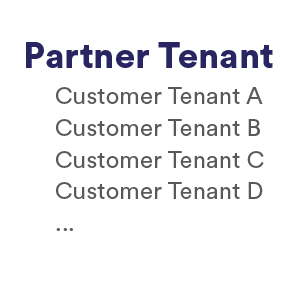
Each partner has access to a CloudHealth account, which they can use to add, edit, and delete an unlimited number of customers under them.
Under each partner tenant, customer tenants are isolated and cannot access each other’s configuration or data. Partner tenants, on the other hand, can view and manage the data and configurations of all customer tenants under them.
The Partner Platform supports multiple Partner–Customer deployment scenarios. This broad support exists because customers have single or multiple AWS accounts. Large enterprise customers can have complex setups with both standalone and linked accounts that include multiple consolidated bills.
Broadly, Partner–Customer deployment scenarios belong to one of these categories.
- Independent customer bills: Each partner customer has their own independent AWS account with their own billing. Advantage: The per-customer billing process is vastly simplified for the partner because individual customer bills are already being generated for each customer Disadvantage: A partner cannot optimize overall costs by aggregating their customer base under a single consolidated bill.
- Main consolidated bill: The partner managed a consolidated AWS account to which all their customers’ AWS accounts are linked. The partner, therefore, receives a consolidated bill for all their customers. Advantage: The partner can optimize costs by aggregating their customer base under a single consolidated bill. Disadvantage: The per-customer billing process becomes complicated because the partner needs to separate out usage and cost for each customer from the consolidated bill.
- Some customers with independent bills and others consolidated under a single bill: This is a hybrid deployment scenario that simplifies per-customer billing in some cases while complicating overall cost management in others.
Billing Configuration
- The partner configures all their AWS consolidated accounts in CloudHealth.
- For each existing partner customer, a customer tenant is added to the partner account in CloudHealth. The AWS account of each customer is linked to the consolidated billing account of the partner.
- A new partner customer links their individual AWS account to the consolidated billing account of the partner. When the new customer’s AWS accounts are fully ingested, they are listed in the partner’s account listing in the CloudHealth platform. The new customer can then be assigned as a tenant.
Bill Processing
CloudHealth generates individual billing records for a partner’s customers by processing AWS billing records after each new deposit from the partner's AWS main consolidated bill. The billing records are generated in the Cost and Usage Report (CUR) format that AWS employs for reporting detailed usage along with resources and tags. Effectively, the billing records represent artifacts that AWS would have produced for a customer were they not linked to the partner’s consolidated bill. This process is internal to the CloudHealth platform and does not in any way change the consolidated bills that AWS generates for the partner.
CloudHealth deposits the generated customer-specific CURs in an S3 bucket created for partner billing that is accessible only to the partner. CURs uses the following output path target:
[bucket_region]:[bucket_name]:cur/[cloudhealth_client_api_id]/pgb-processed-cur/[cloudhealth_aws_account_id]/[report_prefix]/[report_path]/20180601-20180701/[assembly_id]/[report_name]-[report_segment_file_number].csv.gz
[bucket_region]:[bucket_name]:cur/[cloudhealth_client_api_id]/pgb-processed-cur/[cloudhealth_aws_account_id]/[report_prefix]/[report_path]/20180601-20180701/[assembly_id]/[report_name]-Manifest.json
[bucket_region]:[bucket_name]:cur/[cloudhealth_client_api_id]/pgb-processed-cur/[cloudhealth_aws_account_id]/[report_prefix]/[report_path]/20180601-20180701/[report_name]-Manifest.json
Bill Adjustments
During the generation of individual customer CURs, the following adjustments are introduced:
- The benefit of reservations purchased by a customer in their own accounts is not allowed to “float” to other linked accounts that do not belong to the customer. So the customer receives full benefit of their usage of assets under reservations or Savings Plans.
- Customers do not receive the benefit of reservations or Savings Plans purchased by a partner outside of the customer’s linked accounts.
- Customers receive the benefit of volume discounts owing to the usage of specific resources such as EC2, S3, and Glacier in their linked accounts.
- Customers receive the benefit of permanent free tiers eligible for the usage of specific assets such as S3 and Lambda in their linked accounts. A permanent free tier is a discount provided to all AWS customers. For example, AWS does not charge for the first GB of data that is transferred from S3.
- Support charges specified by the partner are added to the customer’s bill. These charges can be based on AWS default pricing plans or a custom pricing plan.
- Custom charges specified by the partner are added to the customer’s bill.
- Tax is removed.
Use Partner-Generated Billing to Automate Complex Billing in AWS
Partner-generated billing (PGB) can help you easily manage and bill large groups of related accounts.
Billing Blocks
Customers can have single or multiple billing configurations depending on their need by organizing accounts into Billing Blocks.
Account Structures
Within AWS, there are two types of account structures: consolidated and standalone.
- Consolidated accounts generate a single statement that combines usage and shares tiered discounts (such as Reserved Instances and Saving Plans) for all accounts in a particular block.
- Standalone accounts generate one statement per account, and do not share these benefits between accounts.
Either account structure is recommended for customers who are resold an AWS service by a partner, which is determined by customer need and preference.
Full Family Billing Blocks
Additionally, CloudHealth has a third option for Billing Blocks called Full Family. This option is designed for customers who have their own AWS Organizations. Full Family configured customers still have partner credits removed, but tiered discounts and other benefits are not adjusted.
You can create Billing Blocks - or subsets of accounts - for a single customer, which combines multiple accounts into one group. Billing Blocks can consist of consolidated accounts, with linked accounts under them where RI/SPs and tiering is applied across all accounts. One statement is produced for the entire billing block. Billing Blocks can also consist of standalone accounts, which generate statements per account but do not share RI/SPs and tiering between accounts.
For example, you could create a Billing Block for the Finance group and a Billing Block for the Engineering group within the same company. Because the Finance group has a separate cost center from Engineering, they require a separate bill.
Billing Blocks only expose billing data to the account that requires access to it. In the previous example, even though Engineering and Finance are in the same company, CloudHealth can be configured so that Finance sees only the bill or bills related to their usage.
Setting Up Partner-Generated Billing
To enable PGB:
Use Custom Price Books to Change the Rate of Existing Line Items
Custom price books (CPB) give you more control, visibility, and transparency into unique pricing arrangements with your customer base. You can create CPB for each customer to reflect different pricing agreements.
CPB can help you automate complex line items, such as resource type discounts, percent increase based on a specific product, regional discounts, flat rates for resources, and percent increase on service types and operations.
During the partner generated billing process, CPB are applied as post-processing, and reflected in the final CUR.
Creating a custom price book
To create a custom price book, you must use the REST API. To create, test, and assign custom price books using the REST API, refer to Introduction to Price Book API.